WP Manifestindependent plugin directory
manifest / security / wp-email-blocker

Email Registration Blocker WP Registry grade B. Medium-severity findings · 1 findingWP RegistryMedium-severity findings · 1 findingOpen the reportB

Prevent people or bots from registering with certain email domains or full addresses.

★ 5stars
25release downloads
1.4.6latest · 1 year ago

Install

Download wp-email-blocker.zip From the 1.4.6 release on GitHub, Aug 16, 2025

Upload it under Plugins → Add New Plugin → Upload Plugin, then activate.

Install straight from GitHub with WP-CLI:

wp plugin install https://github.com/zerosonesfun/wp-email-blocker/releases/download/1.4.6/wp-email-blocker.zip
No built-in updater. New versions won't appear under Dashboard → Updates. Install new releases yourself, or let Git Updater track the repository.

WP (Wilcosky) Email Blocker is a WordPress plugin designed to prevent users or bots from registering on your website using specific email domains or full email addresses.
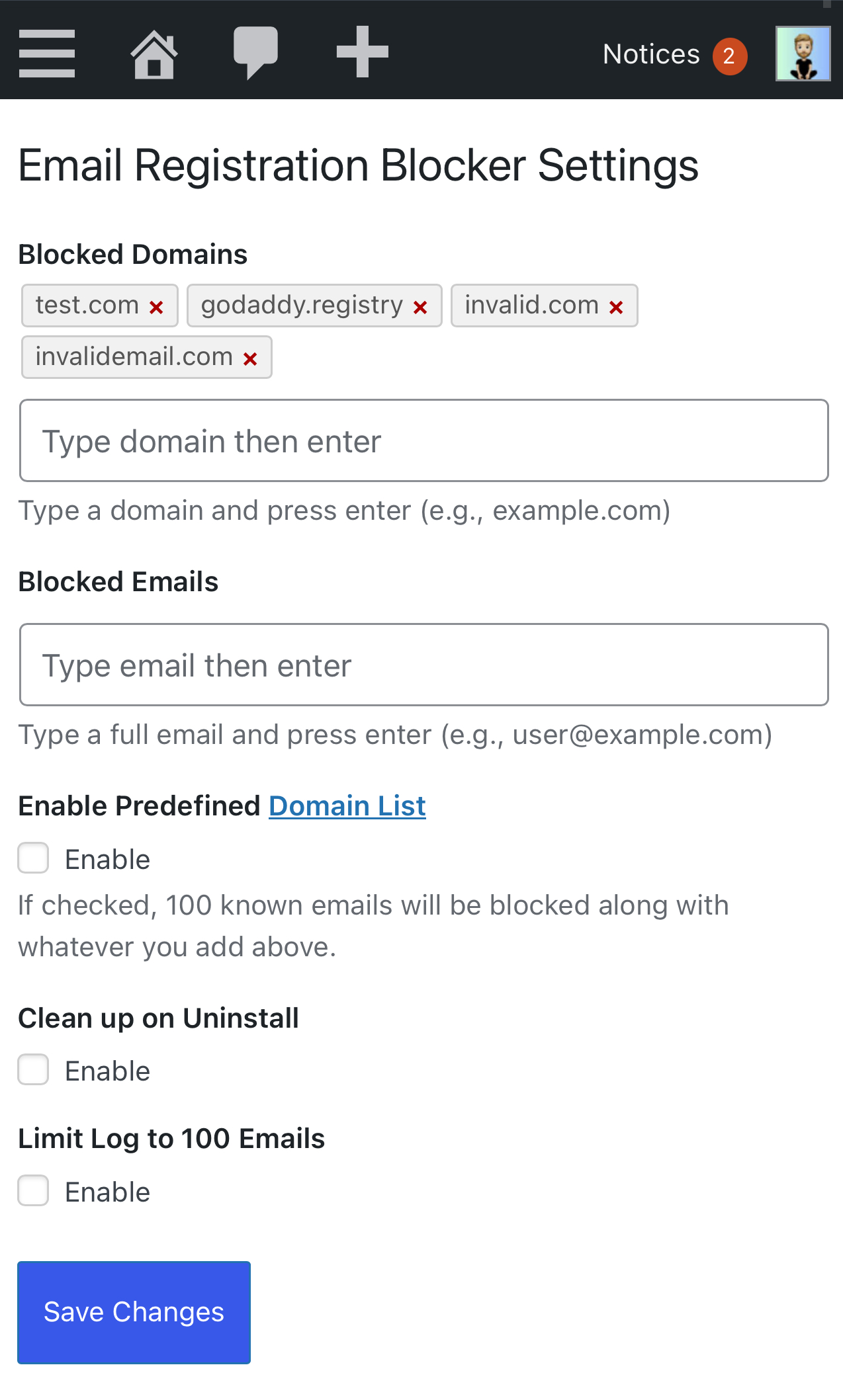

Features

  • Block specific email domains (e.g., example.com).
  • Block specific email addresses (e.g., spam@example.com).
  • Block emails with excessive dots.
  • Optionally include a predefined list of common spam email domains. (See repository wiki for the list)
  • A simple log shows you it's working and which emails are being used repeatedly.
  • Easy-to-use interface to manage blocked emails using a "pill" UI.
  • Lightweight, efficient, pretty code.

Installation

  1. Download the plugin from the GitHub repository.
  2. Upload the plugin folder (wp-email-blocker) to your WordPress /wp-content/plugins/ directory.
  3. Activate the plugin through the 'Plugins' menu in WordPress.

Usage

  1. Go to the plugin settings page in the WordPress admin dashboard.
  2. Add the email domains or specific email addresses you'd like to block.
  3. Save your changes. Users or bots attempting to register with blocked emails will now be prevented.

Contributing

Feel free to contribute! I do want to keep this light though. It's not meant to turn into some kind of all-in-one security plugin or anything like that.

Releases

15 releases. Each count is every asset in that release; expand a row for the breakdown.

Tag
Published
Assets
Downloads
1.4.6 latest
Aug 16, 2025 1 year ago
wp-email-blocker.zip
13
Aug 16, 2025 1 year ago
wp-email-blocker.zip
3
Jun 21, 2025 1 year ago
wp-email-blocker.zip
9
Jun 21, 2025 1 year ago
tag only
—
May 6, 2025 1 year ago
tag only
—
May 5, 2025 1 year ago
tag only
—
1.4
May 5, 2025 1 year ago
tag only
—
May 5, 2025 1 year ago
tag only
—
May 5, 2025 1 year ago
tag only
—
May 5, 2025 1 year ago
tag only
—
May 5, 2025 1 year ago
tag only
—
May 5, 2025 1 year ago
tag only
—
May 4, 2025 1 year ago
tag only
—
Apr 30, 2025 1 year ago
tag only
—
Apr 26, 2025 1 year ago
tag only
—
B grade

Security

Email Registration Blocker 1.4.6 · audited by WP Registry

Medium-severity findings.

1 medium
Audited release
1.4.6
Findings
1
Worst severity
medium
Content hash
398edd1e8622785e55ca680d…

Findings

  • medium Unauthenticated unbounded autoloaded block log enables site-wide DoS

    dos

    Every blocked registration calls is_blocked($email) with $log=true (registration_errors, rest_pre_insert_user, and pre_user_email). log_blocked_email() get_option('wilcosky_erb_block_log'), appends {email,time}, and update_option()s the whole array. The 100-entry cap is opt-in: register_setting('wilcosky_erb_max_log_limit') defaults to false, and get_option($this->opt_log_limit, false) keeps it off. update_option() is called without autoload=false, so the first insert autoloads. On sites with registration open and any domain/email blocked (manual, CSV, or the predefined list), an unauthenticated client can POST unique blocked addresses (e.g. rand@blocked.example) and grow an autoloaded wp_options row without rate limit. Each attempt rereads and rewrites the entire blob (quadratic). Consumers are every request via alloptions plus the manage_options settings page, which array_column/array_count_values the full log. Plugin Requires at least: 5.0, so many installs lack later core autoload-size safeguards. Email values are is_email-constrained on the default register_new_user path and echoed with esc_html in admin, so this is availability not XSS.

    wilcosky-email-blocker.php:410-423

    Recommendation

    Always cap wilcosky_erb_block_log (ignore the opt-in flag, or default wilcosky_erb_max_log_limit to true) and pass autoload=false / 'no' on update_option/add_option. Prefer a non-autoloaded custom table or a rotating transient. Do not log on every public pre_user_email hit without a size/rate limit. Add current_user_can('manage_options') next to the nonce in handle_clear_logs as defense in depth.

WP Registry hashes the installable build and reports on that exact bytes-for-bytes copy. Embargoed findings are withheld until they are disclosed, so a clean verdict means nothing public is outstanding. WP Manifest does not audit code itself.