Memos Widget WP Registry grade A. No security issues foundWP RegistryNo security issues foundOpen the reportA
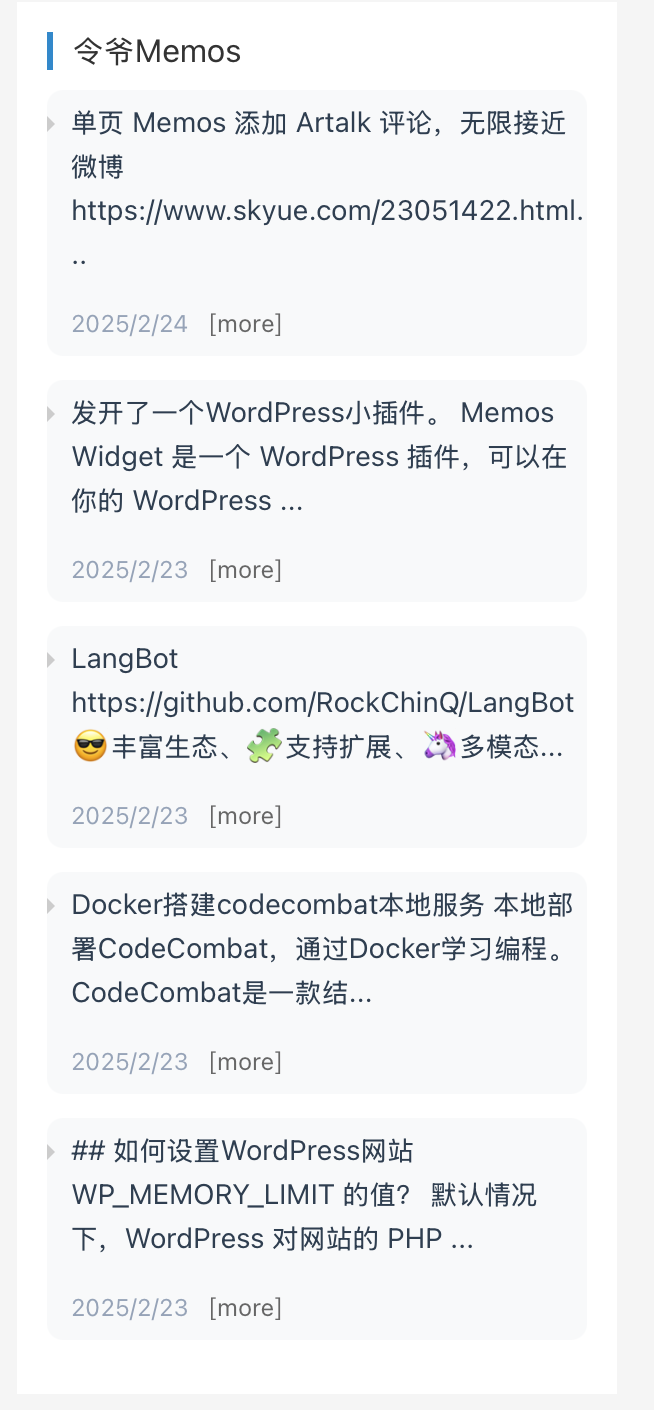
Memos Widget 是一个 WordPress 插件,可以在你的 WordPress 站点边栏显示最新的 Memos 动态。这是一个简单优雅的方式,让你能够与博客访客分享来自 Memos 的想法和笔记。
Install
Upload it under Plugins → Add New Plugin → Upload Plugin, then activate.
Install straight from GitHub with WP-CLI:
wp plugin install https://github.com/zengqueling/memos-widget/releases/download/memos-widget/memos-widget.zipMemos Widget for WordPress
English
Introduction
Memos Widget is a WordPress plugin that allows you to display your latest Memos updates in your WordPress site's sidebar. It's a simple and elegant way to share your thoughts and notes from Memos with your blog visitors.
Features
- Display latest Memos updates in WordPress sidebar
- Customizable number of posts to display
- Adjustable content length
- Clean and responsive design
- Support for various Memos API response formats
Installation
- Download the plugin files
- Upload the plugin folder to the
/wp-content/plugins/directory - Activate the plugin through the 'Plugins' menu in WordPress
- Go to 'Appearance' > 'Widgets' and add the 'Memos Widget' to your sidebar
Configuration
- Global Plugin Settings (
Settings>Memos Widget):- Memos API URL: Your Memos instance URL (e.g.,
https://memo.zengqueling.com) - Access Token: Personal Access Token (Required for Memos v0.22+, generated under Memos Settings -> Account -> Personal Access Tokens)
- Memos API URL: Your Memos instance URL (e.g.,
- Widget Settings (
Appearance>Widgets):- Title: The widget title displayed in your sidebar
- Number of posts: How many Memos to display (default: 5)
- Content length: Maximum number of characters to show for each Memo (default: 50)
Requirements
- WordPress 5.0 or higher
- PHP 7.0 or higher
- A running Memos instance with accessible API
License
This project is licensed under the MIT License - see the LICENSE file for details.
Contributing
Contributions are welcome! Feel free to:
- Fork the repository
- Create your feature branch
- Commit your changes
- Push to the branch
- Create a new Pull Request
中文
简介
Memos Widget 是一个 WordPress 插件,可以在你的 WordPress 站点边栏显示最新的 Memos 动态。这是一个简单优雅的方式,让你能够与博客访客分享来自 Memos 的想法和笔记。
功能特点
- 独立的 WordPress 后台设置页面(设置 -> Memos Widget),统一管理 API 地址与 Token
- 在 WordPress 侧边栏显示最新 Memos 动态
- 支持新版 Memos (v0.22+) 的 Access Token 鉴权机制及 OpenAPI 路由规范 (
/m/{uid}) - 小工具端精简配置:仅设置标题、显示条数及截取长度
- 清爽响应式设计
- 支持多种 Memos API 返回格式
安装方法
- 下载插件文件
- 将插件文件夹上传到
/wp-content/plugins/目录 - 在 WordPress 的"插件"菜单中启用插件
- 进入"设置" > "Memos Widget"配置 API 地址与 Access Token
- 进入"外观" > "小工具"添加"最新Memos动态"小工具
配置说明
- 插件全局后台(设置 -> Memos Widget):
- Memos API地址:你的 Memos 实例地址(如
https://memo.zengqueling.com) - Access Token(访问令牌):针对新版 Memos (v0.22+),API 要求携带 Bearer Token 鉴权。请在你的 Memos 后台(设置 -> 账号 -> 个人访问令牌)中生成并填入此处
- Memos API地址:你的 Memos 实例地址(如
- 侧边栏小工具(外观 -> 小工具):
- 标题:小工具显示的组件标题
- 显示条数:要显示的 Memos 数量(默认 5 条)
- 内容截取长度:每条 Memo 显示的最大字符数(默认 50 字符)
Releases
5 releases. Each count is every asset in that release; expand a row for the breakdown.