ODAM Legible 2017 WP Registry grade A. No security issues foundWP RegistryNo security issues foundOpen the reportA
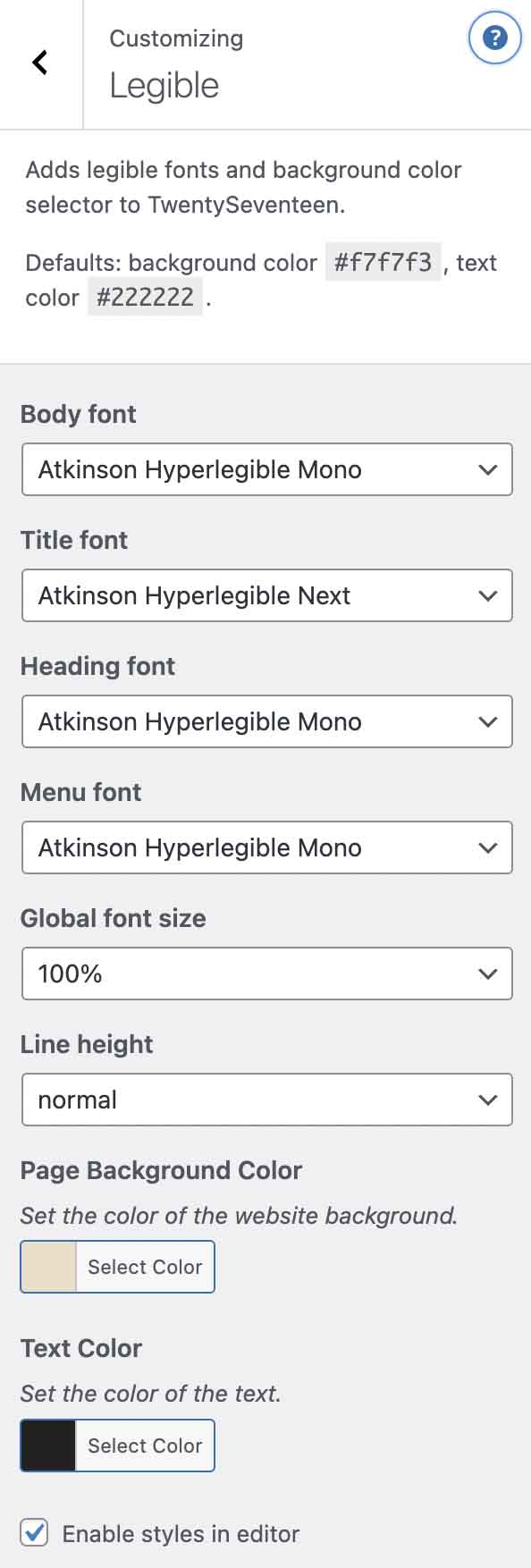
Adds legible fonts and background color selector to TwentySeventeen.
Install
Upload it under Plugins → Add New Plugin → Upload Plugin, then activate.
Install straight from GitHub with WP-CLI:
wp plugin install https://github.com/xxsimoxx/legible-2017/releases/download/1.2.0/legible-2017-1.2.0.zipAdds a menu in Customizer to make the site more legible with TwentySeventeen theme.
- Legible fonts selector
- Font size selector
- Font color picker
- Line height selector
- Background color picker
The plugin is intended to make the site more accessible to people with reduced vision or dyslexia.
Supported themes
- Twenty Seventeen
- ClassicPress TwentySeventeen
- The ClassicPress Theme
Please report other themes where this plugin works.
Fonts
The plugin uses 4 Google Fonts: Atkinson Hyperlegible, Atkinson Hyperlegible Next, Atkinson Hyperlegible Mono and Lexend Deca. You can add your preferred fonts using a filter linke this:
add_filter( 'legible_2017_fonts' , function( $list ) {
    $list[] = 'Roboto';
    return $list;
});
Editor
Fonts and colors can also be used in the editor. This feature can be enabled in the Customizer or using a filter:
add_filter( 'legible_2017_editor' , '__return_true' );Loading font locally
This plugin works well with Local Google Fonts plugin.
Credits
- This plugin was originally forked from Customize Twenty Seventeen by BOLDThemes.
- ODAM is the name of the site for which this plugin was designed. Thanks to my client Elisa Botton.
Screenshots
Releases
3 releases. Each count is every asset in that release; expand a row for the breakdown.
Active-site estimate ≈10 comes from the median of recent superseded releases. Method.