Enriched Editor WP Registry grade A. No security issues foundWP RegistryNo security issues foundOpen the reportA
Add rich formatting, tool, and controls to the ClassicPress editor.
Install
Upload it under Plugins → Add New Plugin → Upload Plugin, then activate.
Install straight from GitHub with WP-CLI:
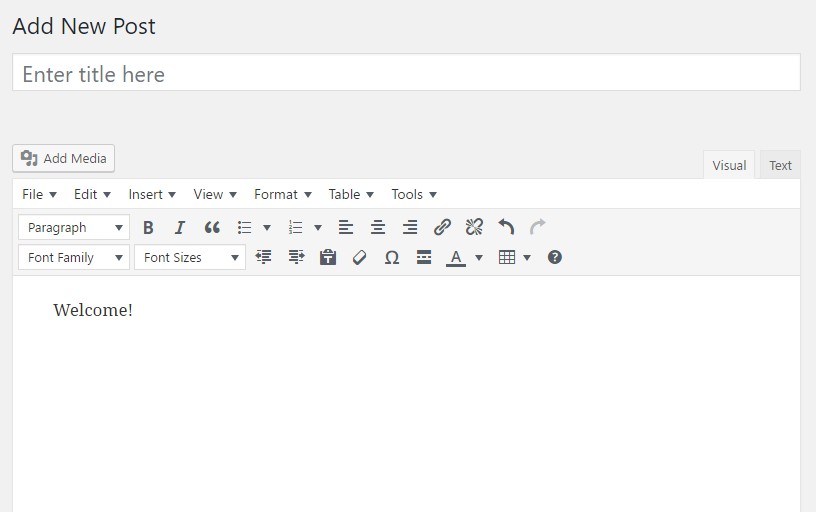
wp plugin install https://github.com/xxsimoxx/codepotent-enriched-editor/releases/download/1.2.5/codepotent-enriched-editor-1.2.5.zipThe Enriched Editor plugin adds lots of additional options to the ClassicPress visual editor. This plugin is a fork of TinyMCE Advanced for WordPress and contains no Gutenberg code.

Pre-Installation
If you already have TinyMCE Advanced or WYWIWYG Advanced installed, you will need to deactivate and delete before installing Enriched Editor. If you want to preserve your current editor settings, you can export them to a text file before deleting the current plugin. You can then import those settings back into Enriched Editor after you get it installed.
Editor Options
- Enable Editor for Primary Screens Enable the Enriched Editor for primary editing screens, including those for posts, pages, and custom post types.
- Enable Editor for Secondary Areas Enable the Enriched Editor for secondary editing areas, including those for text widgets and other textarea inputs.
- Enable Editor for Public Use Enable the Enriched Editor for public use, such as in user comments and other textarea inputs.
- Advanced Menu Enable the advanced menu (File, Edit, Insert, View, Format, Table, and Tools) for the first row.
- Enhanced Lists Enable advanced list options, including upper-case, lower-case, disk, square, circle, etc.
- Right-Click Enable link insertion by right-clicking the editor.
- Simplified Links Use a simplified dialog for creating links.
- Font Sizing Use pixels (instead of points) for font sizes.
- Preserve Paragraphs Preserve <p> and <br> tags without replacing them.
- Custom Style Menu
Pull custom styles from an
editor-style.cssfile and add them to a drop-down menu.
Releases
5 releases. Each count is every asset in that release; expand a row for the breakdown.
Active-site estimate ≈40 comes from the median of recent superseded releases. Method.