Whimsical Promo WP Registry grade A. No security issues foundWP RegistryNo security issues foundOpen the reportA
Editor-managed promo cards (newsletter, app, custom CTAs) rendered at theme hooks or on exit intent, with client-side chaining, cookies, and dataLayer/gtag tracking.
Install
This is the repository archive. It installs, but the folder name will carry the branch suffix and updates will not flow.
Install straight from GitHub with WP-CLI:
wp plugin install https://github.com/xwp/whimsical-promo/archive/refs/heads/main.zipEditor-managed promo cards — newsletter sign-ups, app pitches, any CTA — rendered after the post body, at a theme hook of your choosing, or on exit intent: the cursor leaving the window on desktop, and optionally the end of the article on a coarse-pointer device. Copy, design and targeting all live in the block editor, so changes ship without a deployment.
Activate per site from the Plugins screen. Deactivating is the kill switch: no promo markup, no assets.
What it looks like
Both of these are the same plugin, authored entirely in the block editor — the copy, the button and the design are editor settings, not code.
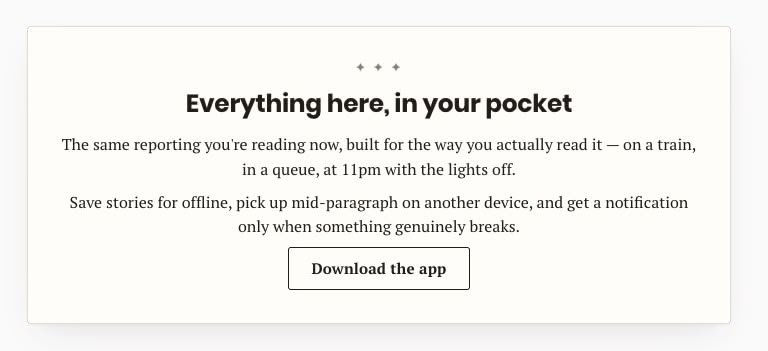
Inline placement: the card renders at a theme hook inside the post, in the content column. A paragraph holding only a link becomes the button.
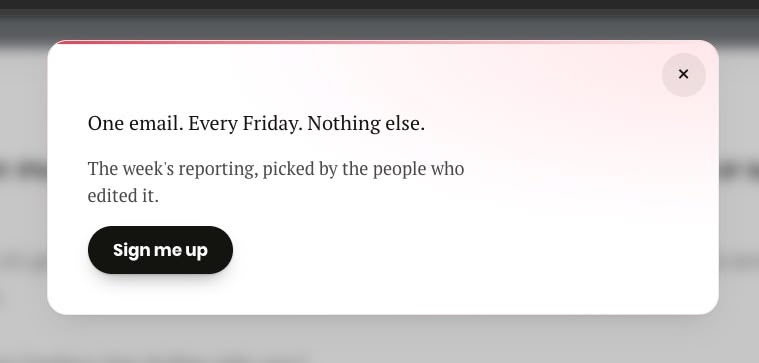
Exit-intent placement with the slide-down presentation: it arrives when the cursor
leaves the top of the window on desktop, and closes with the ×. Same authoring, different
placement and style.
Installation
The plugin lives at github.com/xwp/whimsical-promo and installs with Composer. From the site repo root:
composer config repositories.whimsical-promo vcs https://github.com/xwp/whimsical-promo
composer require xwp/whimsical-promo:dev-main
composer/installers reads the repo's installer-paths and drops it in the plugins
directory — plugins/whimsical-promo/ in the VIP Go mirror. There is no build step, so
nothing needs compiling afterwards.
Without Composer, clone the repo into wp-content/plugins/whimsical-promo/.
Requires PHP 8.1+.
Upgrading to 1.2
Nothing to do, and nothing to rewrite. Two behaviour changes worth knowing about before you see them in the numbers:
- Overlays are now rate-limited site-wide. After any exit-intent promo opens, none opens again for 15 minutes. On a site running a single overlay this is close to invisible; on a site running two it is the difference between a fallback and a nuisance. See The quiet period.
- Exit-intent chain order has a control of its own, Show this one first, instead of depending on Order and publication date. Existing promos are unflagged, so their order is exactly what it was.
Upgrading from 1.0
1.1 renames what the plugin puts on the page, at the client's request, so that nothing in the rendered document reads as advertising:
| 1.0 | 1.1 |
|---|---|
whim-promo, whim-promo__card, whim-promo--… |
whim-bogo, whim-bogo__card, whim-bogo--… |
#whim-promo-<id> |
#whim-bogo-<id> |
whimsical_promo event, promo_* parameters |
whimsical_bogo event, bogo_* parameters |
window.whimPromoCfg |
window.whimBogoCfg |
Nothing is rewritten for you, deliberately. Any Custom CSS stored on a promo, and
any theme CSS targeting .whim-promo…, has to be updated by hand — search for
whim-promo and replace with whim-bogo. A promo whose Custom CSS still uses the old
prefix keeps rendering, but with promo-base.css and nothing else — Custom CSS replaces
the selected style rather than adding to it, so once its selectors stop matching there is
no design left underneath. The damage is obvious rather than silent, which is the point.
(An automatic rewrite was tried and dropped: telling a
selector from a value that merely contains the same word means parsing the CSS, and
getting that wrong corrupts a working stylesheet — url("#whim-promo-filter") is a
value, not a selector.)
Analytics is not migrated either — rename the variables, trigger and parameters in
GTM/GA4 to match. The data-whim-* attributes and the whim_seen_<slug> cookies are
unchanged, so nobody's frequency capping resets.
The plugin directory and its asset filenames still say whimsical-promo, since
those are the repository's name. If the word has to disappear from request paths
too, that is a repo rename and a Composer package rename — say so and it can be
done as its own change.
How a promo works
- Create Promos → Add New. The title is for the admin list only; the body is the card content, edited with regular blocks.
- Fill in Promo Settings (below the editor).
- Publish. Drafts, pending and scheduled promos never render.
Promos on the same hook form a chain. The first promo the visitor has not already interacted with wins; the rest stay hidden. So the "already subscribed?" fallback is simply the next promo in the chain.
Chain order comes from the Order field (Page Attributes), and promos left on the same Order — which is all of them until you change it — queue newest first. Every exit-intent promo shares one chain regardless of hook, and for those there is a plainer control: tick Show this one first and that promo leads, whatever the dates say (see below).
A promo with Stop showing once the visitor clicks or submits unticked is always visible: it wins as soon as the chain reaches it, whatever the cookies say, and nothing after it can ever show. That is how you build a permanent fallback — and why it has to be last.
Promos on different hooks are not a chain. They are independent slots and all of them render, which is the usual reason a hand-off appears not to work.
Promo Settings reference
| Field | What it does |
|---|---|
| Placement | Inline renders at a theme hook. Exit intent renders in the footer and appears when the cursor leaves the top of the window (desktop). To turn a promo off, set its status back to Draft — only published promos are placed on the site. |
| Preview | The whim_preview=<slug> query string for this promo, with a Copy button. Add it to any page the promo appears on to open it on demand (see below). |
| Hook name | whim_after_content — the default — appends the promo to the post body, so a fresh install needs no theme work. Otherwise any action hook your theme fires inside the post. Suggestions come from the whimsical_promo_hooks filter and a new promo starts on the first one, so a theme that filters its own hooks to the front sets the default. A few hooks are refused (see below). |
| Show on these post types | Public post types the promo may appear on. Nothing checked = never renders. |
| Stop showing once the visitor clicks or submits | Sets a whim_seen_<slug> cookie, which hands off to the next promo in the chain on later visits. Inline promos set it on click or submit; exit-intent promos set it as soon as they open (see below). Unchecked = shows every visit, never hands off. |
| Remember for (days) | How long an interaction is remembered, counted from it. Only shown while the box above is ticked; emptying it or setting 0 unticks that box, which is how a promo becomes always-visible. Default 30. |
| Show this one first | Moves this promo to the front of the exit-intent queue, so a promoted overlay goes ahead of a campaign that runs all year without either being unpublished. Only one promo can hold it: ticking the box unticks it everywhere else. Exit intent only, off by default (see below). |
| Exit-intent presentation | slide-down, slide-up or modal (only modal dims the page). Exit intent only. |
| Also trigger on mobile… | Opens the promo when the reader reaches the end of the article, since a phone has no cursor to leave the page. Exit intent only, off by default (see below). |
| Animation | slide-up-spring, slide-down-spring, fade-rise or none. The spring pair differ only in which way the card travels — pick the one that matches the edge it enters from. Readers who ask for reduced motion always get a plain crossfade. |
| Style | The design this promo ships with (see below). Defaults to basic-1. |
| Custom CSS | This promo's CSS, replacing the style's own. Administrators only. Empty means the selected style ships as designed. |
| Colour and shape overrides | Any CSS value per token — hex, rgba(), var(--your-token), gradients. These land in the wrapper's style attribute, so they beat both the style and Custom CSS. |
Override values containing ;, {, }, <, >, @, \, url(,
expression(, a comment marker, a control character, or more than 200 bytes are
rejected on save: an admin notice names the fields, and the previous value is kept.
Hooks that are refused
wp_head, wp_footer, shutdown, template_redirect, wp_enqueue_scripts,
the_content, the_title and the_excerpt are cleared on save, and dropped from the
suggestion list even if a theme adds them. Each one breaks the page rather than the promo:
wp_head puts a card in <head>, wp_footer is where the exit-intent chain already
renders, shutdown prints after </html>, the two early actions print before the document
opens, and the three filters print above the value they filter rather than after it. Use
whim_after_content instead of the_content.
Every other name is allowed, including one your theme has not fired yet. A hook that never fires renders nothing, and a name that turns out to be a filter is handed its value back untouched — so a typo can cost you the promo, never the page.
Running two overlays, and which goes first
Every exit-intent promo shares one chain, so two of them already behave as a pair: the first opens, spends its cookie, and the next page view gets the second. They can never both appear in the same page view.
What decides which is first is Show this one first. Without it the queue falls back to Order and then to publication date, which is invisible from the promo screen and reads as "the newest one always wins". With it, the promoted overlay leads and everything else keeps its place behind — so a year-round campaign stays published and simply takes its turn later, instead of being unpublished for the duration of an event and remembered back afterwards.
The box behaves like a radio spread across posts: ticking it on one promo unticks
it on every other, and the newest tick is the one that counts. Switching a promo
to Inline clears its flag too, since a promo that is not an overlay cannot lead
the overlay queue.
The quiet period
Once any overlay opens, no overlay opens again for 15 minutes. It is automatic, site-wide, and there is nothing to configure.
This is what stops a pair of overlays reading as a sequence. A reader who bounces through three articles in a minute gets one overlay, not one per page; the second arrives on a later visit, which is the point of having a fallback at all. A promo held back this way is not spent — nothing is written, and it wins its chain normally on the next page view outside the window.
It is kept in a whim_exit_at cookie holding the time the last overlay opened, so
like everything else here it is a browser-side decision and the cached HTML is
unaffected. Previews are exempt in both directions: opening one does not start a
quiet period, and an active one does not block a preview.
Reaching the end of the content, on mobile
Exit intent is a cursor gesture, so it does not exist on a coarse-pointer device. Ticking Also trigger on mobile when reaching the end of the content gives an exit-intent promo a second way in: on any device that reports a coarse pointer, it opens once the end of the article has scrolled up near the bottom of the viewport. Desktop is untouched — the pointer check runs first, so a device only ever uses one of the two triggers.
Which element counts as "the article" is a plugin-wide setting, Promos → Settings → Content selectors: a comma-separated list of CSS selectors tried in order, the first match on the page being the element watched. The default is
.entry-content, .post-content, article, mainPoint it at the article body rather than at the page. Reaching the end of a wrapper that also holds comments, related posts and the footer means the promo arrives long after the reader actually finished reading. If nothing on a page matches, the promo simply does not open there.
The comma separates entries, so a selector containing one of its own —
:is(article, main) — has to be written as two entries. A selector the browser
cannot parse is skipped and the next one is tried.
No element is injected into your markup and no scroll handler is bound: this is one
IntersectionObserver whose root box is collapsed onto a line at 90% of the viewport
height, so each callback carries the article's own bottom measured against that line.
The last tenth is left over on purpose — a line pinned to the very bottom edge would
only be crossed on a page that can scroll past the end of its article, and a page
whose article runs to the final pixel never can. The margin is computed in pixels and
re-measured after a resize or a rotation, rather than written as a percentage, because
engines disagree over which axis a percentage rootMargin resolves against. The same
five-second dwell as desktop exit intent applies, so a reader who lands mid-article and
scrolls straight to the end is not ambushed on arrival.
Writing a promo body
The stylesheet designs plain editor markup, so you rarely need custom classes:
| You write | You get |
|---|---|
| A heading | Display type, tight leading, balanced line breaks. |
| A first paragraph with no heading | Treated as the lead, one step up in size. |
| Later paragraphs | Supporting copy, one step back in contrast. |
| A paragraph holding only a link | The style's button. Add whim-link to that link to keep it looking as text. |
| A Buttons block | The same button. |
| A link inside a sentence | An accent-underlined text link, never a button. |
A link with class whim-btn--google |
The "Add as a preferred source on Google" chip — white, with the multicolour G. |
| A link wrapping only an image | Your artwork on a white backing plate, no button chrome. |
| A list | Accent star markers. |
A shortcode form (input + button) |
Styled field and matching button; stacks on narrow cards. |
whim-cta on any element opts it into the button treatment. The Google chip's G
is an inline data: URI, so it needs no external request and passes CSP.
The standalone-link rule is applied in PHP, not CSS: Render::promote_cta_links()
adds whim-cta to a link whose paragraph says nothing else. CSS can't tell that
case from a link inside a sentence — p > a:only-child matches both, because text
nodes don't count as children.
Blank lines can't be used as spacers. A trailing empty paragraph or a stray
is stripped before the body renders, because the card spaces its children
itself and an empty paragraph would read as a hole. Space a card with its style,
not with its content.
Previewing a promo
Append whim_preview=<slug> to any URL the promo renders on. The slug is on the
promo screen under Preview, with a Copy button, so nobody has to guess it:
https://example.com/some-article/?whim_preview=exit-modalwhim_preview=1 (or =all) previews the first promo of every chain on the page,
rather than one named promo.
The promo has to be published — drafts and scheduled promos are never placed, so there would be nothing on the page for the link to open. The Preview field says so instead of offering a link that does nothing.
A preview:
- ignores the
whim_seen_cookie, so a promo already spent for that visitor still shows; - writes no cookie and reports no analytics, so it is repeatable, it cannot use up the promo for whoever opens the link, and it never shows up as an impression or a click in GA;
- wins its chain outright when named by slug, so the third promo in a chain can be reviewed without spending the first two.
For exit intent it also skips the cursor gesture, the five-second dwell and
the (hover: hover) and (pointer: fine) check — so the modal and the bars can be
reviewed instantly, and on a phone, where exit intent does not otherwise exist.
Inline promos deliberately keep their scroll-triggered entrance: the animation is the thing worth looking at, so preview only lifts the cookie gate. Scroll to the hook as normal.
The parameter is read from location.search in JavaScript, never from PHP. The
HTML is byte-identical with and without it, so page caches are untouched and a
preview link cannot poison a cached page.
It is not capability-gated — a preview link works for anyone, which is what
makes it shareable with a client who has no login. It reveals nothing that is not
already published, and it writes nothing. To restrict it, drop the
previewTarget lookup in assets/promo.js behind a value emitted from PHP for
logged-in users only.
Styles
| Style | Reads as |
|---|---|
basic-1 |
Clean. White card, red accent hairline along the top, ink pill, serif copy. The default. |
editorial-insert |
The paper's own furniture. Warm stock, hairline border, a print asterism that settles a beat late, a sonar ping on yes. |
prime-time |
Broadcast lower-third. Gradient surface, glass ring, an "on-air" light bar that warms up along the edge, a lens bloom on yes. |
Each style is one file under assets/styles/. It owns the whole look —
typography, buttons, forms, entrances, the click micro-interaction.
assets/promo-base.css declares the container-type, and only basic-1 uses
@container against it; the others size on the viewport.
The three layers
Weakest to strongest:
assets/promo-base.css— the shape of the box, and nothing else. Where a promo sits, how it reveals and dismisses, the close button's 44×44 hit area, a fallback focus ring. No colour, no type, no radius.- The style's CSS, served as its own stylesheet and scoped to
#whim-bogo-<id>(theIDplaceholder resolved to this promo). - Colour and shape overrides, in the wrapper's
styleattribute.
Layer 2 is an id selector (1-0-0), so it outranks the base (0-2-0 at most)
by construction. That is the point of the split: a style never needs
!important, and the base never has to mirror a style's specificity.
How the CSS is delivered
A promo's CSS is a pure function of its post meta, so it is the same for every
visitor and can be cached hard. Each promo gets its own stylesheet at
/?whim_bogo_css=<id>&whim_ver=<hash>, sent with
Cache-Control: public, max-age=31536000, immutable. The hash is a fingerprint of
the CSS itself, so saving a promo changes the URL and nothing has to be purged.
VIP's edge honours an application's own Cache-Control rather than replacing it,
which is what makes the long TTL real.
Three things follow from that:
- Bundled templates are minified on the way out — comments and slack removed,
which roughly halves the compressed weight. Author-written Custom CSS is passed
through untouched: stripping comments with a regex would corrupt any string
holding
*/, and there is no corpus to test that against. - Promo stylesheets do not block the first paint. They load as
media="print"and swap toallon load, with a `
This README is longer than the copy stored here. Read the rest on GitHub →
Releases
4 releases.
These releases are tags only. The author does not attach a packaged zip, so there are no download counts to report.