PostMeta Audit
WordPress plugin that audits every post/page for on-page SEO issues, shows a sortable, filterable admin report with scores, and exports results to CSV/XLSX. No external APIs.
by Harsha Shinde · github.com/xexpertai/postmeta-audit · website
Install
No release zip yet. The repository archive installs, but the folder name will carry the branch suffix and updates will not flow:
wp plugin install https://github.com/xexpertai/postmeta-audit/archive/refs/heads/main.zipA WordPress plugin that answers one question quickly and offline: which pages have broken SEO basics?
PostMeta Audit checks your published content against 12 rules. It stores what it finds in its own database table and shows a sortable, filterable report under Tools → SEO Audit. You can export the report as CSV or XLSX to send to a client.
- No external HTTP calls, no telemetry and no paid services. Links are resolved locally with
url_to_postid(). - No runtime dependencies. The admin uses vanilla JS and CSS with no build step, and the XLSX writer is built in.
- PHP 8.1+, WordPress 6.4+, MySQL/MariaDB via
$wpdb. - Licence: GPL-2.0-or-later.
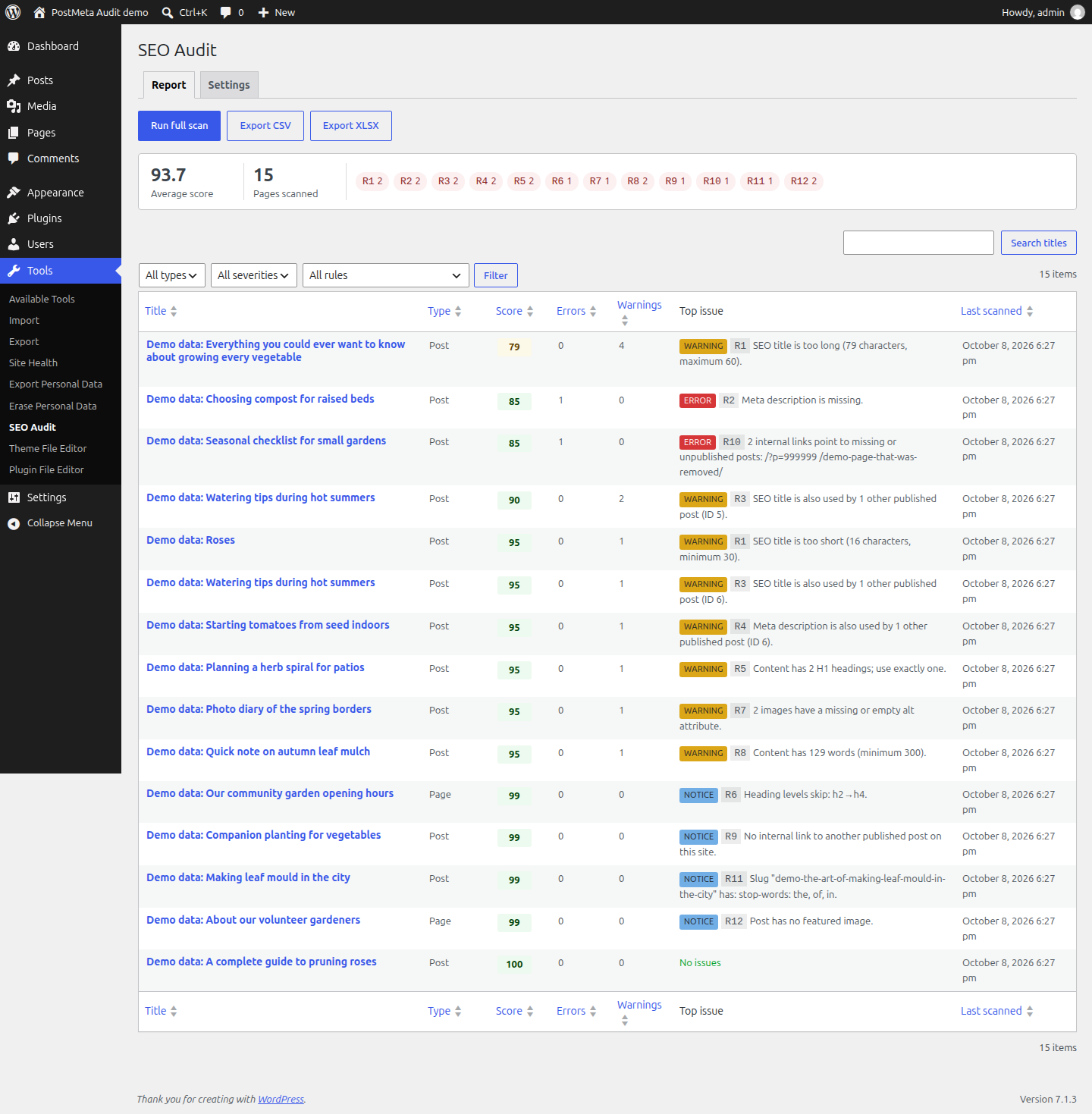
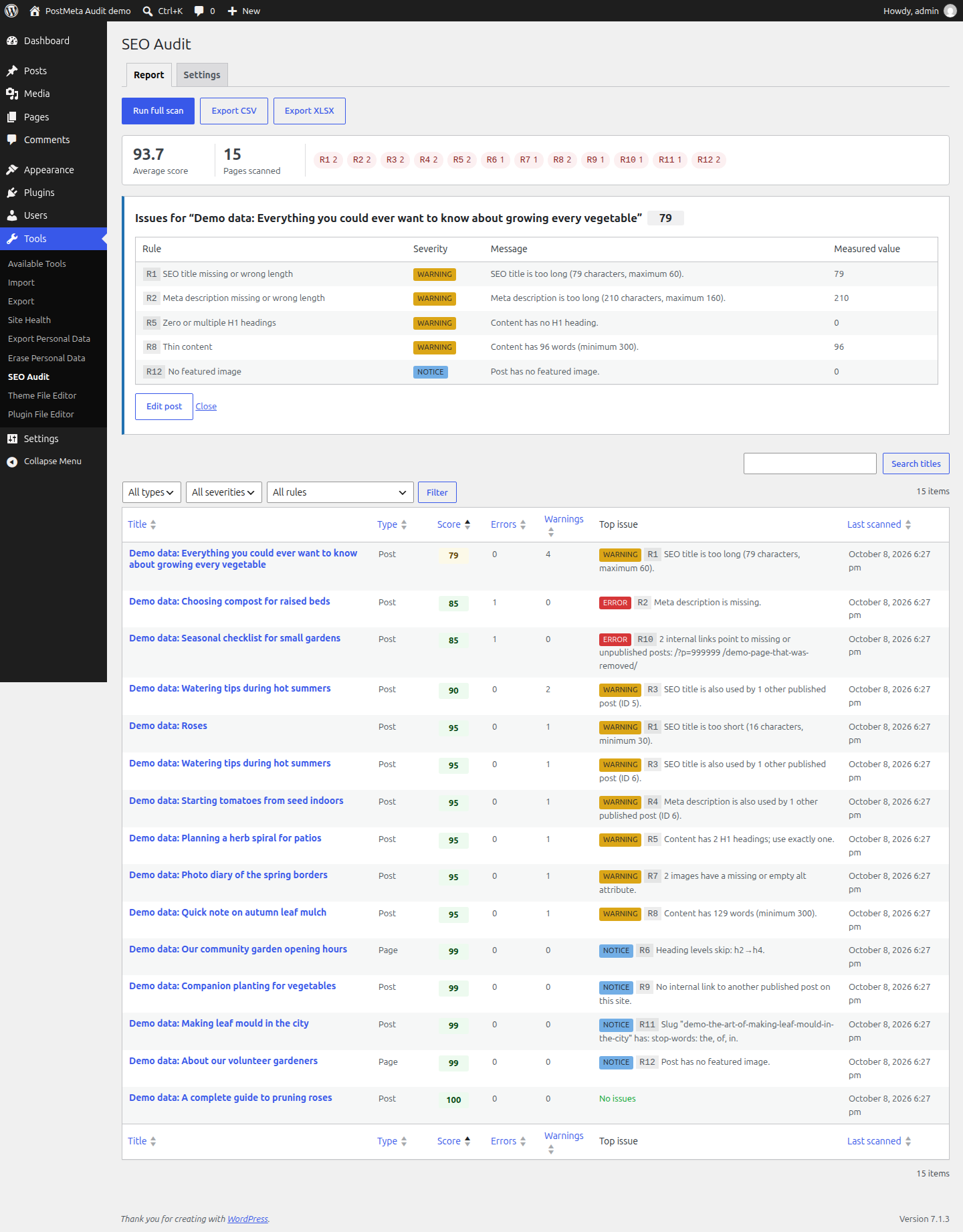
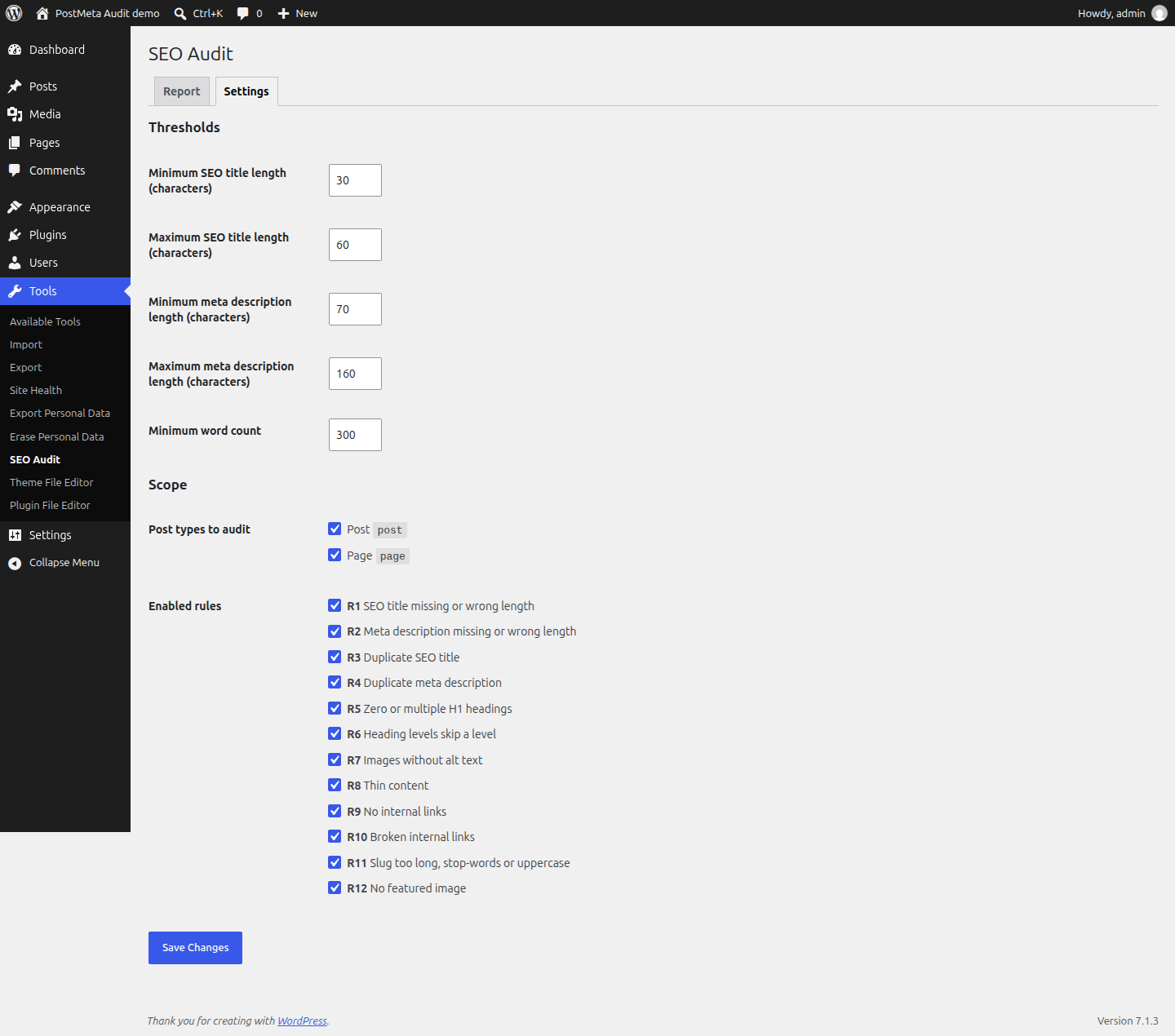
| Per-post details | Settings |
|---|---|
 |
 |
Full scan with the batched progress bar (25 posts per request):

The screenshots show the bundled demo data (
bin/seed-demo.php). Every post in them is fictional and its title starts with "Demo data".
Contents
- Install
- Usage
- Rules
- Scoring
- Exports
- WP-CLI
- Demo data
- How it works
- Developer hooks
- Uninstall and data
- Development
- Security
- AI-assisted development
- Licence
Install
Into an existing site
- Copy this folder to
wp-content/plugins/postmeta-audit. You can also build a clean zip withgit archive --format=zip --prefix=postmeta-audit/ -o postmeta-audit.zip HEADand upload it under Plugins → Add New → Upload. The zip leaves out the development files listed in.gitattributes. - Activate PostMeta Audit. Activation creates the table
{prefix}pma_results. - Go to Tools → SEO Audit and click Run full scan.
The plugin needs nothing beyond PHP 8.1+ with the dom and mbstring extensions. XLSX export also needs zip. Composer is only used for development tools.
Local demo with Docker
You need Docker with Compose v2.
docker compose up -d --wait   # WordPress on http://localhost:8080, MySQL 8, WP-CLI
bin/docker-setup.sh           # installs WordPress, activates the plugin, seeds demo data, runs `wp pma scan`
Then log in at http://localhost:8080/wp-admin/ as admin / admin and open Tools → SEO Audit.
- Run any WP-CLI command with
docker compose run --rm cli wp …. - Stop the demo with
docker compose down. Add-vto delete the data too. - The plugin folder is mounted read-only into the containers.
Usage
Report (Tools → SEO Audit → Report)
| Element | What it does |
|---|---|
| Run full scan | Scans every published post in scope using AJAX batches of 25 posts per request, with a progress bar. The report reloads when the scan finishes. |
| Summary bar | Shows the average score, pages scanned and issue count per rule for the current filters. Click a rule chip to filter by it. |
| Table | Built on WP_List_Table. Columns: Title (edit link, plus Details / View row actions), Type, Score, Errors, Warnings, Top issue and Last scanned. It shows 20 rows per page. |
| Sorting | Sort by Score, Errors, Warnings, Title, Type or Last scanned. |
| Filters | Filter by post type, severity and rule. A post matches when it has at least one issue with the selected severity and rule. Search matches titles. |
| Details | The Details row action opens a panel listing every issue for that post with its message and measured value. |
| Export CSV / XLSX | Downloads the report with the active filters applied. See Exports. |
Automatic re-scan. Saving a post re-scans it in the same request, so the report is always current for that post. A post that is unpublished, trashed or deleted is removed from the report.
Settings (Tools → SEO Audit → Settings)
The settings are stored with the Settings API in the option pma_settings and sanitised on save.
- Thresholds: SEO title length (default 30–60), meta description length (default 70–160) and minimum word count (default 300).
- Post types to audit (default: posts and pages).
- Each rule can be switched on or off.
Rules
Each rule is a separate class in includes/rules/ that implements RuleInterface::check( WP_Post $post, DOMDocument $html ): array.
| ID | Rule | Fails when | Severity | Measured value |
|---|---|---|---|---|
| R1 | SEO title length | The title is missing, or shorter/longer than the configured range (30–60). The SEO title is the Yoast (_yoast_wpseo_title) or Rank Math (rank_math_title) title if set, otherwise the post title. |
missing → error, length → warning | characters |
| R2 | Meta description length | The description is missing, or shorter/longer than the range (70–160). It comes from Yoast (_yoast_wpseo_metadesc), Rank Math (rank_math_description) or the explicit excerpt. |
missing → error, length → warning | characters |
| R3 | Duplicate title | Another published post (in scope) has the same SEO title. The comparison ignores case and extra whitespace. | warning | number of other posts |
| R4 | Duplicate description | Another published post has the same meta description. | warning | number of other posts |
| R5 | Single H1 | The content has zero <h1> or more than one. |
warning | H1 count |
| R6 | Heading hierarchy | Heading levels skip, e.g. h2 → h4. The page title counts as level 1, so content may start at h2. | notice | e.g. h2→h4 |
| R7 | Image alt text | An <img> has a missing or empty (whitespace-only) alt. |
warning | image count |
| R8 | Thin content | The visible text has fewer words than the minimum (300). Scripts, styles and block comments are ignored, and words are counted Unicode-aware. | warning | word count |
| R9 | Internal link | The post has no link to another published post on the same site. | notice | 0 |
| R10 | Broken internal link | An internal link points to a missing or unpublished post. It is resolved with url_to_postid() and no HTTP calls. |
error | link count |
| R11 | Slug quality | The slug is longer than 75 characters, contains stop-words (a, an, the, and, of, to, in, …) or contains uppercase letters. |
notice | slug |
| R12 | Featured image | The post has no featured image, or the thumbnail ID points to nothing. | notice | 0 |
Notes and limits
-
Yoast/Rank Math template variables are partly expanded:
title,sitename,sepandexcerpt(%%var%%/%var%). Any other variable is removed before the length is measured. -
Internal links are same-host links (
www.is ignored), or relative links inside the WordPress install. Some links are never treated as post links and are skipped by R9/R10:- anchors,
mailto:/tel:links and the front page; - files with an extension other than
.html/.php; wp-admin,wp-content,wp-includesandwp-jsonURLs;- feeds, and category/tag/author/pagination archives.
You can override this with the
postmeta_audit_internal_content_urlfilter. - anchors,
-
R3/R4 compare against all published posts in scope. Saving a post re-scans that post only, so run a full scan to refresh the duplicate flags on the other posts.
Scoring
score = max( 0, 100 − 15 × errors − 5 × warnings − 1 × notices )For example, 2 errors and 1 warning give 100 − 30 − 5 = 65. The same formula is used in PHP (Scoring::score()) and in SQL for sorting. Tests check that both give the same result.
Exports
Both formats contain one row per issue, with these columns: Post ID, Title, URL, Type, Score, Errors, Warnings, Notices, Rule, Rule name, Severity, Message, Measured value and Last scanned (UTC).
- Active filters apply. The exports respect post type, severity, rule, search and sort order. When a severity or rule filter is set, only issues matching that filter are exported. Without one, posts with no issues still get a single "No issues found." row.
- CSV is UTF-8 with a BOM, so Excel shows accented characters such as "Café – naïve" correctly. Cells that start with
= + - @are prefixed with'to stop formula injection. - XLSX is written by
Xlsx_Writer, a small SpreadsheetML writer that usesZipArchiveand needs no Composer package. It produces one sheet with a bold, frozen header row and an autofilter. Text uses inline strings and numbers use numeric cells, and characters that are invalid in XML are removed. The test suite checks that every part of the file is well-formed XML and that LibreOffice opens and converts it.
WP-CLI
wp pma scan                       # scan all post types in scope
wp pma scan --post_type=page      # only pages
wp pma scan --format=json         # summary as JSON (table|csv|json|yaml)
The command prints a table with the issue count per rule, then Success: Scanned N posts. Average score: X.Y. It exits with code 0, or 1 if the post type is not enabled.
Demo data
wp eval-file wp-content/plugins/postmeta-audit/bin/seed-demo.php          # create the 15 demo posts/pages
wp pma scan
wp eval-file wp-content/plugins/postmeta-audit/bin/seed-demo.php remove   # delete them again
The script creates 13 posts and 2 pages. All of them are labelled in three ways: the title starts with "Demo data", they are in the "Demo data" category (posts only), and they carry the _pma_demo meta. Each one has a known set of issues:
| Demo post | Expected rules |
|---|---|
| A complete guide to pruning roses | none (clean) |
| Roses | R1 |
| Choosing compost for raised beds | R2 |
| Watering tips during hot summers (one) | R3 |
| Watering tips during hot summers (two) | R3, R4 |
| Starting tomatoes from seed indoors | R4 |
| Planning a herb spiral for patios | R5 |
| Our community garden opening hours (page) | R6 |
| Photo diary of the spring borders | R7 |
| Quick note on autumn leaf mulch | R8 |
| Companion planting for vegetables | R9 |
| Seasonal checklist for small gardens | R10 |
| Making leaf mould in the city | R11 |
| About our volunteer gardeners (page) | R12 |
| Everything you could ever want to know… | R1, R2, R5, R8, R12 |
tests/integration/SeedFixtureTest.php seeds this data, runs a full scan and checks that every post reports exactly its expected rules. It runs once with plain permalinks and once with pretty permalinks. Re-running the seed script first deletes the previous demo content. The featured image is generated locally with GD and no download.
How it works
postmeta-audit.php            bootstrap (autoloader, activation hook)
uninstall.php                 drops the table, deletes pma_* options and scan meta
includes/
  class-installer.php         dbDelta schema: {prefix}pma_results (id, post_id, rule, severity, message,
                              measured_value, scanned_at) + indexes on post_id and rule
  class-scanner.php           analyze / scan_post / scan_batch (keyset pagination) / save hook
  rules/                      RuleInterface + 12 rule classes
  class-site-index.php        one query that loads every SEO title/description for R3/R4
  class-link-resolver.php     internal-link classification + url_to_postid()
  class-report-query.php      prepared, filtered, aggregated report queries (score computed in SQL)
  class-exporter.php          CSV/XLSX streaming (chunks of 200 posts)
  class-xlsx-writer.php       minimal SpreadsheetML writer
  class-request-guard.php     manage_options + nonce checks, HTTP 403 on failure
  admin/                      Tools → SEO Audit page and WP_List_Table
assets/                       vanilla JS (batched scan + progress bar) and CSS
bin/seed-demo.php             demo data; bin/e2e.sh end-to-end checks; bin/docker-setup.sh
Some design decisions:
- Raw post content is audited. Running
the_contentwould execute shortcodes and oEmbeds, and those can make HTTP requests. Block comments are ignored by the parser. Sites that need rendered HTML can provide it through thepostmeta_audit_content_htmlfilter. - Re-scan on save uses
wp_after_insert_post. This is the end of the save flow, after post meta, terms and the featured image have been stored, in the classic editor, the block editor/REST API and programmatic saves alike. A plainsave_posthook would run before the block editor stores meta and the featured image, so it would audit stale data. The re-scan still happens in the same request. - Scans replace rows. Every scan of a post deletes its old rows and inserts the new ones. A post meta value,
_pma_scanned_at, marks a post as scanned even when it has no issues, so clean posts still show up with a score of 100. - Batches scale. The full scan pages through posts with
ID > last_id LIMIT 25(keyset pagination), primes the post caches for each batch and clears them afterwards. Each AJAX request does a fixed amount of work regardless of site size. The tests and the e2e script scan 500+ generated posts this way. - A full scan cleans up first. Before it starts, it removes rows for posts that are no longer published or no longer in scope.
Developer hooks
| Filter | Arguments | Purpose |
|---|---|---|
postmeta_audit_content_html |
string $html, WP_Post $post |
Change the HTML that is audited. The default is the raw post_content. |
postmeta_audit_internal_content_url |
?string $url, string $href |
Decide whether a link counts as a link to a single post. Return null to ignore it. |
postmeta_audit_slug_stop_words |
string[] $words |
Change the stop-words used by R11. |
Uninstall and data
| Data | Where it lives |
|---|---|
| Results | {prefix}pma_results |
| Settings | pma_settings |
| Schema version | pma_db_version |
| Scan marker | _pma_scanned_at post meta |
Deleting the plugin from the Plugins screen runs uninstall.php. It drops the table, deletes every pma_* option and removes the scan meta. On multisite it does this for every site.
Development
Requirements:
- PHP 8.1+ with
mysqli,dom,mbstring,zipandgd; - Composer;
- a MySQL or MariaDB server for the WordPress test suite.
composer install

# Test database: any empty database the user may create/drop tables in.
export WP_TESTS_DB_HOST=127.0.0.1:3306 WP_TESTS_DB_NAME=wordpress_test WP_TESTS_DB_USER=root WP_TESTS_DB_PASSWORD=root
vendor/bin/phpunit          # 75 integration tests on the real WordPress test suite (wp-phpunit)
vendor/bin/phpcs            # WordPress-Extra + WordPress-Docs, must report 0 errors
Test suite. The tests run inside the official WordPress test framework. Each one runs in a database transaction that is rolled back afterwards. The suite covers:
- a passing and a failing case for each of R1–R12;
- the score formula, in PHP and in SQL;
- the 15-post demo fixture, with plain and pretty permalinks;
- a full scan of 500 posts through the AJAX endpoint (21 requests, progress reaches 100%);
- re-scanning on save in the same request;
- capability and nonce checks: 403 for a missing nonce, a forged nonce or a subscriber;
- input sanitisation;
- CSV BOM/UTF-8, export filters, and XLSX structure (plus a LibreOffice round-trip when
sofficeis installed); - activation and uninstall;
- the WP-CLI command;
- a test that hooks
pre_http_requestand fails if it is ever called while the whole plugin workflow runs.
End-to-end checks. bin/e2e.sh runs against a real site through WP-CLI and HTTP:
WP="docker compose run --rm -T cli wp" SITE_URL=http://localhost:8080 bin/e2e.shIt checks the following:
- Activation creates the table.
wp pma scanexits with code 0 and prints the post count and average score.- AJAX and export requests return 403 without a nonce, with a forged nonce, or as a subscriber.
- The CSV has a BOM and keeps "Café – naïve" intact.
- A filtered export contains only matching rows.
- A 500-post batched AJAX scan reaches 100%.
- Saving a post replaces its rows.
- Uninstall removes the table and the
pma_options.
CI (.github/workflows/ci.yml) has three jobs:
- PHPCS;
- PHPUnit on PHP 8.1–8.4 with MySQL 8 (LibreOffice is installed on 8.3);
- the Docker end-to-end job, which also fails on any PHP notice or error logged by the plugin.
Security
- Capability and nonce checks. Every state-changing or data-returning admin action checks
manage_optionsand an action-specific nonce: scan start, scan batch and export. Failures return HTTP 403. There are nonoprivAJAX handlers. - Input handling. Request values are unslashed, sanitised and whitelisted in one place (
Filters::from_array()). Sort columns and directions come from fixed maps, and search uses$wpdb->esc_like(). - SQL. Every query with variable data uses
$wpdb->prepare(). - Output. All output is escaped with
esc_html,esc_attrandesc_url. - Translations. All user-facing strings are translatable with the text domain
postmeta-audit(languages/postmeta-audit.pot).
AI-assisted development
This project was built with an AI coding assistant (Anthropic's Claude, running in Claude Code). The assistant wrote the code, tests and documentation from a written specification. Its output was checked with:
- the automated PHPUnit suite;
- PHPCS (WordPress-Extra);
- the end-to-end script against a real WordPress 7.1 install;
- a LibreOffice round-trip of the XLSX export.
Bugs and suggestions are welcome as issues.
Licence
GPL-2.0-or-later. See LICENSE. WordPress plugins must be licensed under the GPL or a compatible licence.