FAQ Tab For WooCommerce - Advanced FAQ Addon
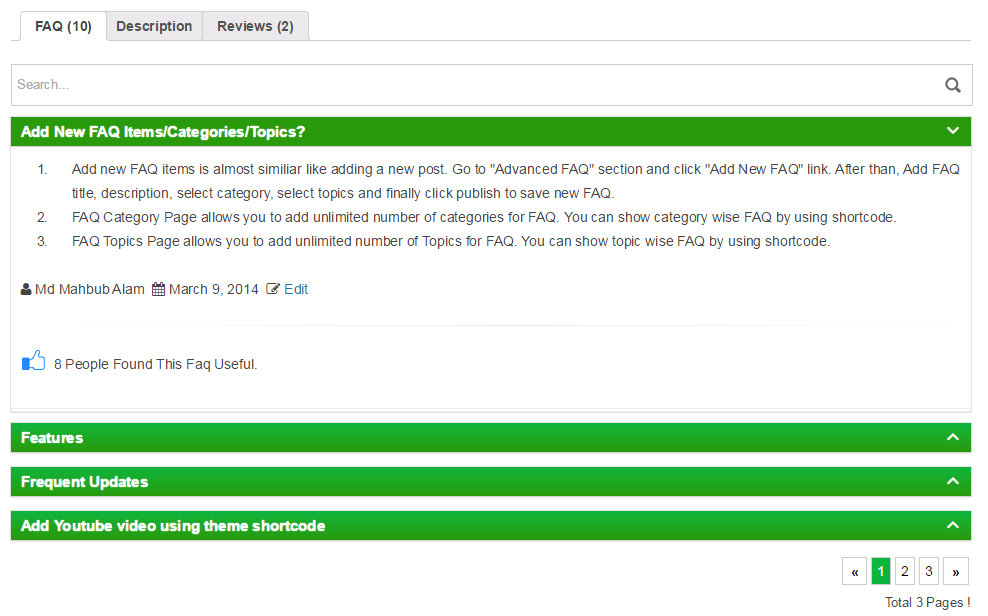
FAQ tab for woocommerce Addon allows you to convert you're existing FAQ posts in to WooCommerce product FAQ item with in a minute. You can add unlimited number of FAQ post as product FAQ items and using drag drop feature sort them according to you're choice.
Install
This is the repository archive. It installs, but the folder name will carry the branch suffix and updates will not flow.
Install straight from GitHub with WP-CLI:
wp plugin install https://github.com/xenioushk/faq-tab-for-woocommerce-advanced-faq-addon/archive/refs/heads/main.zipFAQ Tab For WooCommerce - Advanced FAQ Addon
FAQ Tab For WooCommerce allows you to convert your FAQ posts into WooCommerce product FAQ items within a minute. You can add an unlimited number of FAQ posts as product FAQ items and, using the drag-drop feature sort them according to you're choice.
Addon comes with Unique Searchable Accordion jQuery Plugin. So that the users can easily find their required content from the FAQ lists. Also, the pagination feature gives the flexibility to quickly present a large no of FAQ items.
In the admin panel, Addon automatically integrates two custom columns(No of FAQs and FAQ Tab Display Status) with each WooCommerce product. This option gives you a quick overview of product FAQ status. you can easily show/hide the FAQ tab using the Quick and Bulk Edit options. You can also do this while adding/editing product information.
Addon also brings an extensive options panel that allows you to configure FAQ tabs according to your needs. You can set FAQ tab order, set TAB title, set Pagination & many more.
Demo | Download | Documentation
Addon requirements
You need to install BWL Advanced FAQ Manager Plugin to use FAQ Tab For WooCommerce - Advanced FAQ Addon. Minimum version 3.0.0 required.
You need at least WordPress version 6.0+ installed for this plugin to work properly. It is strongly recommended that you always use the latest stable version of WordPress to ensure all known bugs and security issues are fixed.
Technical requirements
- WordPress 6.0 or greater.
- PHP version 8.2 or greater.