Install
This is the repository archive. It installs, but the folder name will carry the branch suffix and updates will not flow.
Install straight from GitHub with WP-CLI:
wp plugin install https://github.com/xenioushk/bwl-yt-video-schema-injector/archive/refs/heads/production.zipNo built-in updater. New versions won't appear under Dashboard → Updates. Install new releases yourself, or let Git Updater track the repository.
Injects schema markup for YouTube videos in WordPress posts, pages, and custom post types.
Requirements
- WordPress 6.0 or higher
- PHP 8.2 or higher
- Composer for dependency management
- Basic knowledge of WordPress plugin development
- YouTube API Key.
How to Use
- Install the Plugin: Download and install the BWL YouTube Video Schema Injector plugin from the WordPress plugin repository or upload it manually.
- Activate the Plugin: Go to the Plugins section in your WordPress admin dashboard and activate the BWL YouTube Video Schema Injector plugin.
- Configure the Plugin: Navigate to the plugin settings page to enter your YouTube API key and configure any additional settings as needed.
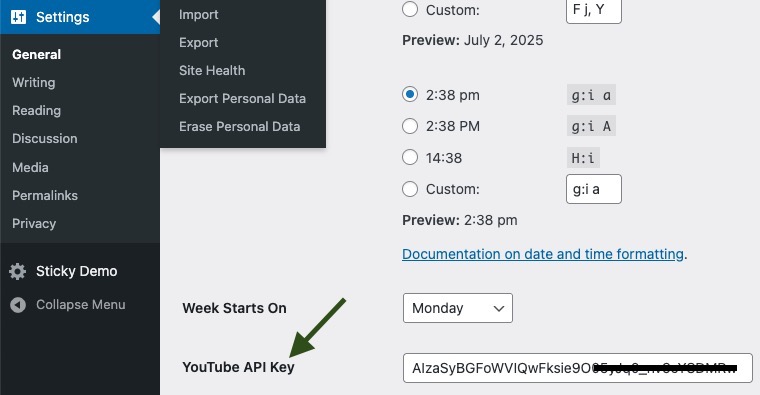
- Add YouTube Video URLs: In your posts, pages, or custom post types, add YouTube video URLs in the content editor. The plugin will automatically detect these URLs and inject the appropriate schema markup.
- Check Schema Markup: Use tools like Google's Structured Data Testing Tool to verify that the schema markup has been correctly injected into your content.
Changelog
1.0.0
- Initial release of the plugin.