Install
This is the repository archive. It installs, but the folder name will carry the branch suffix and updates will not flow.
Install straight from GitHub with WP-CLI:
wp plugin install https://github.com/xaviermsd/fieldpilot-for-acf/archive/refs/heads/main.zip
 FieldPilot: AI & JSON Copilot for ACF
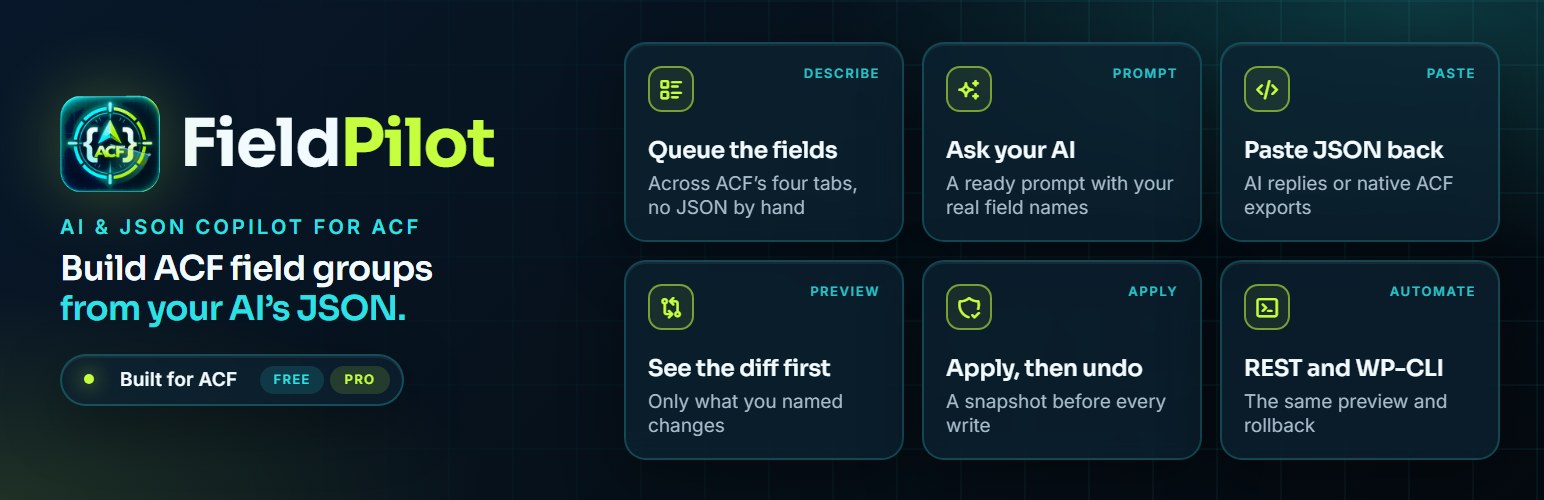
Build and change ACF field groups with your AI and JSON, in minutes instead of clicks.
Queue the fields you want, copy a prompt that knows your real field names, paste the JSON reply back,
preview the exact diff and apply. Every change is snapshotted, so you can undo it any time.
Built for ACF free and PRO. No API keys, no external services, no tracking.


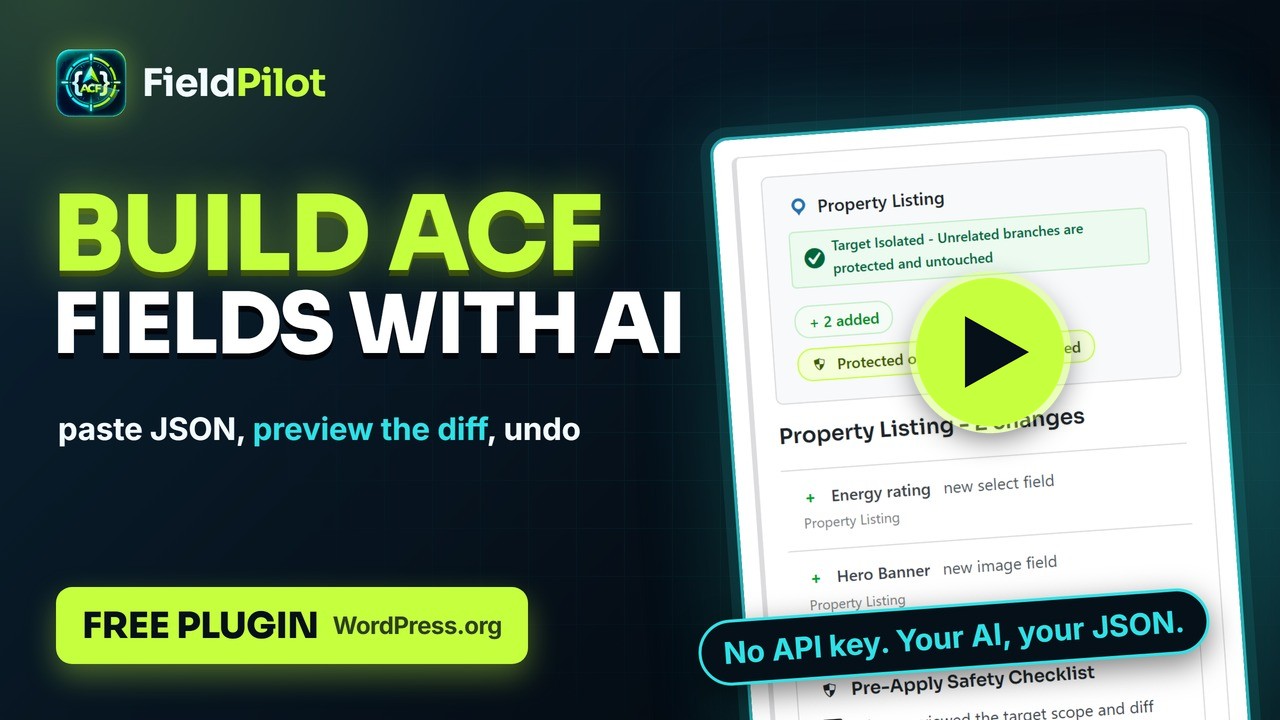
Watch the full tutorial on YouTube (3:42)






Create · Build · Preview · Protect · Undo · Overview · Install · FAQ · Developers
What do you want to do?
Click a task to jump straight to how it works.
- Let my AI write the fields, without giving it my site
A ready prompt with your real field names; paste the JSON reply back · Show me - Build a whole field group from a description
Create a group and its fields from one JSON payload · Show me - Add a field to a repeater without clicking through ACF
A JSON patch aimed at one target, with everything else left alone · Show me - Make one field required and change nothing else
Partial updates: only the settings you name change · Show me - Import a native ACF export, or an AI reply with code fences
Sloppy JSON is normalised, not rejected · Show me - Know what a patch will do before it runs
A diff preview, old value to new, nothing hidden · Show me - Change a field's type without losing content
Conflicts stop and ask, with three clear choices · Show me - Undo a change
A snapshot before every write and one-click rollback · Show me - See which groups I can edit from here
The Dashboard labels database, PHP and acf-json groups · Show me - Apply patches from a deployment
REST and WP-CLI, with the same preview and rollback · Show me
[!TIP] Nothing is written until you tick the safety checklist and click Apply. Every apply takes a snapshot first, checks every field in the group afterwards, and undoes itself if anything is off.
Start from any field group, or make one
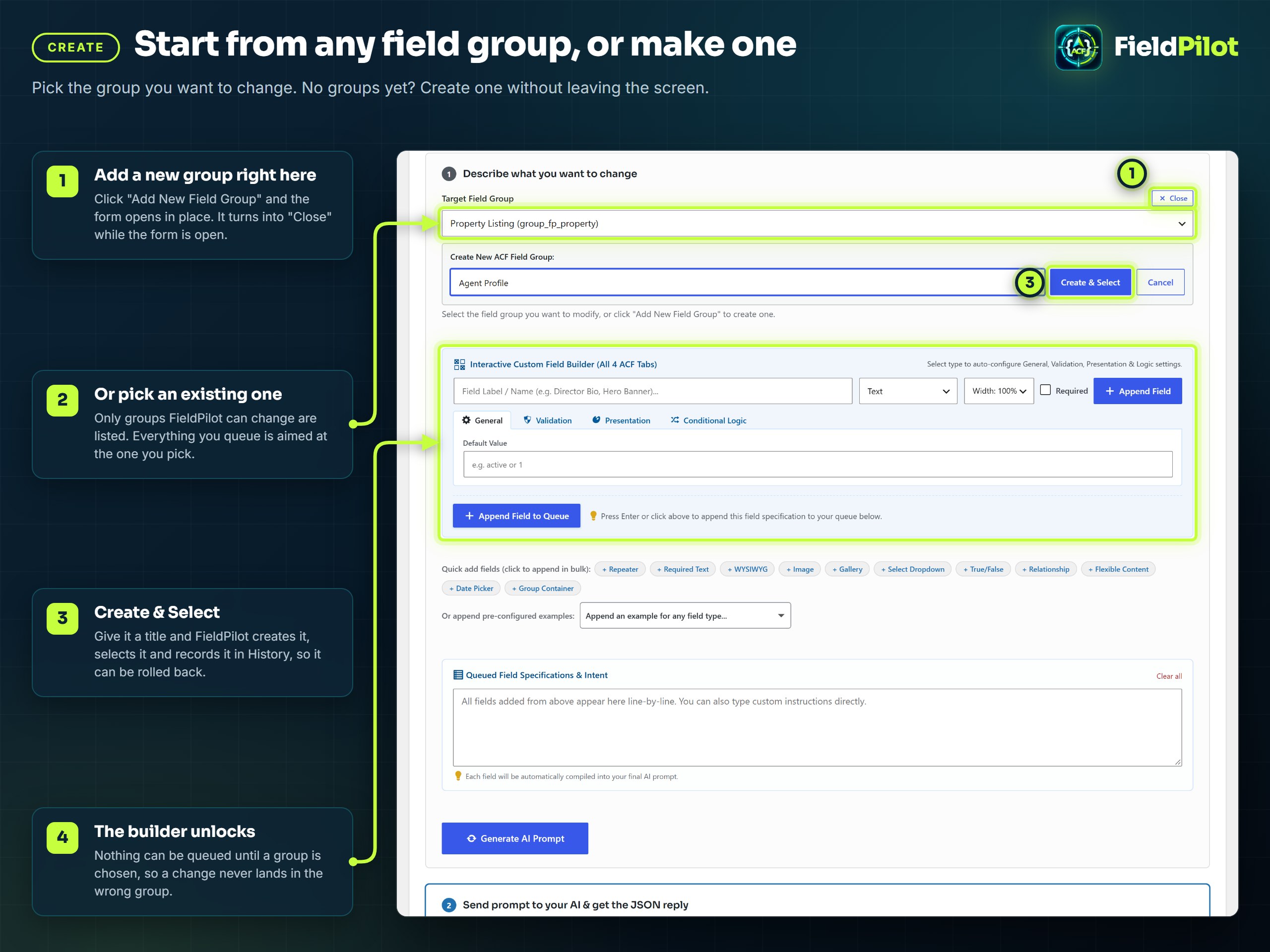
- On FieldPilot > Import JSON, pick the Target Field Group. Only groups FieldPilot can change are listed.
- No groups yet? Click Add New Field Group, type a title, click Create & Select. The group is created, selected and recorded in History, so it can be rolled back like anything else.
- The custom field builder unlocks once a group is chosen, so a change never lands in the wrong group.
Describe fields, get a ready prompt
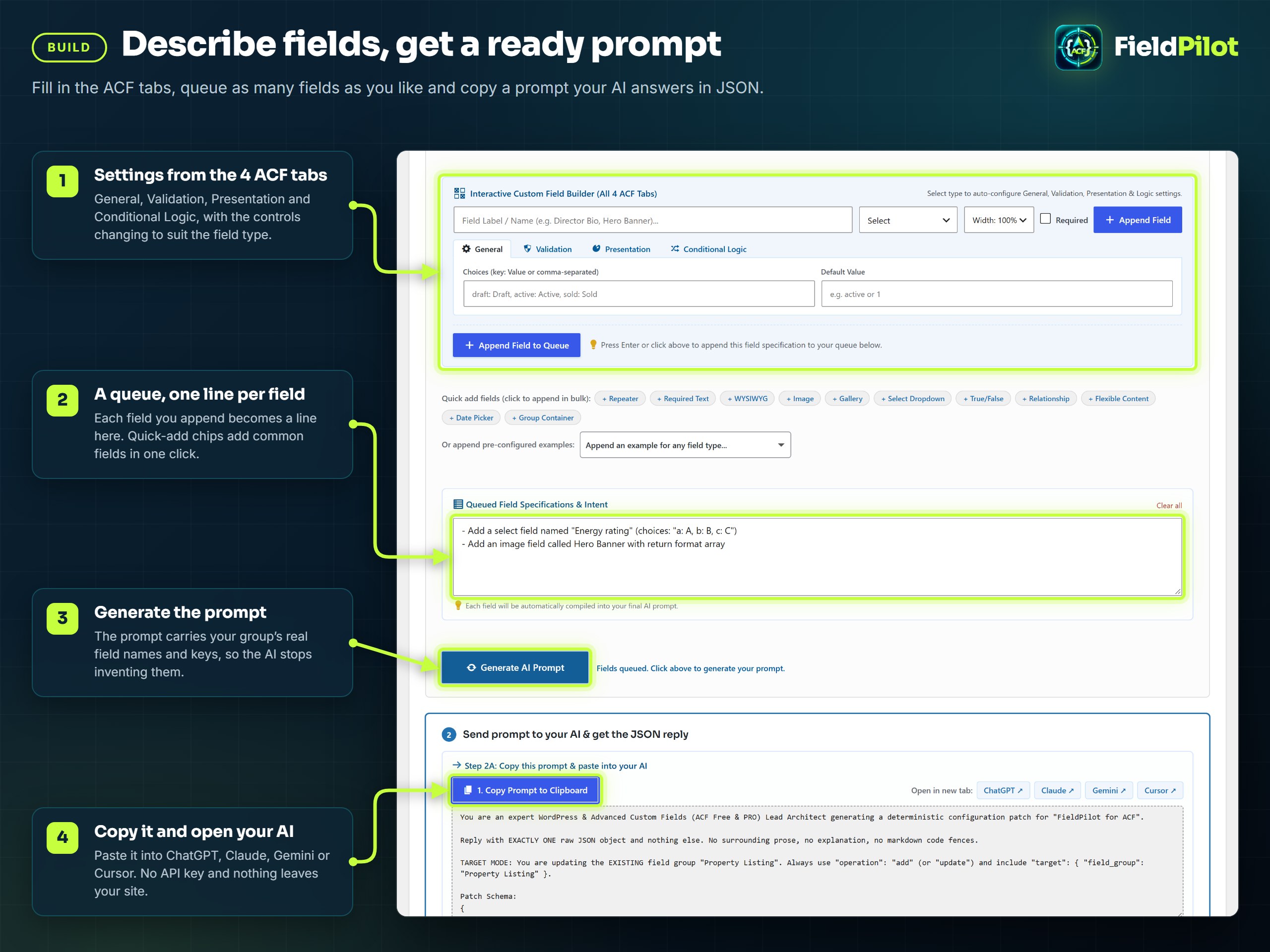
- Fill in a field across ACF's four tabs (General, Validation, Presentation, Conditional Logic) and click Append Field to Queue. Quick-add chips add common fields in one click; types your ACF cannot store are disabled.
- Click Generate AI Prompt. The prompt carries your group's real field names and keys, and only the field types your site can use, so the AI stops inventing them.
- Copy it, open ChatGPT, Claude, Gemini or Cursor, and paste the JSON reply back with Paste AI Response & Switch to Editor. Code fences are stripped and the preview runs.
No API key, nothing sent anywhere. You use whatever AI you already have.
What the prompt contains- The patch schema and the eight operations, with an example of each.
- Your target group's current fields: names, keys, types and nesting, so updates address real fields.
- The field types available on this site (32 on ACF free, 36 on ACF PRO) and the ones to leave out.
- The settings behind each ACF tab, so
required,wrapper,conditional_logicand friends come back in ACF's own shape.
See every change before anything is written
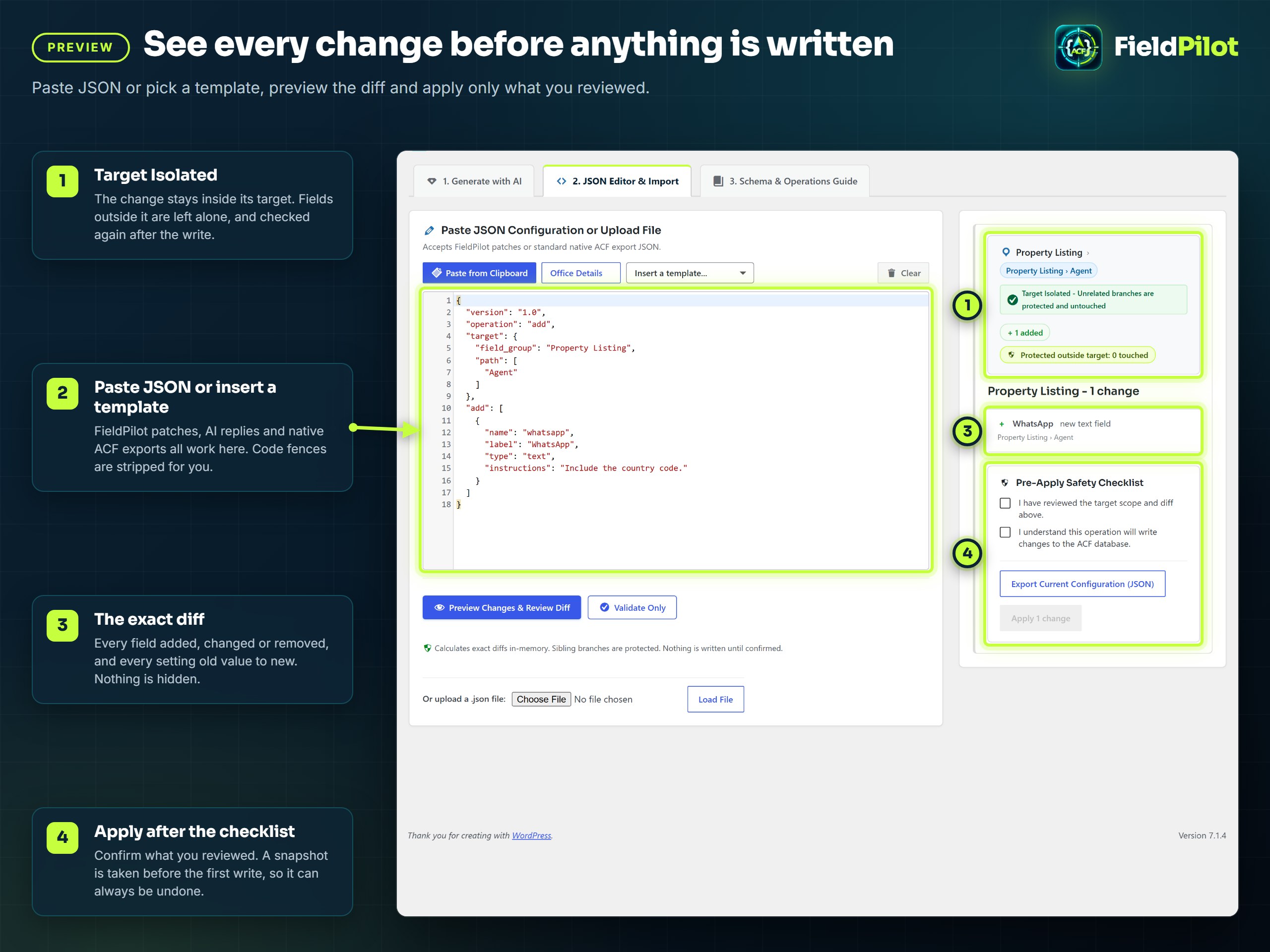
- Paste JSON into the editor, pick Insert a template..., or upload a
.jsonfile. FieldPilot patches, AI replies and native ACF exports all work. - Click Preview Changes & Review Diff. The right column shows the target breadcrumb, the Target Isolated badge, and every change with each setting old value to new.
- Tick the checklist and click Apply. A snapshot is taken before the first write and every field in the group is re-read afterwards.
{
  "version": "1.0",
  "operation": "add",
  "target": { "field_group": "Property Listing", "path": ["Agent"] },
  "add": [
    { "name": "whatsapp", "label": "WhatsApp", "type": "text", "instructions": "Include the country code." }
  ]
}
Everything outside Agent is left exactly as it was, and FieldPilot checks that after the write.
{
  "version": "1.0",
  "operation": "update",
  "target": { "field_group": "Property Listing", "path": ["Agent"] },
  "changes": {
    "email": { "required": 1, "instructions": "Work email only." }
  }
}
Settings you leave out keep their values. Field keys are never regenerated, so stored content stays connected.
The eight operations| Operation | What it does | Risk |
|---|---|---|
add |
Adds fields or layouts to the target. Nothing else changes. | safe |
update |
Changes only the settings named, on the fields named. | safe |
create |
Creates a new field group with its fields. Rolling it back trashes the group. | safe |
move |
Moves a field to another container or position, keeping its key. | caution |
merge |
Adds what is missing, updates what is named, deletes nothing. | safe |
delete |
Removes the fields named. Content is scanned first. | destructive |
sync |
Makes the group match the payload, including removals. | caution |
replace |
Rebuilds the target from the payload. Matching fields keep their keys. | destructive |
Sloppy JSON is normalised, not rejected: group for field_group, description for instructions,
true where ACF wants 1, paths written as "Parent > Child" or "parent.child".
Risky changes stop and ask
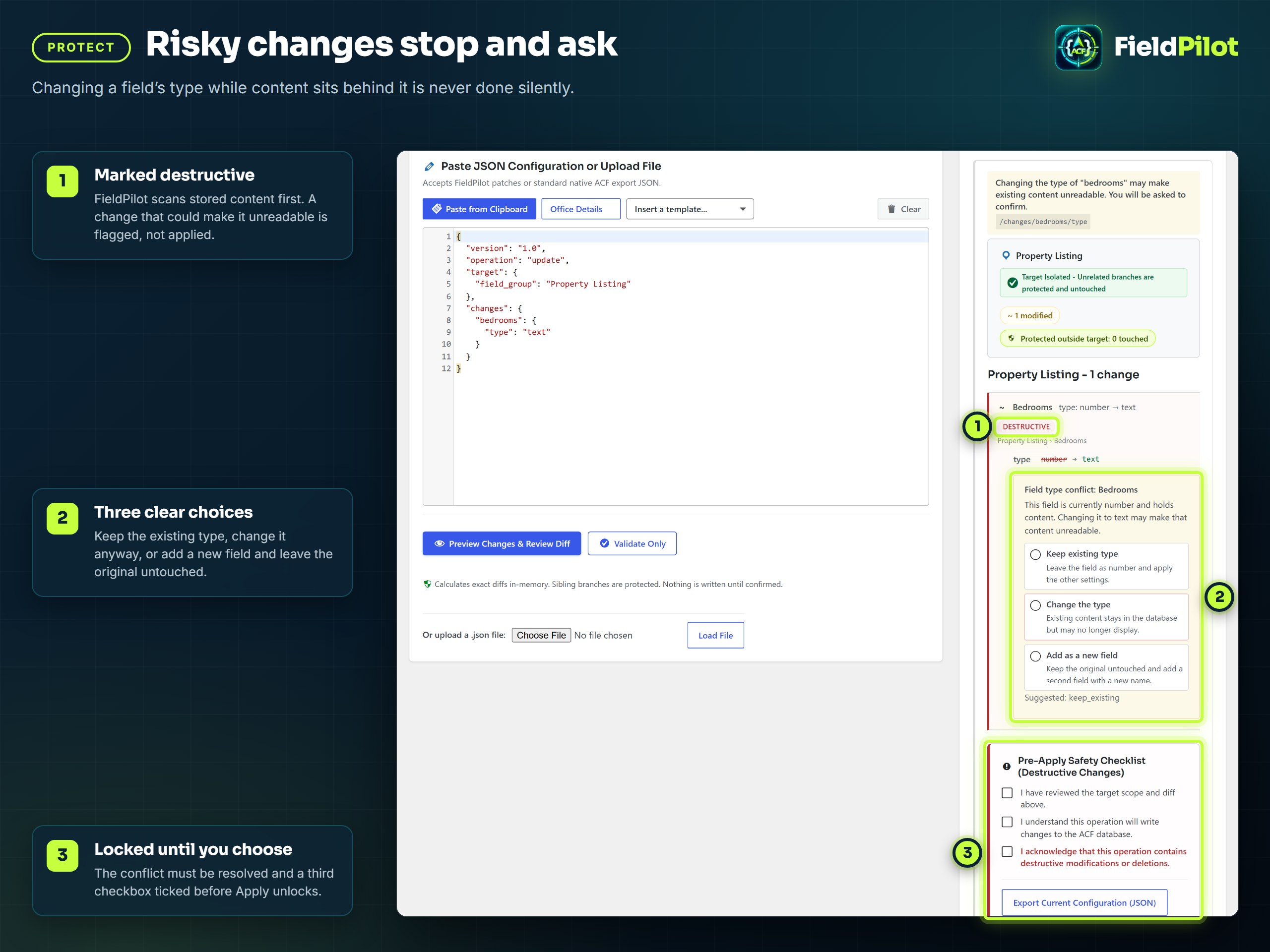
FieldPilot scans stored content before a change that could lose it: deleting a field or layout that holds data, or changing a field's type. The change is marked destructive and nothing is written until you choose.
- Keep existing type
The type stays. Every other setting in the patch is applied. - Change the type
The type changes. Existing content stays in the database but may no longer display. - Add as a new field
The original is untouched and a second field with a new name is added.
A third checkbox must be ticked before Apply unlocks for a destructive batch.
Every change logged, ready to roll back
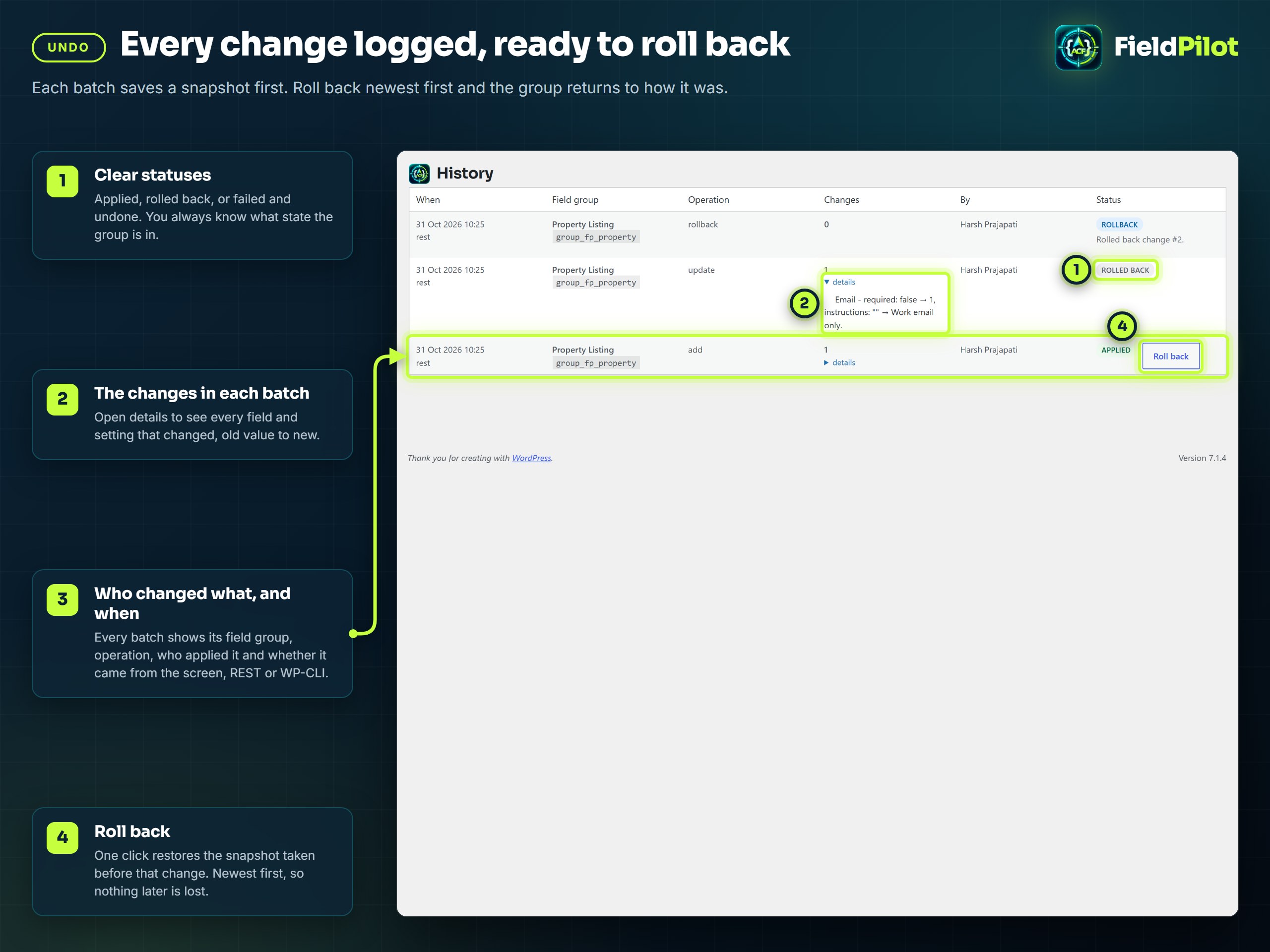
Every batch is recorded on FieldPilot > History with its field group, operation, who applied it and where it came from (the screen, REST or WP-CLI). Open details to see each setting old value to new.
- Roll back restores the snapshot taken before that change. Rollbacks go newest first, so nothing later is lost.
- Statuses are explicit: Applied, Rolled back, Failed - undone and Failed - needs restore.
- If a write fails its own check, the snapshot is restored automatically and the batch is recorded as undone.
[!IMPORTANT] FieldPilot's snapshots protect ACF field group configuration. They are not a site backup. Keep your regular database backups.
Know what is safe to edit
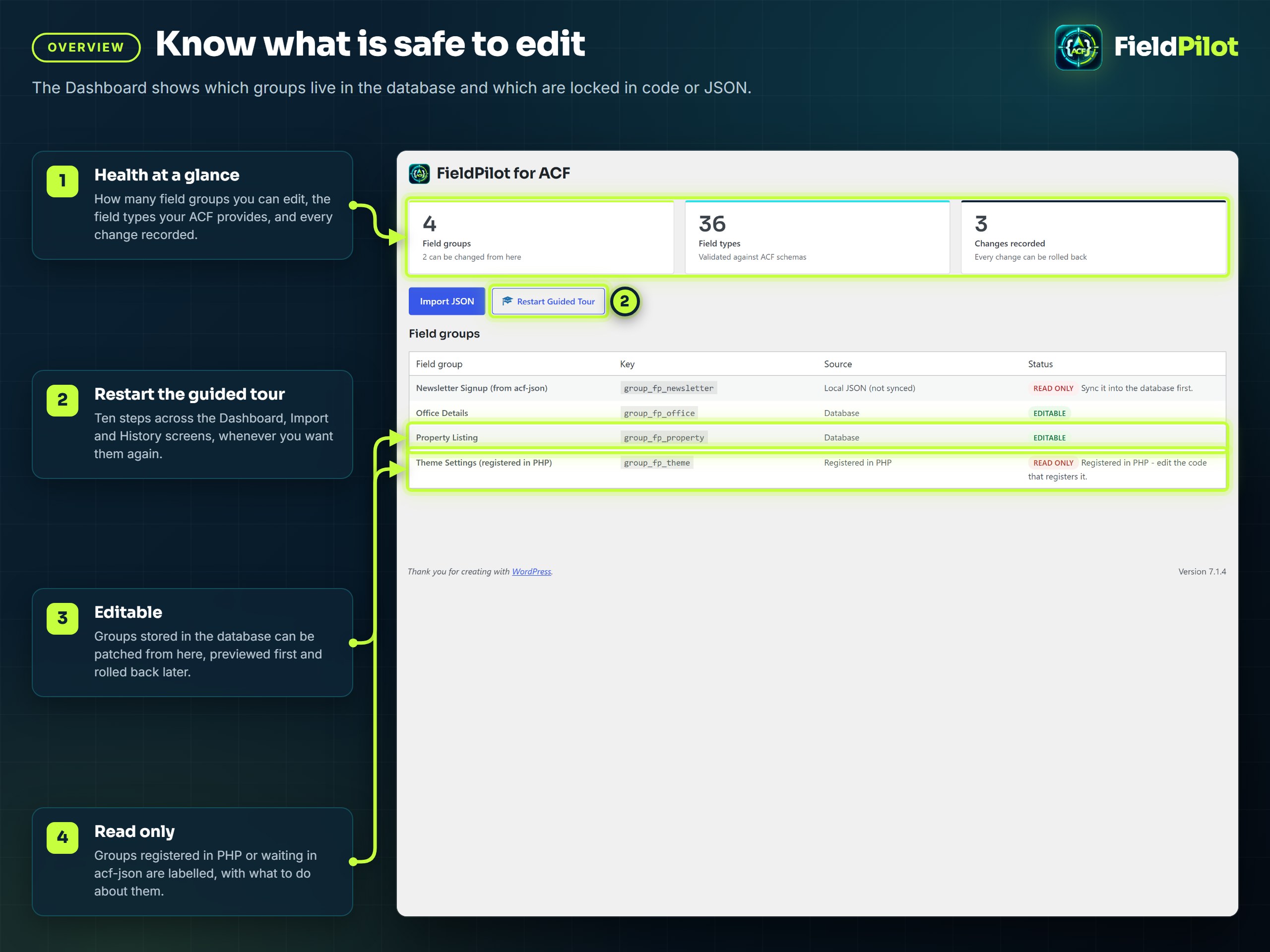
The Dashboard shows how many groups you can edit, the field types your ACF provides, and every change
recorded. Groups stored in the database are Editable. Groups registered in PHP, or waiting in acf-json
and not yet synced, are Read only, with what to do about them. Restart Guided Tour replays the
ten-step tour across the Dashboard, Import and History screens.
Install in a minute
- Plugins > Add New, search for FieldPilot, install and activate. ACF (free or PRO) must already be active.
- Open FieldPilot in the admin menu. The guided tour starts on the first visit.
- Pick a field group on Import JSON, queue a field, generate the prompt, and paste the reply back.
Or from the command line:
wp plugin install fieldpilot-for-acf --activateRequirements: WordPress 6.5+, PHP 8.1+, ACF 6.2+ (free or PRO). Repeater, Flexible Content, Clone and Gallery need ACF PRO; Icon Picker needs ACF 6.3+. On ACF 6.8+, new fields are also checked against ACF's own field-type schemas.
Settings
FieldPilot > Settings:
- Read-only mode (default: Off)
Previews, validation and exports keep working; applying and rolling back are refused. Alsodefine( 'ACFJP_READ_ONLY', true );inwp-config.php. - Content detection (default: On)
Scans posts, terms, users and options for a field's content before a delete or type change. - History per field group (default: 50)
Entries kept for each group before older ones are pruned. - History age limit (default: 90 days)
Entries older than this are pruned. - Delete all FieldPilot data when the plugin is deleted (default: Off)
When on, deleting the plugin removes its settings, history and snapshots. Field groups are never touched.
FAQ
Will this overwrite my existing fields?No. An
update changes only the settings your JSON names. Every other setting and every other
field is left as it was, and field keys are never regenerated, so no content is orphaned.
Does it work with ACF free?
Yes, with the 32 field types ACF free provides. Repeater, Flexible Content, Clone and Gallery are ACF PRO features: FieldPilot shows them disabled and refuses payloads that use them, with a clear message. Does it need an API key or send my data anywhere?
No. FieldPilot contains no AI integration. It generates a prompt for whichever AI you already use, and you paste the reply back. Nothing leaves your server. Why can't it edit one of my field groups?
Groups registered in PHP with
acf_add_local_field_group() do not live in the database, so nothing
can be written to them. Groups from an acf-json file that has not been synced are the same. The
Dashboard labels every group; sync JSON groups into the database first.
How do I undo a mistake?
On History, click Roll back on the newest entry. It restores the snapshot taken before that change. Keep going, newest first, to go further back. What happens to my data when I delete the plugin?
Nothing is removed unless you tick Delete all FieldPilot data when the plugin is deleted on the Settings screen. Then its settings, history and snapshots go; your field groups belong to ACF and are never touched. On multisite, each site's own setting decides.
For developers
WP-CLICommands that write (apply, create-group, rollback, self-test) need a user, for example --user=admin.
wp acfjp validate patch.json                       # check a payload, touches nothing
wp acfjp plan patch.json                           # show the diff it would make
wp acfjp apply patch.json --user=admin             # apply it
wp acfjp apply patch.json --confirm --user=admin   # apply a batch with destructive changes
wp acfjp create-group "Case Studies" --user=admin  # create an empty field group
wp acfjp export "Property Listing" > listing.json  # export a group as clean JSON
wp acfjp groups                                    # list groups and whether they can be patched
wp acfjp history --limit=10                        # recent changes
wp acfjp rollback 42 --user=admin                  # roll back a journal entry, newest first
wp acfjp prompt --group="Property Listing" --intent="Add a WhatsApp number"
wp acfjp schema                                    # print the JSON Schema
wp acfjp self-test --user=admin # run the diagnosticsNamespace /wp-json/fieldpilot-for-acf/v1, authenticated with a REST nonce in the admin or an Application
Password for a user with manage_options (change the capability with the acfjp_capability filter).
| Endpoint | Method | What it does |
|---|---|---|
/validate |
POST | Parse and validate JSON without reading ACF. |
/plan |
POST | Resolve the target and return the plan with its diff. |
/apply |
POST | Apply a plan by plan_id, with optional resolutions and confirm. |
/prompt |
GET, POST | Generate the AI prompt for a group (group_key, intent). |
/field-groups |
GET | List field groups with their mutability. |
/field-groups |
POST | Create an empty field group (title). |
/field-groups/:key |
GET | Fetch a group tree (dialect: native or acfjp). |
/history |
GET | Journal entries (group_key, limit, offset). |
/history/:id/rollback |
POST | Roll back an entry, newest first. |
/self-test |
POST | Run the diagnostics. |
/schema |
GET | The JSON Schema. |
add_filter( 'acfjp_capability', fn () => 'edit_theme_options' );           // default: manage_options
add_filter( 'acfjp_read_only', fn () => 'production' === wp_get_environment_type() );
add_filter( 'acfjp_data_probe_enabled', '__return_true' );                 // content scan before risky changes
add_filter( 'acfjp_plan_ttl', fn () => 1800 );                             // seconds a preview stays applicable, default 900
add_filter( 'acfjp_max_payload_bytes', fn () => 16 * MB_IN_BYTES );        // default 8 MB
add_filter( 'acfjp_max_depth', fn () => 48 );                              // nesting depth, default 32
add_filter( 'acfjp_field_type_schema', fn ( array $schema, string $type ) => $schema, 10, 2 );| Action | Arguments | Fires |
|---|---|---|
acfjp_booted |
$container |
Once FieldPilot is ready. |
acfjp_applied |
$result |
After a batch is applied and verified. |
acfjp_journal_recorded |
$id, $changeSet, $status |
After a batch is written to the journal. |
acfjp_restored |
$groupKey, $snapshot |
After a group is restored from a snapshot. |
acfjp_audit |
$event, $context, $userId |
On a security-relevant event that changed nothing. |
JSON (patch, AI reply or native ACF export)
  -> Parse and normalise (aliases, code fences, booleans)
  -> Locate the group (database, PHP or acf-json: only database groups can be patched)
  -> Resolve the target (key, then name in scope, then path, then unique label; ambiguity is an error)
  -> Diff against the current tree (the ChangeSet you preview)
  -> Guard (state fingerprint, capability, read-only mode, apply lock, confirmation)
  -> Snapshot, then write through ACF's own functions
  -> Verify: every requested change is there, every other field is unchanged, or restore the snapshot
-> Journal, ready to roll back- PHPUnit
110 unit tests, plus 25 integration tests on a real WordPress with ACF PRO and ACF free - PHPStan
Level 8 on every PHP file - PHPCS
WordPress Coding Standards, zero issues - Plugin Check
The WordPress.org review tool, no errors - Self-test
wp acfjp self-testruns the engine end to end on a live site
| Colour | Used for | |
|---|---|---|
 |
#061019 Navy |
Backgrounds |
 |
#c6ff3d Lime |
Main accent, the ring and the arrow in the logo |
 |
#2de2e6 Cyan |
Second accent, the braces in the logo |
 |
#f2fbff Ice |
Text on dark |
 |
#a9bdcc Mist |
Secondary text |
Headings use Sora, body text uses Inter.
The brand sources live in docs/brand.
Contributing
Issues and pull requests are welcome on GitHub. For a security issue, please open a private report instead of a public issue.
License
GPL-2.0-or-later. See LICENSE.
Made by Harsh Prajapati. Also by the same author: MenuNest, the smart menu manager for WordPress.