Install
This is the repository archive. It installs, but the folder name will carry the branch suffix and updates will not flow.
Install straight from GitHub with WP-CLI:
wp plugin install https://github.com/wpquark/wpq-wp-update/archive/refs/heads/develop.zipWordPress Plugin/Theme Update Server for Envato
Originally developed at WPQuark Private GitLab
This plugins aims to convert your WordPress installation to a secure update server for your plugins and themes hosted on envato market place.
Usage
This plugin provides a server for easy updates with purchase code verification. To set things up you need to install the server and configure your plugin.
Installing the Server
- Install this plugin by a git clone.
- Install composer dependency
composer install - Make sure you have grunt available globally.
npm install grunt-cli -g - Build the plugin
npm install && grunt build - Activate Plugin.
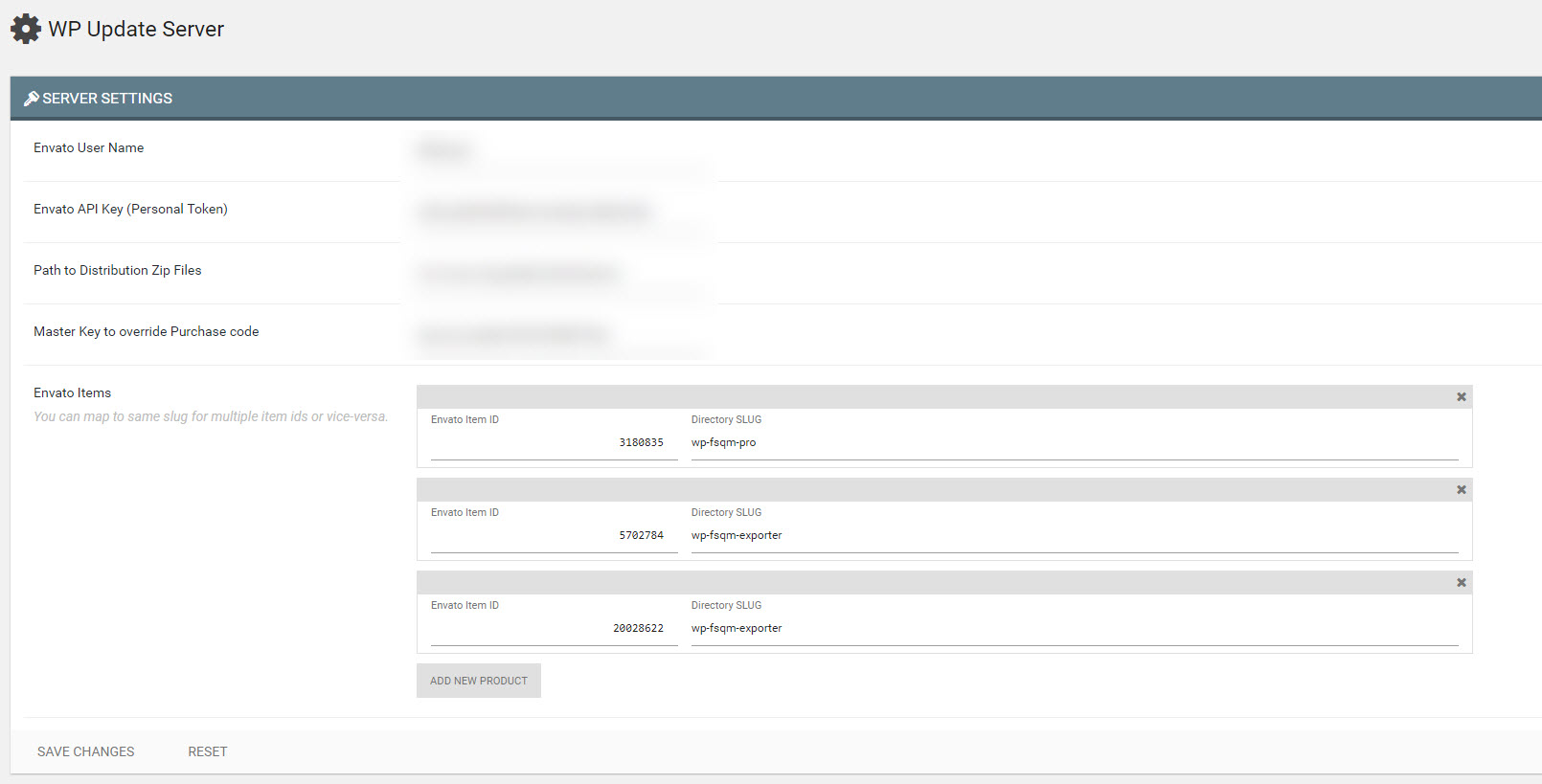
- Go to WP Update > Settings
- Enter your Envato API Key and distribution directory
- Map Envato Item ID with ZIP Slug.
Configuring your plugin/theme
- Modify and include the file under
client/class-plugin-autoupdate.php. - Point to your distribution server by editing the constants.
- Now you provide a UI for collecting purchase code from your user and when saving simply call like this:
$updater = Plugin_AutoUpdate::instance();
$updater->set_token_from_code( wp_unslash( $_POST['purchase_code'] ) );
To show the activation status call this from anywhere
$updater = Plugin_AutoUpdate::instance();
$activation_status = $updater->current_activation_status( $settings['purchase_code'] );
echo '<p>Activation Status: ' . ( true == $activation_status['activated'] ? 'Active' : 'Inactive' ) . '</p>';
echo '<p>Message: ' . $activation_status['msg'] . '</p>';
Hack away buddy, hack away.
Releasing Updates
This follows the same logic as wp-update-server with the added benifit to configure your distribution directory. These can be outside your public server and would still work.
Say you want to publish update for wp-fsqm-pro.zip. So place the file under distributions/packages/wp-fsqm-pro.zip and the server takes care of the rest.
You can even put banners in the banners directory. But you would need to point URL /banner/ to the banner directory yourself ( through apache config or nginx config ).
I have a GitLab CI workflow which puts the packages when-ever I tag a release. It looks something like this:
# Our base image
image: wpquark/wptest-php-nodejs-grunt:latest

# mysql service
services:
- mysql

# Select what we should cache
cache:
  paths:
  - vendor/
  - node_modules/
  - bower_components/

# Our stages
stages:
  - test
  - build
  - deploy

# We test on php7
# default job to run on every commit, everywhere
test:
  stage: test
  tags:
    - wordpress
  before_script:
    # Install npm to get grunt and other stuff
    - npm install

    # Install all dependencies
    - grunt install

    # Create the build files (js/css) so that we can test them
    - grunt prep

    # Check the PHP Version
    - php -v

    # Install WordPress PHPUnit Test
    - bash bin/install-wp-tests.sh wordpress_test root mysql mysql $WP_VERSION
  script:
  - grunt test
  artifacts:
    paths:
      - build/
    expire_in: 1 week

# Now we build on merging to master
build:
  stage: build
  cache:
    paths:
      - vendor/
      - node_modules/
      - bower_components/
    policy: pull
  tags:
    - wordpress
  before_script:
    # Install npm to get grunt and other stuff
    - npm install
    # Install all dependencies
    - grunt install
  script:
    - grunt release
  artifacts:
    paths:
      - build/package
    expire_in: 1 week
  only:
    - master@wpq-develop/wp-fsqm-pro

# release job on tag
# It basically creates an installable zip file and attaches to the artifact
deploy-distribution:
  stage: deploy
  cache:
    paths:
      - vendor/
      - node_modules/
      - bower_components/
    policy: pull
  tags:
    - wordpress
  variables:
    CMD_CREATE_DIR: 'rm -rf '
  before_script:
    # Install npm to get grunt and other stuff
    - npm install
    # Install all dependencies
    - grunt install

    # Setup Environment variables to access keys & ssh agent
    - eval $(ssh-agent -s)
    - '[[ -f /.dockerenv ]] && echo -e "Host *\n\tStrictHostKeyChecking no\n\n" > ~/.ssh/config'

    # Make the build package if not found, because artifacts expire
    - '[[ ! -f build/package/wp-fsqm-pro.zip ]] && echo "Distribution Package not found. Making now..." && grunt release || echo "Found Distribution Package. Using from artifacts"'
  script:
    # Make sure we add the Staging Key so that we can SSH
    - ssh-add <(echo "$WPQ_DISTRIBUTION_KEY")
    # Delete old resources
    - ssh -p22800 wpqdist@gliese.itg-vps.com "rm -rf ~/distributions/packages/wp-fsqm-pro.zip && rm -rf ~/distributions/banners/wp-fsqm-pro-*"
    # Copy the distribution ZIP
    - scp -P22800 build/package/wp-fsqm-pro.zip wpqdist@gliese.itg-vps.com:~/distributions/packages
    # Copy Banners
    - scp -P22800 banners/wp-fsqm-pro-* wpqdist@gliese.itg-vps.com:~/distributions/banners
    # The server script should take care of it
  artifacts:
    name: 'wp-fsqm-pro'
    paths:
      - build/package/wp-fsqm-pro.zip
  environment:
    name: production/distribution
    url: https://dist.wpquark.io/wp-admin/
  dependencies:
    - build
  only:
    - /^release-.*$/@wpq-develop/wp-fsqm-pro
  except:
    - branches
Essentially I work on develop branch and once done, I merge to master. Then when I tag a release, the CI does everything else.
ScreenShots
Credits
- wp-update-server - For providing the update server.
- plugin-update-checker - For providing the client library.
- WordPress Rest API - For giving an access point for easy activation flow.
License
WordPress Update Server is licensed under GPL-3.0.
This program is free software: you can redistribute it and/or modify
it under the terms of the GNU General Public License as published by
the Free Software Foundation, either version 3 of the License, or
(at your option) any later version.

This program is distributed in the hope that it will be useful,
but WITHOUT ANY WARRANTY; without even the implied warranty of
MERCHANTABILITY or FITNESS FOR A PARTICULAR PURPOSE.  See the
GNU General Public License for more details.

You should have received a copy of the GNU General Public License
along with this program.  If not, see <http://www.gnu.org/licenses/>.
RoadMap
Right now the plugin is in alpha stage. This works, but requires you to build it. Also the dashboard functionality isn't implemented.
- Complete the build process and host on WordPress.org
- Implement Dashboard with statistics.
- Write PHPUnit tests.
Originally developed at WPQuark Private GitLab