Install
This is the repository archive. It installs, but the folder name will carry the branch suffix and updates will not flow.
Install straight from GitHub with WP-CLI:
wp plugin install https://github.com/wppompey/pompey-chart/archive/refs/heads/main.zip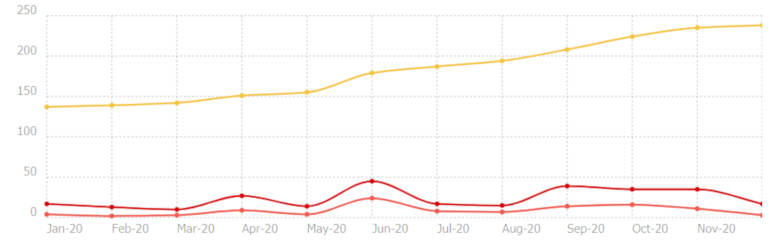
- Contributors: bobbingwide, andrewleonard
- Donate link: https://www.oik-plugins.com/oik/oik-donate/
- Tags: chart, chartist, line,
- Requires at least: 5.5
- Tested up to: 5.6
- Stable tag: 0.2.0
- License: GPLv3
- License URI: http://www.gnu.org/licenses/gpl-3.0.html
Charts to display interesting statistics.
Description
v0.2.0 delivers a generic [chart] shortcode that can be used to display a variety of chart types:
-
Line
-
Bar
-
Pie
-
Examples: taken from Top 12 WordPress plugins - December 2020
Total downloads for the most downloaded plugins
[chart type=Bar tooltips=true horizontalBars=true]Plugin,Total downloads (M)
Yoast SEO,290.578416,5.000000
Jetpack,207.932506,5.000000
wordfence,182.932054,4.000000
akismet,180.873037,5.000000
contact-form-7,165.347624,5.000000
woocommerce,119.836086,5.000000
elementor,84.678564,5.000000
google-analytics-for-wordpress,81.092236,2.000000
all-in-one-seo-pack,71.780860,2.000000
wpforms-lite,56.953308,4.000000
updraftplus,45.000922,3.000000
optinmonster,44.200773,1.000000
[/chart]
WordPress plugins grouped by total downloads
[chart height=250px]Groups:,downloads
1->10,22,
10->100,1488,
100->1000,20077,
1000->10000,24849,
10000->100000,8868,
100000->1000000,2278,
1000000->10000000,470,
10000000->100000000,63,
100000000->1000000000,6,
[/chart]
Last updated counts by year
[chart type=bar height=250]Groups:,# plugins
2020,18681
2019,5988
2018,4499
2017,4167
2016,4677
2015,4292
2014,3744
2013,2841
2012,2784
2011,2264
2010,1810
2009,1329
2008,646
2007,230
2006,39
2005,118
2004,12
[/chart]
WordPress version compatibility
[chart type=bar]Version,Requires,Tested
0.70 to 2.9,20270,4421,
3.0 to 3.9,13030,9928,
4.0 to 4.9,18026,17666,
5.0,2054,1421,
5.1,413,1116,
5.2,686,3132,
5.3,440,2900,
5.4,232,4209,
5.5,204,7829,
5.6,19,3882,
Other,2745,1580,
Other+,2,23,
5.7,0,13,
5.8,0,1,
[/chart]
Star ratings
[chart type=Pie]Stars,# plugins
19867,5
6077,4
2528,,3
674,2
1087,1
[/chart]
Installation
- Upload the contents of the pompey-chart plugin to the `/wp-content/plugins/pompey-chart' directory
- Activate the plugin through the 'Plugins' menu in WordPress
- Use the [pompey_chart] shortcode to display a chart
Screenshots
- Pompey Chart for 2020
Upgrade Notice
0.2.0
Upgrade for different chart types using the [chart] shortcode.
0.1.0
Upgrade for locally enqueued scripts and CSS
0.0.0
Initial version for WordPress Portsmouth Meetup statistics
Changelog
0.2.0
- Fixed: Remove unwanted/unnecessary styling.,https://github.com/wppompey/pompey-chart/issues/1
- Changed: Start adding colours for ct-legend ct-series-5 onwards.,https://github.com/wppompey/pompey-chart/issues/1
- Added: Generic [chart] shortcode,https://github.com/wppompey/pompey-chart/issues/4
- Added: Support horizontal bar chart.,https://github.com/wppompey/pompey-chart/issues/4
- Added: Add class parameter to [chart] shortcode.,https://github.com/wppompey/pompey-chart/issues/4
- Added: Support stacked Bars ( stackBars attr ),https://github.com/wppompey/pompey-chart/issues/4
- Added: add tooltips attr - default false,https://github.com/wppompey/pompey-chart/issues/4
- Added: Add Pie chart,https://github.com/wppompey/pompey-chart/issues/4
0.1.0
- Changed: Enqueues scripts and CSS from local files,https://github.com/wppompey/pompey-chart/issues/1
- Changed: Supports multiple uses of the [pompey_chart] shortcode,https://github.com/wppompey/pompey-chart/issues/3
- Tested: With WordPress 5.6 and WordPress Multi Site
- Tested: With PHP 7.4
- Tested: With Gutenberg 9.6.2
0.0.0
- Added: First version using Chartist.js and plugins from cloudflare.
Additional notes
The [pompey-chart] shortcode will use source data as follows:
- shortcode content
- the meetup-stats.csv file
- if not present locally ( it should be ) the file is loaded from an external URL
[pompey_chart height=500px]