Integrate CiviCRM with Groups
A WordPress plugin that integrates CiviCRM Groups with Groups provided by the Groups plugin.
Install
This is the repository archive. It installs, but the folder name will carry the branch suffix and updates will not flow.
Install straight from GitHub with WP-CLI:
wp plugin install https://github.com/wpcv/wpcv-civicrm-groups-integration/archive/refs/heads/main.zipIntegrates CiviCRM Groups with Groups provided by the Groups plugin.
Description
Please note: this is the development repository for Integrate CiviCRM with Groups.
Integrate CiviCRM with Groups is a WordPress plugin that integrates CiviCRM Groups with Groups provided by the Groups plugin.
Requirements
This plugin requires a minimum of WordPress 4.9, Groups 2.5 and CiviCRM 5.8.
Installation
There are two ways to install from GitLab:
ZIP Download
If you have downloaded Integrate CiviCRM with Groups as a ZIP file from the git repository, do the following to install and activate the plugin:
- Unzip the .zip file and, if needed, rename the enclosing folder so that the plugin's files are located directly inside
/wp-content/plugins/wpcv-civicrm-groups-integration - Activate the plugin (in multisite, network activate)
- You are done!
git clone
If you have cloned the code from the git repository, it is assumed that you know what you're doing.
Notes
WordPress Users
By default, this plugin does not create a WordPress User when a CiviCRM Contact is added to a CiviCRM Group which is synced to a Groups Group. If you wish to do so, use a callback from the wpcv_cgi/wp/user_id filter to create a new WordPress User and return the User ID.
CiviCRM Contacts
By default, this plugin does not create a CiviCRM Contact when a WordPress User is added to a Groups Group which is synced to a CiviCRM Group. If you wish to do so, use a callback from the wpcv_cgi/civicrm/contact_id filter to create a new CiviCRM Contact and return the Contact ID.
BuddyPress compatibility
If you are using both BuddyPress and Groups then you will also need this plugin in order to prevent conflicts between the two identically-named actions in these plugins.
Permissions Sync
If you want to have manual control over syncing permissions from CiviCRM to Groups, you can apply this patch to your CiviCRM install.
Usage
WordPress Groups
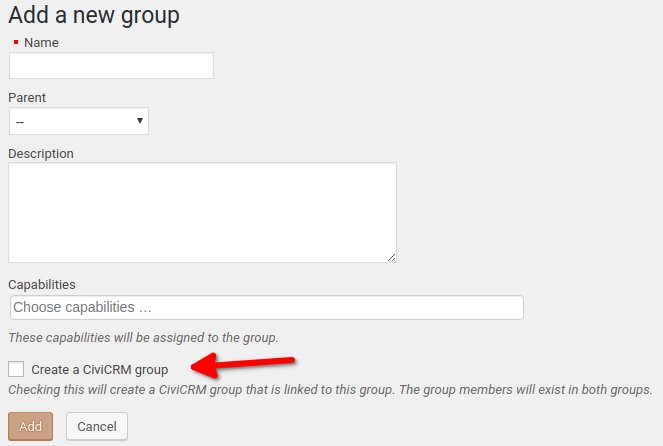
When you add a Group in WordPress, you'll be able to select an option that also creates a Group in CiviCRM. This allows you to update a User in a WordPress Group and it will update that Contact in CiviCRM and add them to the CiviCRM Group.
With the Groups in WordPress, you'll be also be able to assign capabilities or ACLs so that Users in that Groups can access the parts of CiviCRM they can work on.
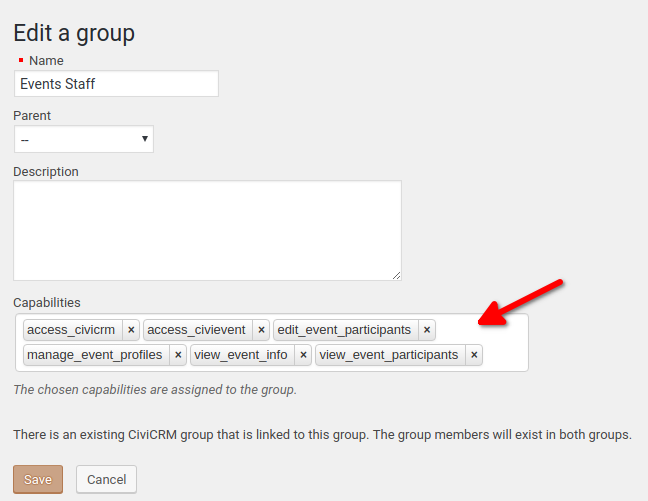
Tip: Add Users as WordPress using the default User Roles, like Subscriber or Author. Then add them to the appropriate Group to get the ACLs needed to access CiviCRM.
CiviCRM Groups
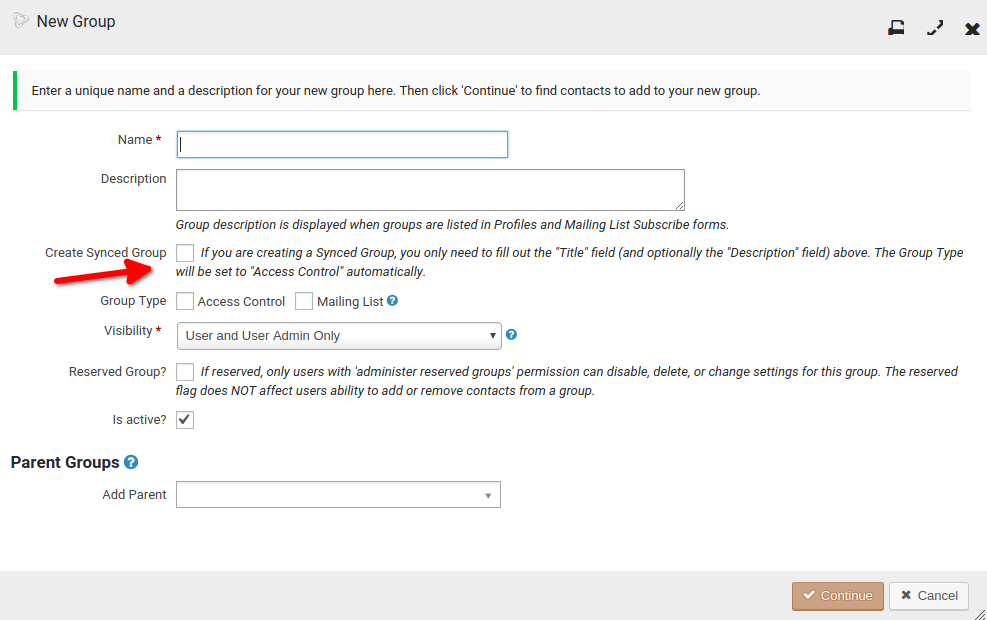
When adding a Group in CiviCRM, there will be an option to also create a Group in WordPress. These Groups are all Access Control Groups, since capabilities can be assigned to the Groups, as referenced above.
Keeping your Groups in sync
It seems that there can be situations which cause the Groups to get out of sync. To address this, there are three options that you can use:
- A pair of WP-CLI commands
- A WordPress scheduled event
- A "Manual Sync" settings page
When using these options, you will need to choose your sync direction depending on whether your CiviCRM Groups or your "Groups" Groups are the "source of truth".
WP-CLI commands
Use either wp cvgrp job sync-to-wp or wp cvgrp job sync-to-civicrm to sync all Groups each time the job runs.
WordPress scheduled event
The "Groups Sync" settings page enables you to set up a scheduled event to keep your Groups in sync.
"Manual Sync" page
Use the utilities on this page to sync your Groups immediately.