Install
This is the repository archive. It installs, but the folder name will carry the branch suffix and updates will not flow.
Install straight from GitHub with WP-CLI:
wp plugin install https://github.com/wpclouddeploy/wp-cloud-deploy/archive/refs/heads/main.zipAbout WPCloudDeploy
WPCloudDeploy is a WordPress plugin that allows you to easily deploy servers at major cloud-server providers and then install apps (such as WordPress) on those servers. And it does it from inside the familiar WordPress wp-admin dashboard.
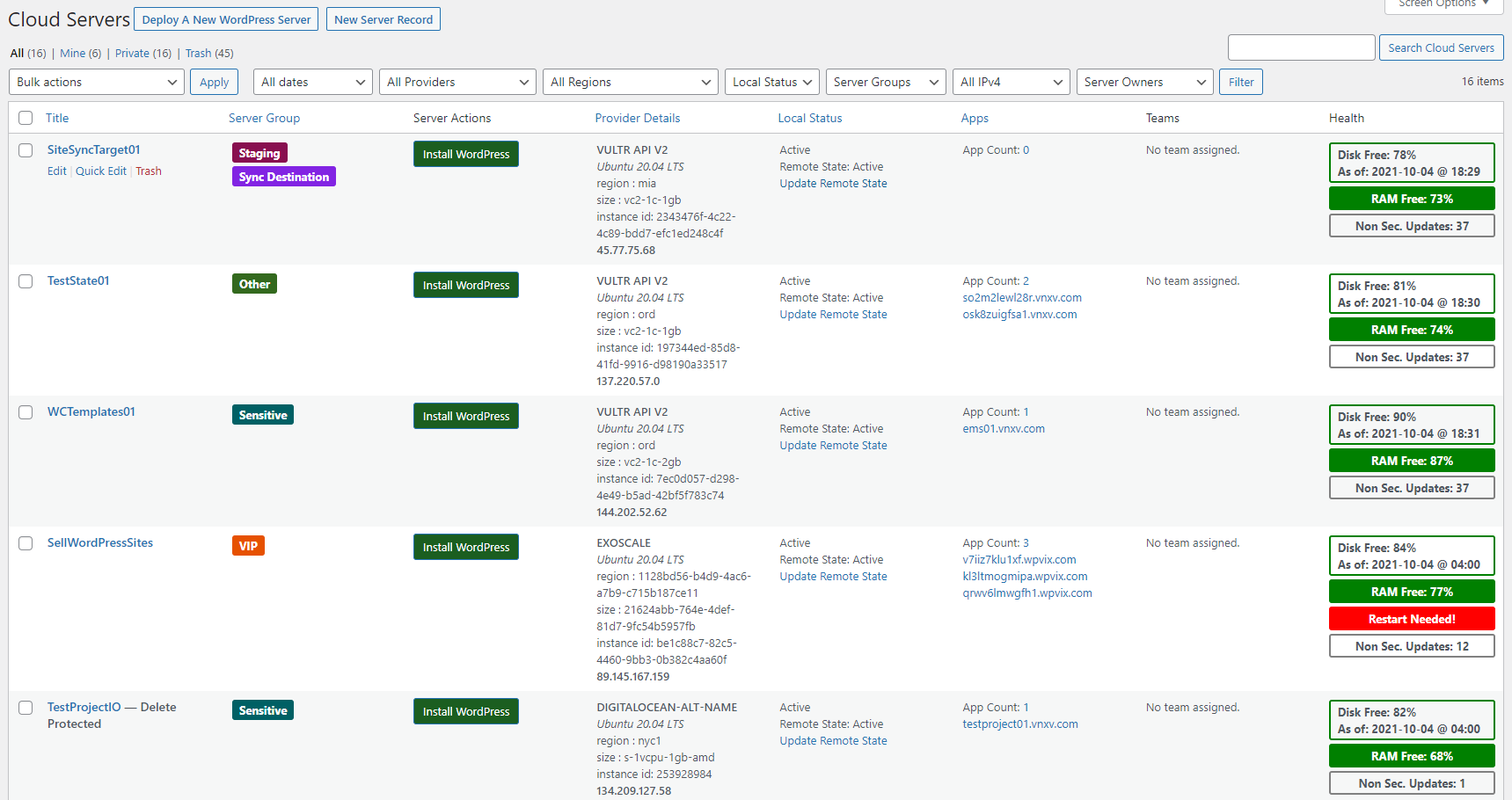
The plugin makes it easy to deploy servers at well-known providers such as DigitalOcean, Linode, Vultr, AWS, Google Cloud and more.
It is primarily used to install and manage WordPress servers and sites.
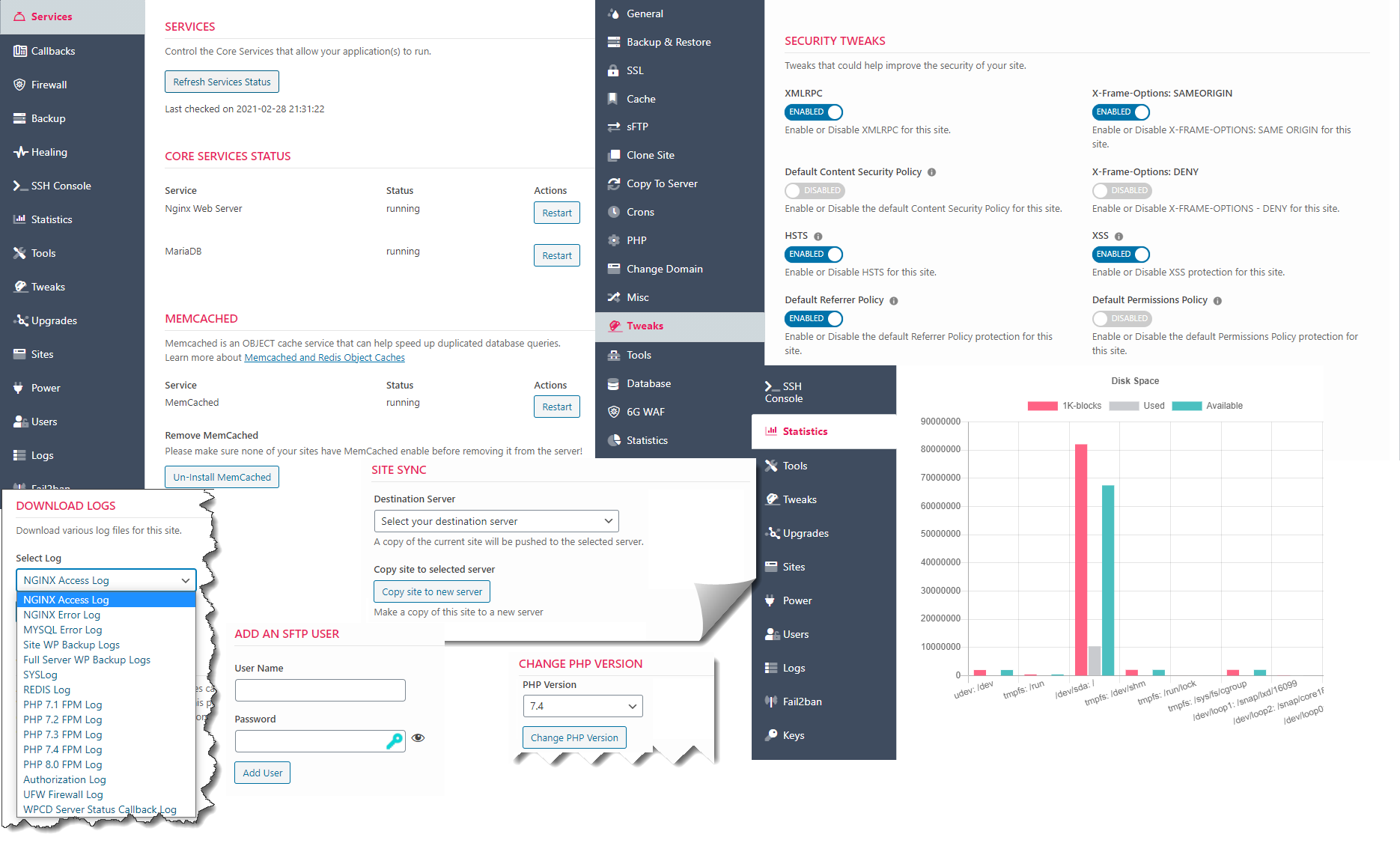
Its extensible model allow developers to add new apps in the future.
All management features are available inside of wp-admin on your WordPress site. Apart from your cloud server provider(s), you do not need a 3rd party SaaS service to manage your servers and sites.
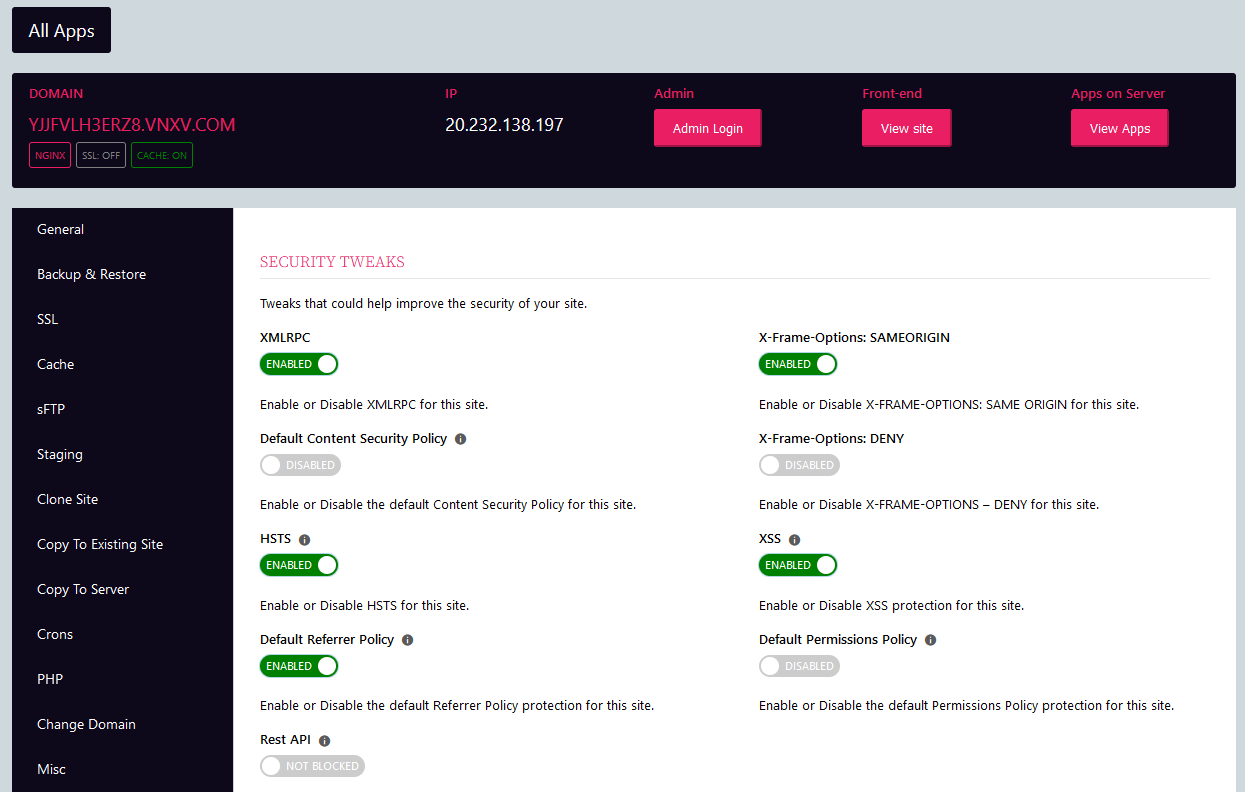
View a full list of WordPress-focused features
Getting Started: The Easier Way
The easiest way to get started is to use the pre-configured droplet at digital ocean.
Just deploy the droplet, login with your ssh credentials and follow the instructions to setup your domain and other info.
Then follow the getting started documentation on the WPCloudDeploy site.
These instructions will help you create ssh keys, api keys and connect to your account at DigitalOcean.
Getting Started: The Less Easier Way
Alternatively, you can download the zip file from here and install it like you would any other WordPress plugin. You will need to tweak your webserver so check out the pre-requisites before going down this road.
Then, to install WordPress servers and sites, follow the getting started documentation on the WPCloudDeploy site
Notifications and Updates
Please consider signing up for our notifications so that you can be notified of project updates.
Documentation
Full documentation is located on the WPCloudDeploy website.
Plugin Features
Features of the plugin include:
- APP: WordPress - EXTENSIVE support for deploying and managing WordPress servers and sites from inside the WordPress admin dashboard. This is the primary app type that this plugin supports.
- Integrated DigitalOcean Cloud Provider.
- Extensible server provider model supports EC2, LIGHTSAIL, LINODE, VULTR, UPCLOUD, HETZNER, EXOSCALE, AZURE, GOOGLE CLOUD and other public and private cloud providers via additional plugins.
- Extra App: OpenVPN - includes front-end purchase and management. This helps developers to see how multiple apps can potentially co-exist inside the framework.
- Extra App: Basic Server - deploy simple servers with no additional apps pre-installed. This helps developers to see how multiple apps can potentially co-exist inside the framework.
Roadmap
View the official roadmap on Trello
Requirements
- WordPress 5.8 or later
- PHP 7.4, 8.0, 8.1 or 8.2
Once the plugin is installed please view additional changes required to PHP and web server execution timeout values under the WPCLOUDDEPLOY → SETTINGS → GENERAL SETTINGS tab.
You can also view all requirements at the bottom of our getting started documentation or in the requirements documentation
How To Contribute
Have a change you would like to see incorporated? Then create a PR (pull request) against the dev branch.
Have some time to help test new versions? Download a zip of the dev branch and test - changes that need testing are usually listed in the CHANGE LOG section of this readme file below (under the most recent version number.)
If you'd like to contribute to translations, you can do so in our public POEDITOR project.
You can also assist by working on items in the issues list.
Premium Versions
A premium version of this plugin is available on the WPCloudDeploy website. You can view the additional features offered on the pricing page.
Premium features include:
- Support for additional cloud providers: EC2, LIGHTSAIL, LINODE, VULTR, UPCLOUD, HETZNER, EXOSCALE, GOOGLE, AZURE and ALIBABA
- WP Multisite support
- REDIS support for WP
- Bring your own server
- Sell server subscriptions with WOOCOMMERCE
- Sell WP Site subscriptions with WOOCOMMERCE
- Virtual Providers (support multiple accounts on each cloud server provider)
- Server Sync
- Powertools which include features such as summary statistics dashboards and charts, periodic server snapshots, automatic homepage images and much more.
Purchase a premium subscription.
Creating Extensions
Articles on creating WPCD extensions
About Branches
We generally use two branches - the MAIN branch is the most stable version and is suitable for use in a production environment.
The DEV branch is usually stable but not all existing features have been fully regression tested.
If you are starting a project of your own and you'd like to start with a version containing all the latest features, you can usually use the DEV branch.
The DEV branch is usually promoted to the MAIN branch every 30 to 60 days.
We commit EVERYTHING to our repository so there is no pesky build process necessary. You can just download the zip from either branch and upload to your WordPress site using the ADD NEW option in the WordPress plugins screen.
Plugin History
Development was started in 2019 and the first release to the public became available in March 2020. Since then there have been numerous updates, with an average pace of one update per month. The plugin was always open-source but until October 2021, the source was only available to purchasers.
In October 2021, Version 4.10.8 was pushed to a public Github repository. Now, anyone can just install the core plugin and immediately get WordPress server management functions that rival SaaS systems.
Note: Even though the entire git development history isn't available on github, the change log below still reflects the full release history.
Release Notes
Change Log
5.8.0
- New: Experimental support for Ubuntu 24.04.
- New: WPAPP - Add support for PHP 8.3 on NGINX servers.
- New: WPAPP - Add in an option for an alternative negative color. Certain errors require a much brighter warning color.
- Tweak: WPAPP - Updated WP version list to latest versions.
- Fix: WPAPP - Healing tab threw errors under PHP 8.x when using the ADD METAS option that simulate Monit being installed.
- Fix: WPAPP - Copy database from REMOTE to LOCAL was not working because of an incorrect parameter (Thanks @batonac).
- Fix: WPAPP - An edge case where sometimes the front-end UI would not render because it could not find functions in the wp-admin/includes/post.php and similar WP core files.
- Fix: WPAPP - Workaround for new Ubuntu templates on VULTR servers with OPENLITESPEED - need to force a new /etc/cloud/cloud.cfg when installing MariaDB by using the --force-confnew Dpkg option.
- Dev: Add filter wpcd_wpapp_get_full_temp_domain.
5.7.0
- New: WPAPP - Ability to 'expire' sites.
- New: WPAPP - Option to apply http authentication in front of a site when its disk quota has been exceeded.
- New: WPAPP - Use CALLBACKS to collected posttype counts from child sites.
- New: WPAPP - Passwordless login for specific user.
- New: WPAPP - Ability to bulk copy sites from one or more servers to a single target server.
- New: WPAPP - Add option to set meta to indicate a site is using a custom SSL certificate.
- Tweak: WPAPP - PHP 8.0 is now shown with an orange border (caution) in the apps list (since 8.0 no longer receives security updates).
- Tweak: WPAPP - CSS to change the highlighter in the left menu bar in WPCD settings, server and app detail screens.
- Tweak: WPAPP - Updated HELP & FAQ links.
- Tweak: WPAPP - Updated WP Version list.
- Tweak: WPAPP - Add option to upgrade WPCLI to 2.10.0.
- Tweak: WPAPP - Pre-generate user id and password for filemanager, sftp, http auth, monitorix & filegator.
- Tweak: WPAPP - Update netdata script to pull installation files from new netdata urls.
- Tweak: WPAPP - Lots of tweaks to colors to make sure they more cleanly separate between front-end and wp-admin.
- Tweak: WPAPP - Introduce new "WHITE" color setting.
- Tweak: WPAPP - Click-to-copy user id and password on MONITORIX tab.
- Tweak: WPAPP - Click-to-copy user id and password on GOACCESS tab.
- Tweak: WPAPP - The search box on the app list will now search additional CPT fields: PHP VERSION, CURRENT WP VERSION and PACKAGE ID associated with the site.
- Tweak: WPAPP - Set some checkboxes on new site packages to off by default.
- Fix: WPAPP - Missing default $in_args for change_php_workers (Thanks @batonac)
- Fix: WPAPP - Remove an errant error_log statement.
- Fix: WPAPP - Prevent WPCD from registering a site twice on the Logtivity service.
- Fix: WPAPP - The sftp tab was not respecting the site disabled flag.
- Fix: WPAPP - Enabling or disabling a site would not refresh the page. User would have to manually refresh to see new status.
- Fix: WPAPP - Basic http authentication metas not being updated if http auth was already enabled but the metas were not already set for some reason.
- Fix: OTHERAPPS - Fix a "not a countable" type error under PHP 8.x.
- Dev: WPAPP - Add filter to the base WooCommerce class: wpcd_get_unique_products_on_order (customer request).
- Dev: WPAPP - Add filter to the base WooCommerce class: wpcd_does_order_contain_item_of_type (customer request).
- Dev: WPAPP - Add filter to the base WooCommerce class: wpcd_does_order_suppress_thank_you_notice (customer request).
- Dev: WPAPP - Default allowed_classes to false in the wpcd_maybe_unserialize() function. There's no need to unserialize objects by default so setting this to false reduces the attack surface.
- Dev: WPAPP - Add filter around the passwordless login link (customer request).
- Dev: WPAPP - Apply custom kses_filters around the output painting the selects in the filter bars on the server and site lists.
- Dev: Upgrade metabox modules to latest versions.
- Dev: The metabox conditional module was not being loaded.
5.6.0
- New: WPAPP - REDIS now part of CORE plugin and is installed on all servers.
- New: WPAPP - REDIS object cached enabled for all new sites.
- New: WPAPP - SolidWP Security Pro Integration.
- New: WPAPP - Logtivity Integration.
- New: WPAPP - Defaults for userid, password and email address in settings - helps with development when you're creating and destroying many sites over a short period of time. Applies only to admins.
- New: WPAPP - Add option to SITE PACKAGE screen to remove http authentication on new sites. This allows for protected template sites where the password is automatically removed on the customer/tenant site.
- New: WPAPP - Allow for a default of site packages on the INSTALL WORDPRESS popup.
- New: WPAPP - Option to enable UBUNTU pro services on servers with a provided PRO token.
- New: WPAPP - Update script # 30 to add option for passwordless login using any given user id / email address / username. No UI - just command-line.
- Tweak: DO Provider - make the image default UBUNTU 22.04 LTS for all non-wordpress apps.
- Tweak: WPAPP - Remove the NOTES column from the server SERVICES tab - option available to re-add it.
- Tweak: WPAPP - Add multi-tenant parent to the app list APP SUMMARY column if the site is an mt-version site.
- Tweak: WPAPP - When executing update plans, make sure that the WP database is upgraded in case the new files are for a new version of WP.
- Tweak: WPAPP - When executing update plans, reset file permissions to wpcd default on target sites. Add option in plans to leave permissions alone.
- Tweak: WPAPP - Style the check-marks on the SITE UPDATE PLAN HISTORY list screen.
- Tweak: WPAPP - Hide the provider server instance id from the PROVIDER DETAILS column in the server list. Includes setting option to show it but it's now hidden by default.
- Tweak: WPAPP - Remove WordPress auto-save functionality from WPCD screens in wp-admin.
- Tweak: WPAPP - Add an INTEGRATIONS settings tab to consolidate some settings fields that are scattered among other tabs.
- Tweak: WPAPP - Consolidate three notifications tabs in settings into a single tab.
- Tweak: WPAPP - The option to Remove app groups for site update plans and product packages now work.
5.5.1
- Fix: WPAPP - A 'property does not exist' error when WooCommerce isn't active.
5.5.0
- New: WPAPP - Site update plans for standard sites when WooCommerce integration is enabled.
- Enh: WPAPP - For bash script 37 - Backup the entire letsencrypt folder instead of just the live folder.
- Enh: WPAPP - Add notes field to site packages screen.
- Enh: WPAPP - Add options to disable pre/post processing bash scripts via a wp-config.php value.
- Enh: WPAPP - Add ability to push boolean values as raw into wp-config when using site and product packages.
- Enh: WPAPP - Add option in site packages screen to remove updraft backups - useful when products are based on template sites and updraft was being used to backup the template.
- Enh: WPAPP - Add option in site packages to push wp options to tenant site.
- Enh: WPAPP - Add option in site packages to add custom meta options on new site cpt records.
- Enh: WPAPP - Add option in site packages to add a version label into wp-config and the site metas.
- Enh: WPAPP - Add option in site packages to remove debug.log from tenant/customer site for new installs.
- Enh: WPAPP - Add option in site packages to apply a group/category for new sites as well as for upgrades/downgrades.
- Enh: WPAPP - WP-CLI 2.9 is now installed by default. An upgrade option has been added to the UPGRADE tab on all servers.
- Tweak: WPAPP - Show a warning when setting up a user notification in wp-admin and the global notification template is blank.
- Tweak: WPAPP - Bash script 24 - send certain output to null.
- Fix: Left bar on settings screen would hide tooltips if the tooltips was too close to it.
- Fix: WPAPP - White screen if the SYNC component is turned off in wp-config.php and you try to navigate to a wpcd front-end page.
- Fix: WPAPP - Date filter at top of some CPT lists was set to something way way too narrow. Now set to min 100px.
- Dev: WPAPP - More robust error checking when handling data to/from the Cloudflare API.
5.4.0
- New: WPAPP - Option to download 'nightly' WordPress builds.
- New: WPAPP - Passwordless login link now available if you're an admin.
- New: WPAPP - Site Packages.
- Tweak: WPAPP - Drop support for PHP 5.6/7.0./7.1/7.2/7.3 on NGINX. These versions will no longer be installed by default on new servers.
- Tweak: WPAPP - Drop support for tls 1.0 and 1.1 - explicitly set the list of accepted protocols on new nginx servers.
- Tweak: WPAPP - Make Ubuntu 22.04 the default OS for new servers and the default in settings if no other default version is specified.
- Tweak: WPAPP - PHP 7.4 is now shown with an orange border (caution) in the apps list (since 7.4 no longer receives security updates).
- Tweak: WPAPP - Users with the wpcd_manage_all capability should be able to run the setup wizard the first time even if they're not WordPress admins..
- Tweak: WPAPP - Add settings option to still show the INSTALL WORDPRESS button when the background updates running warning appears.
- Tweak: WPAPP - Login links for front-end and wp-admin will not show if site is disabled.
- Tweak: WPAPP - Add 'max_input_vars' to 'common options' section of the PHP tab for sites.
- Tweak: WPAPP - Remove 6G reference from default nginx vhost configuration.
- Fix: WPAPP - Setup wizard needed to clear cache after auto-creating ssh keys.
- Fix: WPAPP - Update the setup wizard to point to the correct url for linode api tokens.
- Fix: WPAPP - Server owners could not see the DELETE option when not an admin.
- Fix: WPAPP - (security) blank out a password in logs if admin adds or changes from inside wpcd.
- Fix: WPAPP - Tweak the message shown in the MISC tab when delete protection is turned on. It now differs slightly based on whether it's shown in wp-admin or the front-end.
- Fix: WPAPP - Ensure that redis and memcached do not install older versions of php as a byproduct of installing their php components.
- Dev: WPAPP - Add an action hook and associated helper function for the 'wp_site_update_wpconfig_option' bash action.
- Dev: WPAPP - Add an action hook and associated helper function for the 'add_php_param' bash action.
- Dev: WPAPP - Add an action hook and associated helper function for the 'change_php_workers' bash action.
- Dev: WPAPP - Restore some action hooks that were inadvertently removed in 5.3.0.
5.3.8
- New: WPAPP - Add setting to control the number of apps listed in the APPS column in the server list.
- New: WPAPP - Add navigation icons next to the app links on the server list (apps column).
- Tweak: WPAPP - Minor UI tweaks to the POWER tab for servers - schedule soft restart fields are in two columns instead of one which helps a bit to reduce space usage.
- Fix: WPAPP - Format the custom links on the front-end.
- Fix: WPAPP - Remove the "private" prefix from the domain names in the APP LIST column in the server list on the front-end.
5.3.7
- Fix: WPAPP - An error message was always being thrown when fail2ban is activated for a site.
- Other: Update translation terms.
5.3.6
- Fix: WPAPP - The letsencrypt renewals folder was not being created on a new server where no site had yet requested an SSL certificate and site-sync pushed a site to that new server.
5.3.5
- Fix: Stay on the same settings tab after saving settings.
- Fix: WPAPP - Make sure that the configuration files in the /etc/letsencrypt/renewal folder gets pushed when copying a site to a different server.
- Fix: WPAPP - Better validation of the domain field when installing WordPress.
5.3.4
- Fix: WPCD Capabilities are not always added on initial plugin activation on new sites. This resolves an issue where the admin sometimes needed to deactivate and reactivate to get the full suite of permissions installed.
5.3.3
- New: WPAPP - Add new wp-config.php option - WPCD_HIDE_WPAPP_MENU.
- New: WPAPP - Add option to upgrade WPCLI to v2.8.
- New: WPAPP - Start showing history of updates on the server UPGRADE tab.
- New: WPAPP - Add option to run certbot -renew on the server.
- Tweak: WPAPP - Remove tiny file manager php version restriction. It now seems compatible with php 8.0 and 8.1.
- Tweak: WPAPP - Update to install the latest version of phpmyadmin (5.2.1).
- Tweak: WPAPP - Forcibly set the PHP version after a site sync to make sure origin and target sites have the same PHP versions.
- Tweak: WPAPP - Automatically call the REFRESH SERVICES action when using the RESTART button for webserver, database and ufw.
- Fix: If an OS version isn't stamped on a server record, it should return as Ubuntu 20.04 now instead of 18.04 (if the server install was done using WPCD 5.0 or greater).
- Fix: A PHP 8.2 deprecation warning about dynamic class instance var.
- Fix: WPAPP - Make sure that SSHD shows up as a default protocol when fail2ban is installed on OLS servers.
- Fix: WPAPP - The WPCD_APP_MENU_NAME constant was not being respected.
- Fix: WPAPP - If a user's role has the wpcd_manage_apps capability but not the wpcd_manage_servers capability the top level menu label in wp-admin should respect the WPCD_MENU_NAME constant instead of hard-coding a "WPCloudDeploy" label.
- Fix: WPAPP - Changing a PHP version for a tenant (MT) did not update the openbasedir to allow the site access to the linked plugins and themes.
5.3.2
- Tweak: WPAPP - Add text on server upgrade tab to indicate that installing php 8.2 is optional.
- Fix: WPAPP - WP_CACHE constant needs to be set with the --raw option when using wp-cli.
- Fix: WPAPP - Spelling error on the low disk space notification message.
5.3.1
- New: WPAPP: Add option to capture low disk space condition when callbacks are run and optionally send alert to admin.
- Tweak: WPAPP - Update default list of WP versions.
- Fix: WPAPP - Monit running on OLS servers would always disable MYSQL because of a bad file check.
- Fix: WPAPP - Creating or updating a user notification profile in wp-admin instead of the front-end did not correctly display the title when an object cache is in use.
5.3.0
- New: WPAPP - Option to change the background and foreground color of the 'terminal'.
- New: WPAPP - Foundation for git support added.
- New: WPAPP - Foundation for Multi-Tenant added.
- New: WPAPP - Option to delete server record without deleting the server at the provider.
- New: WPAPP - Preliminary support for PHP 8.2.
- New: WPAPP - Add option to radically simplify the CHANGE DOMAIN tab when the user is not an admin.
- New: WPAPP - Add option to remove the VIEW APPS ON SERVER link on the site detail screen when the user is not an admin.
- Tweak: WPAPP - Add options for TLS and STARTTLS for the email gateway - this allows the user to disable TLS/STARTTLS (Thanks @batonac)
- Tweak: Better styling for post-states when viewing the server and site lists.
- Tweak: WPAPP - When disabling AUTOMATIC BACKUPS on a server, keep the original specified retention days value in the UI instead of showing the default value of 7.
- Tweak: WPAPP - Disable 6G Firewall tab on new servers. 6G Firewall is now deprecated.
- Tweak: WPAPP - Ubuntu 18.04 no longer shown as an option for new servers.
- Tweak: WPAPP - Use the latest version of the 7G firewall (v1.6).
- Tweak: WPAPP - Use different verbiage on the APP: WORDPRESS SECURITY settings tab to make it easier to understand the meaning of the two different states of the toggle switches.
- Tweak: WPAPP - Hide credential fields when basic authentication is enabled for the site or the wp-login page (site misc tab.)
- Tweak: WPAPP - Make buttons in the wp-admin area for the server and site detail screen match the default front-end styles.
- Tweak: WPAPP - Remove size constraint from certain input fields on tabs to enable more fluid responsive behavior.
- Fix: A 500 error / hard php error was thrown when using the SELECT2 filter for owners in the app screen (the select2 filter only shows if the number of users is greater than 25.)
- Fix: Certain Filters in the server and site list not working when the language was set to something other than English.
- Fix: WPAPP - HTTP2 could not be enabled.
- Fix: WPAPP - Disabling/Enabling browser cache tweak was not working for OLS.
- Fix: WPAPP - OLS Auto-restart cron when .htaccess file changes not working as intended.
- Fix: WPAPP - Site Sync did not correctly set the status of the HTTP AUTH and 6g/7G metas if they were enabled on the source site.
- Fix: WPAPP - Missing variable value when installing memcached. Harmless - just threw a php warning.
- Fix: WPAPP - Remove nginx related sections in the fail2ban tab when the web server is an OLS server.
- Fix: WPAPP - Handle an SSH message related to Multisite wildcard ssl - when ssl was already disabled we weren't flipping the appropriate metas.
- Fix: WPAPP - Added special code to report on an update count issue that popped up with recent Ubuntu updates (first noticed with DigitalOcean servers).
- Fix: WPAPP - Partial workaround for ubuntu update notifier bug - see https://bugs.launchpad.net/ubuntu/+source/update-notifier/+bug/2007311
- Fix: WPAPP - The file name conventions used by the CACHE ENABLER plugin for nginx was changed - update bash scripts to match. (Thanks @msalaj for pointing this out).
- Fix: WPAPP - Better handling for duplicate letsencrypt folders that end with -00xx.
- Fix: WPAPP - When multisite SSL is on, the status was not shown properly in the site list.
- Fix: WPAPP - The VIEW APPS link on the front-end was redirecting to the wp-admin area instead of the front-end page.
- Fix: WPAPP - An invalid variable name warning was thrown during the quick domain change operation.
- Dev: Preliminary foundation set for moving providers and dns data into custom tables.
- Dev: Update to latest version of phpseclib.
- Dev: Check for incompatible add-ons and deactivate self, prevent activation or throw warnings.
- Dev: WPAPP - Use global function to reset site permissions (refactor).
- Dev: WPAPP - Add option for executing local post-processing scripts after a site is cloned.
- Dev: WPAPP - New filters available when displaying info in the server actions column.
5.2.3
- Hot Fix: WPAPP - Issue with PHP 8.1 and OLS when installing sites - PHP execution via piped strings will cause a segmentation fault.
5.2.2
- New: WPAPP - Option to flip just the SSL meta flag on the SSL tab for a site.
- Fix: WPAPP - Remove click to copy function from the APPS column in the server list. It was confusing if someone just wants to click the link to navigate to the app detail screen.
- Fix: WPAPP - Cloning a site would flip the SSL meta to 'off' on the origin site. This qualifies as a DUH!
5.2.1
- Improved: WPAPP - Can now click to copy the domain name just like you can ip addresses.
- Improved: WPAPP - Can now click to copy the user name and password for file manager and phpmyadmin.
- Tweak: WPAPP - The link to open the file manager and phpmyadmin tools are now real buttons instead of just links. This makes it easier to style to match the other buttons, especially on the front end.
- Fix: WPAPP - When restoring just a nginx web server configuration, do not delete ssl certificates.
- Fix: WPAPP - Check that the $domain var in the bash scripts have a value before attempting to use it for deletes.
- Fix: WPAPP - A harmless JS error was being thrown when a server was viewed on the front-end without the STATISTICS having run at least once.
5.2.0
- Tweak: WPAPP - Attempt to detect duplicate simultaneous runs of apt-get and send back warning for error log.
- Tweak: WPAPP - Better handling of calculations related to transient expiration when an object cache is in use.
- Tweak: WPAPP - A better way to manage PHP.INI on OLS servers while still locking down the domain folder (requires upgrading existing OLS servers and sites)
- Tweak: WPAPP - Disable tiny file manager on PHP 8.1 since it is not yet fully compatible with 8.x.
- Fix: WPAPP - Database backups might sometimes leave the .sql file blank.
- Other: This update requires changes to all existing OLS servers and sites. Please see the technical upgrade guide.
5.1.1
- Fix: WPAPP - Edge case issue with SSL when copying template sites and the template site has an SSL and the target domain allows an SSL to be generated.
- Fix: WPAPP - An issue with sFTP users - when two users have similar names (eg: john and john2), certain operations did not work because grep found multiple domain entries in the passwd file.
- Fix: WPAPP - We now delete the orphaned authorized keys file for a user when we delete the user.
- Tweak: WPAPP - Relabel the default PHP version item in the servers TOOL tabs to use the term 'CLI' which more accurately reflects the meaning of the setting & operation.
- Tweak: WPAPP - Do not load timezonedb.so into php.ini since certain components necessary for it are not consistently available in the ols repos.
5.1.0
- New: WPAPP - Global option to set PHP version for all new sites.
- New: WPAPP - Default PHP version for new sites is now 8.1.
- New: WPAPP - Add option to filter by server type in the server list.
- New: WPAPP - Callbacks now send the status of aptget to WPCD. We'll show this in the SERVER STATUS column.
- New: WPAPP - Bulk option to remove callbacks from server. This should help when you need to reinstall callbacks on a lot of servers.
- Improved: WPAPP - Onboarding wizard now supports additional premium providers - Linode, Vultr, Hetzner, UpCloud
- Fix: WPAPP - Make sure PHP 8.1 show up as an option when filtering the app list.
- Fix: WPAPP - Make sure some metas about the status of the http_auth gets copied when pushing sites to new servers.
- Fix: WPAPP - Partially bandaid an OLS core security issue by forcing the list of restricted PHP functions globally for all PHP versions on an OLS server.
5.0.0
- New: WPAPP - Front-end UI and related shortcodes.
- New: WPAPP - Support for OpenLiteSpeed.
- New: WPAPP - Admin lock for sites.
- New: WPAPP - Preliminary support for Ubuntu 22.04 LTS.
- New: WPAPP - Auto-create SSH Key Pair for DigitalOcean and other selected providers.
- New: WPAPP - Add a TEST button in the providers setting area to validate the apikey entered for DigitalOcean (and certain other selected providers) before allowing other fields to show.
- New: WPAPP - File Manager per site.
- New: WPAPP - Allow the admin to curate the list of WP versions shown to customers and other users who create sites.
- New: WPAPP - Send email to wpcd site admin when a pending task has been running for more than 15 minutes.
- New: WPAPP - Click-to-copy IP address to clipboard. Same with PHPMyAdmin and FileManager Userid/password.
- New: WPAPP - You can now backup to S3 compatible endpoints. We've tested with DigitalOcean spaces and backblaze.
- New: WPAPP - You can now easily set the WP database to one located on a remote server.
- New: WPAPP - An optional, better way of triggering our WP cron processes.
- Tweak: WPAPP - Remove extraneous text from certain tabs.
- Tweak: WPAPP - When a manual backup is run we now automatically refresh the backup listing.
- Tweak: WPAPP - Do not show the option to clear the page cache if it has not been installed.
- Tweak: WPAPP - Option to not show each OS when creating a server (helps if you only want to support the most recent or a particular OS version.)
- Tweak: WPAPP - Exclude servers with 512MB RAM from the server sizes list for the DigitalOcean provider.
- Fix: WPAPP - Redirect rules were not being deleted in our database even when deleted on the site.
- Fix: WPAPP - Attempt to detect when we were unable to get an SSL certificate during the domain change process and toggle the SSL meta to reflect that.
- Fix: WPAPP - Server statistics tab would throw silent errors if statistics were never collected.
- Fix: Show more options for DigitalOcean server sizes.
- Dev: WPAPP - Filter for the valid list of WP versions - wpcd_allowed_wp_versions
- Dev: WPAPP - Filter to allow other processes to add classes to individual rows on the front-end/public pages - wpcd_public_table_single_row
- Dev: PHP 8.0/8.1 support for core - only applies to certain providers that have enabled PHP 8.x support for their PHP API wrappers.
- Dev: Add support for using the https://github.com/afragen/git-updater plugin to update WPCD core from the github main branch.
4.16.7
- Hotfix: License check needs to handle the updated data type being returned from the EDD server.
4.16.6
- New: WPAPP - Add option to filter server list based on whether the server needs to be restarted.
- Tweak: WPAPP - Hide certain backup fields when backups are enabled - applies to both the backup tab on servers and sites.
- Fix: WPAPP - Copy to server (aka site-sync) would result in missing Linux users on the target server in certain edge cases (yet another edge case).
4.16.5
- Fix: WPAPP - An annoying invalid variable warning in the debug.log file when a certain combination of fields were disabled and the app list was rendered.
- Fix: WPAPP - Copy to server would result in missing linux users on the target server in certain edge cases.
- Fix: WPAPP - Activating and deactivating PHP versions did not correctly update the UI in the services tab for servers that were created with certain WPCD versions.
- Fix: WPAPP - An issue when getting database name and other data from the wp-config.php file where the values are wrapped in double-quotes instead of single-quotes. Some plugins such as duplicator pro insist on polluting that file using double-quotes instead of single quotes as is the wp standard.
4.16.4
- Fix: WPAPP - An incorrect security check in the clone site action was blocking all clone attempts in some instances.
4.16.3
- New: WPAPP - Add the PHP intl module to the base stack on all new servers (Thanks Sidney).
- Tweak: WPAPP: Changed the transient timeout for the pending log cron because that cron runs on a 60 min interval instead of a 1 min interval.
- Fix: Prevent server and site fields from being included in the DOM when their tabs have been disabled for an author or role.
- Fix: WPAPP - The Monitorix tab did not have a return statement in the proper location in its code. This could sometimes cause tabs to not appear when certain author-based and role-based security options were enabled on the tab.
- Fix: WPAPP - The sites tab on the server screen had an incorrect slug. This caused any author-based and role-based security attempting to hide the tab to fail - the tab would always show.
- Fix: WPAPP - The power tab on the server screen had an incorrect slug. This caused any author-based and role-based security attempting to hide the tab to fail - the tab would always show.
4.16.2
- New: WPAPP - Allow admins to set links to pull and run custom scripts after server and site provisioning is complete.
- Fix: WPAPP - The action hook used to handle bulk install of callbacks was incorrect (we had changed the name in an earlier 4.16 commit but had not changed it here).
- Tweak: Optimized a CRON process
- Dev: Added some in-line dev notes to aid ourselves and future developers trying to understand why we did some things the way we did them.
- Dev: Added an item to the future uninstall routine.
4.16.1
- Fix: WPAPP - An issue on the new wp-config tab where "MB" was used instead of "M" (Thanks, Sidney).
4.16.0
- New: Save any IPv6 address that DigitalOcean assigns to servers. Request IPv6 addresses on all new DigitalOcean servers.
- New: Add install and support links to the plugin entry in the WP plugins list.
- New: Add code to display the change log directly in the plugin list when a new version is available.
- New: WPAPP - Add global option to enable delete protection on all new sites.
- New: WPAPP - Add global option to enable page cache on all new sites.
- New: WPAPP - Add new feature security options in SETTINGS->APP:WORDPRESS SECURITY to control who can see the EMAIL and NOTES/LABELS/LINKS checkboxes.
- New: WPAPP - New tab to allow updating certain values in wp-config.php.
- New: WPAPP - When we detect that our critical crons are not running, send a warning email to the site admin.
- Tweak: Make sure that certain messages only display to users who pass the wpcd_is_admin() check instead of all users.
- Tweak: WPAPP - Disable old PHP versions on new servers by default. Add controls to allow admin to re-enable them on a server-by-server basis.
- Tweak: WPAPP - Preference ipv4 over ipv6 (update bash create-server script)
- Tweak: WPAPP - Validate certain fields on the server monit/healing tab before allowing an operation - this prevents monit from throwing an error because it cannot parse its configuration files.
- Tweak: WPAPP - Updated the list of WP versions to add wp 5.9.1.
- Tweak: WPAPP - Add new notification type to handle upcoming features in the POWERTOOLS add-on.
- Tweak: WPAPP - Display the final status of PHP versions as they are being installed when the server is provisioned.
- Tweak: WPAPP - Collect the default PHP version for the server. Show a notice in the health column if it's not set to 7.4.
- Tweak: WPAPP - Remove extraneous text on the server backup tab.
- Tweak: WPAPP - Better validation of certain fields on the backend before a site is created.
- Tweak: WPAPP - New sites will default to allowing only minor automatic updates to core by setting the WP_AUTO_UPDATE_CORE value in wp-config.php to 'minor'.
- Tweak: WPAPP - New sites will explicitly default to 128M for WP_MEMORY_LIMIT in wp-config.php.
- Tweak: WPAPP - New sites will explicitly default WP_MAX_MEMORY_LIMIT to 128M, down from the default of 256M because the default PHP worker memory_limit is set to 128M.
- Tweak: WPAPP - New sites will explicitly default to setting CONCATENATE_SCRIPTS to false in wp-config.php.
- Tweak: WPAPP - Add option to remove sFTP users when a site is deleted.
- Tweak: WPAPP - Add option to treat 'journalctl -xe' output as script failures (experimental).
- Tweak: WPAPP - When a site is cloned and the root domain of the clone is the one that is set up as the cloudflare temp domain, we will now automatically create the DNS for the clone at Cloudflare.
- Tweak: WPAPP - Only show the activate/deactivate option on the MISC tab when a site is disabled. Hide all other options when the site is disabled.
- Tweak: WPAPP - The option to block the REST API had confusing terminology because it was the inverse of what was actually happening. Clarified this so that the label uses the term 'blocked' and 'not blocked' instead.
- Fix: WPAPP - Staging and Cloned sites did not carry over the metas that indicate the status of the various caches.
- Fix: WPAPP - Individual toggle switches on monit components were not working - only the 'all' switches did what they were supposed to do.
- Fix: WPAPP - Fixed an issue with filters on the server and site lists when a different language other than English is used.
- Fix: WPAPP - Typo on site TOOLS tab - reset permissions description should say 664 for files, not 644.
- Fix: WPAPP - Hide a spurious error message when scheduling a site sync process.
- Fix: WPAPP - The NEW SERVER RECORD button was not showing up in all cases where it should.
- Fix: WPAPP - The ADD NEW APP RECORD button was not showing up in all cases where it should.
- Fix: WPAPP - The default color for the PHP 8.1 label in the sites list was not consistent with the colors used for the PHP 8.0 label.
- Fix: WPAPP - The server tools tab would throw an error if you tried to set the default PHP version to 8.1.
- Fix: WPAPP - The name of a custom post type was incorrect in an array where we were listing certain custom post types we use.
- Fix: WPAPP - The process for marking pending log items as failed did not take into account all the new recent state types.
- Fix: WPAPP - We weren't warning user when they entered the '&()' characters in certain fields where they are invalid.
- Fix: WPAPP - Some minor grammar errors.
- Dev: WPAPP - New filter to allow providers to add text to any error messages when a server immediately fails to deploy.
- Dev: WPAPP - New action hook on the copy-to-existing-site action (wpcd_app_wordpress-app_before_action_copy_to_existing_site).
- Dev: Integrate the wisdom plugin.
- Dev: Update to latest version of metabox.io components.
This README is longer than the copy stored here. Read the rest on GitHub →