WPBakery: Kitchen sink custom elements
A boilerplate plugin for developing custom elements for WPBakery Page Builder. It contains examples of various content elements and is made for developers who are looking to extend WPBakery Page Builder for WordPress with their own custom set of elements or develop an add-on.
Install
No release zip yet. The repository archive installs, but the folder name will carry the branch suffix and updates will not flow:
wp plugin install https://github.com/wpbakery/dev-example/archive/refs/heads/master.zipDescription
This WordPress plugin demonstrates how to create custom elements for the WPBakery Page Builder. It includes simple and essential examples covering common use cases, making it a helpful starting point for developers extending WPBakery with their own elements.
How To Install
Clone this repo to your wp-content/plugins folder of your wordpress project.
git clone https://github.com/wpbakery/dev-example.gitThen go to wordpress dashboard plugins section, and activate the newly installed "WPBakery: Kitchen sink custom elements" plugin there.
Alternatively, if you have WP-CLI set up, you can install and activate the plugin using a terminal command.
wp plugin install https://github.com/wpbakery/dev-example/archive/refs/heads/main.zip --activate --force;
wp plugin activate dev-example;
After plugin activation, you can find all plugin elements in the "Test Elements" category in the WPBakery editor.
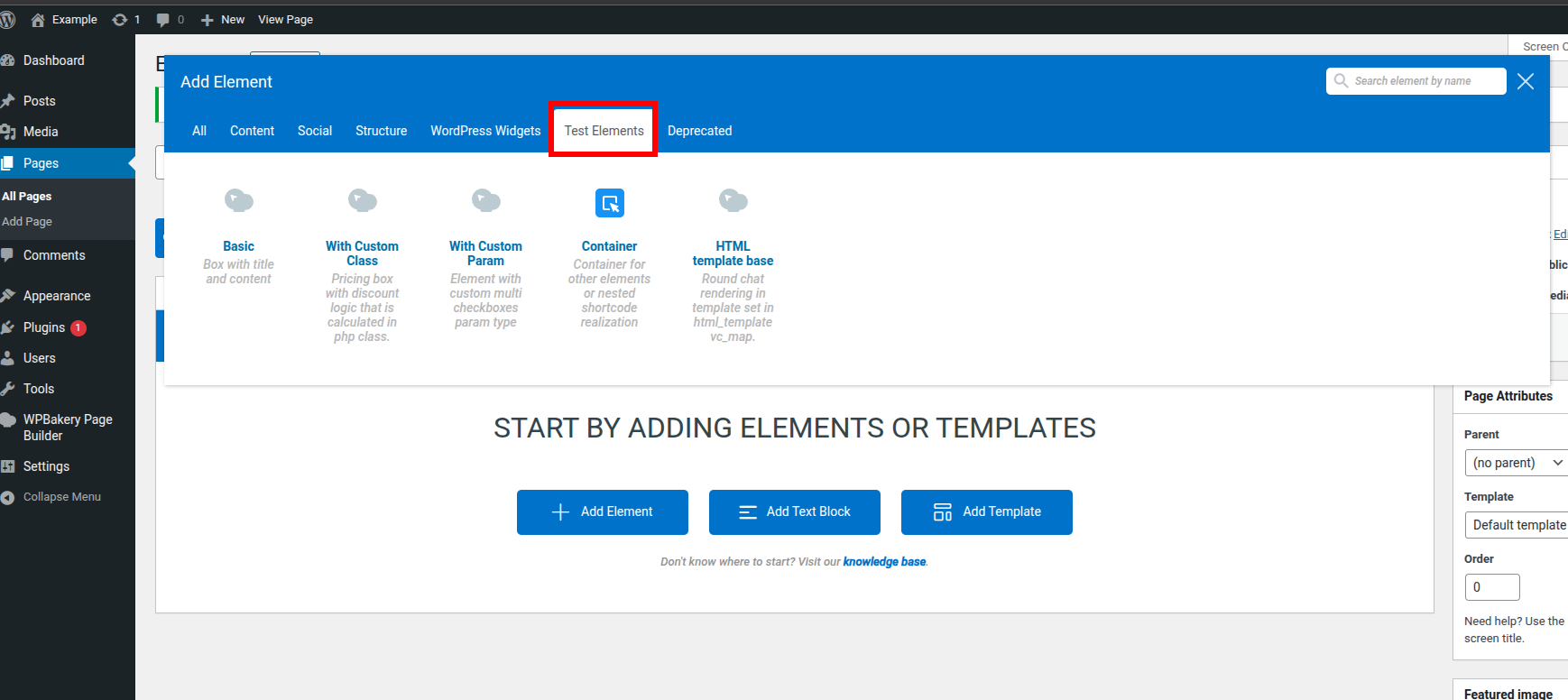
Elements
1. Basic
- Folder:
elements/basic - Description:
- A simple box element with a title and content.
- Customizable background and text color.
- Uses standard WPBakery parameters for easy editing.
- Output is styled with padding, border radius, and box shadow.
2. With Custom Class
- Folder:
elements/with-custom-class - Description:
- Pricing box element with discount logic handled in a custom PHP class.
- Parameters for title, base price, discount, label, background color, and features list.
- Demonstrates how to extend element logic using PHP classes.
3. With Custom Param
- Folder:
elements/with-custom-param - Description:
- Element featuring a custom parameter type (multi-checkboxes).
- Lets users select one or more options via custom radio/checkbox UI in the WPBakery editor.
- Shows how to register and use custom param types in WPBakery.
4. HTML Template Base
- Folder:
elements/html-template-base - Description:
- Show how use html_template vc_map param to render output using a separate HTML template file.
- Show how to use the custom js_view vc_map param.
5. Container
- Folder:
elements/container - Description:
- A container element that allows nesting of other elements.
- Container supports background color customization.
- Demonstrates use of
as_parentandis_containerfor nested/child elements in WPBakery.