Install
This is the repository archive. It installs, but the folder name will carry the branch suffix and updates will not flow.
Install straight from GitHub with WP-CLI:
wp plugin install https://github.com/wpallstars/seoprocookieconsent/archive/refs/heads/main.zip
SEO Pro Cookie Consent
Simple, light cookie consent: blocks scripts until consent, asks only where the law and the page need it, and fits your theme.
SEO Pro Cookie Consent is a free cookie consent plugin for WordPress that you switch on rather than set up. It finds the scripts and embeds on your pages that set cookies (Google Analytics, ad pixels, YouTube, maps and more), holds them back until visitors allow them, and shows a short, theme-matched banner only on pages that have them, only as strictly as each visitor's region needs. There is nothing to scan, no wizard to finish, no account to open and no visitor data sent to outside services.
Compliance notices shouldn't be a tax on your website. So there is no spyware and no phoning home: the plugin never contacts our servers or any tracking service, and nothing about your visitors leaves your site (its only outside requests are video thumbnails, sending just the video ID, and, in the GitHub build, update checks with GitHub). There is no slowdown either: no third-party script for pages to wait on, and page caches keep working. That makes it much better for SEO and conversions than hosted consent platforms: no outside script dragging down Core Web Vitals, no banner at all on pages with nothing to hold back, and a slim bar at the foot of the screen in your theme's style instead of a pop-up wall over your content, so visitors keep reading and buying. And every feature is free, now and always: no paid tier, no locked features, no per-site or per-visit pricing.
Who it is for: site owners, agencies and developers who want consent done properly without a subscription, a cookie-scanning service or a long set-up: business sites, blogs, shops and multisite networks. It moves sites over from Complianz, CookieYes, Cookiebot and nine other consent plugins in a few clicks, with a dry run first and undo after.
Why it differs:
- Light. One script and one stylesheet with no libraries (about 65 KB in all before compression), no banner on pages with nothing to hold back, and page caches keep working: regions are told apart in the browser, never by looking up IP addresses.
- Fair. Accept all and Reject all look the same, and the banner names what the page actually uses.
- Yours. Optional consent records, the cookie policy and terms all stay on your own site; nothing depends on a third-party dashboard.
- Complete. Placeholders with Load buttons for videos, maps, players and posts, Google Consent Mode v2, the WP Consent API, Global Privacy Control, a cookie policy that keeps itself current, and terms and conditions without a paid generator.
It is a tool, not legal advice: check its defaults and your policy text with whoever advises you on privacy law.
Built and maintained with aidevops, made from WP Plugin Starter and at its best alongside SEO Pro Stack: see Built with AI below.
If this saves you time, headaches and costs, feel free to buy me a coffee, or whatever you like, to invest in making more things open-source.
Version: 1.0.2
Screenshots
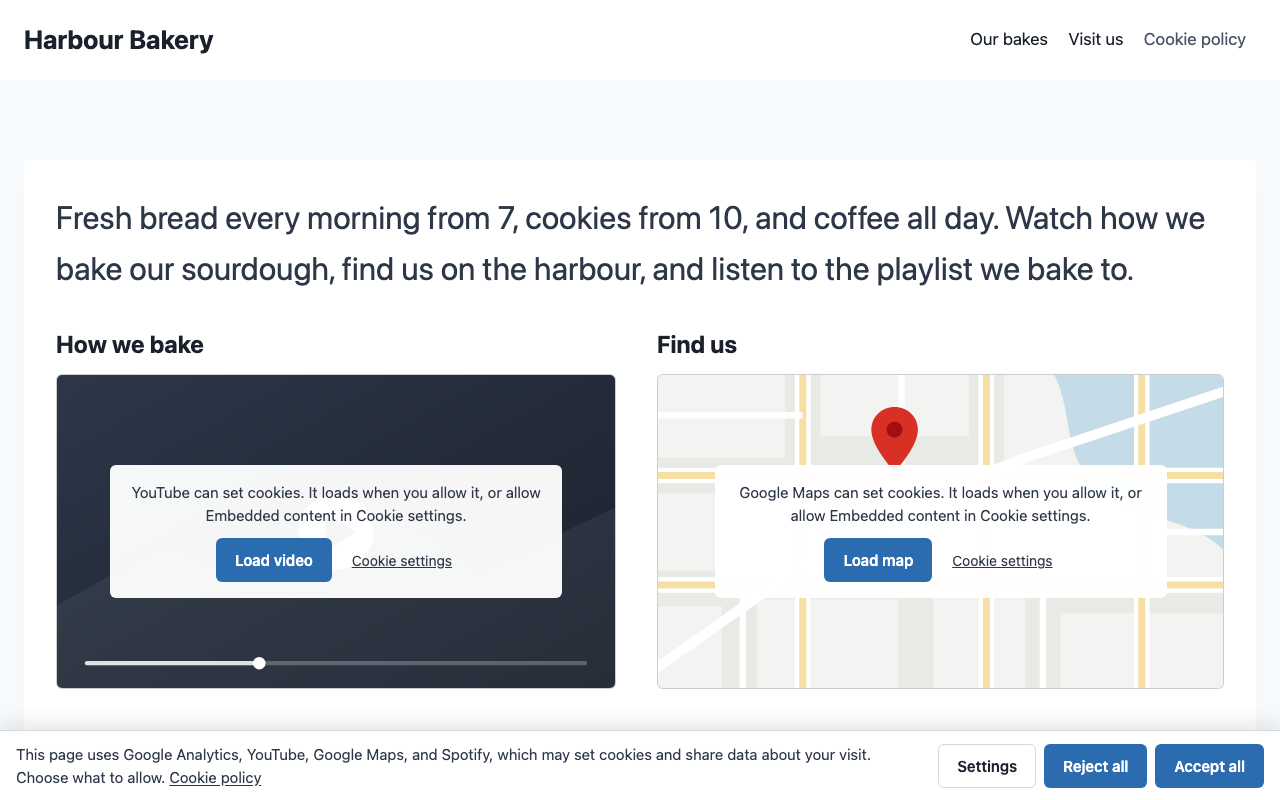
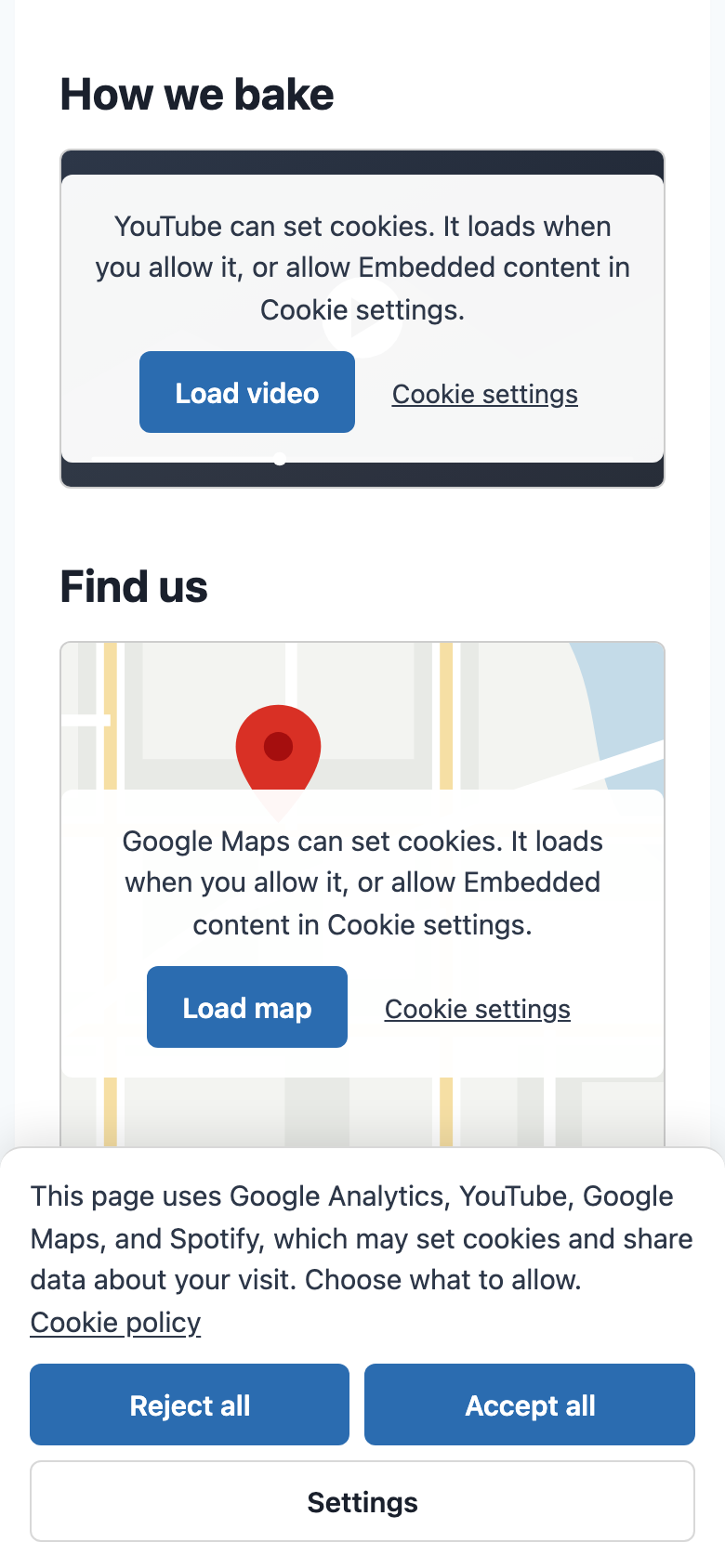
The banner on a visitor's first page, naming what the page uses. The video and map wait behind placeholders with their own Load buttons; nothing reaches YouTube, Google or Spotify yet.
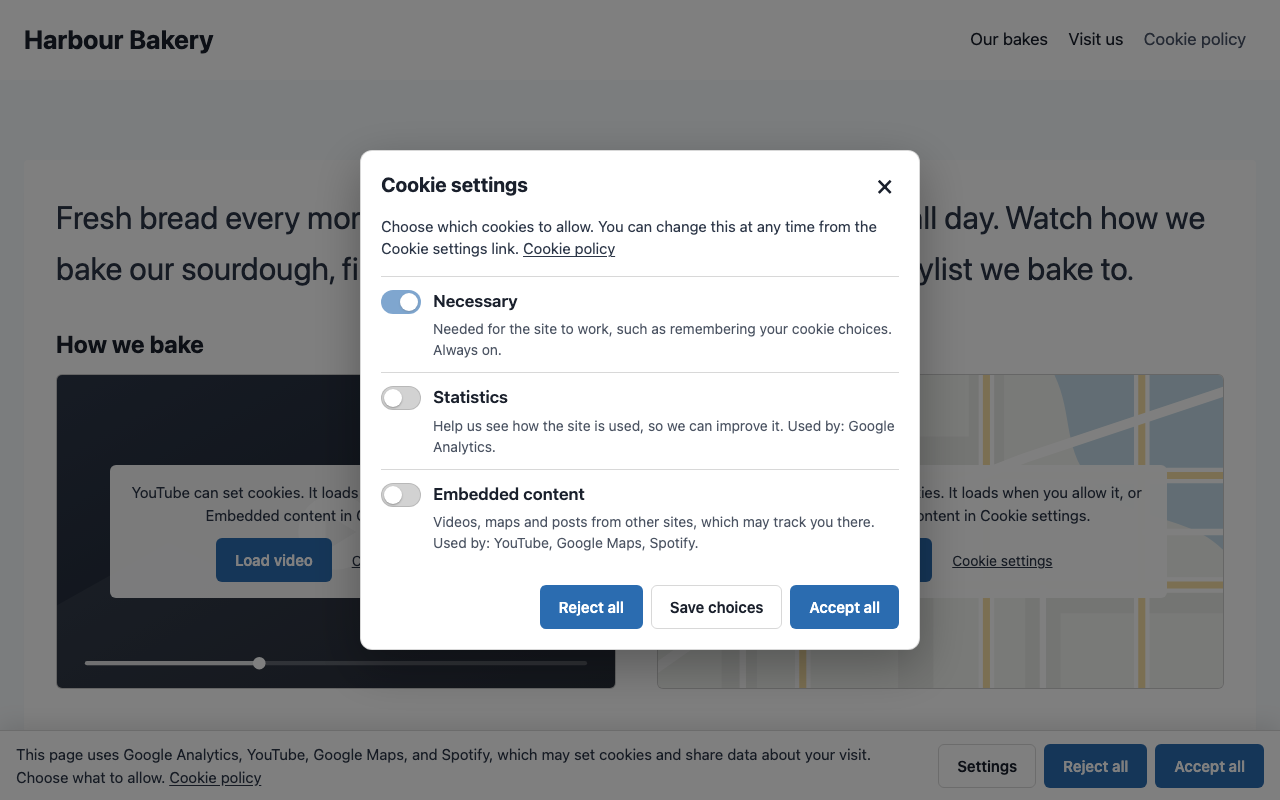
Cookie settings: one switch per kind of cookie, only for kinds the page uses, each naming its services. Reject all and Accept all look the same.
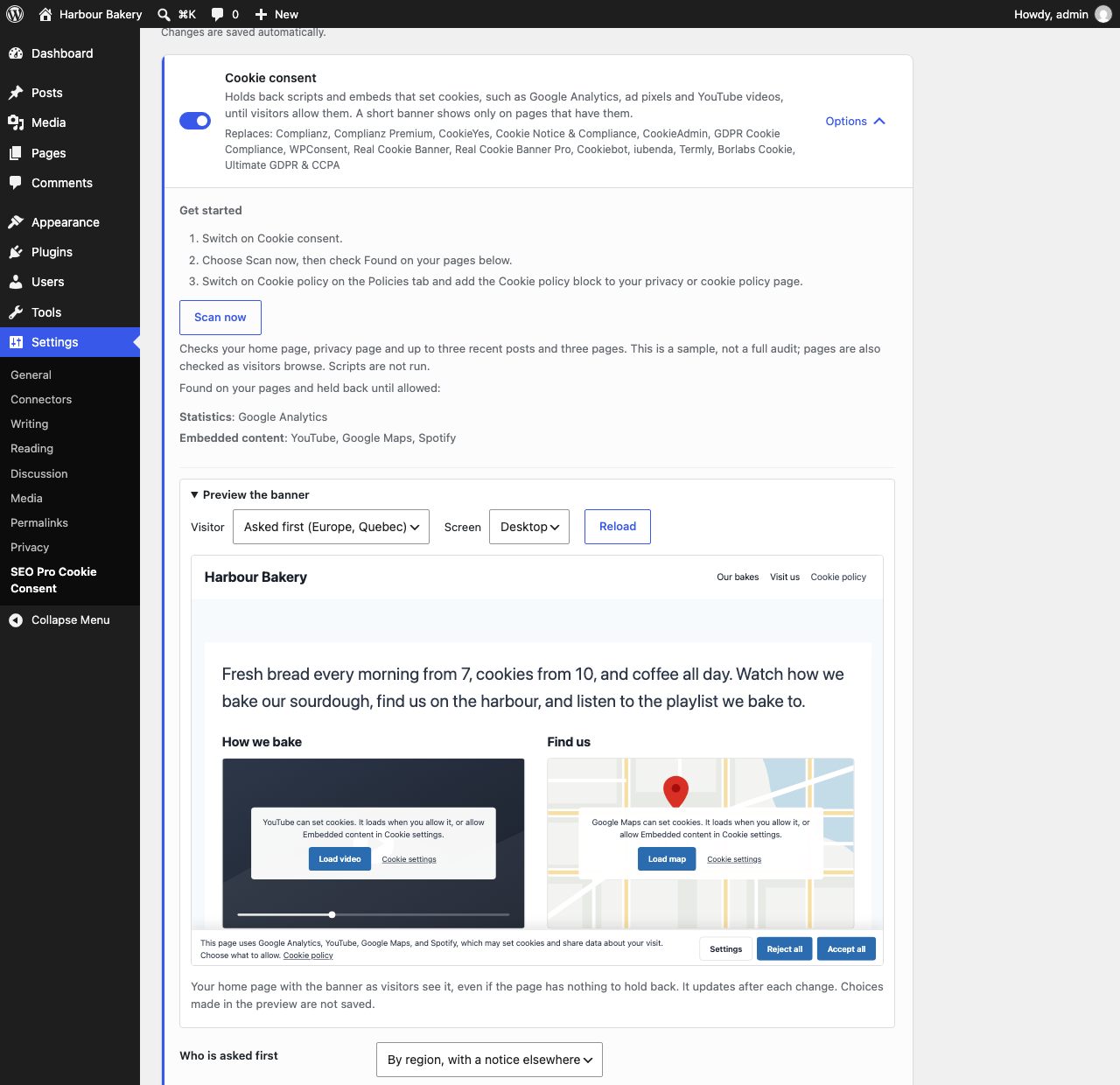
Settings → SEO Pro Cookie Consent → Consent: one switch to turn it on, a live banner preview and the services found on your pages.
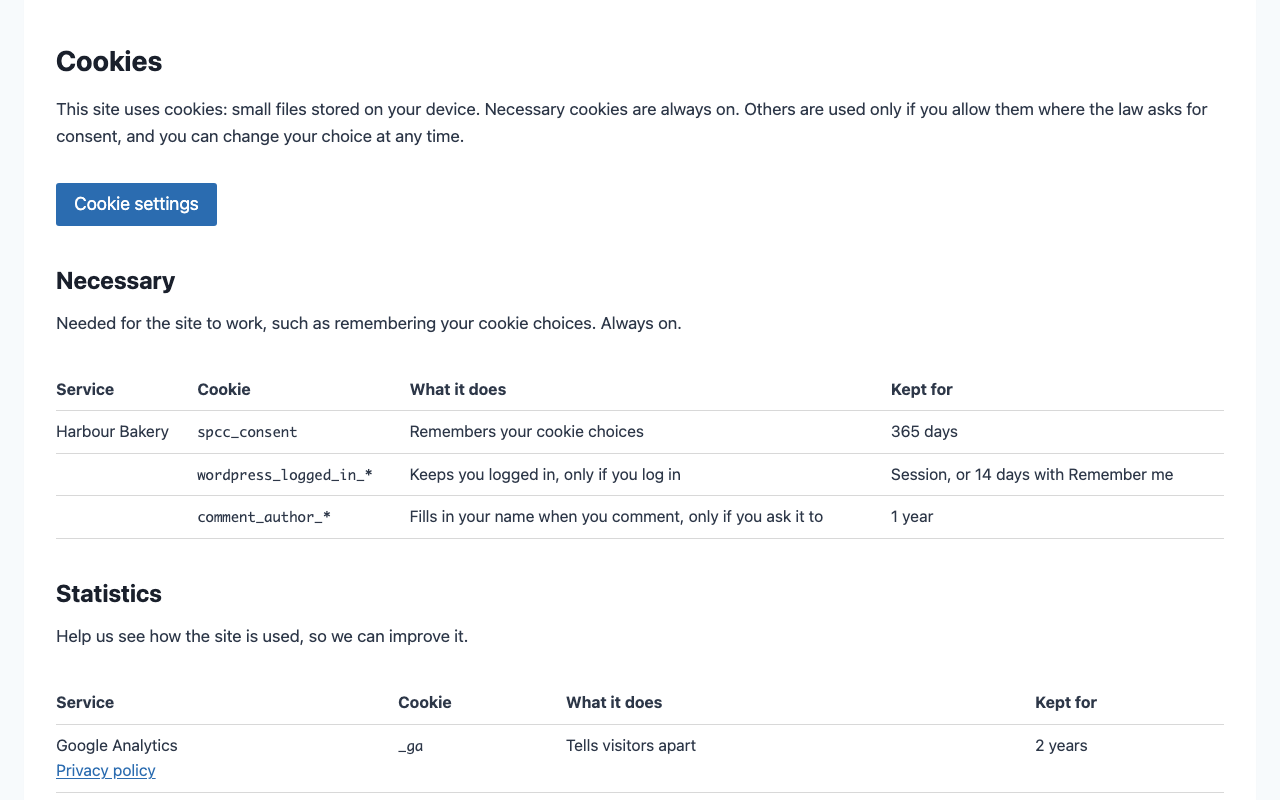
The Cookie policy block lists the cookies the site uses, by kind, with what each does, how long it is kept and a Cookie settings button. It updates itself.
On a phone: the banner's buttons stack and stay full width, and held-back embeds shrink their notice to fit.
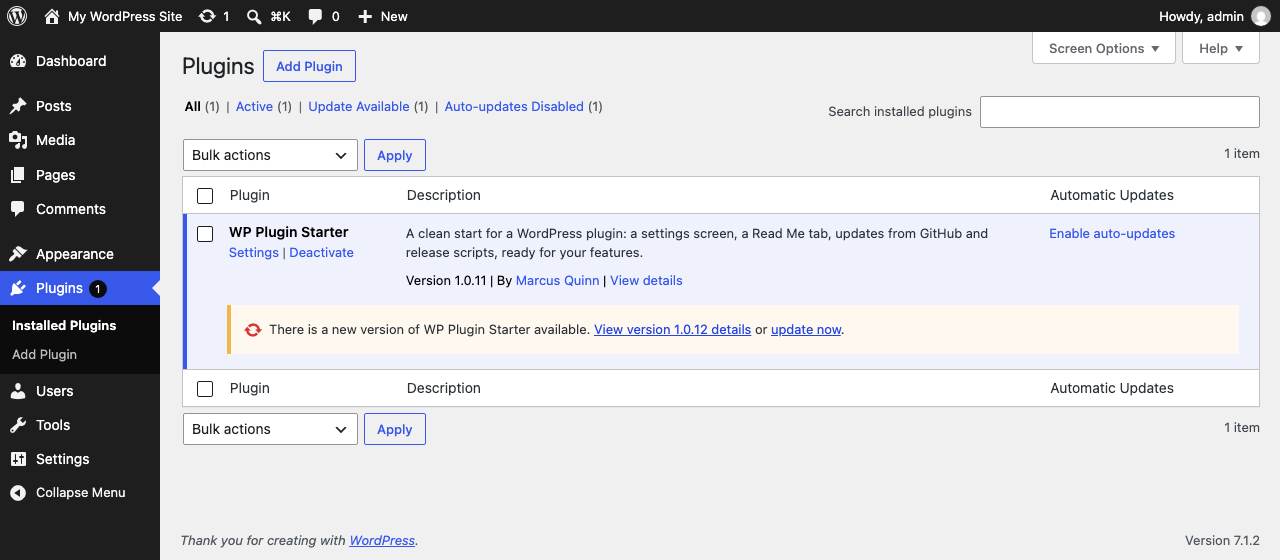
Updates from GitHub (GitHub build): each GitHub release is offered on the Plugins screen as a normal WordPress update. Shown here for WP Plugin Starter, whose updater this plugin shares.
What you get
SEO Pro Cookie Consent replaces 15 plugins, some of them in part, with free and Pro editions counted separately. The 11 that can be downloaded come to 31.6 MB zipped; SEO Pro Cookie Consent is under 300 KB (under 600 KB for the GitHub build, which adds its updater and screenshots).
It replaces the consent features of Complianz, CookieYes, Cookie Notice & Compliance, CookieAdmin, GDPR Cookie Compliance, WPConsent, Real Cookie Banner, Cookiebot, iubenda, Termly, Borlabs Cookie and Ultimate GDPR & CCPA, and provides starting text in place of Complianz Terms & Conditions; review the limits below before switching.
- Holds back what sets cookies. Scripts and embeds from Google Analytics, Google Tag Manager, Google Ads, Meta Pixel, TikTok, LinkedIn, Pinterest, Microsoft Clarity and Advertising, Hotjar, HubSpot, X, YouTube, Vimeo, Google Maps, Spotify, SoundCloud, Instagram, Facebook and live chats (Tawk.to, Crisp, Intercom) wait until visitors allow them. Nothing to scan or list by hand: the plugin recognises them in each page as it is sent.
- Asks only where needed. No banner on pages with nothing held back. Visitors in Europe (EU, EEA, UK, Switzerland), Quebec, or anywhere their browser does not make clear, are asked before anything loads; everyone else gets the site as usual with a short notice, or no notice at all if you prefer. The browser's time zone decides, so nothing is looked up, nothing is sent anywhere and page caches keep working.
- A short, fair banner. Accept all and Reject all look the same, Settings opens a dialog with one switch per kind of cookie, and the message names what is on the page ("This page uses YouTube and Google Analytics…"). A bar along the bottom, or a box at the bottom left or right.
- Videos and maps with a Load button. A held-back YouTube video, map, player or post shows a placeholder the same size, with a generic picture of what it is and a button that loads just that one. On small embeds, such as compact music players or videos on phones, the notice shrinks to fit, down to the Load button alone.
- Catches lightboxes too. Recognised script and iframe addresses added after page load through common DOM APIs wait for the same consent choice. Keep the consent head script excluded from script-delay optimizers. This is not a network firewall: inline-only injected code, shadow roots and unusual parser APIs need integration with the browser consent API.
- Local video thumbnails. YouTube and Vimeo placeholders show a locally stored thumbnail. WP-Cron fetches it once per video, not during a visitor's page request; until it is ready (or if unavailable), a generic video picture shows instead. Cached pages show it after their next refresh. No visitor data is sent to the video service for the thumbnail.
- Fits your theme. Colours, fonts and buttons come from Kadence's palette, light and dark mode included, or your block theme's colours. Comfortable on phones, keyboard friendly, with real switches and a proper dialog for screen readers.
- Easy to change your mind. A Cookie settings link joins your footer menu, just after your cookie policy link or before your privacy policy link, including footer menus shown by widgets. To place it yourself, tick Cookie settings in Appearance → Menus; the automatic link then steps aside. The Cookie settings button block or any link to
#cookie-settingsopens it too, and an optional floating button can show after visitors choose. Taking consent back removes those services' cookies and reloads the page so they stop. - Global Privacy Control turns marketing off where visitors are not asked first.
- Works with Google and WordPress. Google Consent Mode v2 signals (denied by default where visitors are asked first) and the WP Consent API, so plugins that read it follow the visitor's choice.
- Optional consent records. Keep anonymous choice snapshots on your own site, export them as CSV and delete them automatically after your chosen period, never shorter than the consent lifetime. Off by default; no requests on ordinary page views.
- A cookie policy that keeps itself current. The Cookie policy block (or
[spcc_cookie_policy]) lists the cookies your site uses, by kind, with what each does, how long it is kept and the service's privacy policy, plus the Cookie settings button. The block's settings turn the introduction, the button and the last-updated date on or off and choose the heading level. Write the rest of the page as you like; the list updates itself. Suggested text is added to Settings → Privacy → Policy guide. - Shows what it found. The settings card lists the services found on your pages, and any other third-party scripts that load as usual, so you can hold back one it does not know.
- Replaces Complianz, CookieYes, Cookie Notice, CookieAdmin, GDPR Cookie Compliance, WPConsent, Real Cookie Banner, Cookiebot, iubenda, Termly, Borlabs Cookie and Ultimate GDPR & CCPA. The Import tab previews, then imports their settings, script rules, policy pages and, where their format is verified, visitors' explicit choices, with undo and leftover cleanup. While one of them is active this waits, so two banners never show.
- Terms and conditions without a paid generator. An optional block or
[spcc_terms]shortcode turns your business name, country, offering, returns policy and contact details into plain-English starting text. Use your own wording instead if needed. Imports matching identity/contact answers from Complianz Terms & Conditions once, without changing its options or your pages.
For statistics with no cookies and no banner at all, use SEO Pro Stats: it needs no consent, so pages that only use it show no banner.
Set it up
- Go to Settings → SEO Pro Cookie Consent → Consent and switch on Cookie consent.
- Choose Scan now and check Found on your pages on the card. It checks the home page, privacy page and up to three recent posts and three pages, without running scripts or contacting the embedded services. This is a sample, not a full audit or a browser scan: services inserted only by JavaScript are not discovered. Pages are also checked as visitors browse. If loopback requests are blocked, open a few pages yourself instead.
- Optional: switch on Cookie policy (Policies tab) and add the Cookie policy block to your privacy policy page, under a "Cookies" heading.
- Optional: under Policies → Terms and conditions, enter your answers, switch the feature on and add the Terms and conditions block (or
[spcc_terms]) to a page. Review the whole page before publishing.
That is all. Preview the banner, at the top of the card's options, shows your home page with the banner as a visitor who is asked first, or one shown a notice, sees it, on a desktop or phone screen; it updates after each change, and choices made in it are not saved. Under Options you can choose who is asked first, where the banner sits, its message, the policy page it links to (start typing a page title to pick one), and whether a floating Cookie settings button shows (off by default; the footer menu link is usually enough). The banner sits above other floating bars; to change its layer, set --spcc-z on :root in your theme's CSS. Troubleshooting has Also hold back (for a script the plugin does not know: part of its address, with statistics:, preferences: or embeds: in front for another kind), Never hold back, Google Consent Mode advanced, and how long choices are remembered.
Multilingual sites
The banner, dialog and placeholders use the page's WordPress translations. With WPML String Translation or Polylang, open the site's admin after enabling consent, then translate consent_message and, if needed, consent_policy_url in the SEO Pro Cookie Consent string group. Saving settings refreshes the registered source strings. An empty message keeps the automatic translated message.
Policy links use the current language's published policy-page translation when available, including the default privacy policy page; otherwise they keep the original link. TranslatePress translates ordinary page output and uses its string translation API for a custom banner message. Supply translations in your multilingual plugin; this plugin does not translate text automatically or bundle language packs. Clear each language's page cache after changing text or translations. Language follows the page, not browser preferences, cookies or IP. Without a multilingual plugin, the saved message and policy link work as before.
Consent records
Under Consent → Options, turn on Keep consent records only if you need a history. Each explicit choice (including Reject, a later withdrawal, a dismissed opt-out notice and a single-service Load) sends one small, best-effort request to your own site. Ordinary page views, automatic regional defaults and banner previews send none. A random anonymous ID in the consent cookie joins a visitor's choices until the cookie expires or is removed. No IP address, user agent, page URL or WordPress user ID is stored.
Records contain categories, individually allowed services, the choice model, whether the banner still needs an answer, browser choice time, server receipt time, Policy version (up to 100 characters), and a Snapshot hash. The matching private snapshot archives the banner message templates, button labels, category descriptions and service catalogue, policy URL, local policy page source and modification/revision details, and plugin version: evidence of what was shown. Identical content shares one SHA-256 hash; changing the banner message or saving the policy creates a new snapshot only when its content changes. Settings/admin work creates snapshots, never visitor requests. This does not ask visitors again on a version change. Clear page caches after changing settings, policy text or translations.
Snapshots describe the available wording and services, not the exact page-specific list or final regional message a browser rendered. An old cached page can still submit its known older hash. Missing, malformed or unknown hashes are stored as empty without losing the choice. A translated or filtered presentation not yet archived by admin work also sends an empty hash, never a hash for different wording. External policy URLs have no local page source or revision; keep those documents separately. Local page source does not freeze external embeds or dynamically rendered blocks.
Keep records for (days) sets how long you need evidence of consent, up to 3,650 days. The default 0 follows Remember choices for (days), as before. A positive value keeps records for the longer of the two periods, never less than the choice lifetime; for example, 1,095 keeps evidence for three years without remembering visitors' choices for longer. Choose the period appropriate for your site and explain it in your privacy policy.
Reload the settings screen after enabling to see Export consent records (CSV) and Export consent snapshots (CSV). Join the exports by their Snapshot column; snapshot content is JSON in one spreadsheet cell. Only site administrators can export. Record exports omit expired records and protect spreadsheet formula prefixes; snapshot text stays inside a JSON object, not an executable cell. Treat the ID and exports as potentially personal data and include this processing in your privacy policy. WordPress's hourly cron deletes expired records in batches of 1,000, even after recording is switched off; deletion depends on WP-Cron running and busy sites may take several batches. Archived snapshots are retained until uninstall, so cleanup can never remove content a kept record points to. Uninstall removes both tables and the cleanup event on every site in a network.
With recording on, visitors who have made a choice can open Cookie settings to see Your consent ID and copy it with the keyboard-accessible Copy button. Copy success or failure is announced to screen readers; if the clipboard is unavailable, the ID can be selected and copied manually. The browser fills the ID from its consent cookie, never from server-rendered HTML. No ID appears before a recorded choice, with recording off or in the banner preview. Losing or expiring the cookie loses the link to that browser's ID; showing an ID does not prove a record reached the server.
Use Look up a consent ID beside the exports to find one visitor's unexpired rows, newest first, in pages of 100. Enter the exact 32-character lowercase hexadecimal ID. The private administrator-only lookup shows receipt time, choice time (both UTC), choice JSON, policy version and snapshot hash. Older records continues the same lookup; the ID is posted, not put in the URL. There is no public read endpoint. These records are pseudonymous, not linked to a WordPress user or email address: WordPress's email-based personal data export and erase tools do not cover these IDs. Handle requests using the supplied consent ID and your site's privacy procedures.
These are self-reported snapshots, not authenticated identity evidence or a guarantee of legal compliance. Delivery can fail (offline, blocked REST, unavailable storage or browser support); no retry or recording-success claim is made. Browsers without secure random generation or sendBeacon still save consent locally, but send no record. The write-only public route accepts bounded JSON from the site's origin; it is not protection against bots forging requests. Use your host's request limits for abuse protection. Each multisite site has separate storage and exports.
Terms and conditions
This feature is off by default and independent of Cookie consent. Fill in your legal business or owner name and public contact details before using the suggested wording; it stays empty for visitors until both are present. Country identifies where you are based, not a choice of governing law. Describe what you offer, payment and delivery terms where relevant, and your returns, refunds and cancellation process. No return period or country-specific legal clause is assumed. Empty optional answers omit their sections.
The block and shortcode read current settings on every render. After changing answers, clear any full-page cache to update cached copies. Your own wording replaces all suggested text with plain text, one paragraph per line; HTML and shortcodes are not executed. Normal blocks around it remain yours to edit.
On upgrade, the plugin imports only unset business name, country and the selected email/contact-page answer from Complianz Terms & Conditions. Review imported country codes and complete the other answers yourself. It never enables Terms for you, changes the old plugin's options, or converts its blocks, shortcodes, documents or withdrawal forms on its own. While that plugin is active, Terms waits. Review your replacement page and any required withdrawal process before deactivating it, then replace its block or shortcode with this one, or keep the old document as editable HTML from the Import tab.
The wording is a starting point, not legal advice or a guarantee of compliance. Have someone qualified for your business and jurisdictions review it, including consumer rights, sales disclosures and any required online withdrawal process. This feature does not provide checkout acceptance or a withdrawal form.
Move from Complianz
Open Settings → SEO Pro Cookie Consent → Import. It finds Complianz data even when the plugin is inactive or deleted, and shows a dry run before anything changes.
- Settings: region handling, consent lifetime, Google Consent Mode, the default banner's position and message, and the cookie policy link. Only settings still at their defaults are filled in. When Complianz asked visitors elsewhere with an opt-in banner (EU, UK, South Africa or Brazil), everyone is asked first here too.
- Script rules: enabled custom blocked and allowed URLs are added to Also hold back and Never hold back. Inline "add script" entries are not imported.
- Pages, each only when you select it, with a saved revision: cookie policies become the Cookie policy block (and Cookie policy is turned on, so it shows), Manage consent and revoke links become the Cookie settings button, a document you unlinked and edited keeps your text as editable HTML, and generated documents are kept as rendered HTML. Generated documents need Complianz active to render; a blank document is never saved. Forms (data requests, Do Not Sell) and live lists are listed for you to replace.
- Visitors' choices: a visitor who chose categories in Complianz keeps them; only dismissing the banner is not consent. Carry-over starts once Complianz is inactive.
Continue consent records: when Complianz Premium's local records table has rows, the dry run includes Keep consent records: on, and importing turns it on. The same applies to local consent tables left by Borlabs Cookie, Ultimate GDPR & CCPA, Real Cookie Banner, CookieAdmin and WPConsent, even if their settings are gone. Only the existence of a row is checked; old records are never read or copied. Empty or missing tables, data requests and Real Cookie Banner's revisions alone do not enable recording. Hosted providers leave the setting unchanged. Undo restores the previous setting through the normal changed-since-import checks; importing again without changes does nothing. Review your privacy policy and purge page caches when switching.
Each import can be undone while its values and pages are unchanged. After checking the banner and pages, deactivate and delete Complianz, then use Remove leftover data to delete exactly the listed options, tables, scheduled events, post meta (scan markers and the per-page hide-banner setting) and the folders it generates in uploads/complianz (vendor lists, banner CSS, placeholders, GeoLite database, PDF font cache), never while Complianz is active. Its records of consent and data requests, and any other uploads/complianz folder such as proof-of-consent snapshots, are listed but kept; export them first if you must keep them. Check Complianz's own delete-data-on-uninstall setting first, and purge page caches after switching. The same steps run with WP-CLI: wp seoprocookieconsent migrate plan|import|undo|cleanup complianz (--pages=ID,ID, --dry-run).
Until Complianz and its data are gone, the Plugins screen (a notice at the top and a note under each Complianz row) and this plugin's settings screen show the next step, with a link:
| Step | When | Links |
|---|---|---|
| Import | Complianz is active and nothing is imported, or it is inactive or deleted with its settings still here (pages that show its documents may already be blank) | Import from Complianz |
| Switch | Imported, Complianz still active | Check the import, Turn on Cookie consent when it is off, then Deactivate |
| Remove | Complianz is inactive or deleted and left data | Delete Complianz (single sites), Remove leftover data |
Only people who can activate plugins see these. Hide hides the current step for you; it shows again at the next step. The Plugins screen then leaves out its usual "can do the job of these plugins" line for Complianz, so it never says to deactivate before importing.
Move from CookieYes or Cookie Notice
The same Import tab, WP-CLI command (cookieyes, cookie-notice), undo, Move here steps and leftover cleanup work for CookieYes (cookie-law-info, checked against 3.5.7) and Cookie Notice & Compliance (cookie-notice, checked against 3.1.17). Only data stored on your site is read. Neither plugin keeps records of consent on the site, so cleanup has none to keep.
A shortcode of either plugin that sat inside a paragraph becomes [spcc_cookie_settings] or [spcc_cookie_policy], so the paragraph stays valid; on its own it becomes the block.
CookieYes
- Settings from its default banner: a GDPR banner asks everyone first; consent lifetime, position (box bottom left/right, or bar), a changed message and the Read more link. A CCPA banner is imported without carrying choices over.
- Script rules: each cookie with a script URL pattern becomes an Also hold back line in its category (Functional → preferences, Analytics and Performance → statistics, Advertisement and custom categories → marketing).
- Pages:
[cookie_audit]becomes the Cookie policy block,[cookie_settings]and[wt_cli_manage_consent]the Cookie settings button.[cookie_after_accept]blocks, the CCPA opt-out link and other legacy shortcodes are listed for you to replace. - Visitors' choices: Accept all, Reject all and a saved selection carry over, by category. Its dialog has switches only for categories with listed cookies, so those decide; the others follow Accept all or Reject all. Closing the banner counts as Reject all, and a cookie that is neither a clear consent nor a full rejection is ignored, so that visitor is asked again.
- Not imported: sites connected to the CookieYes web app (banner, categories and scripts live there) and its legacy version 2 mode. The Import tab says so; visitors are asked again. Scripts you marked for CookieYes in your theme (
data-cookieyeswithtype="text/plain") stay off once it is gone: remove those two attributes so this plugin holds them back instead.
Cookie Notice & Compliance
- Settings: consent lifetime (1, 3 or 6 months, or a year), a bottom bar, a changed message and the privacy policy link. Sites with "after acceptance" scripts ask everyone first.
- Script rules: addresses in its after-acceptance scripts (head and body) become Also hold back lines. Inline scripts with no address are listed for you to add by hand. Cookie Notice ran those scripts itself, so they stop when it is gone: add them to your theme or a header-code plugin, and this plugin holds them back. Copy them before removing leftover data; if Cookie Notice's Deactivation option is on, it deletes them when deactivated.
- Pages:
[cookies_revoke]becomes the Cookie settings button.[cookies_accepted]blocks and[cookies_policy_link]are listed for you to replace. - Visitors' choices: Accept allows every category; Reject and its close button allow none. When it accepted on scroll or click, only rejections carry over.
- Not imported: Cookie Compliance (hosted) mode, where the banner and choices live in its web app. The Import tab says so; visitors are asked again.
Move from CookieAdmin, GDPR Cookie Compliance or WPConsent
The same Import tab, WP-CLI command (cookieadmin, gdpr-cookie-compliance, wpconsent), undo, Move here steps and leftover cleanup work for CookieAdmin (cookieadmin, checked against 1.2.6), GDPR Cookie Compliance by Moove (gdpr-cookie-compliance, checked against 5.2.2) and WPConsent (wpconsent-cookies-banner-privacy-suite, checked against 1.2.0). Only data stored on your site is read. Their Pro add-ons were not checked: geolocation, custom scripts and consent logs from them are not imported.
CookieAdmin
- Settings: its GDPR law asks everyone first (unless Pro showed the banner only in some regions); consent lifetime, position (box bottom left/right, or footer bar), a changed message and the cookie policy link.
- Script rules: each cookie in its list with a script pattern becomes an Also hold back line in its category (Functional → preferences, Analytics → statistics, Marketing and unclassified → marketing).
- Visitors' choices: Accept all, Reject all and saved preferences carry over; embeds follow Marketing. Only its GDPR law carries choices over: with US state laws (opt-out) or a Pro law, visitors are asked again.
- Scripts you marked for CookieAdmin in your theme (
type="text/plain"withdata-cookieadmin-category) stay off once it is gone: remove those two attributes so this plugin holds them back instead.
GDPR Cookie Compliance (Moove)
- Settings are read from its own settings table, even while it is inactive: everyone is asked first unless categories were on before visitors chose; consent lifetime, position (bottom bar, or bottom left/right box) and a changed message in the site's main language.
- Script rules: addresses in the scripts of its enabled categories become Also hold back lines; inline scripts with no address are listed for you to add by hand. It added those scripts itself, so they stop when it is gone: add them to your theme or a header-code plugin, and this plugin holds them back. Its built-in integrations (Google Analytics 4, Tag Manager, Ads, Meta Pixel, Microsoft) are listed with their IDs to add back the same way.
- Visitors' choices: its categories hold whatever you put in them, so a choice carries over only when every switchable category agrees; a mixed choice carries over as Reject all. When its close button accepted all cookies, or categories were on before visitors chose, only rejections carry over. If its add-on accepted on scroll or after a timer, choose Stop carrying over old consent: those look the same as Accept.
- Pages: it has no page shortcodes to convert.
WPConsent
- Settings: its default opt-in banner asks everyone first; consent lifetime, bottom bar or bottom left/right box, a changed message and its cookie policy page.
- Script rules: none to import; it blocked its own list of known services, which this plugin recognises too.
- Pages:
[wpconsent_cookie_policy]becomes the Cookie policy block and[wpconsent_preferences_button]the Cookie settings button. Links with itswpconsent-open-preferencesclass are listed: point them at#cookie-settingsinstead. - Visitors' choices: its Statistics and Marketing choices carry over; embeds follow Marketing, and preferences need both. A visitor who only pressed Load on one embed, or chose only some services, is asked again. Closing its banner saves nothing.
- Cleanup keeps its consent logs and Do Not Track requests. Its cookie list (posts and categories) is not removed: WPConsent deletes it on uninstall when its own delete-data option is on.
Move from Real Cookie Banner
The same Import tab, WP-CLI command (real-cookie-banner), undo, Move here steps and leftover cleanup work for Real Cookie Banner and Real Cookie Banner Pro (real-cookie-banner, real-cookie-banner-pro, both checked against 5.4.0). Only data stored on your site is read.
- Settings: an active banner asks everyone first; consent lifetime, a bottom bar or bottom left/right dialog, and its cookie policy page. Its banner texts are not imported: they describe its own dialog, and the message here names what each page uses.
- Script rules: addresses that its services' opt-in code loads, and plain address rules of its content blockers, become Also hold back lines in the service's category (recognised services by template; otherwise Statistics, Marketing, or functional groups as preferences). Rules with inner wildcards and element selectors are left for you. It ran its services' code itself, so that code stops when it is gone: the Import tab lists those services; add any code you still need to your theme or a header-code plugin, and this plugin holds it back.
- Pages:
[rcb-cookie-policy]becomes the Cookie policy block, and[rcb-consent]change and revoke links the Cookie settings button. History links,[rcb-consent-history-uuids]and#consent-…links are listed for you to replace. Menu links to#consent-change,#consent-historyor#consent-revokeare reported: point them at#cookie-settings. - Visitors' choices: Accept all, Continue without consent, saved individual choices, a content blocker's Load and a revoke carry over. Visitors could accept single services, so a category is allowed only when every Real Cookie Banner service in it was accepted; one with none of its own follows them all. Closing its banner with the close icon, country bypass and bot or Do Not Track choices are not carried over, so those visitors are asked again.
- Not imported: Pro's TCF, Google Consent Mode, country bypass, consent forwarding and banner-less consent. The Import tab names any that were on; while country bypass or banner-less consent is on, visitors are asked again.
- Cleanup removes its settings, services, content blockers, banner links, groups and its scan, template and statistics tables. Its consent records and the revisions they refer to are listed but kept. Deleting the plugin removes only its copied script files. When local consent rows exist, the import turns on Keep consent records to continue documenting choices.
Move from Cookiebot, iubenda or Termly
The same Import tab, WP-CLI command (cookiebot, iubenda, termly), undo, Move here steps and leftover cleanup work for Cookiebot by Usercentrics (cookiebot, checked against 4.7.5), iubenda (iubenda-cookie-law-solution, 3.13.5) and Termly (uk-cookie-consent, 3.3.1). Their banners, categories, texts, cookie scans and consent records live in their web apps. The import never contacts them or asks for an account: it reads only what their plugins saved on your site.
- What stays behind: the Import tab says which dashboard settings were not imported, and lists the services this plugin found on your pages to compare with their cookie scan. Add anything missing under Also hold back. Export any consent records you must keep from their dashboard before closing the account, and turn on Keep consent records to go on documenting choices.
- Visitors' choices are not carried over: their hosted scripts write the consent cookies, and those formats were not checked against a live account, so visitors are asked again once.
- Cookiebot: its "ignore scripts" list becomes Never hold back lines, except for services this plugin recognises. Google Tag Manager that Cookiebot loaded, Google Consent Mode, TCF, CCPA, region banners, add-ons and its WPForms add-on (which turned off WPForms' GDPR settings) are reported.
[cookie_declaration],[uc_embedding], its Cookie declaration block andcd.jsscript become the Cookie policy block; links and buttons callingCookiebot.renew()orCookiebot.show()open Cookie settings. Scripts markeddata-cookieconsentand the declaration widget are listed for you to change. - iubenda: its simplified set-up (not pasted code) asks everyone first when it did, and sets a bottom left/right box position. Custom script and iframe patterns become Also hold back lines by purpose (strictly necessary ones Never hold back).
[iub-cookie-block]content stays with its tags removed and its addresses held back here;[iub-cookie-skip]content stays as is. Its hosted cookie policy embed becomes the Cookie policy block andiubenda-cs-preferences-linklinks open Cookie settings. Other hosted embeds, privacy and terms buttons, the legal block and widget, US/Brazil laws, TCF and its form mapping to its consent database are reported. - Termly: its custom blocking map becomes Also hold back lines (advertising → marketing, analytics → statistics, performance → preferences, social → embeds) and Never hold back lines for essential addresses. Links calling
displayPreferenceModal()open Cookie settings. Its policy embeds name a document only by ID, so they are listed for you to replace. A TermlyBot section it may have added torobots.txtis reported. - Cleanup removes their options, Cookiebot's widget and add-on settings, iubenda's form mappings and scheduled checks, and Termly's daily account check and its saved API key (by name; the value is never shown).
Move from Borlabs Cookie or Ultimate GDPR & CCPA
The same Import tab, WP-CLI command (borlabs-cookie, ct-ultimate-gdpr), undo, Move here steps and leftover cleanup work for Borlabs Cookie (borlabs-cookie, checked against 3.4.6 and a running 3.4.6 site) and Ultimate GDPR & CCPA by createIT (ct-ultimate-gdpr, checked against 5.4.0). Both are sold outside WordPress.org. Only data stored on your site is read, also while they are inactive or deleted, and no code of theirs is used.
- Visitors' choices are not carried over: neither cookie format could be fully checked (Borlabs Cookie's validity depends on a cookie version), so visitors are asked again once.
- Borlabs Cookie settings: its dialog asks everyone first when it was on, out of setup mode and shown to everyone (not with geo-IP or hidden pages); cookie lifetime, a bottom bar or bottom left/right box, and its privacy page or link. Its settings are read as plain data, never as its classes. Dialog texts are not imported.
- Borlabs Cookie script rules: addresses its optional services' opt-in code loads, its service locations and its content blocker locations become Also hold back lines in the service's category (recognised services by key or code; other
This README is longer than the copy stored here. Read the rest on GitHub →