WP Banana WP Registry grade A. No security issues foundWP RegistryNo security issues foundOpen the reportA
AI image generation and editing via Gemini, OpenAI, Fal and Replicate, right in your WordPress media library. Native-like integration in Elementor, WooCommerce, and other plugins.
Install
This is the repository archive. It installs, but the folder name will carry the branch suffix and updates will not flow.
Install straight from GitHub with WP-CLI:
wp plugin install https://github.com/wp-autoplugin/wp-banana/archive/refs/heads/main.zip
WP Banana
WP Banana is a free WordPress plugin that lets you generate and edit images with AI, right inside your WordPress admin. Connects directly to your AI image generation API of choice. No ads, no locked features, no upsells, no flashy UI — just clean, native-like integration that feels like part of WordPress core.
- Combine existing images from your Media Library with new uploads
- Generate completely new images from text prompts
- Edit, enhance, and transform images using state-of-the-art models like Google Nano Banana 2 (with 4K resolution support)
- Native-like integration in Gutenberg, Classic Editor, and most page builders
Plugin Highlights
- Native Integration: Looks and feels like WordPress core — no flashy UI, no distractions
- Free & Open Source: 100% free, GPL-licensed, no upsells
- Bring Your Own Key: Connect your own Google, OpenAI, Fal or Replicate API key (no middleman fees)
- Multiple AI Models: Supports OpenAI’s
gpt-image-2, Google's Nano Banana 2 (gemini-3.1-flash-image), and more - Secure & Performant: Clean codebase, minimal overhead, optimized for WordPress best practices
- Universal Compatibility: Works with Gutenberg, Classic Editor, Elementor, WooCommerce, ACF, and more
Features
AI Image Generation
- Create new images from simple text prompts
- Attach optional reference images from your computer or the Media Library to guide generation
- Use AI to generate featured images, blog graphics, product photos, and more
- Multiple model support: ChatGPT Image model, Seedream 5, Gemini 3 Pro Image, FLUX.2 models
AI Image Editing
- Select images from your Media Library or upload new ones
- Combine images to generate unique composites (e.g. product in different settings)
- Apply targeted edits (replace background, adjust style, regenerate parts)
Media Library Integration
- Access AI generation and editing directly inside the Media Library and Media pop-up
- Edit images directly from the attachment details view
- Generate images while creating or editing posts and pages
- Compatible with image fields across WordPress, themes, and plugins
- Generated images are automatically saved to your WordPress Media Library
Edit History & Undo
- Non-destructive editing with a full history of changes
- Preview edits before saving
- Undo/redo individual changes or revert to the original image
- Save edits as a new image or overwrite the original
- Detailed API usage logs with a review table
WP Command Palette Integration
- Quick access to WP Banana features via the WordPress Command Palette (Cmd+K / Ctrl+K)
- Navigate to settings, generate images, and access API logs without menu hunting
- Requires WordPress 6.9+ for full Command Palette support
Developer-Friendly
- Built with hooks and filters for extensibility
- BYOK (Bring Your Own Key) approach — use your own API credentials
- Store keys in the database or define them in
wp-config.php - Transparent, polished codebase — easy to audit and extend
Installation
-
Download or clone this repository into your
/wp-content/plugins/directory.git clone https://github.com/WP-Autoplugin/wp-banana.git -
Activate WP Banana from the Plugins menu in WordPress.
-
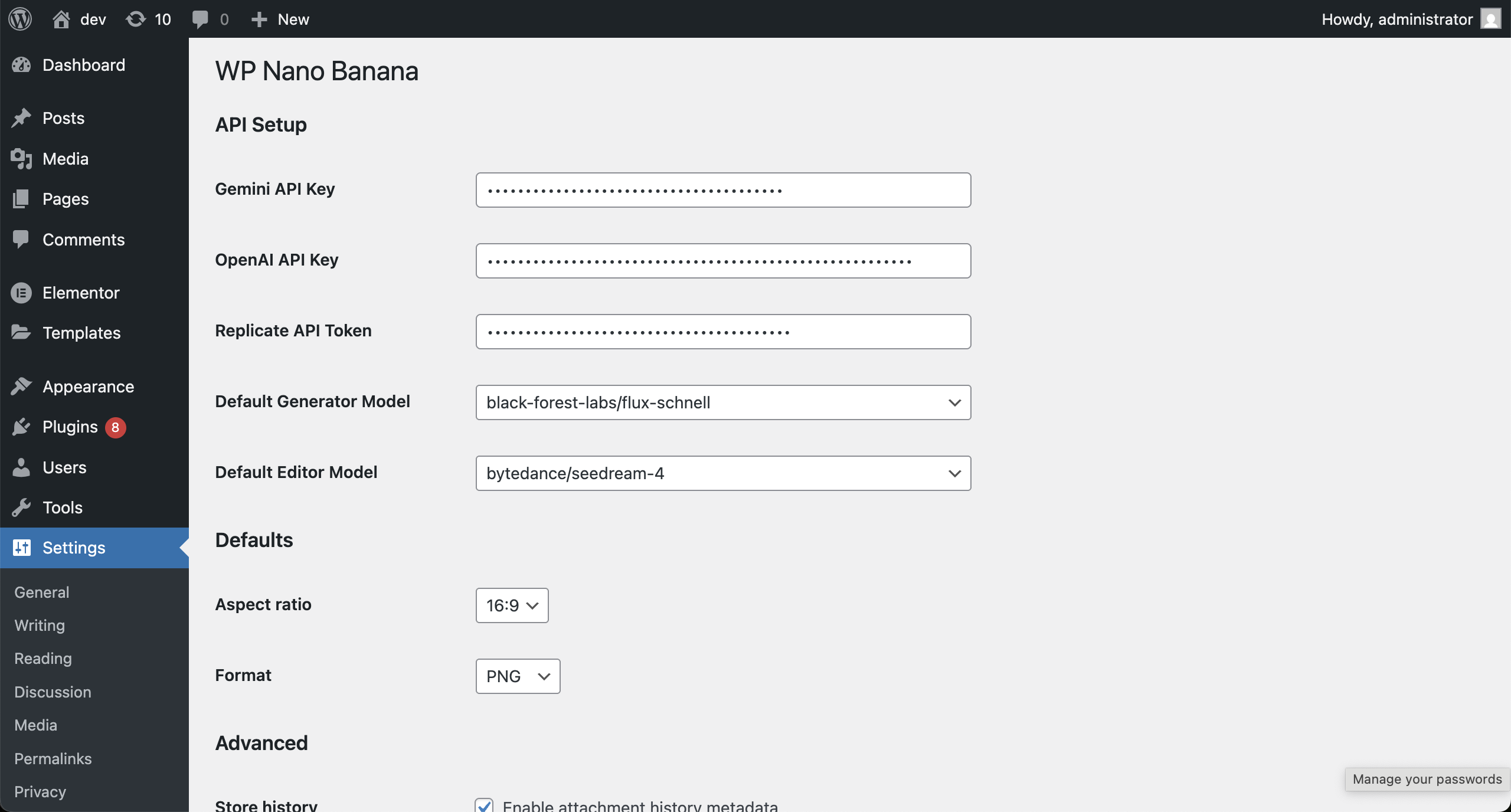
Go to Settings → WP Banana and add your API key (OpenAI, Replicate, etc.).
-
Start generating and editing images right inside your WordPress dashboard.
For environments where you don’t want keys in the DB, you can define them in wp-config.php:
define( 'WP_BANANA_OPENAI_API_KEY', 'sk-...' );
define( 'WP_BANANA_GOOGLE_API_KEY', 'AIza...' );
define( 'WP_BANANA_REPLICATE_API_KEY', 'r8_...' );
define( 'WP_BANANA_FAL_API_KEY', '...' );
Constants (if present) take priority over saved settings.
Updates
WP Banana uses a customized version of the GitHub Updater library to enable seamless updates directly from GitHub. When a new release is published, you can update WP Banana just like any other plugin from the WordPress dashboard. You can disable these update checks if you prefer by adding the following line to your wp-config.php:
define( 'WP_BANANA_DISABLE_GITHUB_UPDATER', true );Or use the filter in your theme’s functions.php or a custom plugin:
add_filter( 'wp_banana_disable_github_updater', '__return_true' );Usage Examples
Generate a New Image
- Open the Media Library or the Media pop-up in the Post Editor.
- Click Generate Image.
- Enter your text prompt (e.g. "banana-shaped rocket flying through space in retro 90s neon style").
- Click Generate Image to create the image in a few seconds and save it to your Media Library.
- Want variations? Use the preview button to queue 1–4 images at once, review them inline, and decide which ones to save or discard before they hit the Media Library.
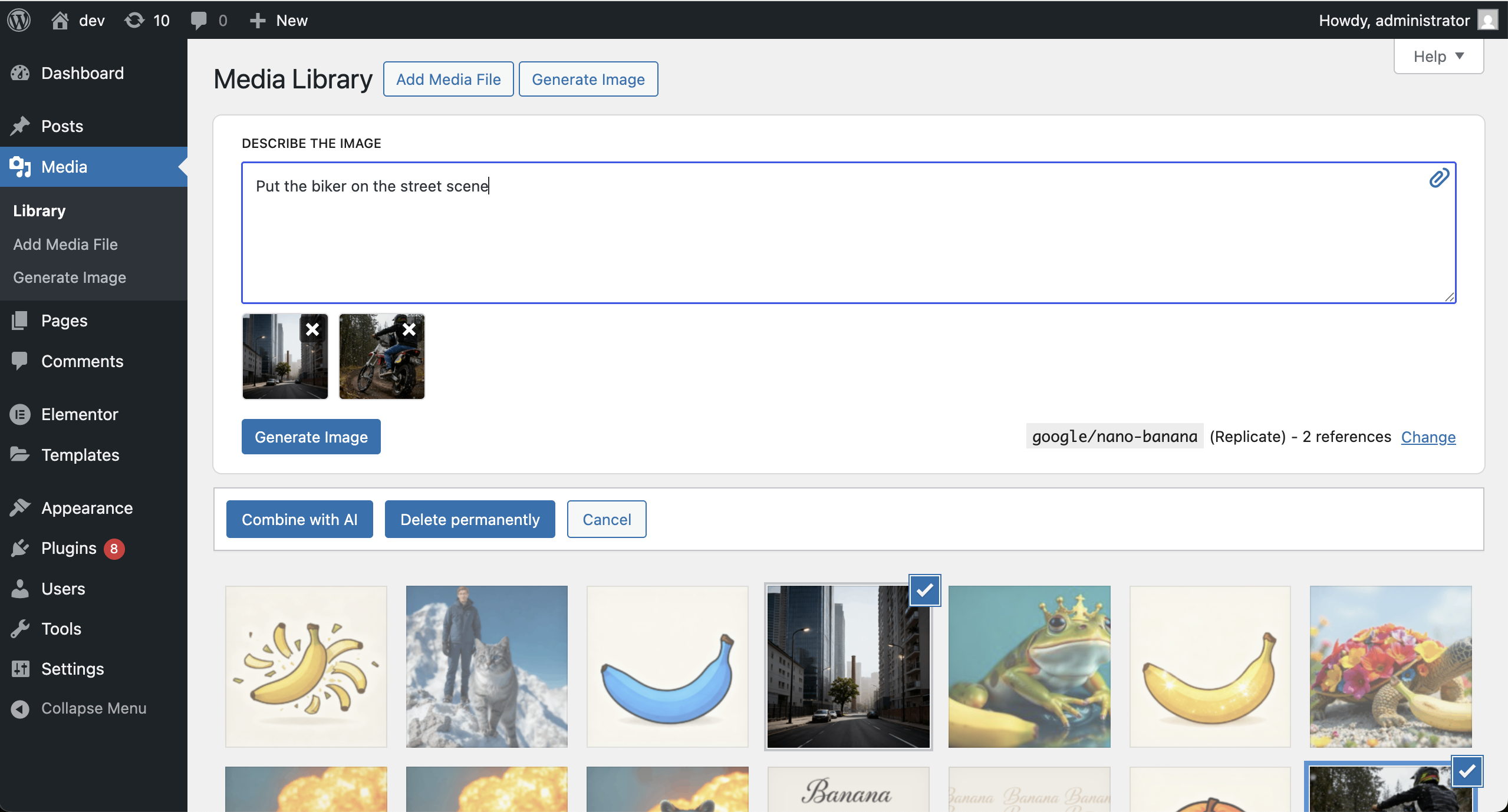
Combine Images
- Select one or more images from the Media Library.
- Click Combine with AI.
- Provide a text prompt to guide the transformation.
- A new AI-generated composite image is created and saved.
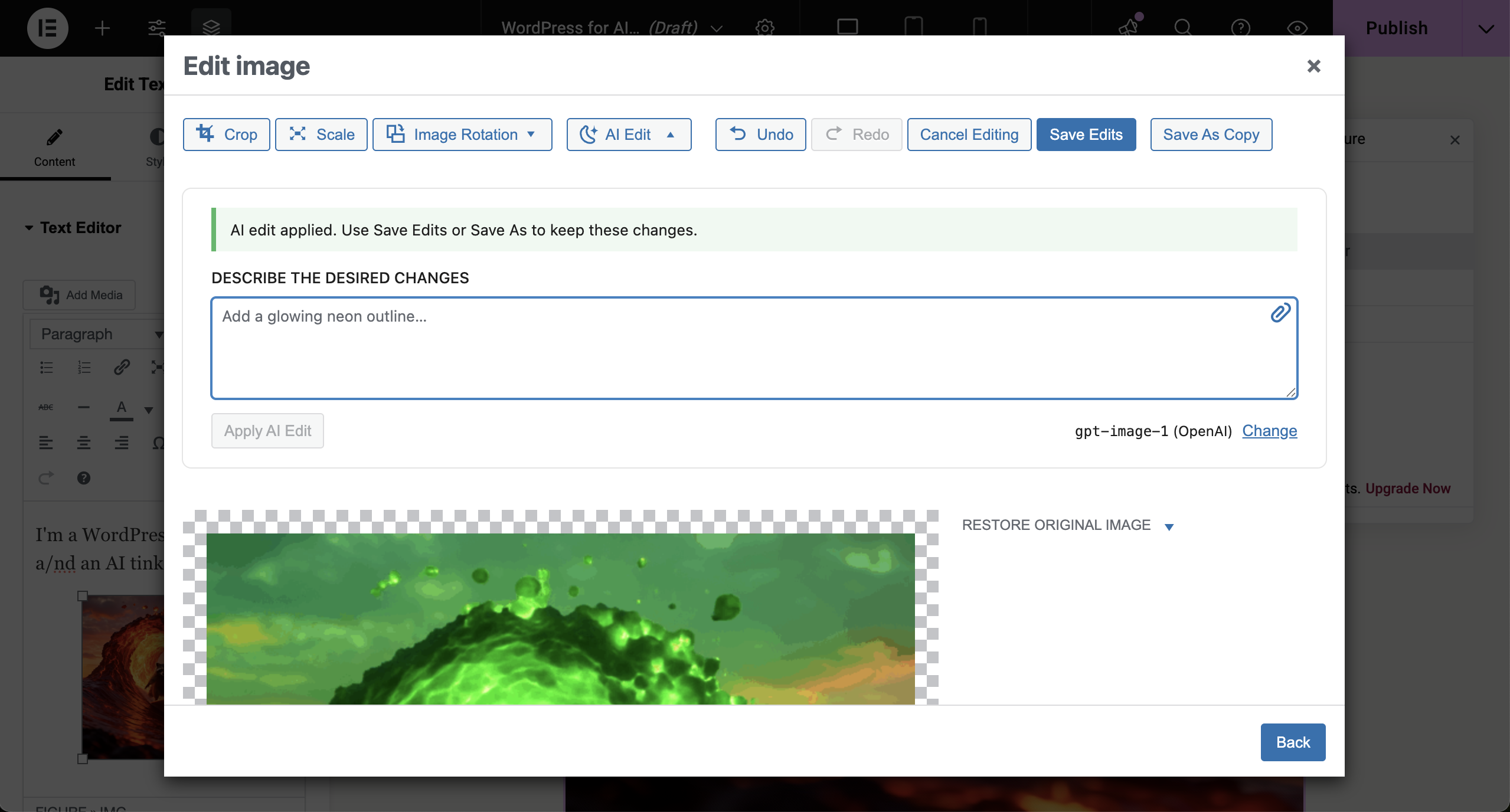
Edit Existing Image
- Open any image in the Media Library.
- Click Edit Image, then Edit with AI.
- Describe changes (e.g. "remove background", "make it look like watercolor", "add subtle circuit board texture").
- The edited image will appear in the preview area. You can undo changes if needed.
- Click Save Changes to apply the edits or Save Copy to keep both versions.
Screenshots & Demo
Watch a 1-minute demo videohttps://github.com/user-attachments/assets/28a5ef2d-682e-4206-99e7-6eb1f141146d
AI image generation from the Media Library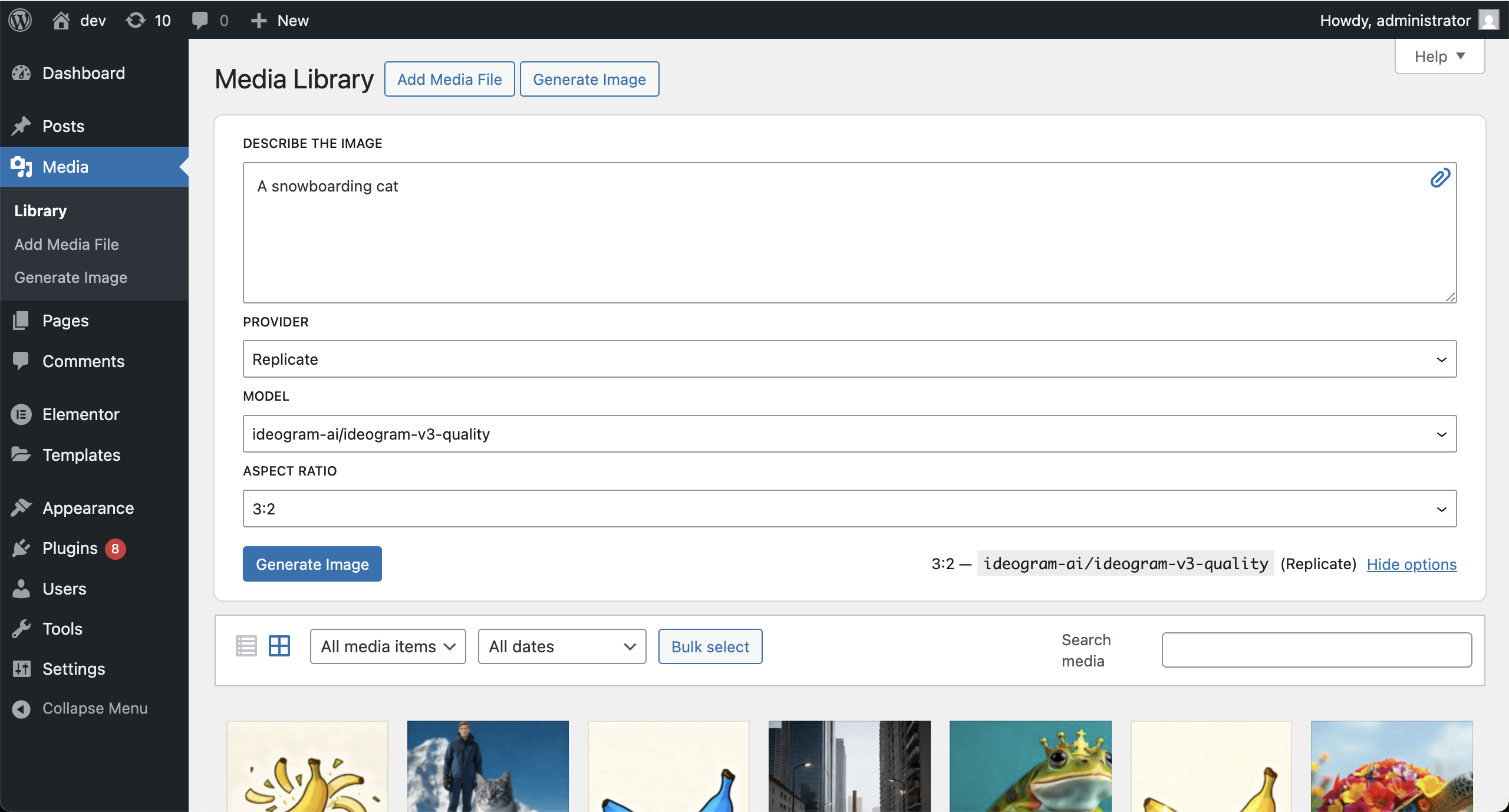 Image editing inside Elementor
 Select and combine images
 Settings page for API configuration
Requirements
- WordPress 6.0+
- PHP 7.4+
- ImageMagick enabled on your server
- API key for supported AI providers (OpenAI, Replicate, Fal, Google AI Studio)
Supported AI Models
WP Banana supports a wide range of state-of-the-art AI image models for both generation and editing. Below are some of the available models you can use:
Via fal.ai
- FLUX.2 [dev] (
fal-ai/flux-2) - FLUX.2 [pro] (
fal-ai/flux-2-pro) - FLUX.2 [max] (
fal-ai/flux-2-max) - FLUX.2 [turbo] (
fal-ai/flux-2/turbo) - FLUX.2 [flash] (
fal-ai/flux-2/flash) - FLUX.2 [flex] (
fal-ai/flux-2-flex) - Nano Banana 2 (
fal-ai/nano-banana-2) - Nano Banana Pro (
fal-ai/nano-banana-pro) - Gemini 3.1 Flash Image (
fal-ai/gemini-3.1-flash-image-preview) - Gemini 3 Pro Image (
fal-ai/gemini-3-pro-image-preview) - Imagen 4 (
fal-ai/imagen4/preview) - Imagen 4 Fast (
fal-ai/imagen4/preview/fast) - Imagen 4 Ultra (
fal-ai/imagen4/preview/ultra) - GPT-Image-2 (
fal-ai/gpt-image-2) - GPT-Image-1.5 (
fal-ai/gpt-image-1.5) - GPT-Image-1 Mini (
fal-ai/gpt-image-1-mini) - Reve (
fal-ai/reve/text-to-image) - Reve Remix (
fal-ai/reve/remix) - Recraft V3 (
fal-ai/recraft/v3/text-to-image) - Ideogram V3 (
fal-ai/ideogram/v3) - Hidream I1 (
fal-ai/hidream-i1-full,fal-ai/hidream-i1-dev,fal-ai/hidream-i1-fast)
Via Google AI Studio (Gemini API)
- Google Gemini 3.1 Flash Image Preview, a.k.a. Nano Banana 2 (
gemini-3.1-flash-image-preview) - Google Gemini 3 Pro Image Preview, a.k.a. Nano Banana Pro (
gemini-3-pro-image-preview) - Google Gemini 2.5 Flash Image, a.k.a. Google Nano Banana (
gemini-2.5-flash-image) - Google Imagen 4 (
imagen-4.0-generate-001,imagen-4.0-ultra-generate-001,imagen-4.0-fast-generate-001)
Via OpenAI
- OpenAI GPT-Image-2 (
gpt-image-2) - OpenAI GPT-Image-1.5 (
gpt-image-1.5) - OpenAI GPT-Image-1 (
gpt-image-1) - OpenAI GPT-Image-1-Mini (
gpt-image-1-mini)
Via Replicate
- FLUX.2 (
black-forest-labs/flux-2-dev,black-forest-labs/flux-2-pro,black-forest-labs/flux-2-flex) - FLUX Kontext (
black-forest-labs/flux-kontext-max,black-forest-labs/flux-kontext-dev) - FLUX 1.1 Pro (
black-forest-labs/flux-1.1-pro) - FLUX Schnell (
black-forest-labs/flux-schnell) - FLUX Dev (
black-forest-labs/flux-dev) - OpenAI GPT-Image-2 (
openai/gpt-image-2) - OpenAI GPT-Image-1.5 (
openai/gpt-image-1.5) - OpenAI GPT-Image-1 (
openai/gpt-image-1) - OpenAI GPT-Image-1-Mini (
openai/gpt-image-1-mini) - Nano Banana 2 (
google/nano-banana-2) - Nano Banana Pro (
google/nano-banana-pro) - Nano Banana (
google/nano-banana) - Google Imagen 4 (
google/imagen-4,google/imagen-4-ultra,google/imagen-4-fast) - Recraft v3 (
recraft-ai/recraft-v3) - Reve Create, Edit, Remix (
reve/create,reve/edit,reve/remix) - Ideogram v3 (
ideogram-ai/ideogram-v3-turbo,ideogram-ai/ideogram-v3-quality,ideogram-ai/ideogram-v3-balanced) - Bytedance Seedream 5 Lite (
bytedance/seedream-5-lite) - Bytedance Seedream 4.5 (
bytedance/seedream-4.5) - Bytedance Seedream 4 (
bytedance/seedream-4) - Bytedance Seededit 3.0 (
bytedance/seededit-3.0) - Tencent Hunyuan Image 3 (
tencent/hunyuan-image-3) - Stability AI Stable Diffusion 3.5 Large (
stability-ai/stable-diffusion-3.5-large) - Minimax Image 01 (
minimax/image-01) - Qwen Image (
qwen/qwen-image,qwen/qwen-image-edit)
You can select from these models when generating or editing images, depending on your connected provider and the task at hand.
Contributing
Contributions are welcome! Please open an issue or submit a pull request.
License
GPL-2.0 or later — https://www.gnu.org/licenses/gpl-2.0.html
Releases
13 releases.
These releases are tags only. The author does not attach a packaged zip, so there are no download counts to report.