Install
This is the repository archive. It installs, but the folder name will carry the branch suffix and updates will not flow.
Install straight from GitHub with WP-CLI:
wp plugin install https://github.com/wp-autoplugin/abilities-inspector/archive/refs/heads/main.zipWordPress Abilities API Inspector
Abilities Inspector is a WordPress admin plugin that lets you browse every registered Ability on your site and quickly disable or re-enable them. It is built for the WordPress Abilities API introduced in WP 6.9, and provides a fast, filterable list table with bulk actions plus a details panel for deeper inspection.
Key Features
- Browse all abilities registered by WordPress core and plugins.
- Enable/disable abilities from a single screen.
- Count of usage showing how many times each ability is used across the site.
- Bulk actions for enabling or disabling multiple abilities at once.
- Filters & search by status, category, provider, and free text.
- Details panel with metadata like description, category label, REST visibility, annotations, and input/output schemas (when available).
Requirements
- WordPress 6.9+ (or the Abilities API feature plugin).
- PHP 7.4+.
- Admin capability:
manage_options.
Installation
- Upload the plugin folder to
wp-content/plugins/or install the ZIP via Plugins → Add New → Upload Plugin. - Activate Abilities Inspector.
- Go to Tools → Abilities Inspector.
Usage
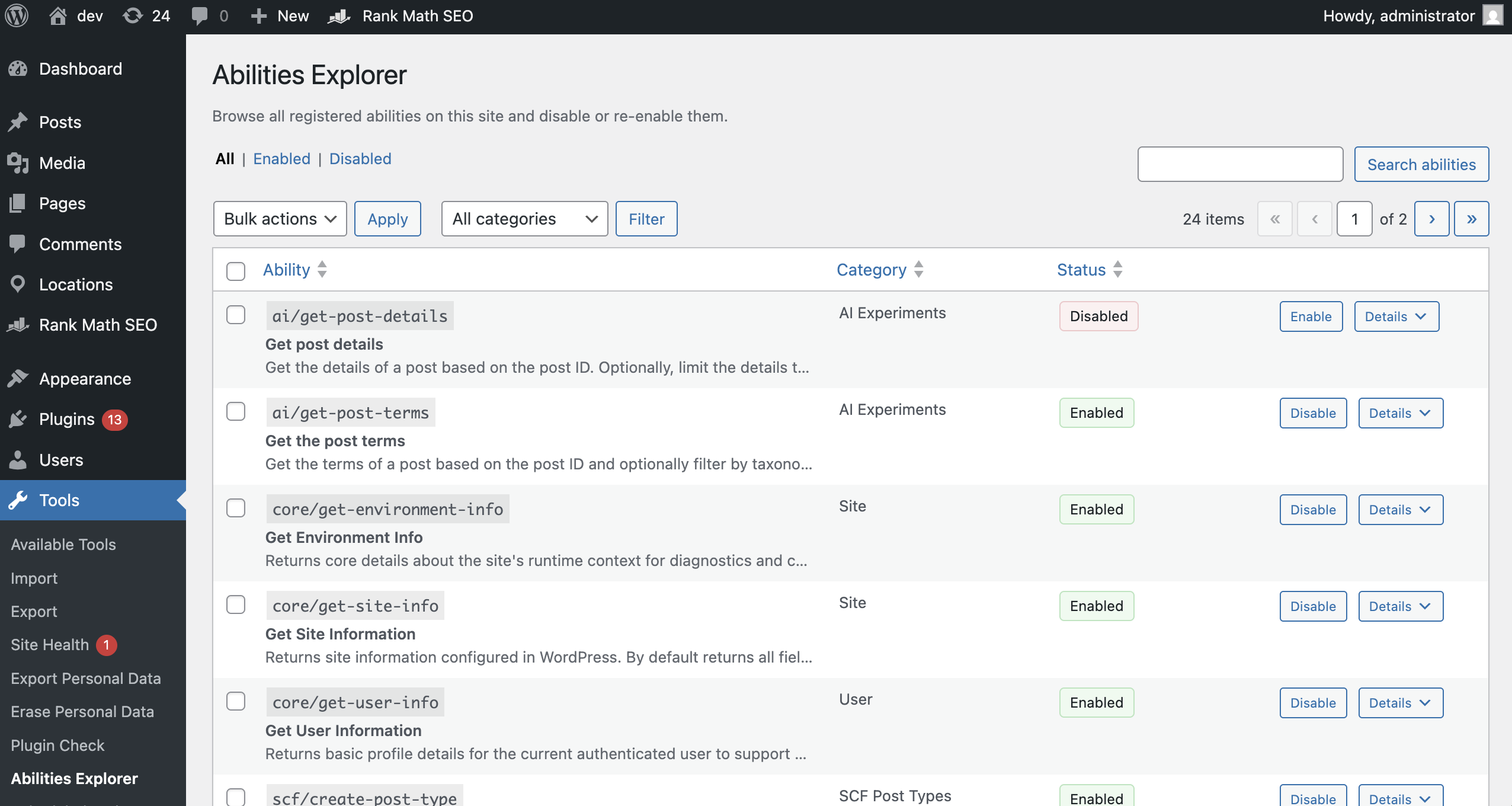
- Open Tools → Abilities Inspector in wp-admin.
- Use the status tabs (All / Enabled / Disabled) and the category filter to narrow results.
- Search by ability name, label, description, or category.
- Click Disable or Enable to toggle a single ability.
- Use the bulk action dropdown to enable/disable multiple abilities at once.
- Click Details to inspect an ability’s metadata.
How Disabling Works
When an ability is disabled, the plugin intercepts its registration and:
- Sets
show_in_resttofalse(so it won’t be discoverable or executable via REST). - Replaces the
execute_callbackwith a 403 response.
Disabled abilities are stored in a WordPress option and applied on every registration, so the behavior persists across requests and admin sessions.
Screenshots
- Abilities Inspector admin screen
Frequently Asked Questions
What is an “Ability” in WordPress?
Abilities are part of WordPress’s Abilities API, which provides structured, discoverable capabilities that can be registered by core or plugins. This plugin simply lists and manages them.
Why can’t I see any abilities?
Abilities are only available when the Abilities API is present. You need WordPress 6.9+ or the Abilities API feature plugin installed.
Is disabling an ability permanent?
No. You can re-enable an ability at any time from the same admin screen. The plugin only stores the disabled list in a WordPress option.
Does this affect custom or plugin-registered abilities?
Yes. Abilities Inspector lists and manages any ability registered through the Abilities API.
Development Notes
- No build process is required; assets are loaded directly.
- Admin UI assets live in
assets/. - Core logic is in
includes/.
License
GPL v2 or later.