Flurfunk
Team conversations inside WordPress: channels, threads and tasks with mentions, files and slash-command cards. Works in wp-admin and the OpenStation desktop.
Install
This is the repository archive. It installs, but the folder name will carry the branch suffix and updates will not flow.
Install straight from GitHub with WP-CLI:
wp plugin install https://github.com/worldoptimizer/flurfunk/archive/refs/heads/main.zip
Website · Install · User guide · Developers · Examples




Flurfunk
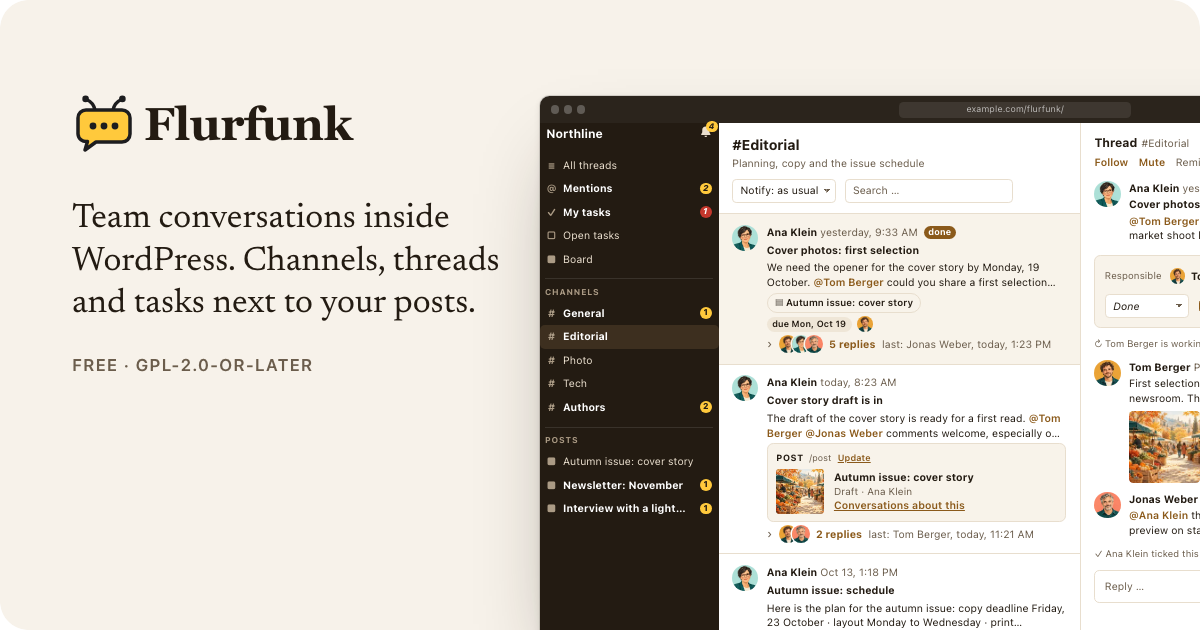
Team conversations inside WordPress. Channels, threads and tasks, attachable to posts, with @mentions, files and cards from other plugins via slash commands. Works in plain wp-admin and inside the OpenStation desktop.
- Overview (
wp-admin/admin.php?page=flurfunk): sidebar with channels, mentions, open tasks and posts with conversations; thread list; thread pane. Your name sits at the bottom of the sidebar and opens your settings (light/dark, which mails you get, push, unread badge). - Full screen (
/flurfunk/): the same app without the admin bar and menu, installable as an app on a phone's home screen (see below). - Editor panel "Conversations" for the configured post types.
- Posts list column with the number of conversations and open tasks.
- Tasks with states (open, in progress, question, done), due dates, responsible people, "My tasks", a board with drag and drop, and reminders.
- Files uploaded or picked from the media library, image galleries with a lightbox.
- Notifications in the app, by mail (instant or daily summary) and by Web Push, with quiet hours, pause, per-channel levels, follow, mute and "remind me".
- Team and guests: each channel decides what the team and what guests (e.g. guest authors) see.
- Assistants for agents and scripts, posting through WP-CLI or the REST API.
- Embeds: threads next to any element on an admin screen (e.g. a checklist).
- Own tables, one JSON format (
flurfunk/1) for export and import with files, privacy export/erase.
Requires WordPress 6.5+, PHP 8.1+ and MySQL/MariaDB. Web Push needs HTTPS and PHP's OpenSSL extension; no external service or library.
Documentation
| Overview | What Flurfunk does, feature tour |
| Installation and administration | Requirements, settings, access, assistants, cron, moving sites, privacy, uninstall, troubleshooting |
| User guide | Threads, formatting, mentions, slash commands, files, tasks, the board, notifications, shortcuts |
| Developer guide | Architecture, data format, REST API, providers, card blocks and actions, targets, embeds, hooks, WP-CLI |
| Card gallery | Every card building block, light and dark |
| Examples | A provider, a card renderer, a target type, embeds, shell and CI scripts, filters |
Quick start
cd wp-content/plugins && git clone https://github.com/worldoptimizer/flurfunk.git flurfunk
wp plugin activate flurfunk
Then open Settings → Flurfunk (name, logo, colours, who is team or guest, channels) and Flurfunk in the admin menu.
Full screen and home screen app
https://example.com/flurfunk/ shows Flurfunk on its own page: no theme, no admin bar, no admin
menu, the app fills the screen (also around notches). Logged-out visitors are sent to the login
and come back; logged-in people without access get a 403. "Open full screen" in your settings
(click your name) leads there, "Back to WordPress" returns. Without pretty permalinks the
address is /?flurfunk_app=1, which always works. Change the slug with the flurfunk_app_slug
filter; the rewrite rules are flushed once after activation, an update or a new slug.
The page carries a web app manifest (start and scope: that address, standalone display, name and sidebar colour from the settings, the site icon or logo – or Flurfunk's own icon – at 192 and 512 px). To install it:
- iPhone/iPad (Safari): open the address, Share → Add to Home Screen. Open Flurfunk from the icon, then turn on push in your settings – iOS only delivers push to home screen apps, and that app has its own login.
- Android (Chrome): open the address, menu → Install app / Add to Home screen.
Once push was turned on in (or the app opened from) the home screen app, tapping a notification opens the thread there instead of in wp-admin. Links to WordPress (e.g. "Open post") leave the app's scope, so phones show them with a small browser bar on top of the app.
Assistants (agents, scripts)
wp flurfunk bot-create --name="Assistant" --default   # account without editing rights
wp flurfunk bot-password <id>                          # application password for the REST API
wp flurfunk post --channel=general --title="Report" --body="…" --file=report.csv
wp flurfunk post --ref=checklist:billing --card='flurfunk/post:{"id":12}'
curl -u "login:application password" -H 'Content-Type: application/json' \
-d '{"channel":"general","title":"Deploy","body":"Release 2.4.0 is live."}' \
https://example.com/wp-json/flurfunk/v1/threadsData
wp flurfunk export backup.json
wp flurfunk export bundle/ --files     # with all files, for moving to another site
wp flurfunk import bundle/
wp flurfunk status
wp flurfunk channel news --name="News" --guests=own-posts
Extending
A slash command with cards:
add_action( 'init', function () {
    flurfunk_register_provider( 'myplugin/report', array(
        'command'  => 'report',
        'label'    => 'Report',
        'hint'     => 'Insert a report card',
        'search'   => fn ( string $q, int $user_id ) => array(
            array( 'ref' => array( 'id' => 12 ), 'title' => 'Q3', 'subtitle' => 'Draft' ),
        ),
        'snapshot' => fn ( array $ref, int $user_id ) => array(
            'title'  => 'Q3',
            'metric' => array( 'value' => '1,284', 'label' => 'views' ),
            'spark'  => array( 3, 5, 2, 8 ),
            'url'    => admin_url( 'admin.php?page=reports' ),
        ),
        'can'      => fn ( int $user_id ) => user_can( $user_id, 'edit_posts' ),
    ) );
} );
Cards are built from ready blocks (fields, checklist, progress, status, people,
table, badges, quote) and can carry buttons that run PHP on the site (actions, with
inline confirmation and an event line in the thread); see
card building blocks.
Also available: targets (flurfunk_register_target), channels from code
(flurfunk_ensure_channel), badges (flurfunk_unread_count), links (flurfunk_url), custom card
renderers (Flurfunk.registerCard), embeds (Flurfunk.mountRefs, mountChannel,
mountTarget) and filters and actions for access, notifications, mail and push. All of it is in
the developer guide.
Modules
Optional parts that only build on WordPress itself live in modules/ and are switched on or off
under Settings → Flurfunk → Modules (or wp flurfunk module on|off <id>):
- Comment cards (
flurfunk/comments, on):/commentinserts a comment with its state and buttons to approve it, mark it as spam or move it to the trash (people who may moderate). - Daily moderation thread (
flurfunk/comments-daily, off): once a day, if comments are waiting, a thread lists them, by default in its own channel #comments that requiresmoderate_comments. - Review requests (
flurfunk/review, off): a post submitted for review becomes a task for the people who may publish it; publishing ticks it off, back to draft marks it as a question. Settings: channel, and whether everyone who may publish is assigned.
Modules can bring settings of their own (channel, checkbox, number, text, select, roles), shown
under their switch and read with flurfunk_module_setting(). Channels can also require a
capability on top of their team and guest levels; see the developer guide.
Tests and development
wp eval-file tests/api-edge.php <team> <team2> <guest>: 100+ checks on rights, input, mentions, read state, paging, editing, targets, mails, export/import. Cleans up after itself.tests/e2e: Playwright against a running site (FF_BASE,FF_TEAM,FF_TEAM_PASS,FF_TEAM2,FF_TEAM2_PASS,FF_GUEST,FF_GUEST_PASS, optionalFF_QUERY).tests/push/run.sh: Web Push crypto checked against Node.node tests/format.test.cjs: the text formatter.wp eval-file tests/load.php: 2000 threads / 20000 messages, timings, cleans up.wp eval-file tests/demo/seed.php: demo content (a fictional editorial team with conversations, tasks and files) for screenshots and trying things out; see the developer guide.tools/strings.pycollects the JavaScript strings intoinc/strings.php;tools/l10n.pybuildslanguages/*.l10n.phpfromtools/translations/*.json;tools/build-zip.shbuilds a release zip.
License: GPL-2.0-or-later.