WooCommerce Subscriptions - Custom Price String WP Registry grade B. Medium-severity findings · 1 findingWP RegistryMedium-severity findings · 1 findingOpen the reportB
Customize the price displayed to your customers for subscription products (or non-subscription product).
Install
This is the repository archive. It installs, but the folder name will carry the branch suffix and updates will not flow.
Install straight from GitHub with WP-CLI:
wp plugin install https://github.com/woocommerce/woocommerce-subscriptions-custom-price-string/archive/refs/heads/master.zipWooCommerce Subscriptions - Custom Price String is an experimental mini-extension for WooCommerce Subscriptions that allows you to customize the following default strings from WooCommerce and WooCommerce Subscriptions:
- Simple product price
- Variable product price
- Subscription product price
- Subscription Variation price
- Variable product From price
- Bookable product price
Installation
To install:
- Download the latest version of the plugin here
- Go to Plugins > Add New > Upload administration screen on your WordPress site
- Select the ZIP file you just downloaded
- Click Install Now
- Click Activate
How-to
Set Product Custom Price String for a Simple Subscription Product
Edit the product and go to its General tab. There you'll find a new field named "Custom price string". By default it will display the current price string (f.e: "$10 on the 1st of each month with a 30-day free trial"). Use this field to change this string to whatever you want (f.e: "$10 each month").

Set Product Custom Price String for a Variable Subscription Product
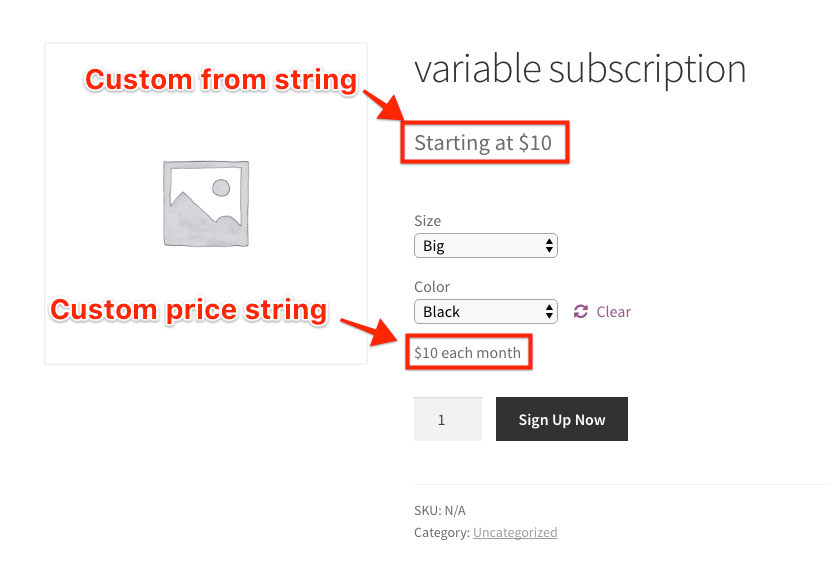
Edit the product and go to its Variations tab. Expand any of the existing variations and there you'll find the "Custom price string". Again, you can use this field to change this string to whatever you want (f.e: "$10 each month"). Each variation can have a different custom price string.

Set Product Custom From String for a Variable Subscription Product
By default, on each variable product page (frontend), a "From" sting is displayed, showing the minimal starting price of the product. If you edit a variable product and go to its Variations tab, you'll find a new field named "Custom Fom String" that you can can use to customize this string (f.e: "Starting at $10").
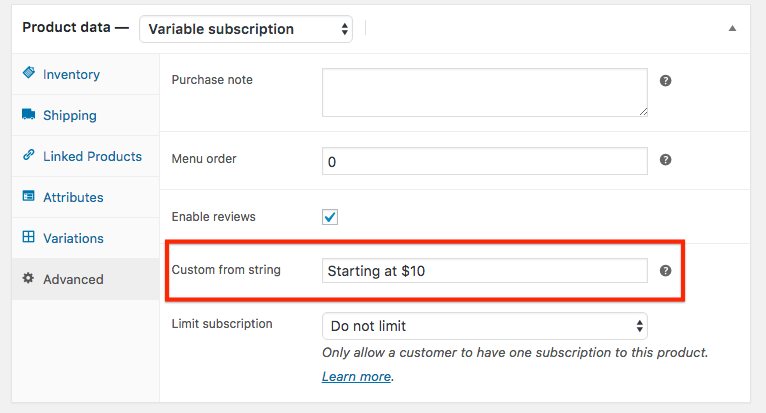
- NOTE: The 'From:' custom price string is located in the 'Advanced' tab for WC versions 3.3.5 and before.
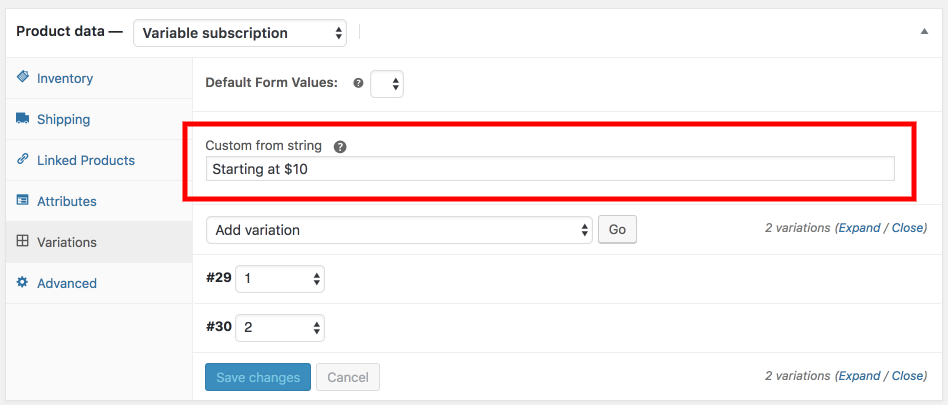
- NOTE: The 'From:' custom price string is located in the 'Variations' tab for WC versions 3.4+.
Result on the Frontend
Set Product Custom Price String for a Bookable product
If you're using WooCommerce Bookings, you may also like to customize the price string of a bookable product in some situations. In these cases, you can find the "Custom price string" field located in the Advanced tab. This field will replace the main price string of the bookable product, located below its title.


Updates
To keep the plugin up-to-date, use the GitHub Updater.
Reporting Issues
If you find an problem or would like to request this plugin be extended, please open a new Issue.
Releases
4 releases.
These releases are tags only. The author does not attach a packaged zip, so there are no download counts to report.