Customs Fees for WooCommerce WP Registry grade A. No security issues foundWP RegistryNo security issues foundOpen the reportA
Add transparent customs and import fee calculations to WooCommerce checkout.
Install
Upload it under Plugins → Add New Plugin → Upload Plugin, then activate.
Install straight from GitHub with WP-CLI:
wp plugin install https://github.com/woocommerce/customs-fees-for-woocommerce/releases/download/1.3.7/customs-fees-for-woocommerce.zipAutomatically calculate and display import duties, customs fees, and taxes for international WooCommerce orders.
Customs Fees for WooCommerce provides transparent international shipping cost calculations by automatically computing import duties, customs fees, and taxes during checkout. Your customers see the complete landed cost upfront, eliminating surprise fees at delivery and reducing cart abandonment.
Purpose
With the U.S. ending its de minimis exemption on August 29, 2025, all international shipments will require customs duties regardless of value. This plugin helps merchants:
- Add transparency to international orders.
- Prevent cart abandonment from
Features
Core Functionality
- Automated Fee Calculation: Calculate customs fees based on percentage or flat rates.
- Origin-Based Rules: Set different fees based on product origin countries.
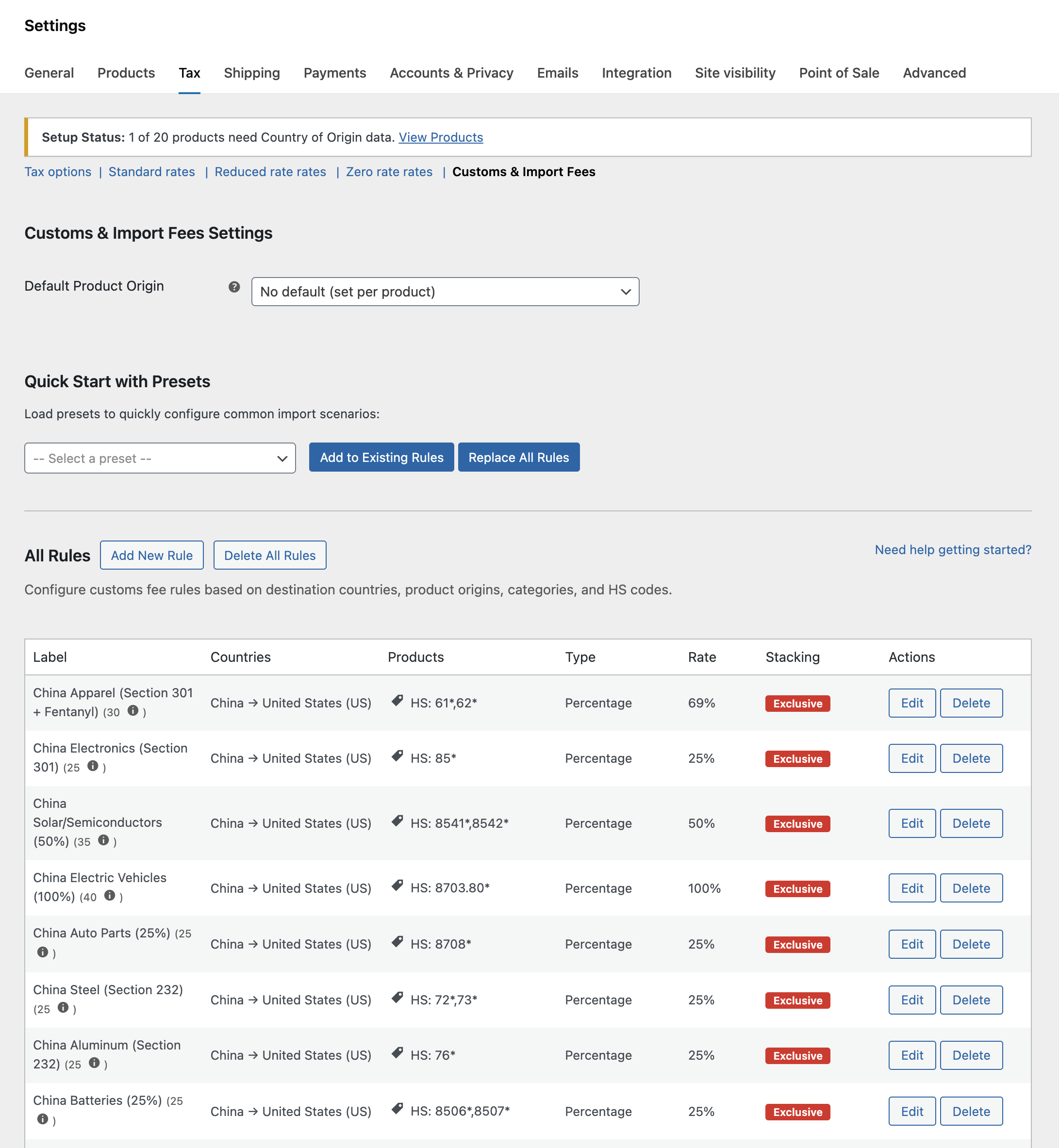
- Smart Presets: Quick setup with 25+ built-in presets for major countries.
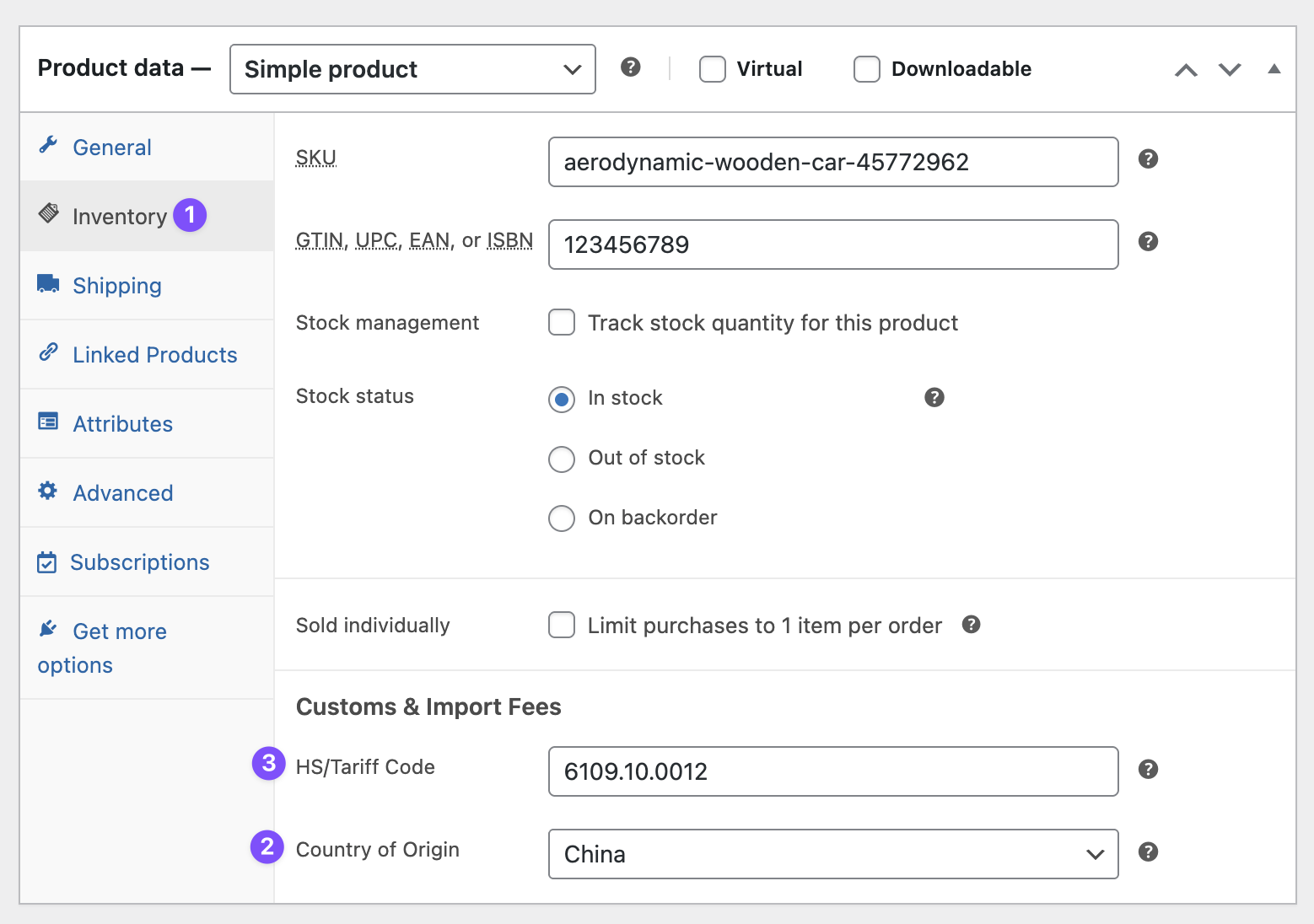
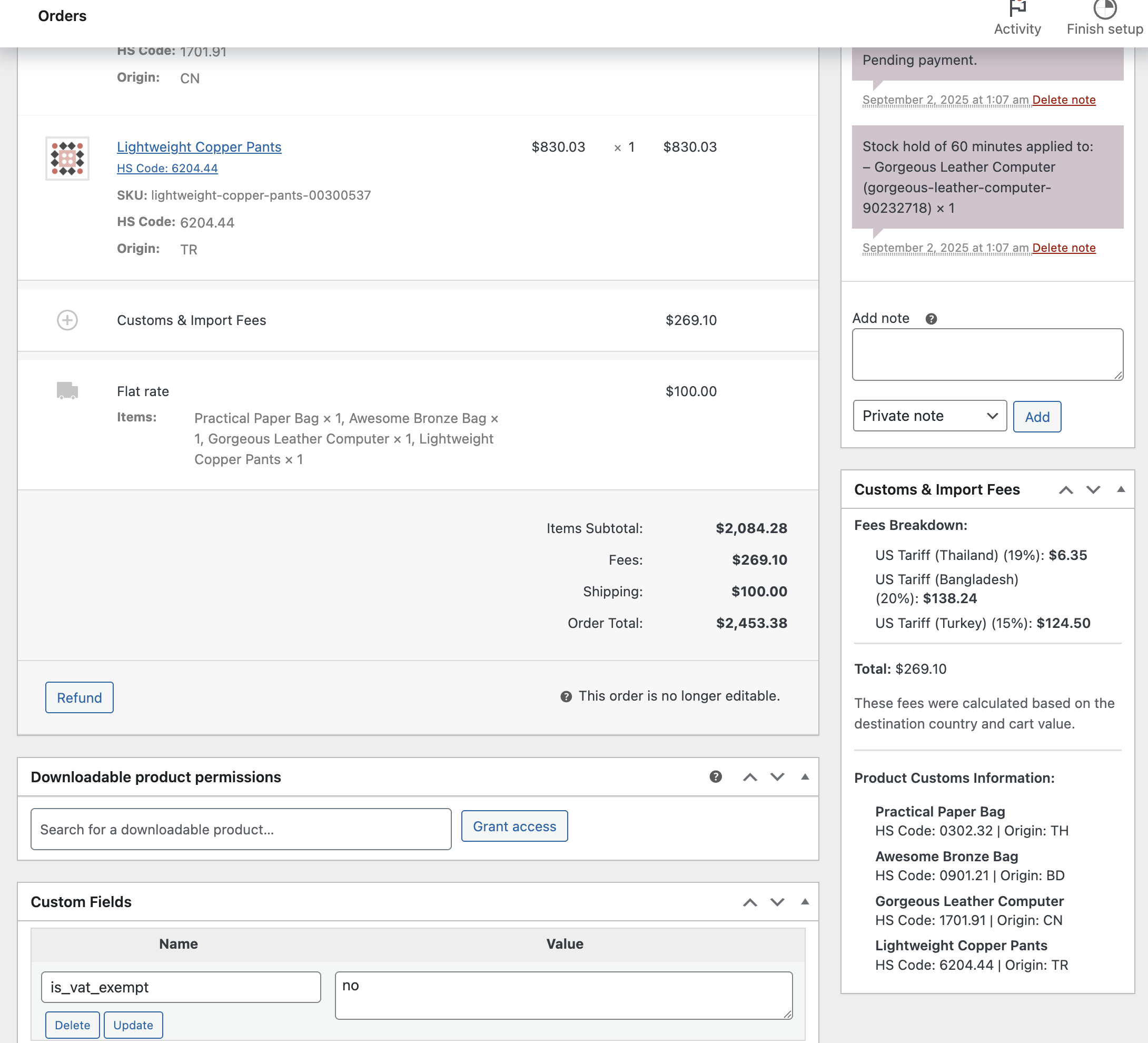
- Product-Level Settings: Define origin country and HS codes for individual products.
- Variable Product Support: Full support for variable products with inheritance from parent.
- CSV Import/Export: Bulk manage rules and product data.
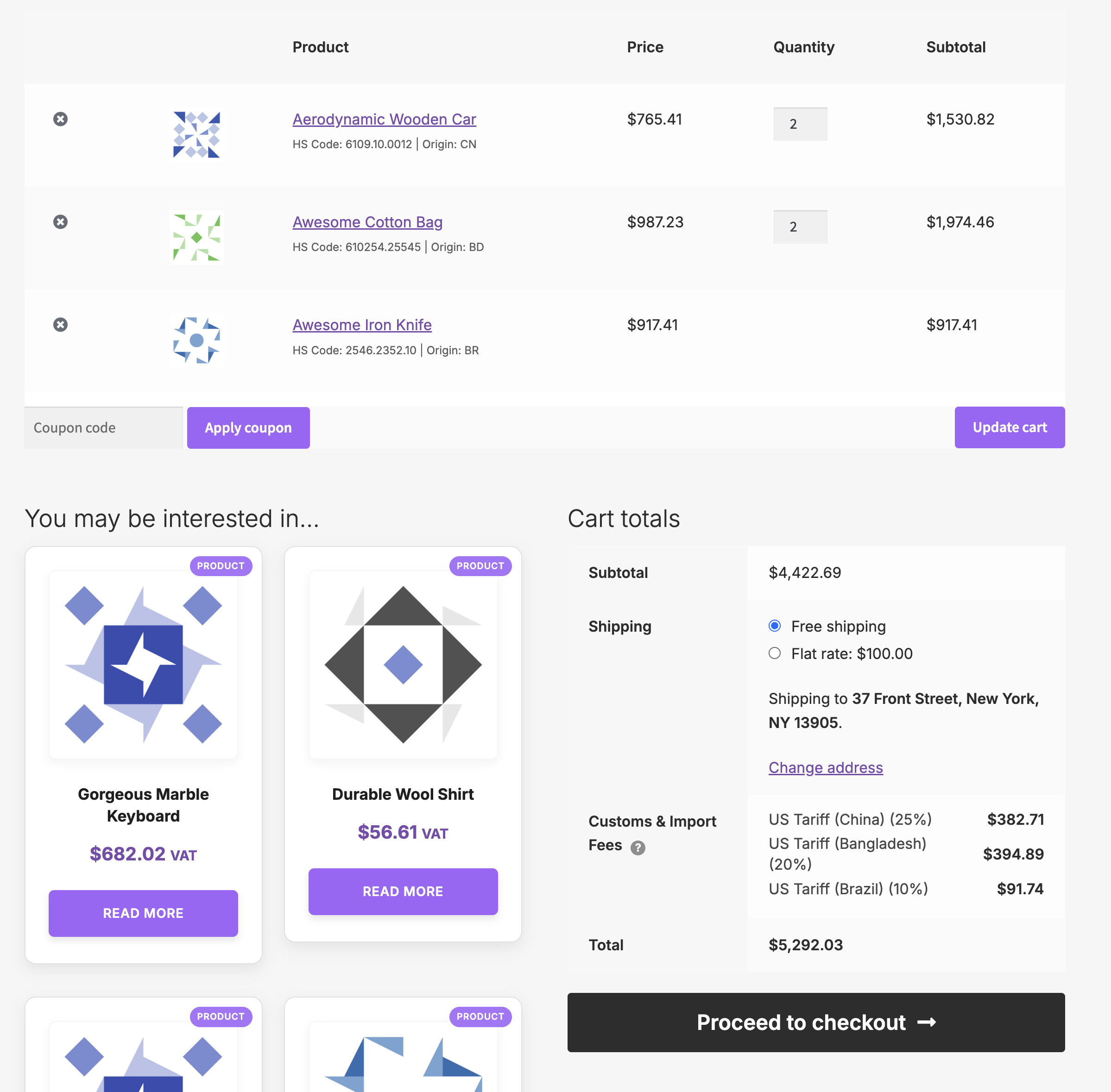
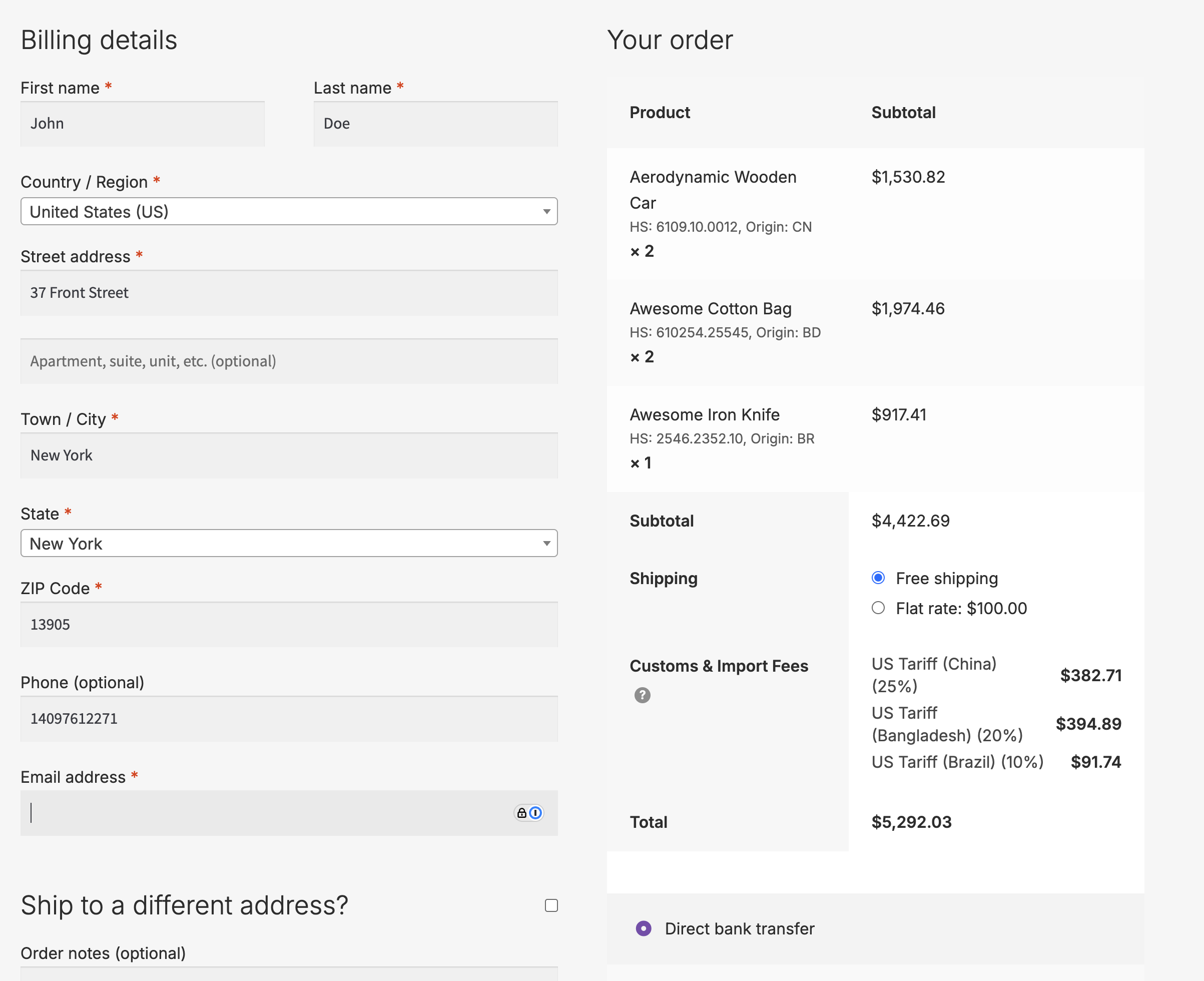
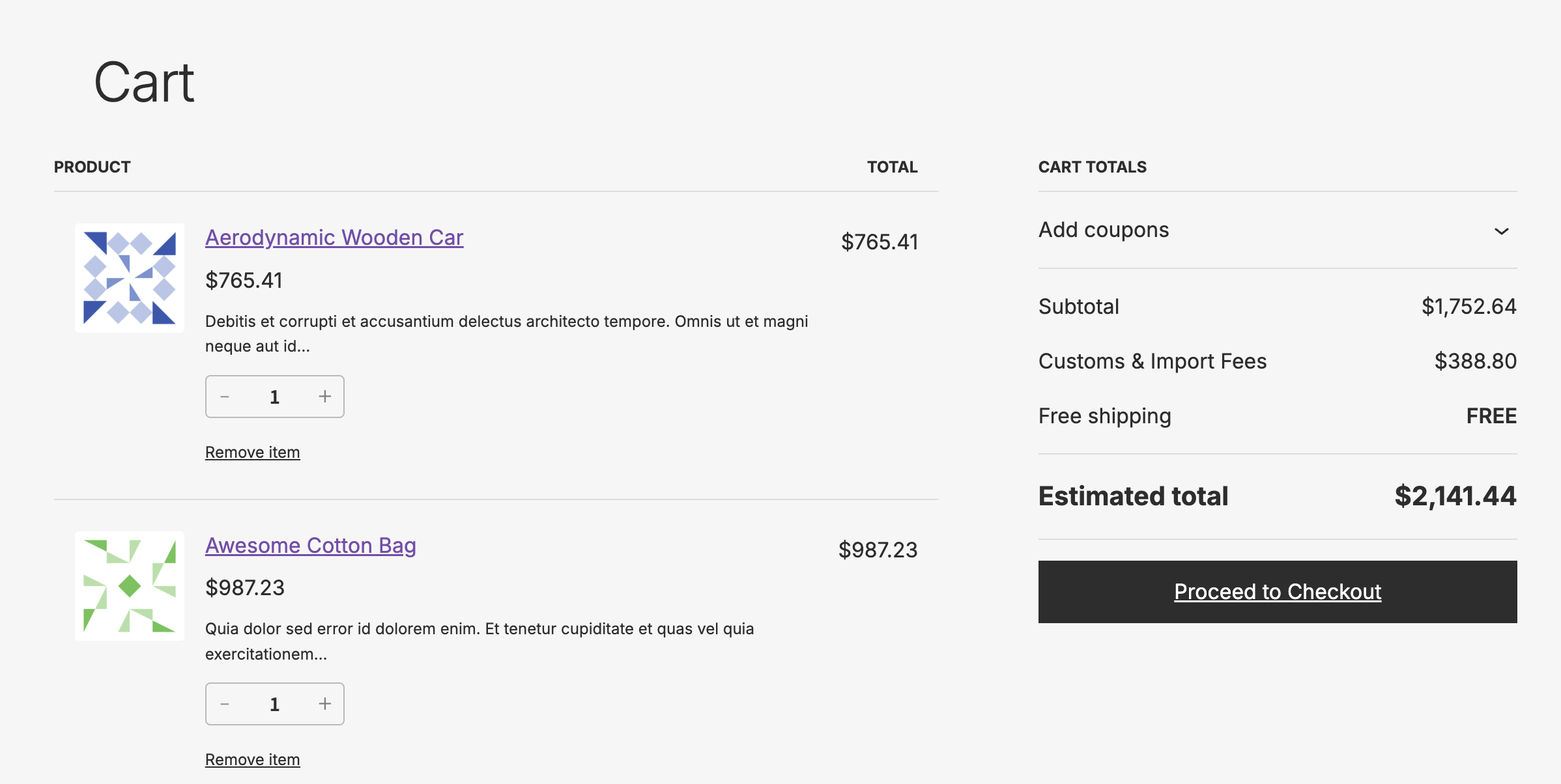
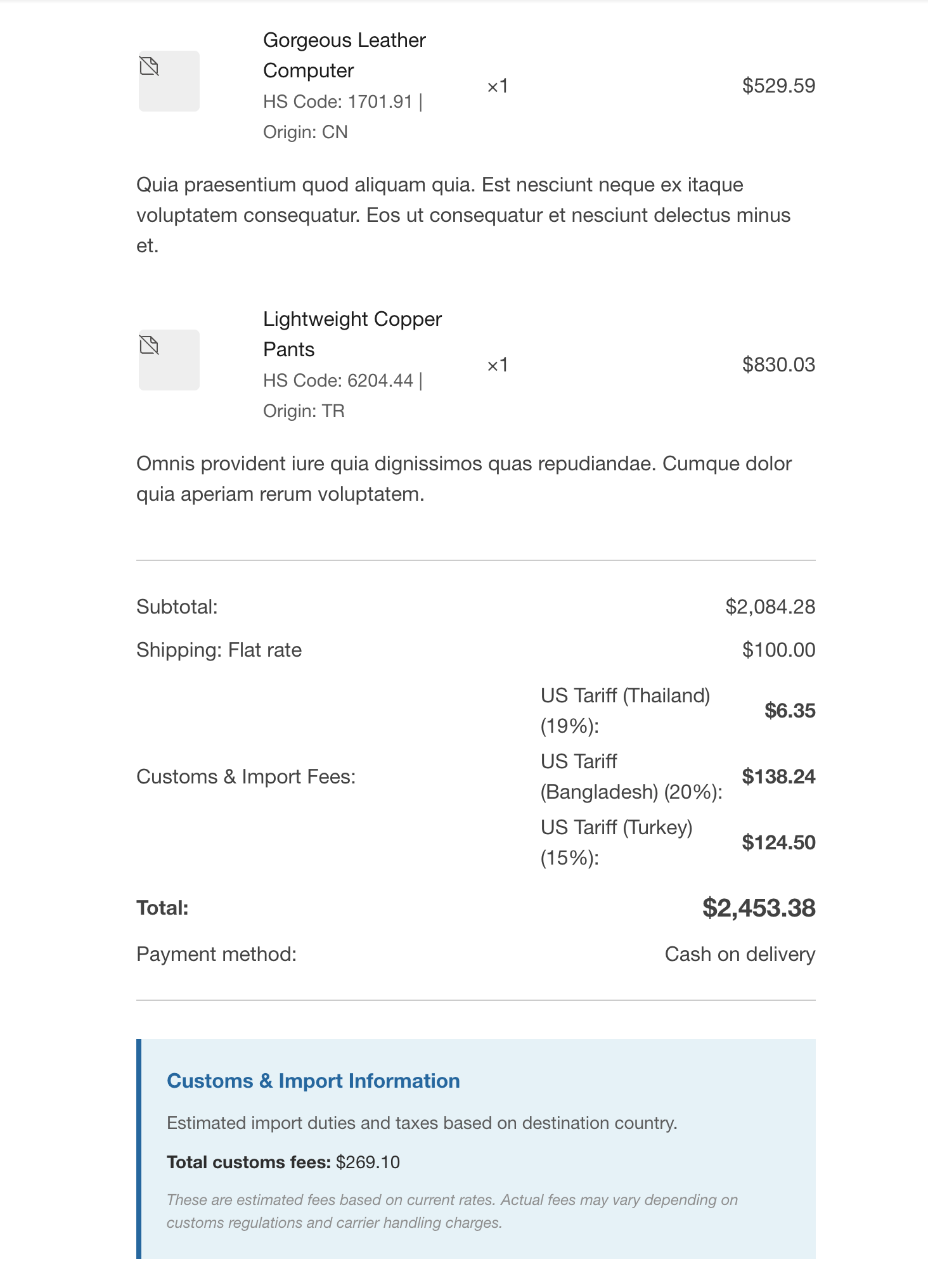
- Transparent Checkout: Display detailed fee breakdown to customers.
- Flexible Rules: Create unlimited custom rules for any country combination.
- HPOS Compatible: Full support for WooCommerce High-Performance Order Storage.
Advanced Features
- Stacking Rules: Control how multiple fees combine (add, override, or exclusive).
- Threshold-Based Fees: Apply fees only above/below certain order values.
- Category-Specific Rules: Different rates for different product categories.
- Multi-Currency Support: Works with WooCommerce multi-currency stores.
- Developer Friendly: Extensive hooks and filters for customization.
Installation
Minimum requirements
- WordPress: see the
Requires at leastheader incustoms-fees-for-woocommerce.php - WooCommerce: see the
WC requires at leastheader incustoms-fees-for-woocommerce.php - PHP 7.4 or higher
Manual installation
- Download the plugin ZIP file
- Log in to your WordPress dashboard
- Navigate to Plugins > Add New > Upload Plugin
- Upload the ZIP file and click Install Now
- Activate the plugin through the Plugins menu
Quick start guide
1. Configure global settings
Navigate to WooCommerce > Settings > Tax > Customs Fees and set your default product origin country.
2. Create your first rule
Click Add New Rule and configure:
- Rule name (e.g., "EU Electronics Import")
- Origin and destination countries
- Fee type (percentage or fixed amount)
- Matching criteria (categories, HS codes, or all products)
3. Configure products
Edit products to add:
- Country of Origin - Manufacturing country
- HS Code - Harmonized System classification code
Variable Products
For variable products, you can:
- Set HS code and origin country at the parent product level (applies to all variations)
- Optionally override settings at the variation level for specific variations
- Variations automatically inherit parent settings when not specified
4. Test the checkout
Add products to cart and proceed to checkout to see customs fees calculated automatically.
Usage examples
Example 1: General import duty
Scenario: Apply 7.5% import duty on all products from China to United States
Rule Name: China to US Import Duty
From: China (CN)
To: United States (US)
Fee Type: Percentage
Amount: 7.5
Match Type: All Products
Example 2: Category-specific fees
Scenario: 15% duty on electronics from any country to European Union
Rule Name: EU Electronics Tariff
From: All Countries
To: Germany (DE)
Categories: Electronics
Fee Type: Percentage
Amount: 15
Match Type: Category
Example 3: HS code precision
Scenario: Fixed fee for lithium batteries (HS codes 8506, 8507)
Rule Name: Battery Import Fee
HS Codes: 8506,8507
Fee Type: Fixed
Amount: 25.00
Match Type: HS Code
Display Examples
Cart Page (Classic)
Subtotal:               $170.00
Customs & Import Fees:   $23.50
  ○ Import Duty (China): $15.00
  ○ Import Duty (EU):     $8.50
Shipping:                $10.00
Total:                  $203.50
Checkout Block
Order Summary
─────────────
Products         $170.00
Shipping          $10.00
Customs Fees      $23.50 ⓘ
─────────────
Total           $203.50
Developer documentation
Available hooks
Filters
// Modify all calculated fees before they're applied
add_filter( 'cfwc_calculated_fees', function( $fees, $destination_country, $cart ) {
    // Modify fees array
    return $fees;
}, 10, 3 );

// Modify a single fee calculation
add_filter( 'cfwc_calculated_single_fee', function( $fee, $rule, $total ) {
    // Apply 50% discount for orders over $1000
    if ( WC()->cart->subtotal > 1000 ) {
        $fee = $fee * 0.5;
    }
    return $fee;
}, 10, 3 );

// Customize fee label displayed at checkout
add_filter( 'cfwc_fee_label', function( $label, $rule, $country, $origin ) {
    return $label . ' (Estimated)';
}, 10, 4 );

// Override product origin country
add_filter( 'cfwc_product_origin', function( $origin, $product_id, $product ) {
    // Force all electronics to use CN origin
    if ( has_term( 'electronics', 'product_cat', $product_id ) ) {
        return 'CN';
    }
    return $origin;
}, 10, 3 );

// Modify customs value (for CIF calculations)
add_filter( 'cfwc_customs_value', function( $customs_value, $line_total, $cart_item, $method ) {
    // Force FOB for US/Canada even if CIF is enabled
    $destination = WC()->customer->get_shipping_country();
    if ( in_array( $destination, array( 'US', 'CA' ), true ) ) {
        return $line_total;
    }
    return $customs_value;
}, 10, 4 );

// Provide insurance value for CIF calculations
add_filter( 'cfwc_insurance_value', function( $insurance_value, $product_value, $method ) {
    // Add 2% insurance to all products
    return $product_value * 0.02;
}, 10, 3 );
Actions
// After cache is cleared
add_action( 'cfwc_cache_cleared', function() {
    // Perform cleanup or sync
} );
Database schema
The plugin creates one custom table for storing rules:
CREATE TABLE {prefix}cfwc_rules (
    id BIGINT UNSIGNED NOT NULL AUTO_INCREMENT,
    name VARCHAR(200) NOT NULL,
    from_country VARCHAR(2),
    to_country VARCHAR(2),
    hs_codes TEXT,
    categories TEXT,
    fee_type VARCHAR(20),
    fee_amount DECIMAL(10,2),
    priority INT,
    status VARCHAR(20),
    stacking_mode VARCHAR(20),
    created_at DATETIME,
    updated_at DATETIME,
    PRIMARY KEY (id)
);
Integration Examples
With Multi-Currency Plugins
// Modify calculated fees for currency conversion
add_filter( 'cfwc_calculated_single_fee', function( $fee, $rule, $total ) {
    if ( function_exists( 'convert_to_current_currency' ) ) {
        return convert_to_current_currency( $fee );
    }
    return $fee;
}, 10, 3 );
With Third-Party Insurance Plugins
// Integrate shipping insurance with CIF customs calculations
add_filter( 'cfwc_insurance_value', function( $insurance_value, $product_value, $method ) {
    if ( function_exists( 'get_cart_insurance_amount' ) ) {
        $total_insurance = get_cart_insurance_amount();
        $cart_subtotal   = WC()->cart->get_cart_contents_total();

        if ( $cart_subtotal > 0 ) {
            return ( $product_value / $cart_subtotal ) * $total_insurance;
        }
    }
    return $insurance_value;
}, 10, 3 );
Performance
- Lightweight: < 500KB total size.
- Optimized: Caches calculations per session.
- Scalable: Handles unlimited products and rules.
- Fast: Average calculation time < 50ms.
FAQs
Q: Do customers pay the customs fees at checkout? A: The fees are calculated and displayed for transparency. Actual collection depends on your payment gateway and business model. Most merchants show fees for information but collect them separately at customs.
Q: Can I set different fees for different states or provinces? A: Currently, fees are configured at the country level. For region-specific fees, use the developer filters to implement custom logic.
Q: How do I keep fees updated with changing regulations? A: Regularly review and update your rules based on current customs regulations. You can export rules for backup before making changes.
Q: Is this compatible with multicurrency plugins? A: Yes, the plugin uses WooCommerce's currency system and works with properly configured multicurrency plugins.
Contributing
We welcome contributions from the community!
How to contribute
- Fork the repository on GitHub.
- Create a new branch for your feature.
- Commit your changes with clear messages.
- Push to your branch.
- Submit a pull request.
Coding standards
This plugin follows:
- WordPress Coding Standards.
- WooCommerce development guidelines.
- PSR-4 autoloading where applicable.
⚠️ Disclaimer
This plugin provides estimated customs fees for display purposes. Actual customs fees may vary based on:
- Current regulations
- Product classifications
- Declared values
- Inspection outcomes
- Additional processing fees
Always verify with official customs authorities for accurate fee information.
License
This plugin is licensed under the GPL v2 or later.
This program is free software; you can redistribute it and/or
modify it under the terms of the GNU General Public License
as published by the Free Software Foundation; either version 2
of the License, or (at your option) any later version.

This program is distributed in the hope that it will be useful,
but WITHOUT ANY WARRANTY; without even the implied warranty of
MERCHANTABILITY or FITNESS FOR A PARTICULAR PURPOSE.  See the
GNU General Public License for more details.
Changelog
Version 1.3.5
- Added "EU Countries" as a selectable option in the rule editor's origin and destination country dropdowns, so EU-wide rules (such as the "EU VAT & Duty" preset) can be created and edited. Previously editing such a rule silently reset its destination to "Any", which applied the fee to every country.
- Fixed the rule editor misreading a destination-only rule's legacy country field as its origin when editing.
- Fixed saving the customs settings clearing the destination of a rule that keeps it in the legacy country field, which made preset rules such as "EU VAT & Duty" charge their fee on every order instead of EU orders only.
Version 1.3.3
- WordPress 7.1 Compatibility.
Version 1.3.2
- Removed the obsolete product block editor compatibility declaration, following the removal of that feature in WooCommerce 11.0.
Version 1.3.1 - July 2026
- WooCommerce 11.0 compatibility.
Version 1.3.0 - June 2026
- Updated the China to US tariff preset rates to reflect the current import regime after the IEEPA tariffs were struck down in February 2026; the apparel rate is corrected from 69% to about 24%.
Version 1.2.1 - June 2026
- Fixed rules with a blank destination country ("Any") or blank origin and destination ("Any → Any") being silently discarded on save and disappearing after page reload.
- WooCommerce 10.9 compatibility.
Version 1.2.0 - June 2026
- Added per-rule valuation overrides (FOB, CIF, CIF + Insurance) with compound base support, so a rule's customs value can include other rules' computed fees.
- Fixed missing confirmation dialog when leaving page or saving settings with an unsaved rule open.
- Updated built-in presets for Canada, Australia, New Zealand, UK, and EU to use correct duty vs. import tax valuation bases.
- The
cfwc_customs_valuefilter now passes the matching rule as a 5th argument; existing 4-argument callbacks remain backwards-compatible.
Version 1.1.9 - May 2026
- WordPress 7.0 Compatibility.
Version 1.1.8 - May 2026
- WooCommerce 10.8 Compatibility.
Version 1.1.7 - April 2026
- WooCommerce 10.7 Compatibility.
Version 1.1.6 - March 2026
- WooCommerce 10.6 Compatibility.
Version 1.1.5 - February 2026
- Added
cfwc_show_hs_code_in_emailfilter to control HS Code display in order emails. - Added
cfwc_show_origin_in_emailfilter to control Country of Origin display in order emails. - Fixed rules not saving when clicking "Save changes" in Customs & Import Fees settings.
- WooCommerce 10.5 compatibility.
- Filters pass the order item and product objects for conditional logic.
Version 1.1.4 - January 2026
New Feature: CIF Customs Valuation
- Added support for CIF (Cost, Insurance, Freight) customs valuation method.
- New setting to choose between FOB (product value only) and CIF (product + shipping) calculation methods.
- Shipping costs are proportionally distributed across products when CIF is enabled.
- Added
cfwc_customs_valuefilter to customize customs value calculations. - Added
cfwc_insurance_valuefilter for third-party insurance plugin integration. - Added
cfwc_fee_labelfilter to customize fee labels at checkout. - Added
cfwc_product_originfilter to override product origin programmatically.
Improvements
- Made "Setup Status" notice on settings page dismissible.
- Improved code quality with PHPCS and PHPStan compliance.
Developer Notes
- CIF is an opt-in feature; default behavior (FOB) remains unchanged.
- Existing orders and rules are not affected.
- Virtual/downloadable products are automatically excluded from CIF calculations.
Version 1.1.3 - December 2025
- Added new setting to calculate customs fees on original price (before discounts).
- Useful for promotions where products are discounted but tariffs should still be based on full product value.
- Tested up to WordPress 6.9 and WooCommerce 10.4.0.
Version 1.1.2 - November 2025
- Fixed HS code matching for product variations in rule processing
- Variations now properly match HS code-based rules with correct inheritance from parent products
- Fixed HS code and origin display for variable products in cart and checkout
Version 1.1.1 - October 2025
- Fixed issue where downloadable products with physical shipping were incorrectly excluded from customs fee calculations.
- Downloadable products that require shipping now properly have customs fees applied.
- Virtual products continue to be excluded as expected.
Version 1.1.0 - September 2025
- Added full support for variable products with parent-level defaults and variation-level overrides
- Enhanced inheritance pattern for HS codes and origin countries in product variations
- Improved UX with clear parent value display in variation settings
- Fixed issue where variable products weren't applying customs fees
Version 1.0.0 - September 2025
- Initial release
- Core fee calculation engine
- Rule management interface
- Product-level HS codes and origin
- Import/export functionality
- HPOS compatibility
- Complete documentation
Need Help? Create an issue on GitHub or contact WooCommere.com support.
Found a Bug? Please report it with steps to reproduce.
Have a Feature Request? We'd love to hear your ideas!
Made with ❤️ by the Happiness Engineers Team
Releases
Newest 25 of 26 recorded releases. Each count is every asset in that release; expand a row for the breakdown.