WLKNS Security WP Registry grade A. No security issues foundWP RegistryNo security issues foundOpen the reportA
Lightweight WordPress hardening plugin — blocks brute-force logins with IP banning, traps bots with honeypots, and disables risky features. All toggleable, zero phone-home.
Install
Upload it under Plugins → Add New Plugin → Upload Plugin, then activate.
Install straight from GitHub with WP-CLI:
wp plugin install https://github.com/wlkns/wordpress-security-plugin/releases/download/v1.0.4/wlkns-security.zip
Harden WordPress in one click: disable risky features, limit logins, trap bots with honeypots, and block offending IPs — all from a single Security menu.
| Contributors | wlkns |
| Tags | security, brute-force, login, honeypot, hardening |
| Requires at least | WordPress 5.8 |
| Tested up to | WordPress 6.5 |
| Requires PHP | 7.4 |
| Stable tag | 1.0.4 |
| License | GPLv2 or later |
Description
WLKNS Security is a lightweight, no-bloat hardening plugin. On activation it switches on a set of sensible defaults that close common attack surfaces, and gives you a single Security admin menu to toggle each protection on or off.
Every feature is optional and individually controllable. Nothing phones home, there are no ads, and there is no premium upsell.
Protections included
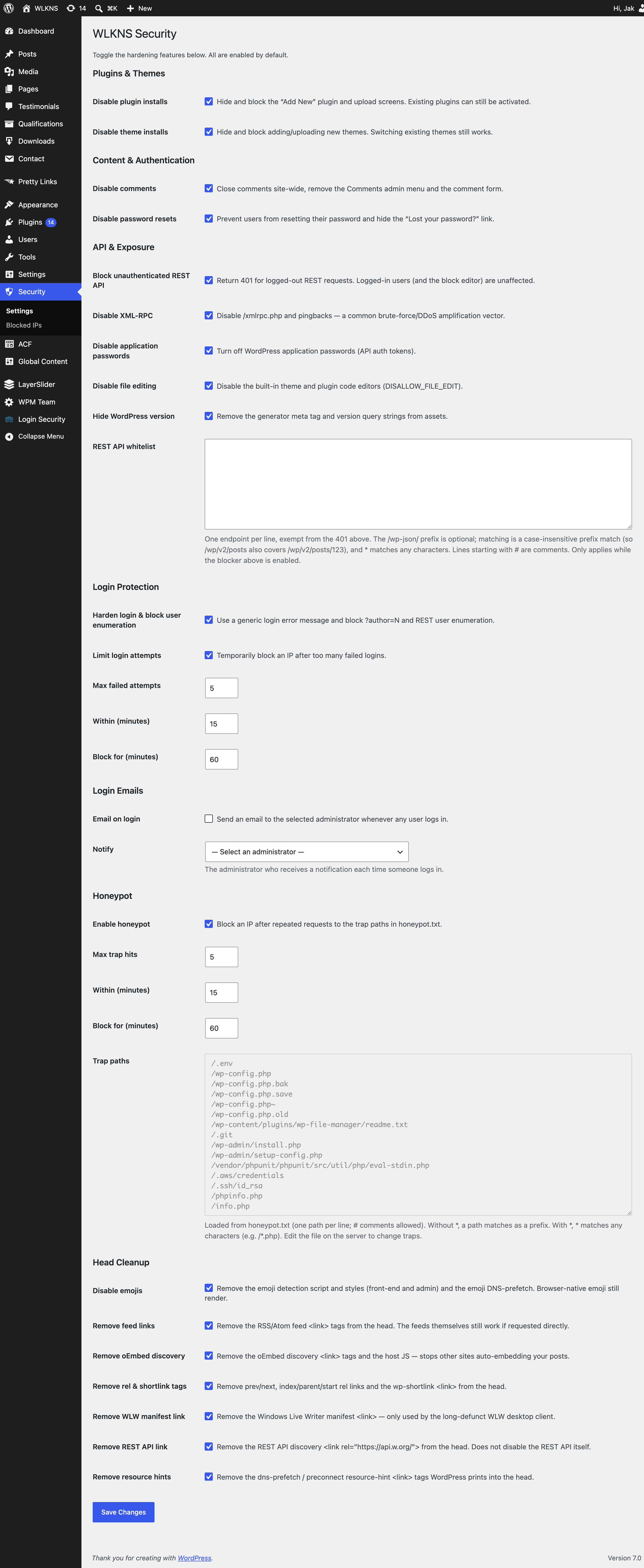
- Disable plugin installs — hide and block the "Add New"/upload plugin screens (activating existing plugins still works).
- Disable theme installs — the same lockdown for themes; switching existing themes still works.
- Disable comments — close comments site-wide and remove the comment UI.
- Disable password resets — prevent password resets and hide the "Lost your password?" link.
- Block unauthenticated REST API — return 401 to logged-out REST requests while leaving the block editor and logged-in users unaffected.
- Disable XML-RPC — turn off
/xmlrpc.phpand pingbacks, a common brute-force/DDoS amplification vector. - Disable application passwords — remove API auth tokens you may not use.
- Disable file editing — switch off the built-in theme/plugin code editors.
- Hide WordPress version — remove the generator tag and version query strings from assets.
- Login hardening — generic login errors plus blocking of
?author=Nand REST user enumeration. - Login attempt limiter — temporarily block an IP after too many failed logins (configurable threshold and lockout duration).
- Login emails — email a chosen administrator whenever any user logs in, including the username, role, source IP, and time. Off by default; pick a recipient to enable.
- Honeypot — block any IP that repeatedly requests one of a fixed set of trap paths (e.g.
/.env,/wp-config.php,/.git) that no legitimate visitor would request.
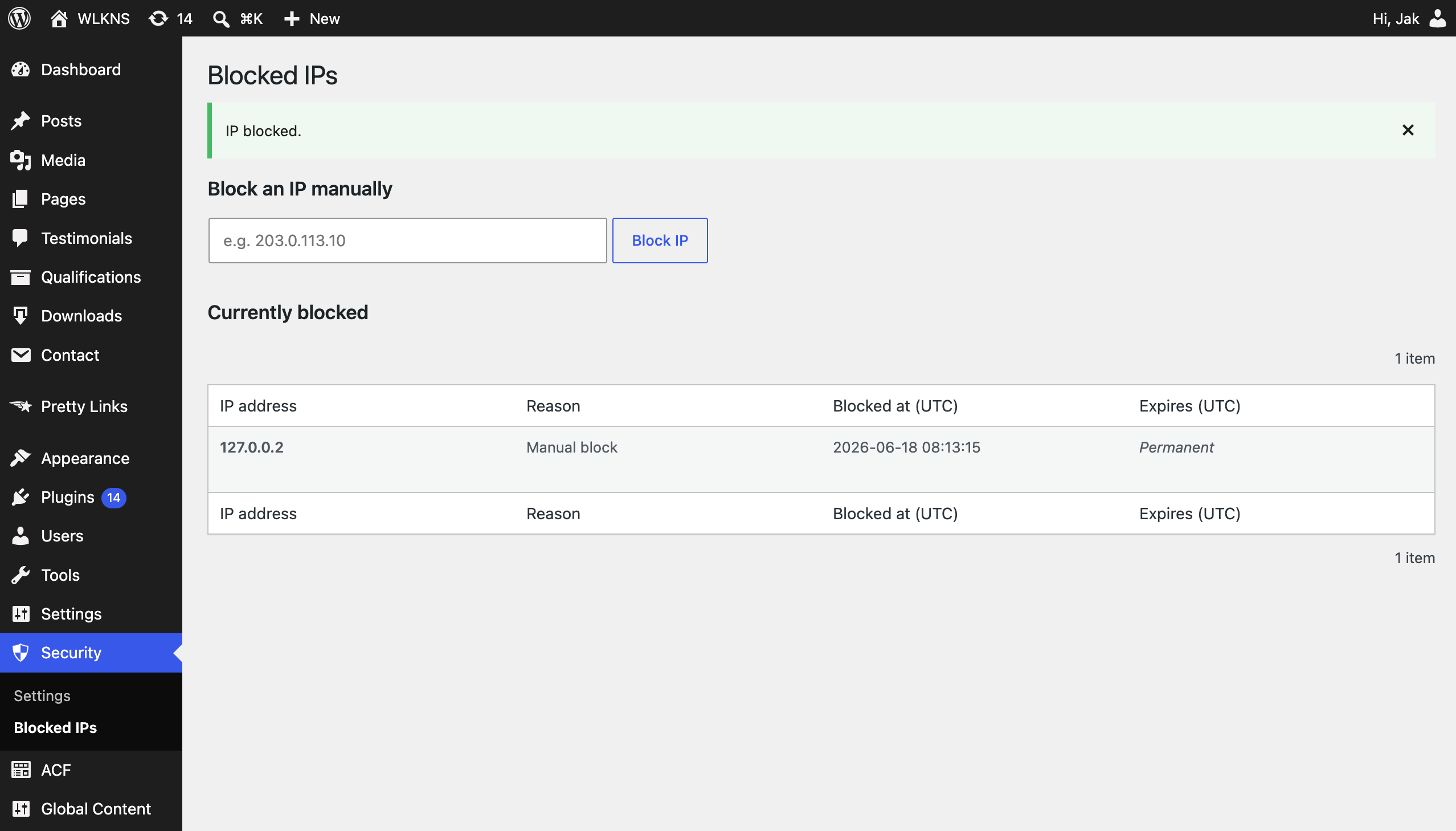
Blocked IPs are stored in their own table and managed from a dedicated Blocked IPs screen where you can review, unblock, or manually add addresses.
Note on proxies/CDNs: IP detection uses
REMOTE_ADDRonly, because forwarded headers can be spoofed. If your site sits behind a reverse proxy or CDN (e.g. Cloudflare), the originating IP must be resolved before it reaches PHP, or the blocklist will see your proxy's address.
Installation
- Upload the
wlkns-securityfolder to/wp-content/plugins/, or install it through the Plugins screen in WordPress. - Activate the plugin through the Plugins screen.
- Go to the new Security menu to review and adjust the protections. All features are enabled by default.
Frequently Asked Questions
Will disabling the REST API break the block editor?
No. Only logged-out requests are blocked. Logged-in users — including the block editor — continue to work normally.
I locked myself out with the login limiter. What now?
Open the Security → Blocked IPs screen and remove your IP, or delete the relevant row from the wp_wlkns_wws_blocked_ips table.
Does the honeypot catch every malicious request?
It catches requests that reach WordPress/PHP. Files served directly by your web server (or blocked at that layer) never hit the plugin, so pair it with sensible server configuration.
Does the plugin store any personal data?
It stores blocked IP addresses (and the reason/time) in a custom table so it can enforce blocks. Removing a block deletes the row; uninstalling the plugin drops the table.
Screenshots
- The Security settings screen with all hardening toggles.
- The Blocked IPs screen — review, unblock, or manually add an address.
Changelog
See CHANGELOG.md — generated from commit messages on each release.
Releases
2 releases. Each count is every asset in that release; expand a row for the breakdown.