Install
Upload it under Plugins → Add New Plugin → Upload Plugin, then activate.
Install straight from GitHub with WP-CLI:
wp plugin install https://github.com/we-wp/advanced-bundles-for-woocommerce/releases/download/v0.1.0/aim-advanced-bundles-0.1.0.zipAdvanced Bundles for WooCommerce is a free, open-source WooCommerce product bundles plugin for fixed kits, multipacks, gift sets, and product packs. Add simple products or exact variations, set quantities, and sell one bundle from one product page while WooCommerce keeps native control of pricing, stock, tax, shipping, orders, and refunds.
Download Free v0.1.0 ZIP · Try the live WooCommerce demo · View the plugin website and guides · Read v0.1.0 release notes
Free download. No account, email address, license key, or telemetry.
Upload the named release ZIP to WordPress. GitHub's automatic Source code archives are not installable plugin packages.
WooCommerce product bundle screenshots
These two screenshots come from the public synthetic demo and contain no customer or production data.
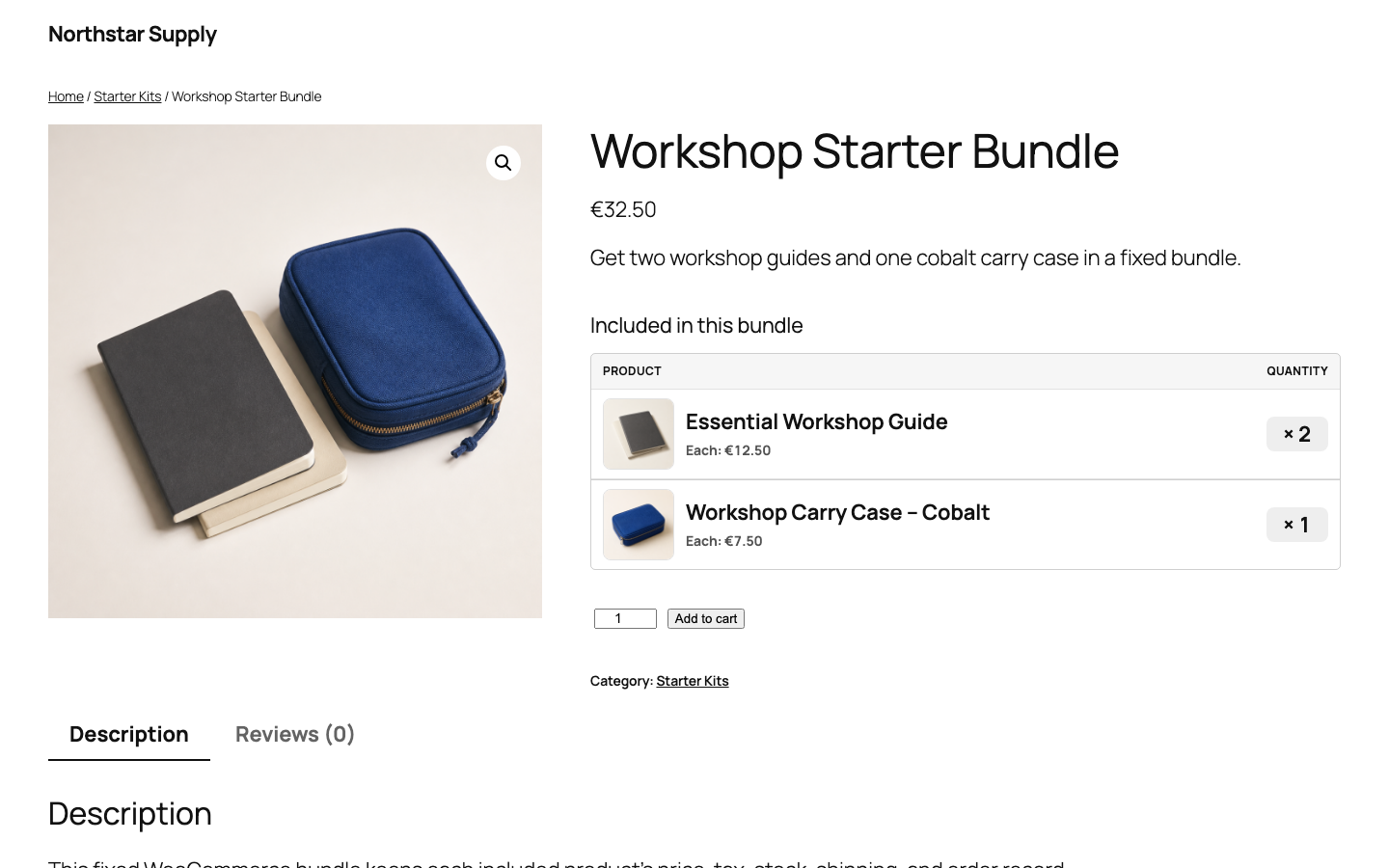
Storefront: Customers see every included product, unit price, and fixed quantity before adding the bundle to cart.
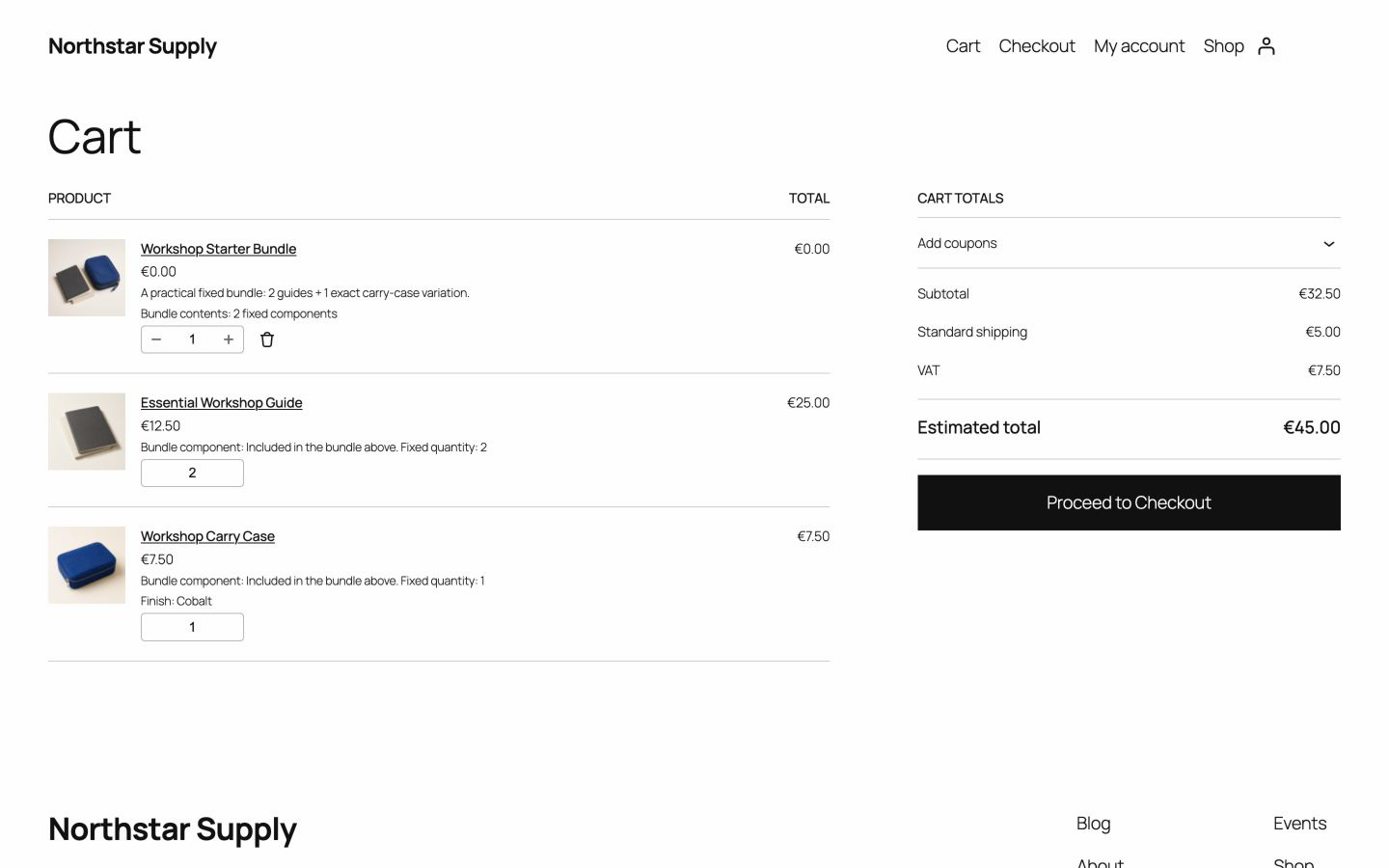
Cart: The zero-value bundle container groups native component lines, while WooCommerce keeps component pricing, stock, tax, shipping, and refund behavior.
Try the interactive WooCommerce product bundle demo in a temporary browser store. No account or shared data. Test the product page, bundle editor, cart, and checkout, then reset the store from the demo toolbar.
Used it successfully? Click Star at the top of this page to save the project and help other WooCommerce users find it. Use GitHub's Watch menu for repository notifications.
Create fixed WooCommerce product bundles
Choose simple products or exact variations, set fixed quantities, and publish one bundle product. Customers see included products in a clear table with thumbnails, prices, quantities, and links to each product.
At checkout, every included product stays a native WooCommerce line. Existing product settings continue to control price, tax, shipping, stock, fulfilment, and refunds. Saved bundle details remain on the order even if the bundle changes later.
Use Free when you need:
- A fixed kit, starter set, gift set, or product pack.
- One bundle page with a clear list of included products.
- Stock deducted from the real products and variations in the bundle.
- Native WooCommerce tax, shipping, fulfilment, and refund workflows.
How to create a WooCommerce product bundle
- Create or edit a WooCommerce product and select Bundle as the product type.
- Add simple products or exact variations and set a fixed quantity for each item.
- Publish the bundle. Its price is the sum of current component prices multiplied by their quantities.
Read the step-by-step WooCommerce product bundle setup guide for a longer walkthrough.
Free features
- Fixed simple products and exact variations.
- Fixed component quantities.
- Bundle pricing from current component prices.
- Combined stock checks before add-to-cart and checkout.
- Grouped classic and Cart/Checkout Blocks carts.
- Native WooCommerce order lines for tax, stock, shipping, fulfilment, and refunds.
- High-Performance Order Storage compatibility.
- Purchase snapshots that preserve calculated bundle details on the order.
The Free plugin has no account requirement, email gate, telemetry, or external requests.
Compatibility
| Software or feature | Support |
|---|---|
| WordPress | 6.8 or newer; tested through 7.1 for version 0.1.0 |
| WooCommerce | 9.9 or newer; tested through 11.0.1 for version 0.1.0 |
| PHP | 8.2 or newer; CI checks PHP 8.2, 8.3, and 8.4 |
| Cart and checkout | Classic templates and Cart/Checkout Blocks |
| Order storage | HPOS compatible |
Install the WooCommerce product bundles plugin
- Download the Free 0.1.0 installer ZIP.
- In WordPress, go to Plugins > Add New Plugin > Upload Plugin.
- Upload
aim-advanced-bundles-0.1.0.zip, select Install Now, then activate the plugin. - Create or edit a product and choose Bundle as the product type.
- Add products or exact variations under Bundle components, set quantities, and publish.
Install with WP-CLI
Requires WordPress 6.8+, WooCommerce 9.9+, and PHP 8.2+.
wp plugin install https://github.com/we-wp/advanced-bundles-for-woocommerce/releases/download/v0.1.0/aim-advanced-bundles-0.1.0.zip --activateThe same installable ZIP is available from the we-wp download mirror. Verify either download with the SHA-256 checksum published in the v0.1.0 release.
On macOS or Linux:
shasum -a 256 aim-advanced-bundles-0.1.0.zipExpected checksum:
cfd0f4cba21842d7216f1565bfe4ae874de29abf9a081d1620229e37b38ee2d4Current limits
- Free supports fixed products, fixed variations, and fixed quantities only.
- Bundle price is always calculated from current component prices and quantities.
- Customer choices, quantity ranges, conditional rules, discounts, and fixed bundle prices are not included.
- Pro is planned as a separate add-on. It is not included in this repository or Free ZIP.
- WordPress.org distribution is planned later. Install Free from the named GitHub Release asset for now.
Source and releases
This public repository contains the Free plugin source only. Advanced Bundles Pro is a separate planned add-on and is not included here.
Every published version is tagged. Each GitHub release includes the installable plugin ZIP and checksum. GitHub Releases is the primary public installer source; the website provides a verified mirror. The main branch may be newer than the latest release, so use release assets for production stores.
Review the 0.1.0 release notes before installing.
Development
Install the locked development dependencies and run every public check:
composer install
composer check
The full Free-only suite is available locally: locked dependency audit, owned PHP parsing, WordPress coding standards with PHP compatibility rules, PHPStan at maximum level with WordPress and WooCommerce stubs, synthetic PHPUnit tests, and explicit installable-ZIP inventory, repeatability, unzip -t, and SHA-256 verification. Public CI currently validates Composer metadata and PHP syntax on PHP 8.2, 8.3, and 8.4; expanding it to the complete suite is still pending.
See CONTRIBUTING.md before opening a pull request.
Support and security
- Use GitHub Issues for reproducible Free-version bugs. Remove private store and customer data first.
- Use the feature request template to explain a real store workflow that Free does not cover.
- Read SUPPORT.md for usage, setup, and compatibility questions.
- Report vulnerabilities privately. Follow SECURITY.md; do not open a public security issue.
License
Copyright 2026 UAB BusinessPress. Licensed under GPL-2.0-or-later. See LICENSE.
Releases
1 release. Each count is every asset in that release; expand a row for the breakdown.