Install
This is the repository archive. It installs, but the folder name will carry the branch suffix and updates will not flow.
Install straight from GitHub with WP-CLI:
wp plugin install https://github.com/waynra/order-on-whatsapp/archive/refs/heads/main.zipA WordPress plugin that lets shoppers send an order to the store's WhatsApp number with the message already written: product, chosen options, quantity, price and link. It also sends a whole cart in one message.
Built for small shops that still close most sales in WhatsApp chats.
▶ Try the live demo — a full WooCommerce store with this plugin, running in your browser via WordPress Playground. Nothing to install; it takes about a minute to load.
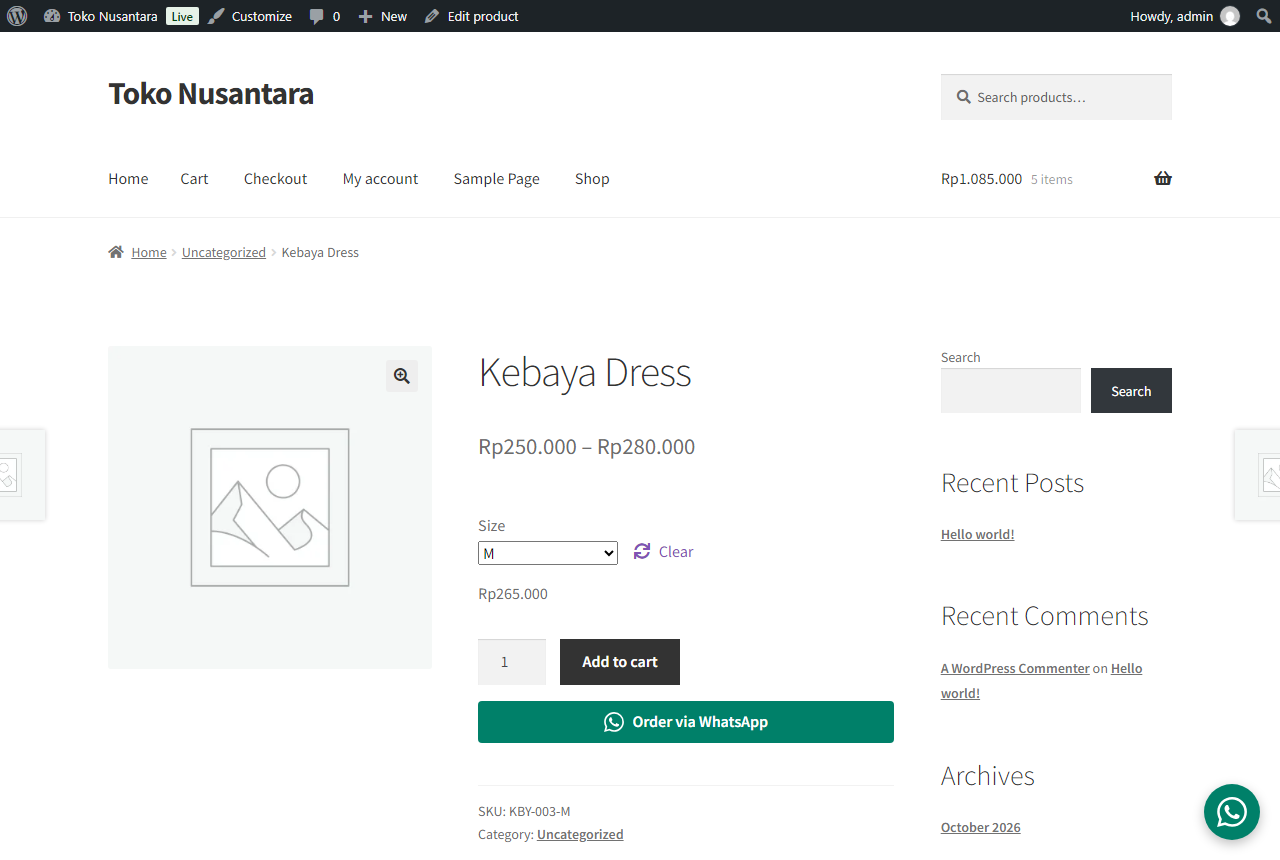
Message sent when the shopper picks size M and quantity 2:
Hello, I'd like to order:
*Kebaya Dress (Size: M)*
Quantity: 2
Price: Rp265.000
Subtotal: Rp530.000
https://example.com/product/kebaya-dress/
Message from the cart button:
Hello, I'd like to order these items:
- Kebaya Dress (Size: M) x 2 = Rp530.000
- Batik Parang Shirt x 3 = Rp555.000

*Total: Rp1.085.000*
Features
- Product page button under "Add to cart". The message updates live when the shopper changes the quantity or picks a variation (size, color).
- Shop page button for simple products (optional).
- Cart button that sends every item and the total. It reads the current cart from the WooCommerce Store API on click, so it works on both the classic cart and the block-based Cart page.
- Floating chat button on every page, bottom left or right.
- Shortcode
[order_on_whatsapp]for landing pages and posts. - Settings page with editable message templates and placeholders.
- Prices follow the store's currency settings (symbol, separators, decimals), e.g.
Rp185.000or₹1,499.00.
How it works
| Part | WordPress / WooCommerce API used |
|---|---|
| Settings page | Settings API (register_setting, add_settings_section, add_settings_field) with a sanitize callback and admin notices for invalid numbers |
| Product button | woocommerce_after_add_to_cart_button hook; JS listens to WooCommerce's found_variation / reset_data events |
| Shop button | woocommerce_after_shop_loop_item hook |
| Cart button | woocommerce_proceed_to_checkout (classic cart) and render_block_woocommerce/proceed-to-checkout-block (Cart block); message built from GET /wp-json/wc/store/v1/cart |
| Floating button | wp_footer |
| Shortcode | add_shortcode + shortcode_atts |
| Compatibility | Declares HPOS and Cart/Checkout blocks support via FeaturesUtil::declare_compatibility |
| Cleanup | uninstall.php removes the saved option |
Security: every value is sanitized on save (sanitize_text_field, sanitize_textarea_field, digits-only phone) and escaped on output (esc_url, esc_attr, esc_html, wp_kses). The settings page checks manage_options.
Accessibility: button colors meet WCAG AA contrast, the floating button has an aria-label, focus outlines are visible, and animations respect prefers-reduced-motion.
Notes from testing
esc_url()strips encoded line breaks (%0A), which flattened the message into one line. The wa.me link is built from a fixed host, a digits-only number andrawurlencode()output, so it is escaped withesc_attr()instead (seewa_href()).- An invalid number (leading
0, wrong length) shows an admin error and keeps the last good number, so the buttons never break. - The shortcode ignores draft and private products, because Contributors can place shortcodes (found with a security audit).
- On phones, Storefront shows a fixed toolbar at the bottom. The floating button moves above it using the
--oow-floating-bottomCSS variable.
Tested on
| Theme | Product page | Shop page | Classic cart | Cart block |
|---|---|---|---|---|
| Storefront (classic) | ✓ | ✓ | ✓ | ✓ |
| Twenty Twenty-Five (block) | ✓ | ✓ | – | ✓ |
WordPress latest, WooCommerce latest, PHP 8.3, via WordPress Playground.
Project structure
order-on-whatsapp/
├── order-on-whatsapp.php        Plugin header and bootstrap
├── includes/
│   ├── class-oow-settings.php   Settings page (Settings API)
│   └── class-oow-frontend.php   Buttons, shortcode, assets
├── assets/
│   ├── css/oow.css
│   └── js/oow.js                Live message updates + cart via Store API
├── blueprint.json               Local demo store (mounts this folder)
├── blueprint-demo.json          Browser demo (installs the plugin from GitHub)
├── screenshots/
├── uninstall.php
└── readme.txt                   WordPress.org format
Run the demo locally
Needs Node.js 20+.
git clone https://github.com/Waynra/order-on-whatsapp.git
cd order-on-whatsapp
npx @wp-playground/cli@3.1.54 server --auto-mount --blueprint=blueprint.json
This starts WordPress at http://127.0.0.1:9400 with WooCommerce, the Storefront theme, three sample products priced in Rupiah, and the plugin active. You are logged in as admin.
Install on a real site
- Download the code (Code > Download ZIP), rename the folder inside to
order-on-whatsappand zip it again, then upload it in Plugins > Add New > Upload Plugin and activate. - Open Settings > Order on WhatsApp and enter the number with the country code, without
+or a leading0(e.g.6281234567890).
Message placeholders
| Message | Placeholders |
|---|---|
| Product | {product} {qty} {price} {subtotal} {sku} {url} |
| Cart | {items} {count} {total} |
WhatsApp formatting works in templates, e.g. *bold*.
Author
Wahyu Nur Agustusanto — wahyunur.runs-on.dev
License
GPL-2.0-or-later