Install
This is the repository archive. It installs, but the folder name will carry the branch suffix and updates will not flow.
Install straight from GitHub with WP-CLI:
wp plugin install https://github.com/walidhoussaf/wc-installment-payments/archive/refs/heads/main.zipWC Installment Payments Engine
Enterprise-grade installment payment processing for WooCommerce.
This plugin implements a robust, event-driven payment engine designed to decouple payment scheduling from the immediate checkout flow. It prioritizes data integrity, automatic recovery, and observability over simple integration.
Key Architectural Highlights
- Service-Locator Pattern: Lightweight orchestration via a centralized
Pluginclass to manage dependencies and lazy-loading. - Custom Data Layer: Dedicated SQL tables (via
dbDelta) for high-performance querying, decoupling financial state from the heavywp_poststable. - Resilient Scheduling: A self-healing background worker that handles retries and failures without blocking the main thread.
- Penny-Perfect Calculation: Financial arithmetic engine ensuring zero-cent loss during installment splitting.
- Security First: HMAC-signed webhooks for secure communication with external recovery systems.
Table of Contents
- WC Installment Payments Engine
Project Structure
The codebase follows PSR-4 standards and separates concerns into logical domains (Core, Payments, Admin).
wc-installment-payments/
├── wc-installment-payments.php       # Entry Point: Bootstrap & Hook Registration
├── uninstall.php                     # Teardown: Clean up SQL/Options
├── src/
│   ├── Plugin.php                    # Orchestrator: Dependency Injection & Wiring
│   ├── Core/                         # Infrastructure Layer
│   │   ├── Activator.php             # Schema Migration (dbDelta)
│   │   ├── Deactivator.php           # Cron Cleanup
│   │   ├── Scheduler.php             # Cron Event Handler
│   │   └── WebhookDispatcher.php     # External Notification Service (HMAC)
│   ├── Payments/                     # Domain Logic Layer
│   │   ├── PlanManager.php           # DAO for Installment Plans
│   │   ├── PaymentManager.php        # DAO for Individual Transactions
│   │   ├── CheckoutHandler.php       # WooCommerce Integration Bridge
│   │   └── RetryStrategy.php         # Algorithm: Recovery Logic (Pure PHP)
│   └── Admin/                        # Presentation Layer
│       ├── AdminMenu.php             # Routing & Controllers
│       ├── PlanListTable.php         # WP_List_Table Implementation
│       └── PlanDetailView.php        # Detailed Reporting View
└── README.md
Data Architecture
The engine bypasses standard WordPress Post Meta to ensure ACID-compliant transactions and efficient querying for high-volume stores.
Plan Repository (wp_wcip_installment_plans)
Represents the "parent" agreement linked to the WooCommerce Order.
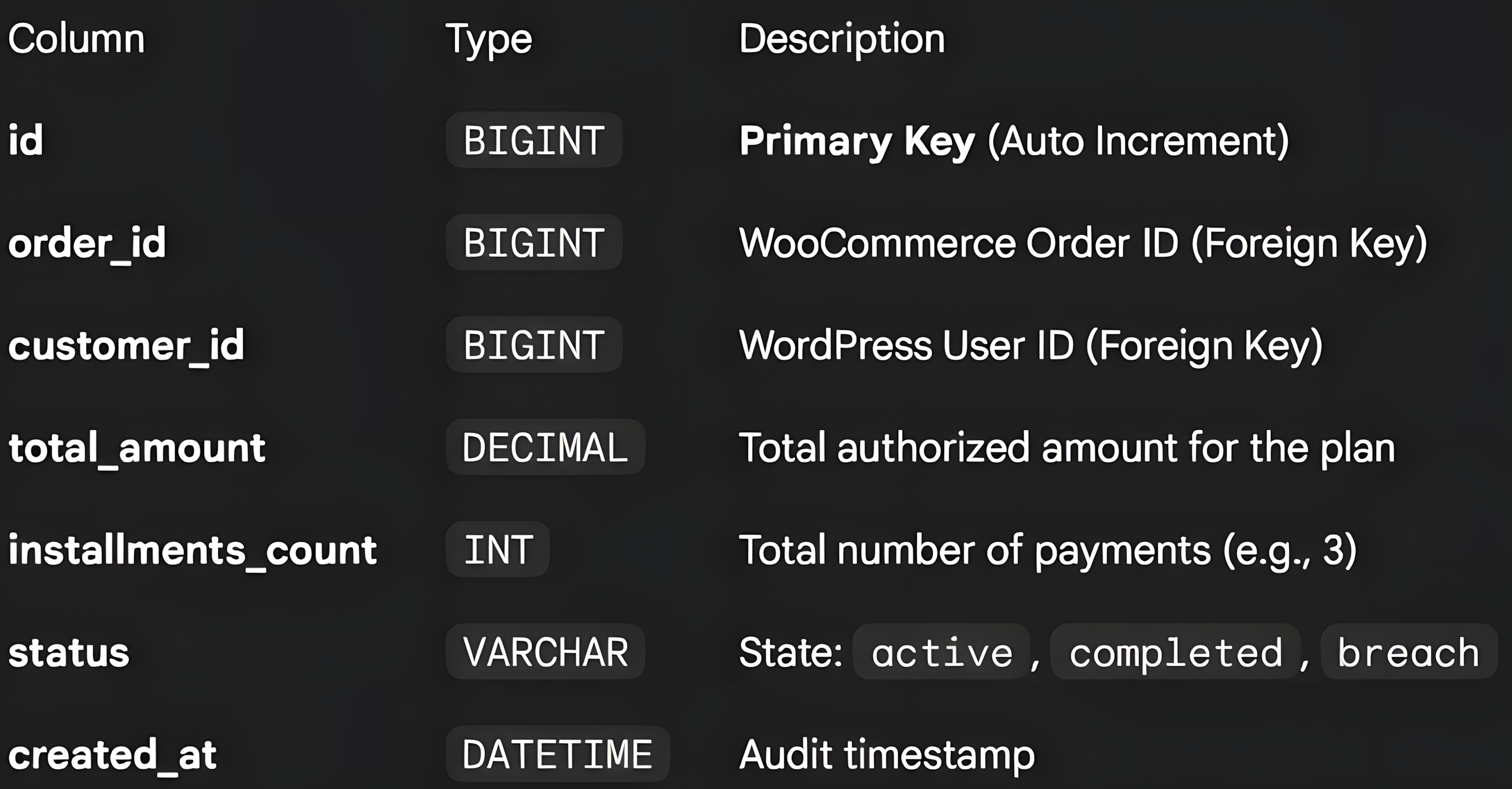
Payment Ledger (wp_wcip_installment_payments)
Represents the individual transaction schedule.
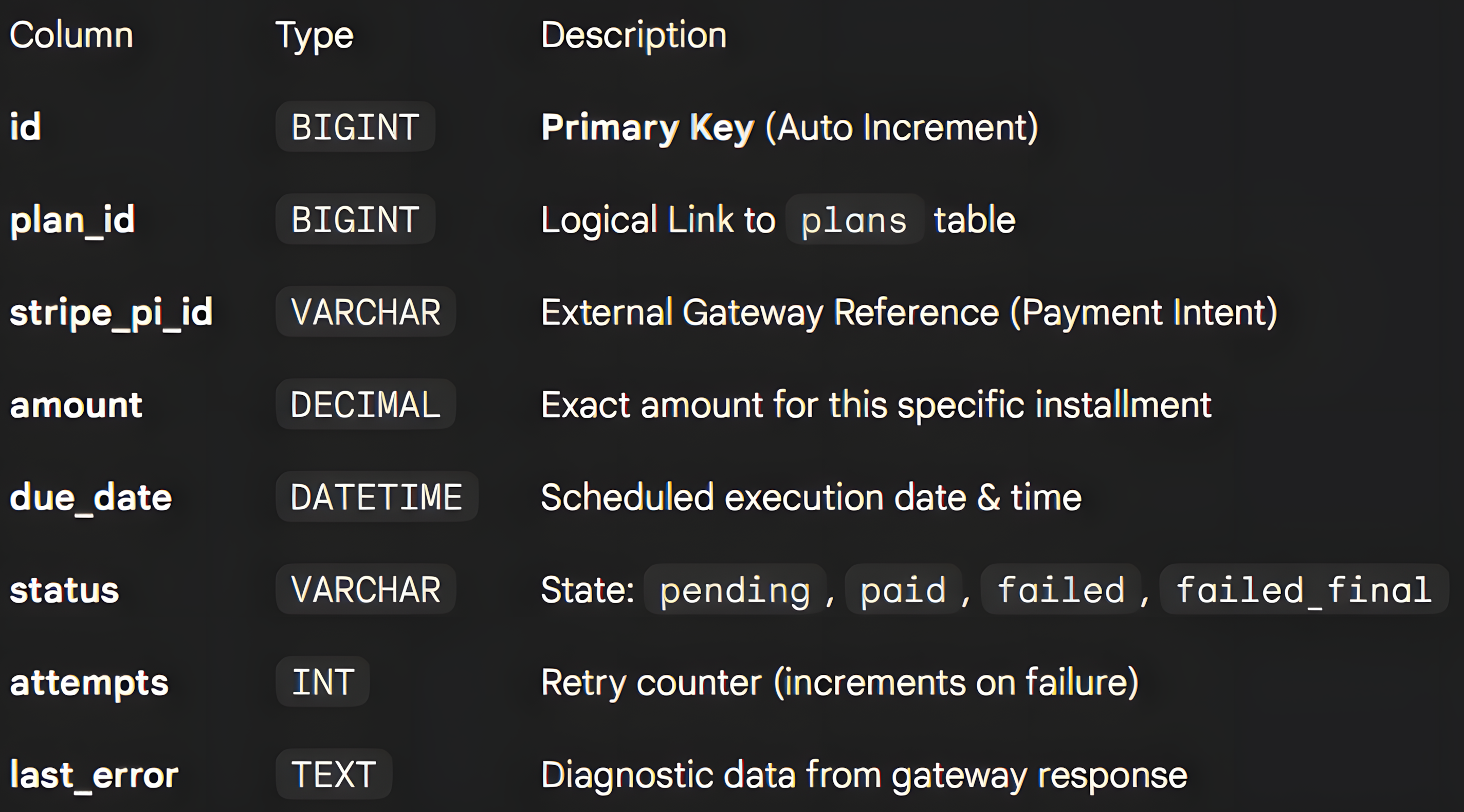
Note: Foreign Keys are logical at this stage to maintain compatibility with dbDelta, but the application layer enforces integrity.
Core Workflows
1. Checkout & Plan Generation
- Handler:
src/Payments/CheckoutHandler.php - Hook:
woocommerce_checkout_order_processed
When an order exceeds the configured threshold (e.g., 100€), the system engages the Installment Engine:
- Transaction Start: Initiates an SQL transaction (
START TRANSACTION). - Plan Initialization: Creates the parent record.
- Penny-Perfect Calculation: Splits the total ensuring no floating-point errors.
Example: 100€ / 3 installments Result:
33.33+33.33+33.34 - Ledger Creation:
- Installment 1: Marked
paid(captured by standard WC Checkout). - Installment 2+: Marked
pendingwith futuredue_date(D+30, D+60).
- Installment 1: Marked
- Commit: Finalizes the transaction.
2. The Scheduler Loop
- Handler:
src/Core/Scheduler.php - Cron Event:
wcip_hourly_process
The background worker operates on a "Fetch-Lock-Process" model to handle high throughput:
- Fetch:
PaymentManager::get_due_payments()retrieves allpendingitems wheredue_date <= NOW(). - Process: Iterates through payments securely (try/catch block per item).
- Execute: Calls
StripeService::charge_saved_card()(Simulation). - Result:
- Success: Updates status to
paid. - Failure: Triggers
wcip_payment_failedaction.
- Success: Updates status to
3. Retry Strategy (Smart Recovery)
- Handler:
src/Payments/RetryStrategy.php - Type: Pure PHP logic (Unit Testable)
The system implements a deterministic recovery strategy to maximize revenue recovery while minimizing gateway spam.
- Trigger: Payment failure in Scheduler.
- Logic:
- Attempt 1 fail → Reschedule to D+3
- Attempt 2 fail → Reschedule to D+7
- Attempt 3 fail → Reschedule to D+14
- Attempt 4 fail → Hard Failure
- Outcome:
- If retrying: Status remains
pending,due_dateupdated. - If exhausted: Status becomes
failed_final, Plan becomesbreach,wcip_payment_failed_finalaction fired.
- If retrying: Status remains
4. Webhook Dispatcher (Recovery)
- Handler:
src/Core/WebhookDispatcher.php
Upon a failed_final event, the system dispatches a secure notification to external dunning/collections software.
Security Specification:
- Method: POST (Async/Non-blocking)
- Signature:
X-WCIP-Signatureheader containingHMAC-SHA256of the payload. - Verification: Receiver uses the shared
secret_keyto validate payload integrity and origin.
Admin Interface
The plugin extends the WooCommerce dashboard to provide full visibility into the installment ledger.
Plan List View
Located at WooCommerce → Installment Plans. Built on top of the native WP_List_Table for consistency with WordPress UI standards. Includes:
- Sortable columns
- Status badges
- Pagination
Plan Detail View
Provides a granular view of a specific plan, including:
- Summary metrics (Total paid, remaining).
- Detailed schedule table (Stripe IDs, attempt counts, last error logs).
Installation & Configuration
-
Deploy: Upload the
wc-installment-paymentsdirectory towp-content/plugins/. -
Activate: Enable via WP Admin. Database migrations run automatically via
Activator::activate(). -
Configure keys: Go to WooCommerce → Installment Settings and set:
- Stripe API key
- Webhook URL
- Webhook secret
Alternatively, you can define constants in
wp-config.php:WCIP_STRIPE_API_KEYWCIP_WEBHOOK_URLWCIP_WEBHOOK_SECRET
Development Notes
Debugging & Logs
The system writes to the standard PHP error_log for critical events:
- Transaction rollbacks during checkout.
- Scheduler execution times and batch counts.
- Webhook response codes.
Manual Triggering
To force the scheduler without waiting for WP-Cron (useful for local dev):
wp cron event run wcip_hourly_processYou can also use WooCommerce → Payment Plans → Direct URL (nonce-protected) to trigger the scheduler and redirect back to the list.
Future Roadmap
- Multi-gateway Support: Extend beyond Stripe to support PayPal, Braintree, etc.
- Advanced Analytics: Dashboard with revenue projections and success rates.
- Customer Portal: Frontend interface for customers to manage their installment plans.
- API Endpoints: RESTful API for third-party integrations.