Install
Upload it under Plugins → Add New Plugin → Upload Plugin, then activate.
Install straight from GitHub with WP-CLI:
wp plugin install https://github.com/vpereira04/just-wanna-be-a-user/releases/download/v1.0.0/just-wanna-be-a-user.zipA WordPress plugin that lets admins log in as any user from the Users screen, then jump straight back to their own account.
Requirements
- WordPress 5.9 or later
- PHP 7.4 or later
Installation
- Copy the
just-wanna-be-a-userfolder intowp-content/plugins/. - Activate Just Wanna Be a User on the Plugins screen.
Usage
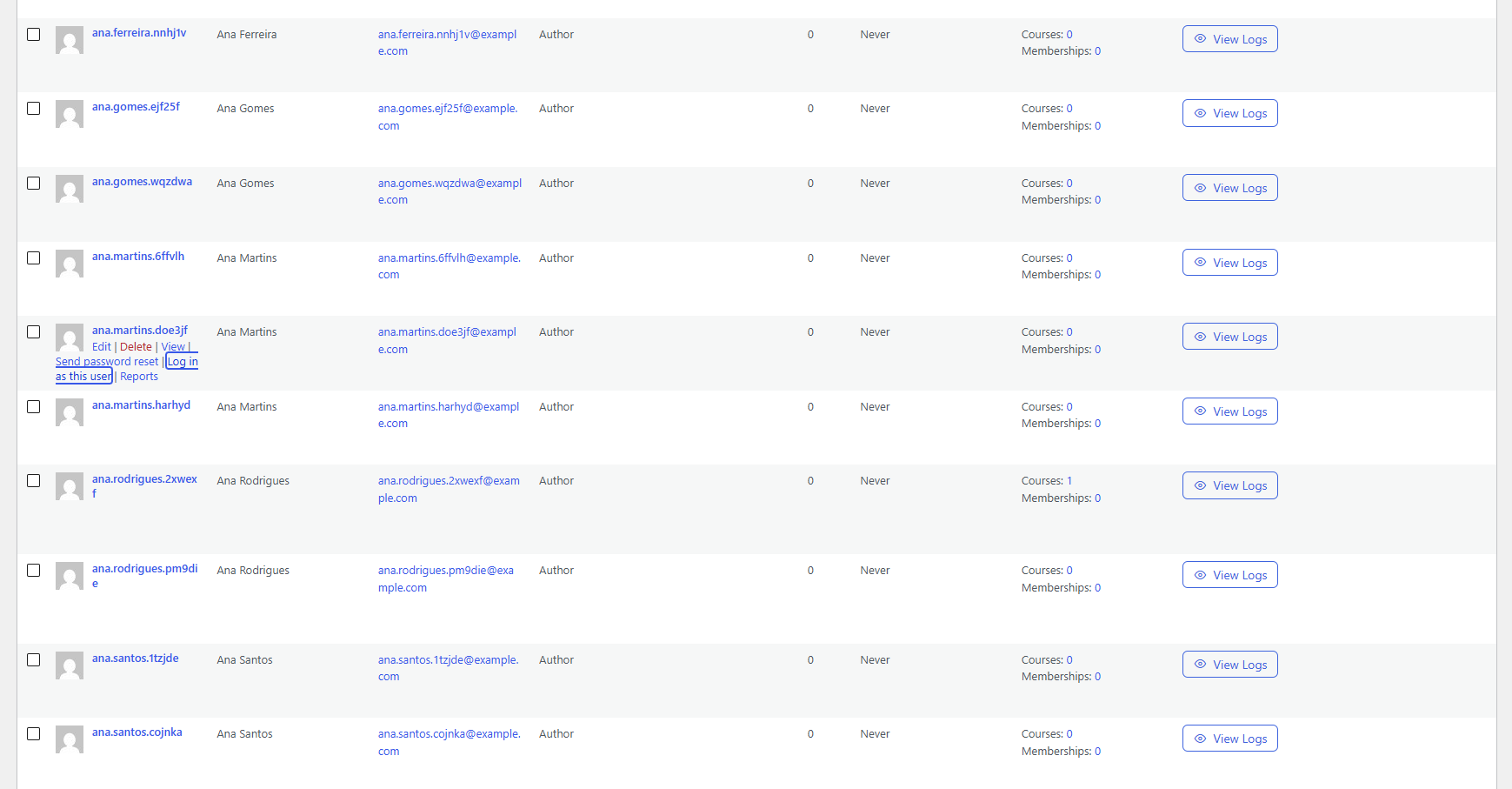
- Go to Users and hover over a user.
- Click Log in as this user. You are logged in as that user and sent to the site's homepage.
- A bar pinned to the top center of the page shows who you're viewing as. Click Go back to admin to return to your own account on the Users screen.
The link only appears for users you're allowed to edit (edit_user), and never on your own row.
Screenshots
The "Log in as this user" link on the Users screen
The "Go back to admin" bar while logged in as another user

How it works
Everything lives in just-wanna-be-a-user.php, in the JWBAU_User_Switcher class.
Switching in (admin-post.php?action=jwbau_switch_to)
- The nonce and the
edit_usercapability are checked. - The admin's current session token is kept alive, and a signed reference to it is generated with
wp_generate_auth_cookie(). It's stored in an HttpOnly session cookie namedjwbau_origin_{COOKIEHASH}. - The auth cookies are swapped to the target user, then the browser is redirected to the homepage.
Switching back (?jwbau_switch_back=1&_wpnonce=… on any front-end URL)
- This runs on
initat priority 0, before maintenance-mode plugins that block oninit. - The nonce is checked, and the origin cookie is validated with
wp_validate_auth_cookie(). That only passes while the admin's original session is still active. - The target user's temporary session is destroyed, and the admin's original session token is restored.
- The browser is redirected to
wp-admin/users.php.
The "Go back to admin" bar
- It prints on
wp_footerandadmin_footer. - Many pages exit before the footer, for example maintenance-mode screens and
wp_die()permission errors. For those, ashutdownfallback prints the bar and its styles. It only does this for HTML responses: it skips redirects, AJAX, REST, XML-RPC, cron and non-text/htmlcontent types.
The plugin stores no options and creates no tables, so there's nothing to clean up on uninstall.
Development
With WordPress Coding Standards installed, run from the plugin folder:
phpcs --standard=WordPress --runtime-set text_domain just-wanna-be-a-user --ignore=vendor .Before a release, also run the Plugin Check plugin against it.
License
GPL-2.0-or-later. See https://www.gnu.org/licenses/gpl-2.0.html.
Releases
1 release. Each count is every asset in that release; expand a row for the breakdown.