Install
This is the repository archive. It installs, but the folder name will carry the branch suffix and updates will not flow.
Install straight from GitHub with WP-CLI:
wp plugin install https://github.com/vl4dimirz/raidpress/archive/refs/heads/main.zip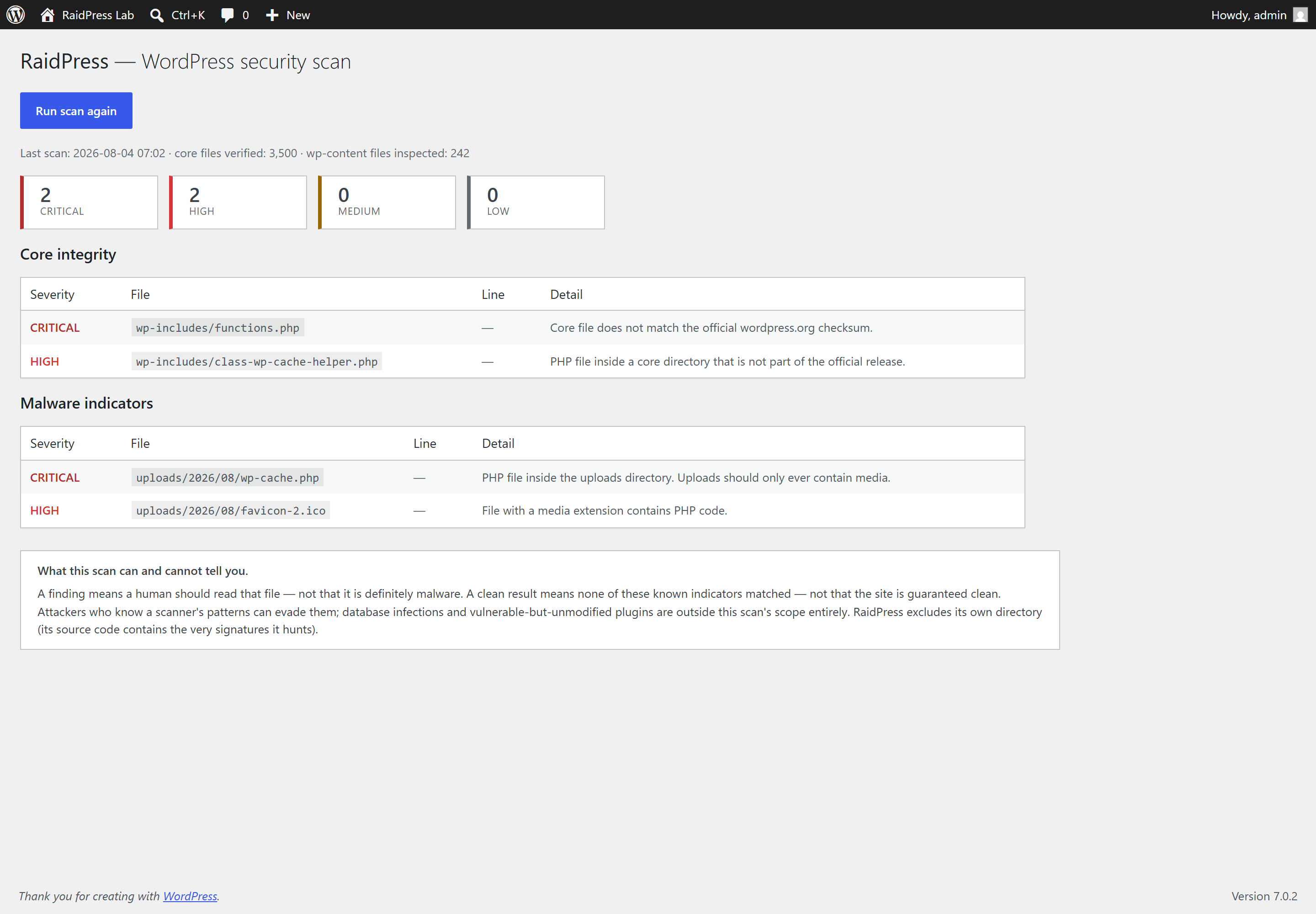
A WordPress security scanner that answers one question honestly: has anything on this site been changed by someone who was not supposed to change it?
It does that two ways.
1. Core file integrity. Every file WordPress ships is hashed and compared against the official checksum list that wordpress.org publishes for that exact version and locale. Core files never change legitimately between releases, so any difference is worth a human's attention:
core-modified— the file exists but its hash does not match (critical)core-missing— a core file is gone (high)core-unknown— a file lives insidewp-admin/orwp-includes/that is not part of the official release (high for PHP files — that is where droppers hide, under names likeclass-wp-cache-helper.phpthat nobody questions by eye)
2. Malware indicators in wp-content. Themes, plugins and uploads are walked looking for constructs that legitimate code almost never contains: eval() of a decoded payload, shell execution fed straight from request input, request input invoked as a function, include of a .ico/.png (how the wp-vcd family hides its payload), long hex-escape runs, and string signatures of known webshell families. Two location rules carry their own weight regardless of file contents: any PHP file inside uploads/ is critical (uploads should only ever hold media), and a media file containing <?php is high.
What this scan can and cannot tell you
This matters more than the feature list, so it is stated in the plugin UI as well as here.
A finding means a human should read that file — not that the file is definitely malware. A clean result means none of these known indicators matched — not that the site is clean. An attacker who knows a scanner's patterns can write around them. Database-resident infections, vulnerable-but-unmodified plugins, compromised credentials and server-level backdoors are all outside this scan's scope.
RaidPress excludes its own directory from the malware scan, because its source contains every signature it hunts for. That is a deliberate, documented exclusion rather than a blind spot — and it is the reason the test suite covers the exclusion logic explicitly.
Install
Copy the folder into wp-content/plugins/ and activate it, or:
git clone https://github.com/Vl4dimirz/raidpress.git wp-content/plugins/raidpressThen open RaidPress in the admin sidebar and run a scan. Requires PHP 8.1+ and WordPress 6.0+. Nothing is sent anywhere; the only outbound request is to api.wordpress.org for the official checksum list, which is cached for twelve hours.
Running the tests
composer install
composer test
21 tests, no WordPress install required. That is by design: the scanner core (RaidPress_Checksum_Verifier, RaidPress_Malware_Scanner, RaidPress_Finding) is plain PHP with no WordPress functions in it, and the WordPress-dependent pieces — fetching checksums, the admin page, persistence — are a thin layer on top. The security logic is therefore testable in milliseconds against a synthetic site tree instead of requiring a full WordPress test harness.
The malicious fixtures the tests scan are assembled at runtime from split string literals, so no file committed to this repository looks like a webshell. Committing the real constructs would trip GitHub's scanning, antivirus on clone, and any reviewer skimming the diff — while adding nothing, since the scanner only ever sees the assembled bytes.
Verified against a real infection
The screenshots in this repo come from a WordPress 7.0.2 install with four deliberate compromises planted in it:
| Planted | Detected as |
|---|---|
| A core file with an appended line | core-modified (critical) |
A dropper named class-wp-cache-helper.php in wp-includes/ |
core-unknown (high) |
A webshell in uploads/2026/08/wp-cache.php |
php-in-uploads (critical) |
PHP hidden inside favicon-2.ico |
php-hidden-in-media (high) |
All four were found: 3,500 core files verified, 242 wp-content files inspected.
Security posture of the plugin itself
A security tool has no excuse for its own holes. Scans run only through admin-post behind both a nonce and a manage_options capability check; every value rendered in the admin page is escaped; no user input reaches the filesystem layer at all — the scanner is only ever pointed at ABSPATH and WP_CONTENT_DIR.
License
MIT. Written by Phisit Tantiranon.