Rating Glance releases
WordPress plugin that shows your Google and Tripadvisor rating at a glance: score, review count and link. Block, widget and shortcode.
by Visco Horeca · github.com/visco-horeca/rating-glance · website
Install
The author publishes release zips, so WP-CLI can install straight from GitHub:
wp plugin install https://github.com/visco-horeca/rating-glance/releases/download/v1.1.2/rating-glance.zipA small WordPress plugin that shows your Google and Tripadvisor rating at a glance: score, number of reviews and a link to the review page. Made for restaurant and business footers, but it works anywhere.
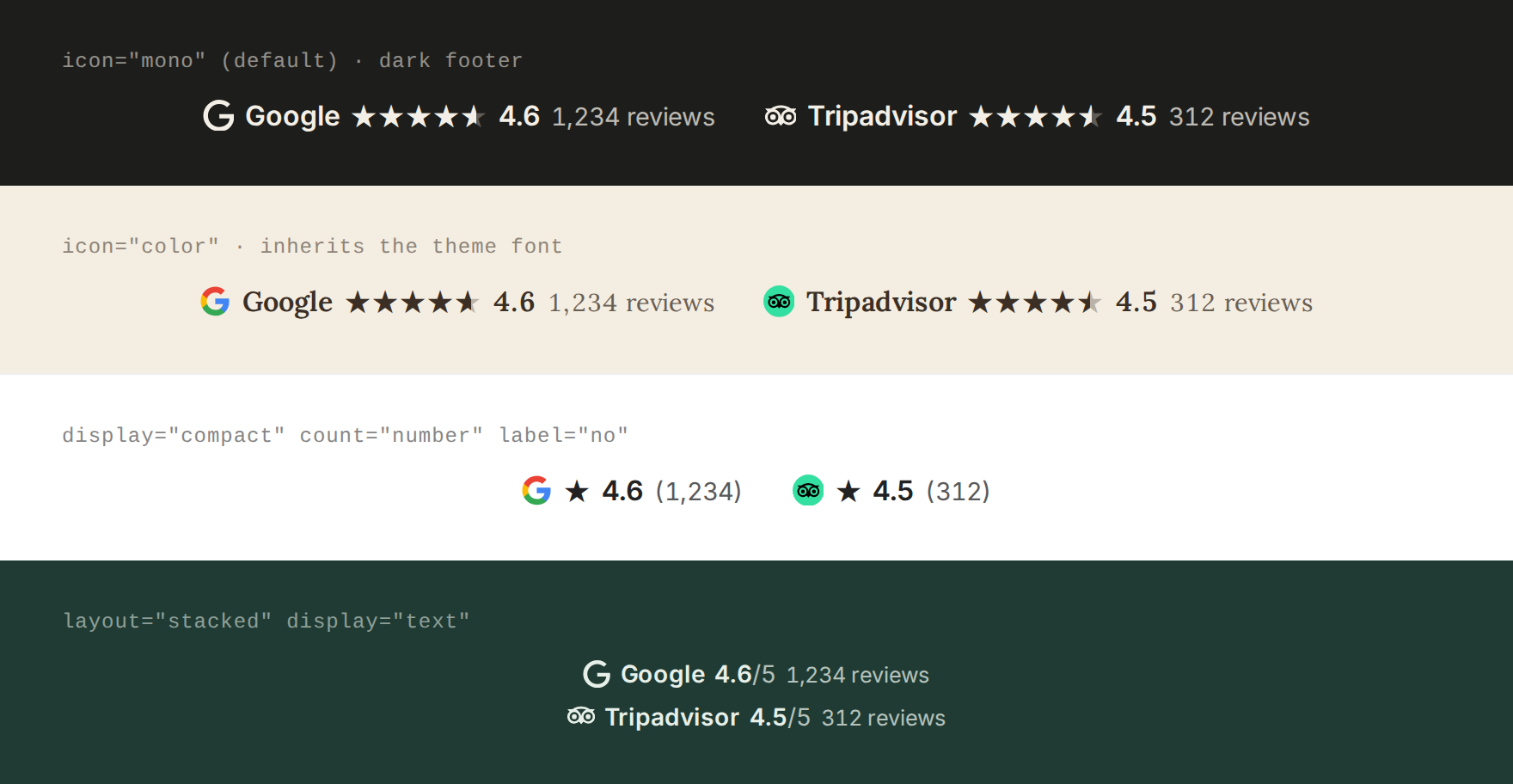
- Block, classic widget and
[rating_glance]shortcode, so it works with block themes, classic themes and page builders (Elementor, Divi, …). - Links to your listings: each rating links to your Google Maps place and Tripadvisor page, with the Google and Tripadvisor logos in your text color or in brand colors.
- Inherits your theme: font, size and text color come from wherever you place it. Works on light and dark footers.
- Fast: ratings are fetched in the background via SerpApi and cached. Visitors never wait on an external API.
- Resilient: if a fetch fails, the last known values stay visible. Manual override per source.
- Easy setup: built-in search finds your Google place ID and Tripadvisor page.
- Accessible: each rating is a single link with a descriptive screen-reader label.
- No dependencies, no build step.
Installation
- Download rating-glance.zip from the latest release and upload it via Plugins → Add New → Upload Plugin. (Don't use GitHub's "Source code" zip; it has the wrong folder name.)
- Go to Settings → Rating Glance and enter a SerpApi key. The free plan is enough: a daily refresh uses about 60 searches a month.
- Click Find next to Google and Tripadvisor, pick your business, and save.
- Add the Rating Glance block, widget or
[rating_glance]shortcode to your footer.
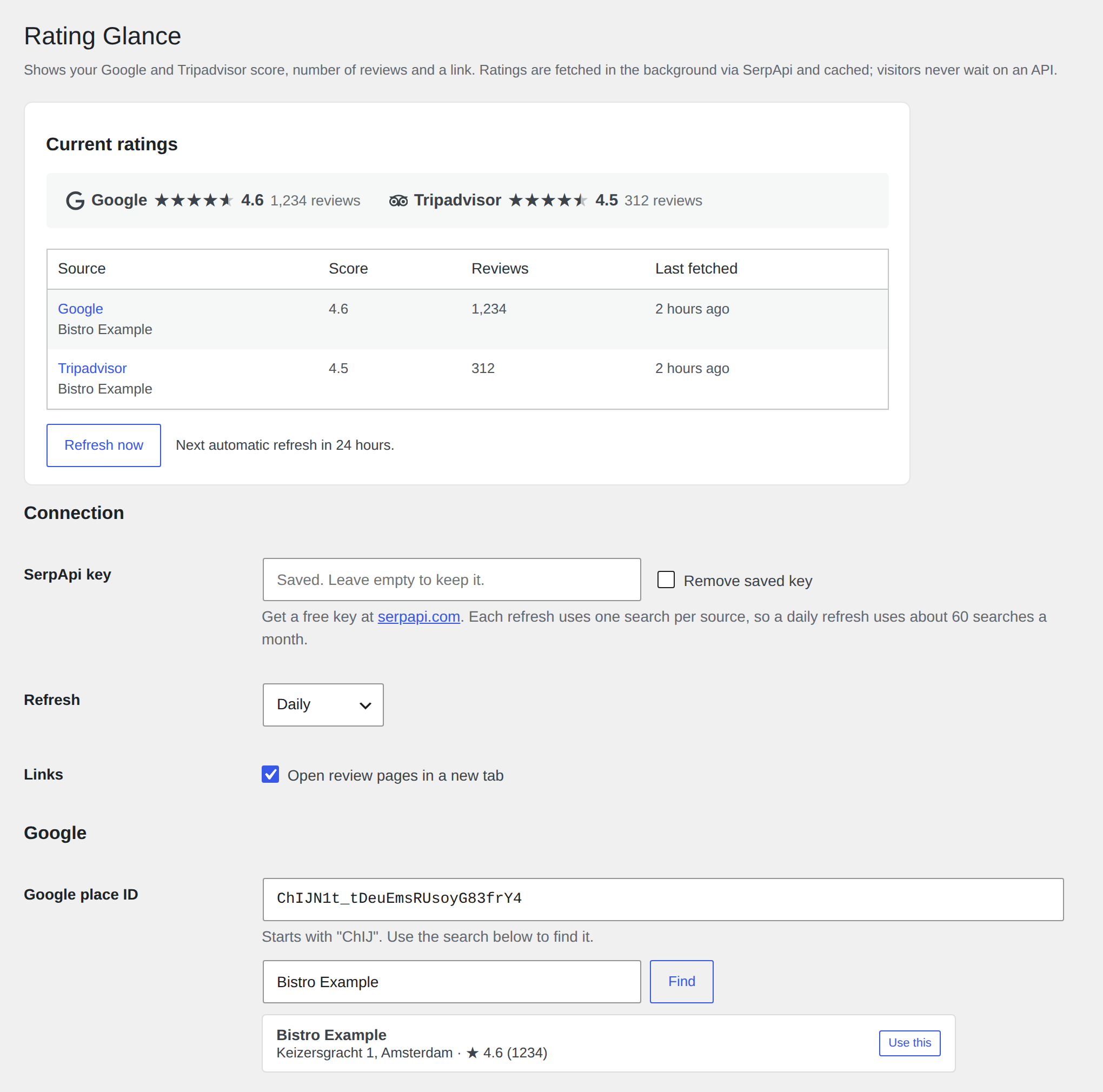
Updating
Rating Glance isn't in the WordPress.org plugin directory, so WordPress won't notify you about new versions or update it automatically. To update:
- Download the new rating-glance.zip from the latest release. The changelog lists what changed.
- Go to Plugins → Add New → Upload Plugin and upload it.
- WordPress sees the plugin is already installed. Click Replace current with uploaded.
Your settings and cached ratings are kept. Don't delete the old version first: deleting the plugin removes its settings, including your API key and place IDs.
To get notified of new releases, click Watch → Custom → Releases on this GitHub repository.
Shortcode
[rating_glance sources="google,tripadvisor" display="stars" icon="mono" count="text" layout="inline" align="start" label="yes"]| Attribute | Values | Default |
|---|---|---|
sources |
google, tripadvisor, comma-separated, in display order |
both |
display |
stars (five stars + score), compact (one star + score), text (4.6/5) |
stars |
icon |
mono (logo in text color), color (brand colors), none |
mono |
count |
text ("250 reviews"), number ("(250)"), none |
text |
layout |
inline, stacked |
inline |
align |
start, center, end |
start |
label |
yes, no (show source name) |
yes |
new_tab |
yes, no |
setting |
class |
extra CSS class |
Styling
The output uses currentColor and font: inherit, so it usually needs no CSS. To fine-tune, set these variables on .rating-glance or any parent:
| Variable | Default |
|---|---|
--rg-gap |
0.5em 1.75em |
--rg-inner-gap |
0.4em |
--rg-icon-size |
1.15em |
--rg-star-color |
currentColor |
--rg-star-empty-opacity |
0.3 |
--rg-count-opacity |
0.75 |
/* Gold stars */
.rating-glance { --rg-star-color: #e0a526; }
How it works
A WP-Cron event (twice daily, daily or weekly) calls SerpApi's google_maps (place) and tripadvisor_place endpoints, and stores rating, review count and link in a single option. Rendering only reads that option. Saving settings or clicking Refresh now triggers an immediate fetch.
On low-traffic sites WP-Cron only runs when someone visits. For exact timing, trigger wp-cron.php from a real cron job.
Privacy
Requests to SerpApi are made from your server only, with your API key and the configured place ID or search text. No visitor data is sent. See SerpApi's terms and privacy policy.
Trademarks
Google and Tripadvisor names and logos are trademarks of their respective owners. They're used only to link to the business's own listing; this project isn't affiliated with or endorsed by either company. Icons: Simple Icons (CC0) and the Google "G" from Wikimedia Commons (public domain).
Requirements
WordPress 6.2+, PHP 7.4+.
Contributing
Issues and pull requests are welcome.
- Commit messages follow Conventional Commits (
fix: …,feat: …,feat!: …). release-please uses them to bump the version, write the changelog and publish releases. - Build an installable zip locally with
./scripts/build-zip.sh(needsbash,rsyncandzip). The result isdist/rating-glance.zip. - CI lints all PHP files on PHP 7.4 through 8.4.
License
MIT © Visco Horeca
Releases
4 releases. Each count is every asset in that release; expand a row for the breakdown.