Install
This is the repository archive. It installs, but the folder name will carry the branch suffix and updates will not flow.
Install straight from GitHub with WP-CLI:
wp plugin install https://github.com/vespaiach/additional-css-enhancement-plugin/archive/refs/heads/main.zipWhy This Plugin Exists
WordPress built-in block Additional CSS is simple and useful for small style changes, but it is limited when a block needs more flexible styling. It does not provide a comfortable way to write scoped selectors, responsive media queries, or other conditional CSS directly for a single block.
That makes responsive block design harder than it needs to be. Additional CSS Enhancement was created to keep the simplicity of block-level Additional CSS while adding the syntax needed to build responsive, state-aware, and more adaptable blocks.
The plugin replaces the default core custom CSS support for supported blocks with an enhanced editor control. CSS entered in the block sidebar is compiled in the editor, previewed against the current block, stored with a versioned cache, and rendered on the frontend only when the compiled CSS still matches the saved source.
Demo
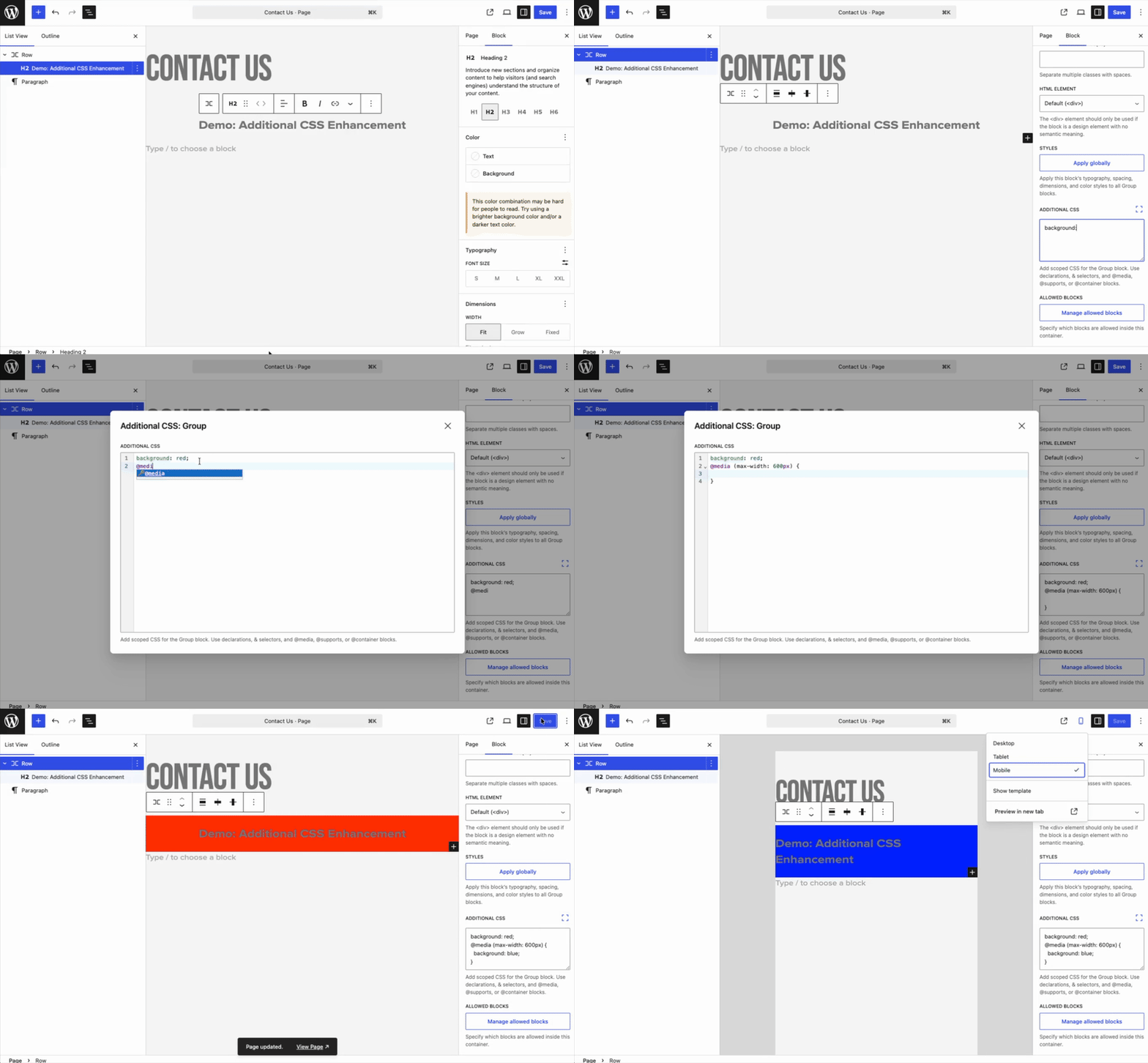
Supported Blocks
The supported block list is defined in supported-blocks.json.
Current supported blocks:
- Paragraph
- Heading
- List
- Quote
- Image
- Gallery
- Video
- Cover
- Group
- Columns
- Column
- Buttons
- Button
How It Works
The plugin keeps the familiar block-level Additional CSS workflow, but adds a safer compilation step between what the user writes and what the browser receives.
CSS for each supported block is treated as belonging only to that block. Simple declarations are scoped automatically, and nested selectors use & to make the connection to the current block explicit.
Valid CSS is previewed in the editor and rendered on the frontend only after it has been compiled, matched to the saved source, and validated again.
Supported CSS Syntax
The Additional CSS field supports a scoped subset of CSS. The current block is always the scope root.
Top-level declarations
Write declarations directly to style the selected block:
color: #111;
padding: 1.5rem;
border-radius: 8px;
Nested selectors with &
Use & anywhere you need to target the current block selector. Nested selectors must include &.
&:hover {
    color: #005f73;
}

&.is-style-outline {
    border: 1px solid currentColor;
}

& .wp-block-button__link {
    text-decoration: underline;
}
Comma-separated selectors are supported when each selector uses &:
&:hover,
&:focus-visible {
    outline: 2px solid currentColor;
}
Supported at-rules
The plugin supports wrapper @media, @supports, and @container rules. Inside these at-rules, use the same supported syntax: declarations, & selectors, comments, and nested supported wrapper at-rules.
@media (min-width: 768px) {
    padding: 2rem;

    &.is-style-wide {
        max-width: 1200px;
    }
}

@supports (display: grid) {
    display: grid;
    gap: 1rem;
}

@container (min-width: 400px) {
    font-size: 1.125rem;
}
Comments
CSS comments are allowed and ignored by the compiler.
/* Larger touch target on interactive cards. */
& a {
    padding-block: 0.5rem;
}
Rejected syntax
The plugin rejects CSS that cannot be safely scoped to the current block.
Unsupported examples:
/* Missing &: rejected. */
.child {
    color: red;
}

/* Unsupported at-rule: rejected. */
@keyframes fade-in {
    from { opacity: 0; }
    to { opacity: 1; }
}

/* Nested rules inside nested selectors: rejected. */
& .child {
    color: red;

    & .grandchild {
        color: blue;
    }
}

/* HTML or style markup: rejected. */
<style>
    .example { color: red; }
</style>
Unsupported at-rules include @keyframes, @font-face, @layer, and other at-rules outside @media, @supports, and @container.
Limitations
- The plugin only works with the supported core blocks listed above.
- It supports a scoped CSS subset, not every CSS feature.
- Nested selectors must use
&; global selectors such asbody,.site-header, or another block outside the selected block are not supported. - Only
@media,@supports, and@containerat-rules are supported. - Nested rules inside another nested selector are not supported.
- CSS with HTML or `