Install
This is the repository archive. It installs, but the folder name will carry the branch suffix and updates will not flow.
Install straight from GitHub with WP-CLI:
wp plugin install https://github.com/vanilla-core/vc-extended-acf-icons/archive/refs/heads/main.zipExtends Advanced Custom Fields Pro’s Icon Picker with additional icon libraries: Font Awesome, Heroicons, Lucide, and your own SVG uploads.
Built by Vanilla Core.
Requirements
- WordPress 6.0+
- PHP 7.4+
- Advanced Custom Fields Pro 6.3+ (Icon Picker field)
The plugin activates without ACF Pro, but shows an admin notice and does not load features until ACF Pro with Icon Picker is available.
Features
- Extra Icon Picker tabs: Font Awesome, Heroicons, Lucide, Custom Icons
- Same ACF Icon Picker UX as Dashicons (searchable grid)
- Lazy-loaded grids (~50 icons at a time, more on scroll) for large catalogs
- Settings page under Settings → Icon Libraries
- Bulk SVG upload with drag-and-drop (Media Library–style grid)
- Uploaded custom icons are hidden from the Media Library
- Optional Font Awesome Kit code for Pro icons
- Enhanced return formats: HTML, URL, ID, enriched array
- Theme-agnostic helpers for rendering icons in templates
Installation
- Download or clone this repository into
wp-content/plugins/vc-extended-acf-icons - Activate Extended ACF Icons in Plugins
- Ensure ACF Pro 6.3+ is active
- Open Settings → Icon Libraries to configure providers and upload custom SVGs
Screenshots
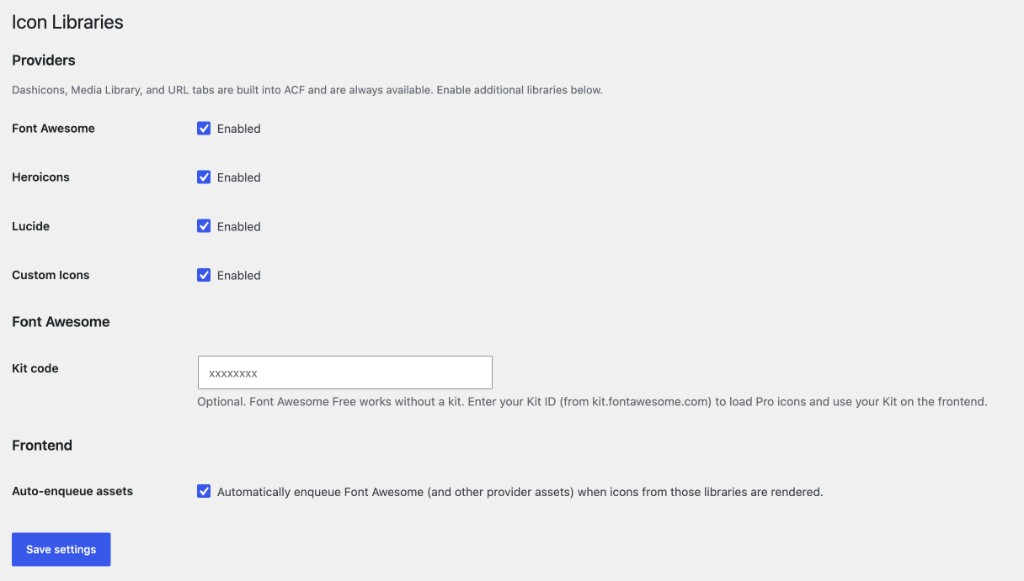
1. Settings
Enable libraries and optionally enter a Font Awesome Kit ID for Pro icons.
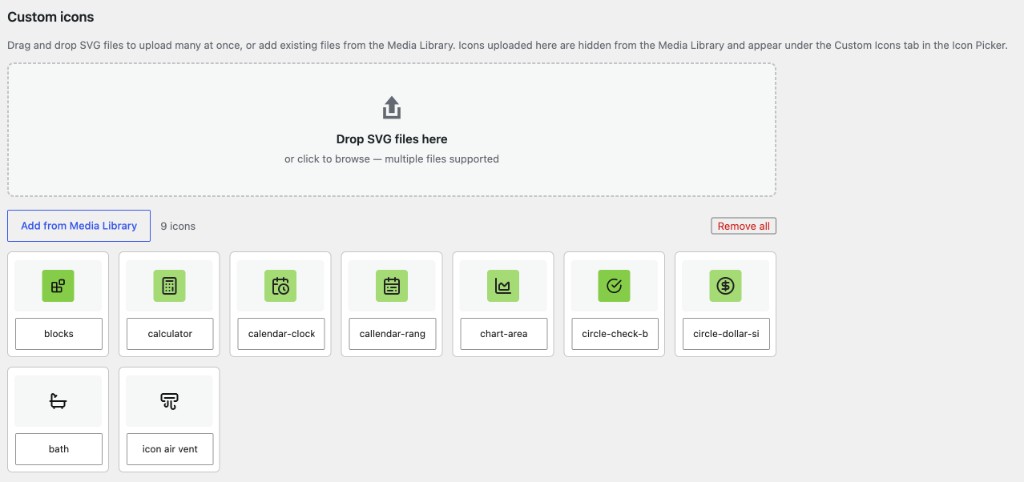
2. Custom icons upload
Upload many SVGs at once. Icons are stored as attachments but filtered out of the Media Library UI.
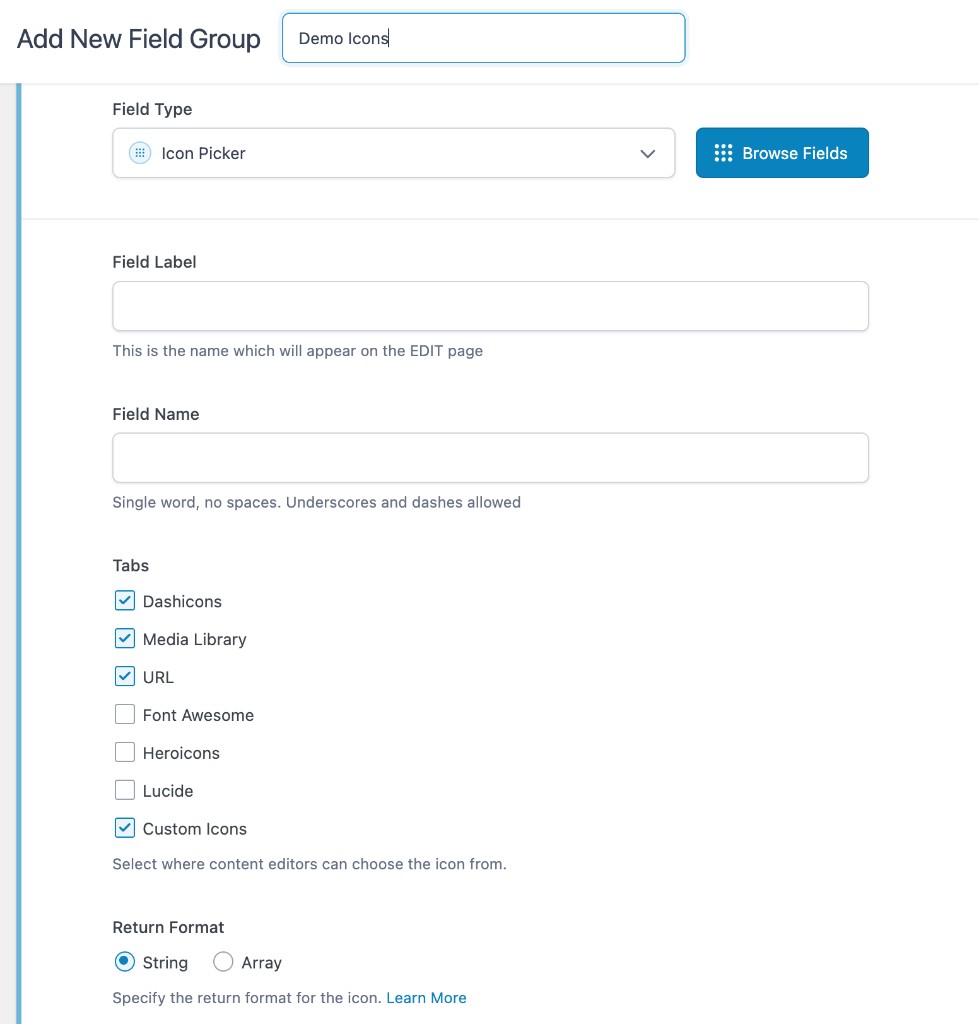
3. ACF field extension
When adding an Icon Picker field, enable which tabs editors can use (including this plugin’s libraries).
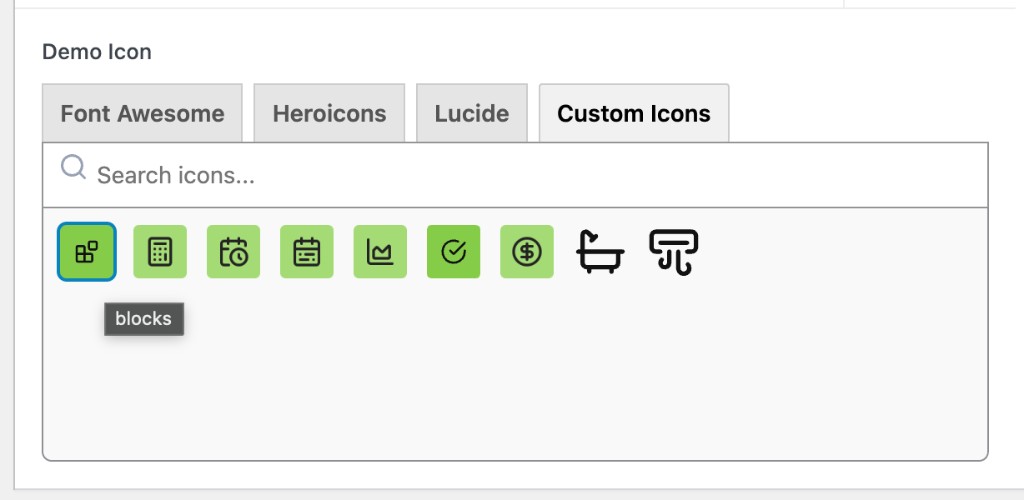
4. Icon picker
Editors pick icons from Font Awesome, Heroicons, Lucide, or Custom Icons — same searchable grid UX as Dashicons.
Usage
1. Configure libraries
Go to Settings → Icon Libraries:
| Setting | Purpose |
|---|---|
| Providers | Enable/disable Font Awesome, Heroicons, Lucide, Custom Icons |
| Font Awesome Kit code | Optional; Free works without it. Kit unlocks Pro icons + Kit frontend load |
| Auto-enqueue assets | Load Font Awesome CSS/Kit when icons are used |
| Custom icons | Drag-and-drop SVGs or add from Media Library |
2. Add an Icon Picker field
- Edit a field group in ACF
- Add field type Icon Picker
- Under Tabs, enable the libraries you want (e.g. Font Awesome, Custom Icons)
- Optionally set Icon Libraries Return Format (HTML, URL, ID, array, …)
Native ACF return formats (String / Array) still work. The plugin’s return format overrides them when set.
3. Output in templates
<?php
$icon = get_field( 'my_icon' );

// If return format is HTML:
echo $icon;

// Or use helpers with any stored value (array or string):
vc_extended_acf_icons_render( $icon );

$html = vc_extended_acf_icons_get( $icon, 'html' );
$url  = vc_extended_acf_icons_get( $icon, 'url' );
$id   = vc_extended_acf_icons_get( $icon, 'id' );     // attachment ID when applicable
$arr  = vc_extended_acf_icons_get( $icon, 'array' );  // type, value, provider, label, url, html, id
Enriched array shape
[
  'type'     => 'fontawesome', // or heroicons, lucide, custom, dashicons, …
  'value'    => 'solid:house',
  'provider' => 'fontawesome',
  'label'    => 'House',
  'url'      => 'https://…',
  'html'     => '<i class="fa-solid fa-house" …>',
  'id'       => null, // or attachment ID for custom / media library
]
How it works
The plugin does not register a new field type. It extends ACF’s Icon Picker via:
acf/fields/icon_picker/tabsacf/fields/icon_picker/{tab}/icons
Stored values stay ACF-native: { type, value }.
Large catalogs are preloaded lightly in HTML (~50 icons), then hydrated over AJAX and rendered in pages of ~50 as you scroll.
Custom icons
- Dropzone accepts multiple
.svgfiles - Files are sanitized on upload
- Marked with meta
_vc_eai_custom_iconand excluded from Media Library queries - Labels are editable in the settings grid (auto-saved)
- Still available under the Icon Picker Custom Icons tab
Font Awesome notes
- Free works out of the box (CDN CSS + SVG previews)
- Enter a Kit code in settings to use Pro icons and load your Kit on the frontend
- Pro icon binaries are not bundled in the plugin
Privacy / external requests
Admin picker previews and (optionally) frontend assets may load from CDNs such as jsDelivr (Font Awesome Free, Heroicons, Lucide). With a Font Awesome Kit configured, the Kit script loads from kit.fontawesome.com.
Development
Plugin slug / folder: vc-extended-acf-icons
Text domain: vc-extended-acf-icons
Main file: vc-extended-acf-icons.php
vc-extended-acf-icons/
├── vc-extended-acf-icons.php
├── readme.txt
├── README.md
├── assets/
│   ├── admin.css
│   ├── admin.js
│   ├── data/          # icon manifests (FA Free, Heroicons, Lucide)
│   └── screenshots/
└── includes/
    ├── class-plugin.php
    ├── class-providers.php
    ├── class-formatter.php
    ├── class-settings.php
    ├── class-custom-icons.php
    └── providers/
Changelog
1.1.0
- Rename plugin to Vanilla Core
vc_prefix (vc-extended-acf-icons) - Migrate options and custom-icon meta from previous slug
- Back-compat aliases for
acf_icon_libraries_get()/acf_icon_libraries_render()
1.0.3
- Hide dropzone-uploaded custom icons from the Media Library
- Backfill hidden meta for existing SVG icons in the custom set
1.0.2
- Media Library–style custom icon grid with drag-and-drop bulk upload
- AJAX upload / save for custom icons
1.0.1
- Lazy-loaded icon grids for large libraries
- Documentation / Plugin URI updates
1.0.0
- Initial release
License
GPL-2.0-or-later. See readme.txt and the plugin header.
Credits
- Advanced Custom Fields — Icon Picker API
- Font Awesome
- Heroicons
- Lucide