Install
This is the repository archive. It installs, but the folder name will carry the branch suffix and updates will not flow.
Install straight from GitHub with WP-CLI:
wp plugin install https://github.com/vagu3s0ul/visitor-analytics-wordpress-plugin/archive/refs/heads/main.zip📊 Visitor Analytics WordPress Plugin
Lightweight visitor tracking plugin with bot detection, geo-tagging, and traffic trend charts
📋 Overview
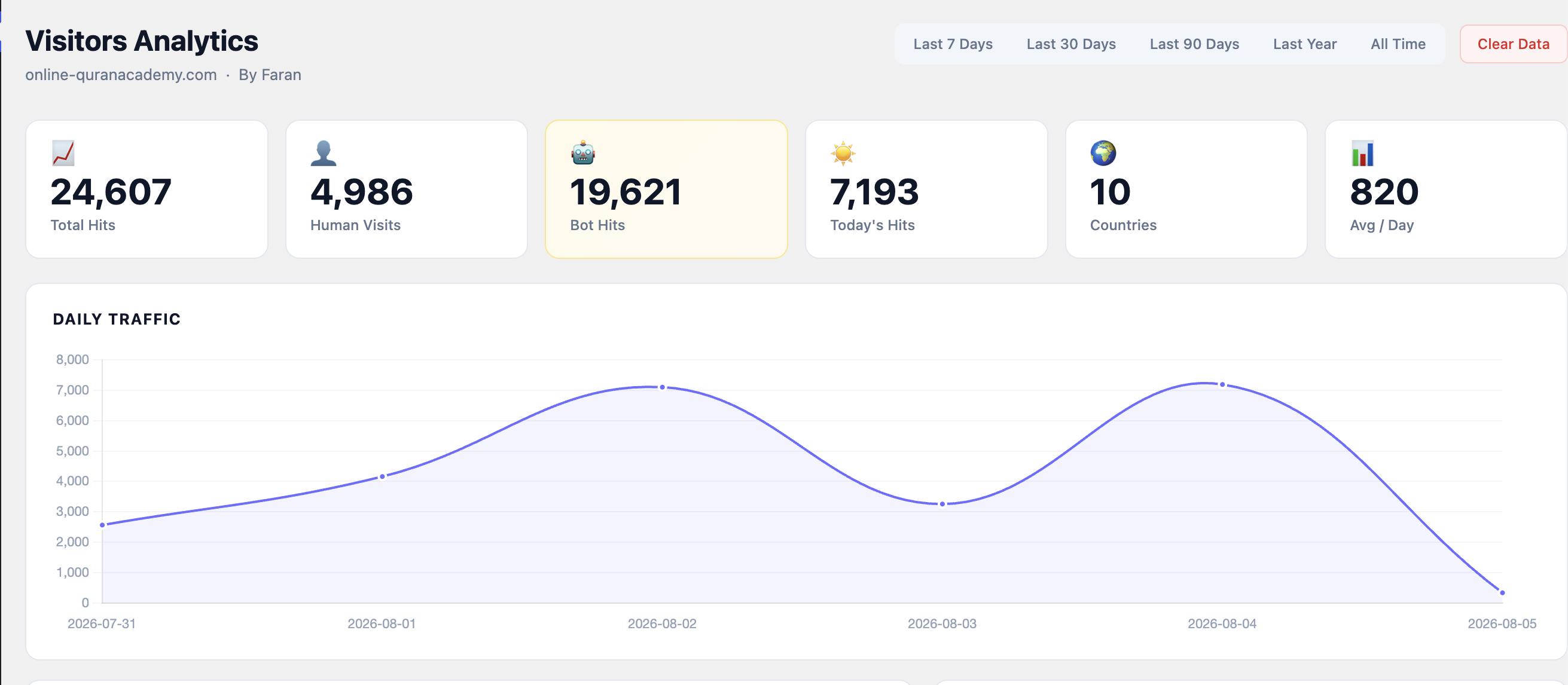
Custom WordPress plugin that logs every site visit and separates human traffic from bot crawlers. It tracks page hits, visitor countries, daily trends, and provides a clean admin dashboard with time-range filters and data-clearing utilities. Built for a Quran academy site that reached 24,607 hits across 10 countries with an 820 hits/day average.
✨ Key Features
📈 Traffic Metrics
- Total Hits — cumulative site impressions
- Human Visits — real user sessions (excludes known bots)
- Bot Hits — search engine crawlers and scrapers detected via user-agent
- Today's Hits — real-time daily counter
- Unique Countries — visitor geo-diversity
- Average Hits/Day — historical trend baseline
📊 Daily Traffic Chart
- 7-day line chart showing hit volume over time
- Peaks and valleys visualization for traffic spikes
- Automatically filters by selected time range (Last 7 Days / 30 Days / 90 Days / Year / All Time)
🌍 Geolocation
- Logs visitor country via IP lookup (MaxMind GeoIP or similar)
- Country count displayed on main dashboard
- (Optional) detailed country breakdown in reports
🕵️ Bot Detection
- User-agent parsing for common bots (Googlebot, Bingbot, YandexBot, etc.)
- Separates bot traffic from human analytics
- Highlighted bot hit count in yellow for at-a-glance health check
🗂️ Time Range Filters
- Last 7 Days / Last 30 Days / Last 90 Days / Last Year / All Time
- Dashboard auto-recalculates KPIs and chart on filter change
- Persistent filter selection across admin sessions
🧹 Data Management
- Clear Data button to reset hit logs (keeps schema)
- Useful for testing or periodic archiving
- Admin-only access with confirmation dialog
🛠️ Tech Stack
| Layer | Technology |
|---|---|
| Backend | PHP 7.4+ (WordPress plugin API) |
| Database | WordPress wp_options or custom table |
| Frontend | JavaScript (vanilla or jQuery), Chart.js |
| Geolocation | MaxMind GeoLite2 or IPStack API |
| Admin UI | WordPress Admin CSS + custom styles |
🚀 Installation
Prerequisites
- WordPress 5.8+
- PHP 7.4+
- (Optional) MaxMind GeoIP database or API key for accurate country detection
Setup
- Download & upload
# Clone or download the plugin folder
git clone https://github.com/yourusername/visitor-analytics-wordpress-plugin.git
Upload to WordPress
mv visitor-analytics-wordpress-plugin /path/to/wordpress/wp-content/plugins/visitor-analytics
2. **Activate**
- Go to **WordPress Admin → Plugins → Installed Plugins**
- Find "Visitor Analytics" and click **Activate**

3. **(Optional) Configure geolocation**
- If using MaxMind, download `GeoLite2-Country.mmdb` and place it in `plugins/visitor-analytics/data/`
- If using an API, enter your key in **Settings → Visitor Analytics → GeoIP API Key**

4. **View analytics**
- Navigate to **Dashboard → Visitor Analytics** in the WordPress admin menu
- The plugin starts logging hits immediately upon activation

## 📸 Screenshots

<div align="center">

<img src="docs/screenshots/1.png" alt="Full dashboard: 6 KPI cards, 7-day traffic chart, time-range filters" width="100%">

</div>

## 🔄 System Architecture

```mermaid
graph LR
    A[WordPress Frontend] -->|Page Load| B[Plugin Hook]
    B --> C{User Agent}
    C -->|Bot| D[Bot Hit Log]
    C -->|Human| E[Human Visit Log]
    E --> F[IP Lookup]
    F --> G[Country DB]
    G --> H[(Hit Records)]
    D --> H
    I[Admin Dashboard] --> H
    H --> J[KPI Cards]
    H --> K[Chart.js Daily Trend]
🔐 Security & Privacy
- IP Logging: If storing IPs, comply with GDPR/CCPA — anonymize or discard after geo-lookup.
- Admin-only: Dashboard and clear-data action restricted to
manage_optionscapability. - Rate limiting: Consider caching hit logs (batch writes every N visits) to reduce DB load on high-traffic sites.
- Bot filtering: Whitelist known good bots (Googlebot) if you want them in analytics; blacklist scrapers you want excluded.
🤝 Contributing
Contributions welcome — especially:
- Support for WP REST API endpoints (headless analytics)
- Referrer tracking (where visitors come from)
- Page-level breakdown (which posts/pages get the most traffic)
- CSV export for external analysis
Fork, branch, and submit a PR with a clear description.
📄 License
MIT License — see LICENSE. Free to use, modify, and distribute.
Simple analytics. No tracking scripts. No third-party cookies.