Install
This is the repository archive. It installs, but the folder name will carry the branch suffix and updates will not flow.
Install straight from GitHub with WP-CLI:
wp plugin install https://github.com/ursishant/web-stories-templates-studio/archive/refs/heads/main.zipWeb Stories Templates Studio
Curated, high-retention 9:16 templates engineered with strict safe zones for Google Web Stories on WordPress.
⚡ Overview
Web Stories Templates Studio provides a massive catalog of 500+ high-retention visual templates engineered specifically for Google Web Stories on WordPress. Every template is built with 5 unique design archetypes per category across 100+ niches (Crypto, AI & Robotics, Haute Cuisine, Fitness, Luxury Lifestyle, Travel, Streetwear, Gaming, and more).
Unlike generic story builders that place critical text underneath browser navigation bars or swipe-up banners, Web Stories Templates Studio enforces Google's official design bounds and safe zones by default — guaranteeing your headlines, badges, and CTAs render with zero clipping across every iOS and Android device.
📸 Visual Tour & Screenshots
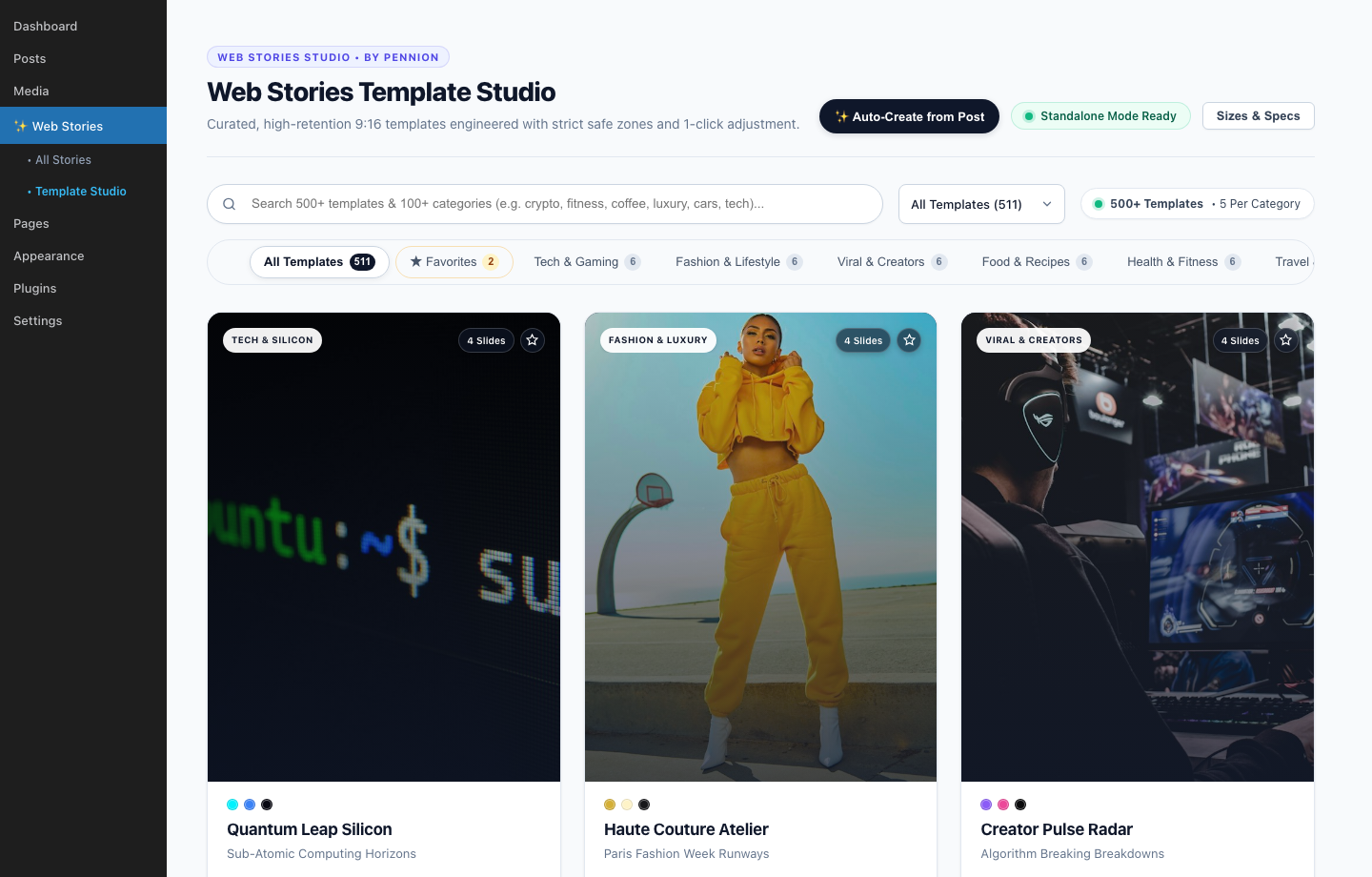
1. Template Studio & 500+ Curated Catalog
Instant fuzzy search, 100+ category filters, 1-click favorites, and active default template management.
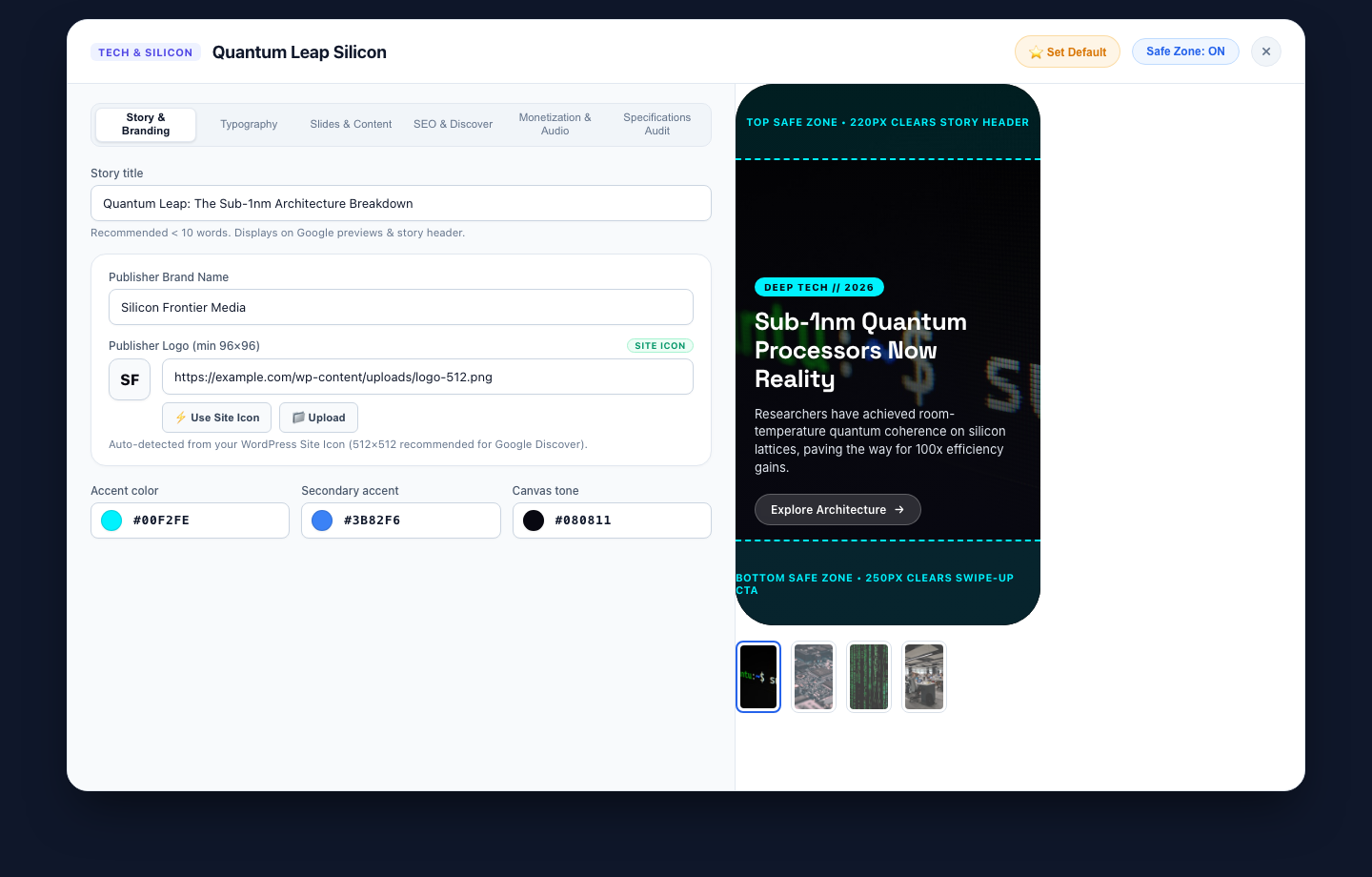
2. Live Phone Simulator & Safe Zone Visual Inspector
Real-time 9:16 mobile mockup enforcing Google Web Stories 220px top boundary (clearing header UI) and 250px bottom boundary (clearing swipe-up CTAs).
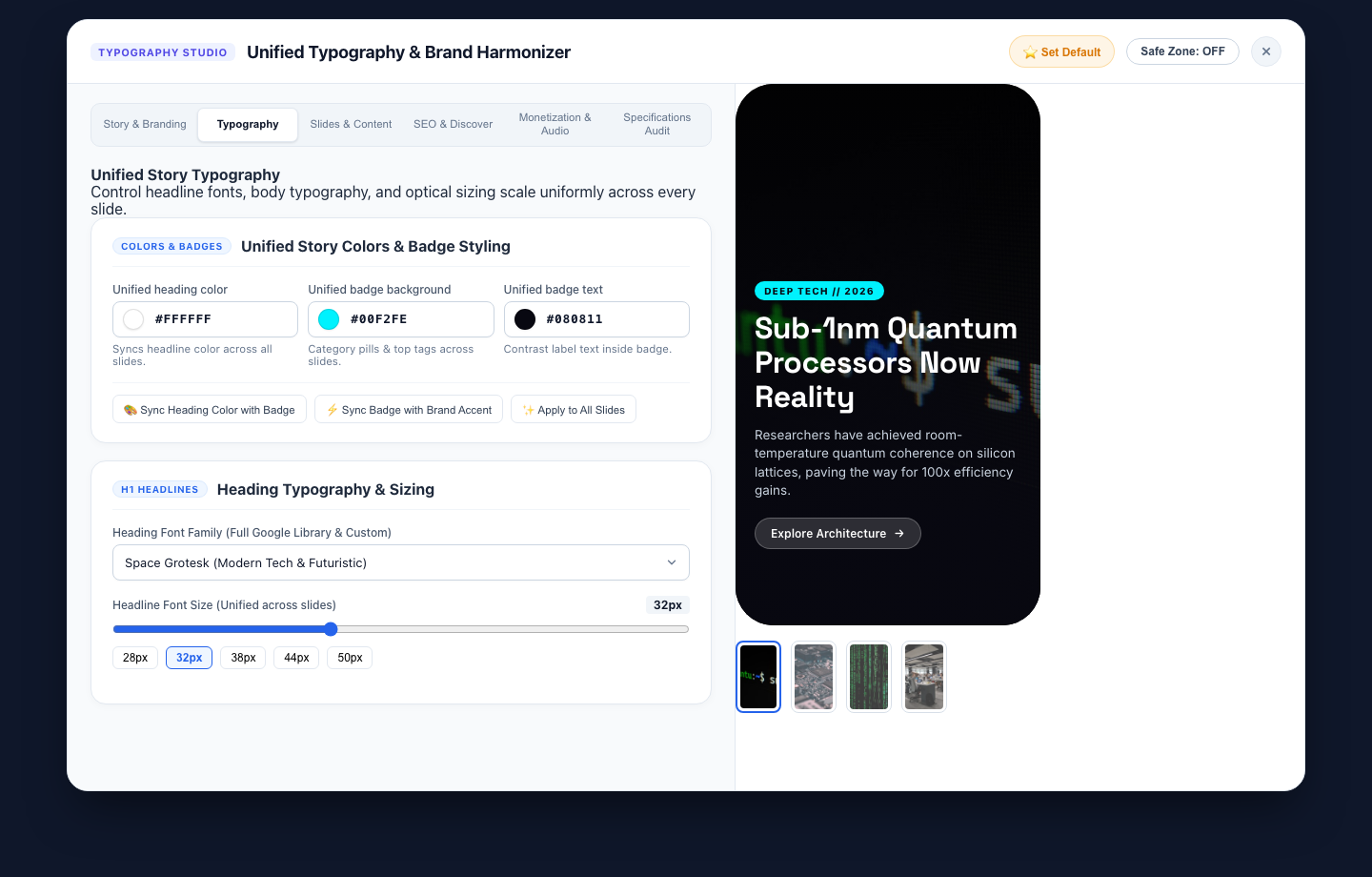
3. Story Typography, Branding & Color Harmonizer
Full Google Fonts library, fluid optical font size sliders, and 1-click palette synchronization across all slides.
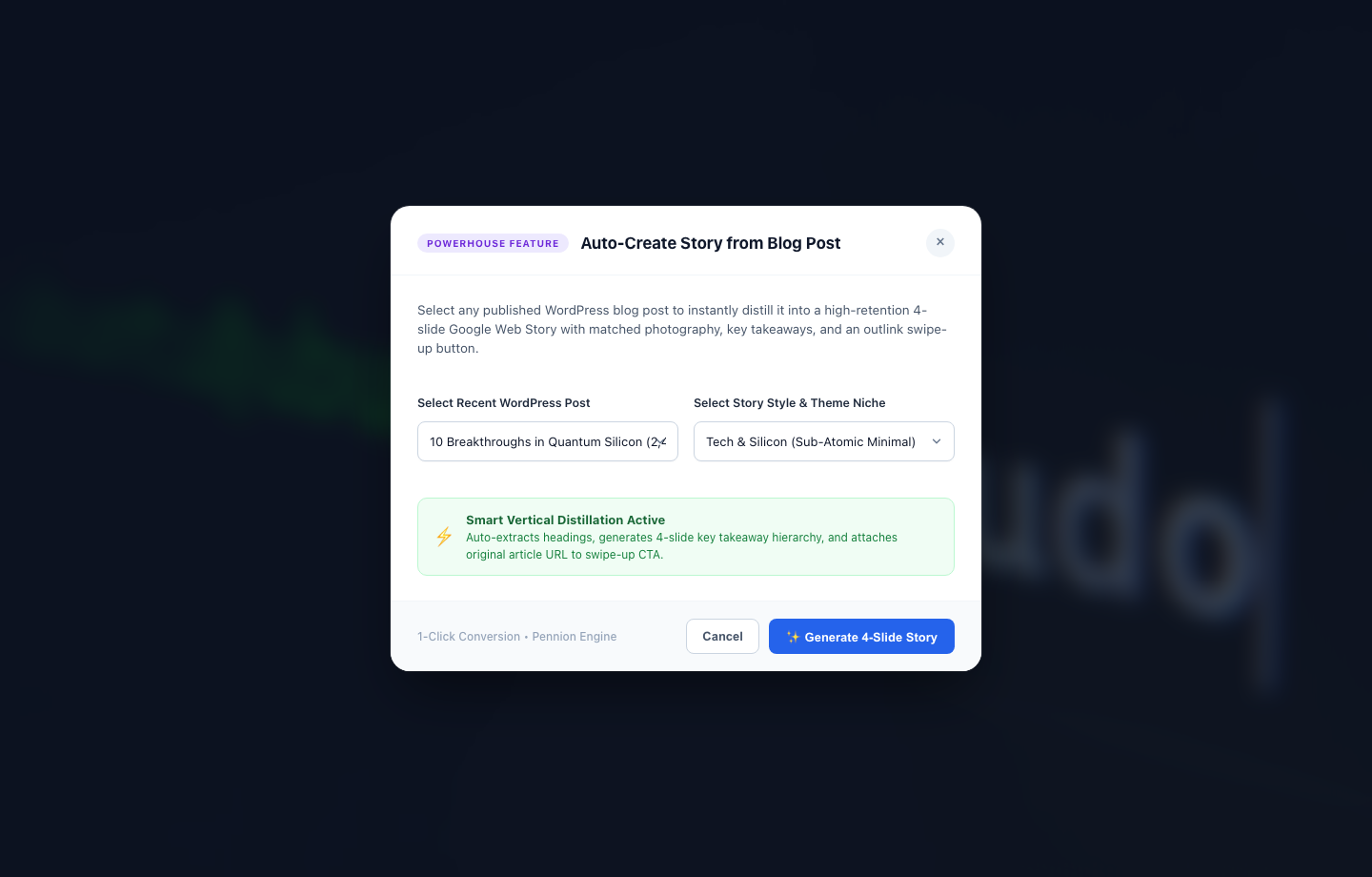
4. 1-Click Blog-to-Story Distiller
Distill any published WordPress article into a high-retention 4-slide AMP Web Story with key takeaways and swipe-up attribution outlink.
✨ Key Features
- 500+ Handcrafted Templates across 100+ Niches: 5 unique, bespoke slide archetypes for every category.
- Strict Safe Zone Enforcement: Built-in guard overlays protecting the 220px top boundary (progress bars, audio toggles, publisher monogram) and 250px bottom boundary (swipe-up gesture, attribution CTAs).
- Auto-Create Story from Blog Post: 1-Click distiller converts any existing WordPress blog post into a high-retention 4-slide AMP Web Story with matched photography and outlink swipe-up button.
- Unified Story Typography & Branding: Full curated Google Fonts library (60+ fonts in categorized optgroups) plus custom font URL support, synchronized color schemes, and 1-click palette harmonization.
- Interactive Live Simulator: Preview your story in real-time with responsive device frames, zero-tooltip navigation, and spring microinteractions.
- Favorites & Instant Search: Bookmark go-to templates with one click and filter through 100+ categories instantly with fuzzy search.
- Standalone Mode & Google Web Stories Integration: Operates seamlessly standalone with built-in AMP HTML rendering, or integrates directly with the official Google Web Stories for WordPress plugin.
- Shortcode Embeds: Embed responsive story players anywhere with
[sick_web_story id="123"].
📐 Google Web Stories Specification Compliance
| Specification | Standard | WSTS Enforcement |
|---|---|---|
| Canvas Dimensions | 1080 × 1920 px | Strict 9:16 vertical aspect ratio |
| Top Safe Zone | 220 px top margin | Clears story progress bars, logo & controls |
| Bottom Safe Zone | 250 px bottom margin | Clears swipe-up outlink buttons & system bars |
| Poster Cover Image | 3:4 portrait (640 × 853 px min) | Enforced 960 × 1280 px recommended upload |
| Publisher Logo | 1:1 square monogram (96 × 96 px min) | 512 × 512 px auto-sync from WP Site Icon |
| Typography Density | Max 280 characters / slide | Live character counter with warning guards |
| AMP Validation | Valid <amp-story> schema |
Zero AMP validation errors out of the box |
🚀 Installation
Option 1: Upload via WordPress Admin (Recommended)
- Download the latest
web-stories-templates.zipfrom Releases. - In your WordPress admin dashboard, navigate to Plugins > Add New > Upload Plugin.
- Choose the downloaded
.zipfile and click Install Now. - Click Activate Plugin.
- Go to Web Stories > Template Studio in your admin menu.
Option 2: Clone via Git
Navigate to your WordPress plugins directory and clone this repository:
cd wp-content/plugins/
git clone https://github.com/ursishant/web-stories-templates-studio.git web-stories-templates
Activate the plugin via WP Admin > Plugins or via WP-CLI:
wp plugin activate web-stories-templates🎨 Template Categories
With over 100 categories and 500+ templates, here are a few examples:
- Tech & Future: AI & Machine Learning, Robotics, Cyber Tech, Crypto & Web3, Quantum Computing, Mobile Hardware
- Lifestyle & Luxury: Haute Couture, Fine Jewelry, Perfumery, Vintage Thrifting, Streetwear
- Food & Hospitality: Artisanal Bakery, Mixology, Farm to Table, Gourmet Cuisine, Street Food
- Fitness & Wellness: HIIT Training, Marathon Running, Pilates, Yoga & Mindfulness, Biohacking
- Travel & Adventure: Deep Sea Diving, Alpine Mountaineering, Van Life, City Weekend Guides
- Business & Growth: Venture Capital, B2B SaaS, Bootstrapping, Real Estate Investing
🧩 Shortcode Usage
Embed any created story directly into WordPress posts, pages, or widget blocks:
<!-- Default 3-column responsive card player -->
[sick_web_story id="42"]

<!-- Custom display view and height -->
[sick_web_story id="42" view="grid" columns="2" height="600"]
📁 Repository Structure
web-stories-templates/
├── assets/
│   ├── css/
│   │   └── admin-studio.css       # Studio UI & simulator styles
│   ├── images/
│   │   ├── default-logo.png       # Fallback publisher monograms
│   │   └── default-logo.svg
│   ├── js/
│   │   └── admin-studio.js        # Interactive studio logic & AJAX handlers
│   ├── screenshot-1.png           # Template Studio Catalog
│   ├── screenshot-2.png           # Live Phone Simulator & Safe Zone Inspector
│   ├── screenshot-3.png           # Typography Studio & Brand Harmonizer
│   └── screenshot-4.png           # Auto-Create Story from Blog Post Distiller
├── includes/
│   ├── class-admin-studio.php     # WordPress admin page & views
│   ├── class-ajax-handler.php     # AJAX endpoints (save, favorite, distill)
│   ├── class-spec-validator.php   # Google Web Stories spec validation
│   ├── class-story-builder.php    # Story compiler & AMP HTML generator
│   ├── class-story-player.php     # Shortcode renderer & embed player
│   ├── class-template-registry.php# Template registration engine
│   └── templates-catalog.php      # 500+ pre-registered templates catalog
├── .github/
│   └── workflows/
│       └── build-release.yml      # Automated release packager
├── .gitignore
├── LICENSE                        # GNU General Public License v2
├── readme.txt                     # WordPress.org plugin directory readme
├── README.md                      # GitHub repository documentation
└── web-stories-templates.php      # Main plugin bootstrap file
🤝 Contributing
Contributions, feature ideas, and PRs are warmly welcome!
- Fork the Project
- Create your Feature Branch (
git checkout -b feature/AmazingTemplate) - Commit your Changes (
git commit -m 'feat: Add new Cyberpunk template') - Push to the Branch (
git push origin feature/AmazingTemplate) - Open a Pull Request
📄 License
Distributed under the GNU General Public License v2 or later. See LICENSE for more details.
Crafted with ❤️ by pennion & ursishant