Advanced Post Grid
Enterprise-grade Gutenberg Post Grid (API v3/React). Implements advanced Data Fetching, State Management, React Hooks, and Jest for unit testing complex components. Focused on SSR and custom object caching to protect Core Web Vitals.
by Upesh Vishwakarma · github.com/upeshv/advanced-gutenberg-post-grid
Install
No release zip yet. The repository archive installs, but the folder name will carry the branch suffix and updates will not flow:
wp plugin install https://github.com/upeshv/advanced-gutenberg-post-grid/archive/refs/heads/main.zipAdvanced Gutenberg Custom Block: Post Grid
A production-ready, dynamic Gutenberg block built for enterprise WordPress environments. This plugin demonstrates the integration of state-driven React development—specifically focusing on data fetching, error boundaries, and modern hooks—with high-performance, VIP-standard PHP server-side rendering.
The editor interface is built with React and uses the @wordpress/data store for cached REST API fetching, while the frontend relies on a standard PHP render.php file for secure, SEO-optimized server-side rendering. It strictly adheres to WordPress Core engineering best practices.
🚀 Technical Architecture
This block utilizes a Hybrid Rendering Architecture to balance editor reactivity with frontend performance:
- Backend Rendering (PHP): Employs dynamic server-side rendering via
render.php. This ensures maximum SEO compatibility, zero-delay initial page loads, and native compatibility with enterprise-level caching layers (like Nginx or Varnish). - Frontend State (React): The editor interface is a state-driven React application. Leverages the WordPress Block API v3 and the @wordpress/data store to handle complex data-fetching lifecycles. Taxonomy queries are strictly capped to prevent memory exhaustion on high-traffic databases.
- Database Optimization: Implements
no_found_rows => trueand disables redundant meta/term caching to bypass heavy SQL calculations, significantly reducing query overhead during server-side execution. - Core Web Vitals (CWV): Frontend styling implements strict BEM architecture. Featured images utilize modern
aspect-ratioCSS and explicit size constraints to eliminate Cumulative Layout Shift (CLS), All layout rules are decoupled from the JavaScript/PHP to ensure maximum browser rendering performance. - WCAG 2.2 Accessibility: Fully compliant with modern accessibility standards. Includes redundant link hiding (
aria-hidden) for screen readers, 40px minimum target sizes for interactive editor controls, and@media (prefers-reduced-motion: reduce)fallbacks for vestibular safety. - Resilient UI: Gracefully handles API interruptions and empty data states, ensuring the Gutenberg editor remains stable even during backend failures.
- Automated Testing: Includes a Jest unit testing suite utilizing
@testing-library/reactto verify complex UI lifecycles, user interactions(fireEvent), and API failure states.
🛠️ Installation & Setup
To use this block in a local or production environment, you need to compile the React assets.
-
Clone the repository into your WordPress plugins folder (
/wp-content/plugins/). Note: We specify theadvanced-post-gridfolder name at the end of the command to match the plugin text-domain:git clone [https://github.com/upeshv/advanced-gutenberg-post-grid.git](https://github.com/upeshv/advanced-gutenberg-post-grid.git) advanced-post-grid cd advanced-post-grid -
Install Node dependencies:
npm install -
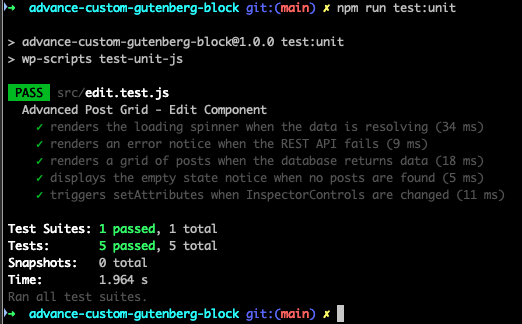
Run the automated test suite and linters to verify your local setup:
npm run lint npm run test:unit -
Compile the assets for production:
npm run build -
Activate the plugin through the 'Plugins' screen in the WordPress Admin Dashboard.
💻 Available NPM Commands
This project uses @wordpress/scripts for deterministic build and test pipelines.
npm start: Compiles assets in development mode and watches for changes.npm run build: Compiles and minifies assets for production.npm run lint: Runs ESLint and Stylelint to ensure strict JS and SCSS coding standards.npm run test:unit: Executes the Jest testing suite (src/edit.test.js) to verify component lifecycles.
🧪 Testing the Block UI
To verify the dynamic fetching and filtering functionality:
- Ensure your WordPress installation has at least 3-5 published posts with varying Categories and Featured Images.
- Navigate to any Page or Post and add the Advanced Post Grid block.
- Use the Block Sidebar (Inspector Controls) to test the reactive UI:
- Grid Layout: Adjust the "Number of Posts" and "Columns" sliders. Toggle the "Show Featured Image" control to see the DOM update instantly.
- Query Settings: Change the "Filter by Category", "Order By", and "Order" (Ascending/Descending) dropdowns to verify cached REST API resolution.
- Save the post and verify the frontend output perfectly matches the editor preview.
🛡️ Security & Compatibility
- Type-Safe Attributes: All block attributes are strictly validated against
block.jsonenums and cast (e.g.,absint,rest_sanitize_boolean) before being evaluated. - Late Escaping: Frontend data is escaped immediately before output using
esc_html,esc_url, andwp_kses_postadhering to strict WordPress security standards. - Compatibility: Optimized for WordPress 6.1+ (Tested up to 6.5) and PHP 7.4 through 8.2+.
✅ Development Verification
To ensure enterprise-grade stability, this block undergoes strict automated and visual verification before deployment:
- Automated Logic: 100% pass rate on Jest unit tests covering API resolution and error handling.
- Asset Pipeline: Webpack-optimized production builds for minimal frontend footprint.
❓ FAQ
Does the block make constant API calls? No. The implementation relies on the local WordPress data store cache. It only pings the REST API when a user explicitly modifies block attributes that change the query parameters.