Install
This is the repository archive. It installs, but the folder name will carry the branch suffix and updates will not flow.
Install straight from GitHub with WP-CLI:
wp plugin install https://github.com/unelmacoin/unelmapay-wordpress-woocommerce/archive/refs/heads/main.zipUnelmaPay Payment Gateway for WordPress & WooCommerce
Official UnelmaPay payment gateway plugin for WordPress and WooCommerce. Accept payments in NPR (Nepalese Rupee) through UnelmaPay's secure payment platform.
🚀 Features
Dual Mode Operation
- Standalone Mode: Use shortcodes to add payment buttons anywhere on your WordPress site
- WooCommerce Mode: Seamless integration with WooCommerce checkout
Payment Features
- ✅ Secure payment processing through UnelmaPay
- ✅ Sandbox and production environment support
- ✅ IPN (Instant Payment Notification) for automatic payment verification
- ✅ Custom success, fail, and cancel URLs
- ✅ Payment tracking and management
- ✅ Debug logging for troubleshooting
- ✅ NPR (Nepalese Rupee) currency support
- ✅ Beautiful branded payment buttons with UnelmaPay logo
Admin Features
- ✅ Easy configuration through WordPress admin
- ✅ Payment history with detailed transaction information
- ✅ Debug logs viewer with filter and download
- ✅ Merchant configuration (Name, Email, Custom URLs)
- ✅ Custom payment columns (Amount, Status, Transaction ID)
📋 Requirements
- WordPress 5.0 or higher
- PHP 7.2 or higher
- WooCommerce 3.0 or higher (optional, only for WooCommerce mode)
- UnelmaPay merchant account (Sign up here)
📦 Installation
Method 1: Install from GitHub (Recommended for Developers)
-
Clone the repository:
cd /path/to/wordpress/wp-content/plugins/ git clone https://github.com/unelmacoin/unelmapay-wordpress-woocommerce.git -
Or download as ZIP:
wget https://github.com/unelmacoin/unelmapay-wordpress-woocommerce/archive/refs/heads/main.zip unzip main.zip mv unelmapay-wordpress-woocommerce-main unelmapay-wordpress-woocommerce -
Activate the plugin:
- Go to WordPress Admin → Plugins
- Find "UnelmaPay Payment Gateway for WooCommerce"
- Click "Activate"
Method 2: Install via WordPress Admin
-
Download the latest release:
- Go to Releases
- Download the latest
.zipfile
-
Upload to WordPress:
- Go to WordPress Admin → Plugins → Add New
- Click "Upload Plugin"
- Choose the downloaded ZIP file
- Click "Install Now"
- Click "Activate Plugin"
Method 3: Manual Installation
- Download the plugin files
- Upload to your server:
- Via FTP/SFTP to
/wp-content/plugins/unelmapay-wordpress-woocommerce/ - Or via cPanel File Manager
- Via FTP/SFTP to
- Activate via WordPress Admin → Plugins
⚙️ Configuration
For WooCommerce Mode
Navigate to: WooCommerce → Settings → Payments → UnelmaPay
| Setting | Description | Required |
|---|---|---|
| Enable/Disable | Enable the payment gateway | Yes |
| Title | Payment method title shown to customers | Yes |
| Description | Payment method description | No |
| Merchant ID | Your UnelmaPay merchant ID | Yes |
| Merchant Password | Your merchant password (for IPN verification) | Yes |
| Merchant Name | Your business name | No |
| Merchant Email | Your contact email | No |
| Success URL | Custom redirect after successful payment | No |
| Fail URL | Custom redirect after failed payment | No |
| Cancel URL | Custom redirect if payment cancelled | No |
| Sandbox Mode | Enable for testing (dev.unelmapay.com) | No |
| Debug Mode | Enable logging for troubleshooting | No |
For Standalone Mode
Navigate to: UnelmaPay → Settings
Same configuration fields as WooCommerce mode.
🎯 Usage
Standalone Mode (Shortcodes)
Add payment buttons anywhere using shortcodes:
Basic Payment Button
[unelmapay_button amount="250" title="Tour Package" description="Jungle tour package"]Custom Button Text
[unelmapay_button amount="50" title="Donation" description="Support our cause" button_text="Donate Now"]Shortcode Parameters
amount(required) - Payment amount in NPRtitle(required) - Item/product namedescription(optional) - Item descriptionbutton_text(optional) - Custom button text (default: "Pay with UnelmaPay")
WooCommerce Mode
- Add products to WooCommerce
- Customer proceeds to checkout
- Customer selects "UnelmaPay" as payment method
- Customer clicks "Pay with UnelmaPay"
- Redirected to UnelmaPay payment gateway
- After payment, customer returns to your site
- Order status updated automatically via IPN
🧪 Testing (Sandbox Mode)
-
Enable Sandbox Mode:
- Go to plugin settings
- Check "Enable Sandbox Mode"
- Save settings
-
Get Test Credentials:
- Contact UnelmaPay support for sandbox credentials
- Or use your existing test merchant account
-
Test Payment Flow:
- Create a test order
- Complete payment on dev.unelmapay.com
- Verify order status updates
-
Check Debug Logs:
- Go to UnelmaPay → Debug Logs
- Review payment processing logs
- Download logs if needed
🚀 Production Deployment
-
Disable Sandbox Mode:
- Uncheck "Enable Sandbox Mode" in settings
- Save settings
-
Use Production Credentials:
- Enter production Merchant ID
- Enter production Merchant Password
-
Verify SSL:
- Ensure your site has valid SSL certificate
- IPN callbacks require HTTPS
-
Test with Real Payment:
- Make a small test transaction
- Verify order completion
- Check IPN callback received
🔄 Transaction Flow
Overview
The UnelmaPay payment gateway handles transactions through a secure, multi-step process that ensures payment integrity and provides real-time status updates.
WooCommerce Mode Flow
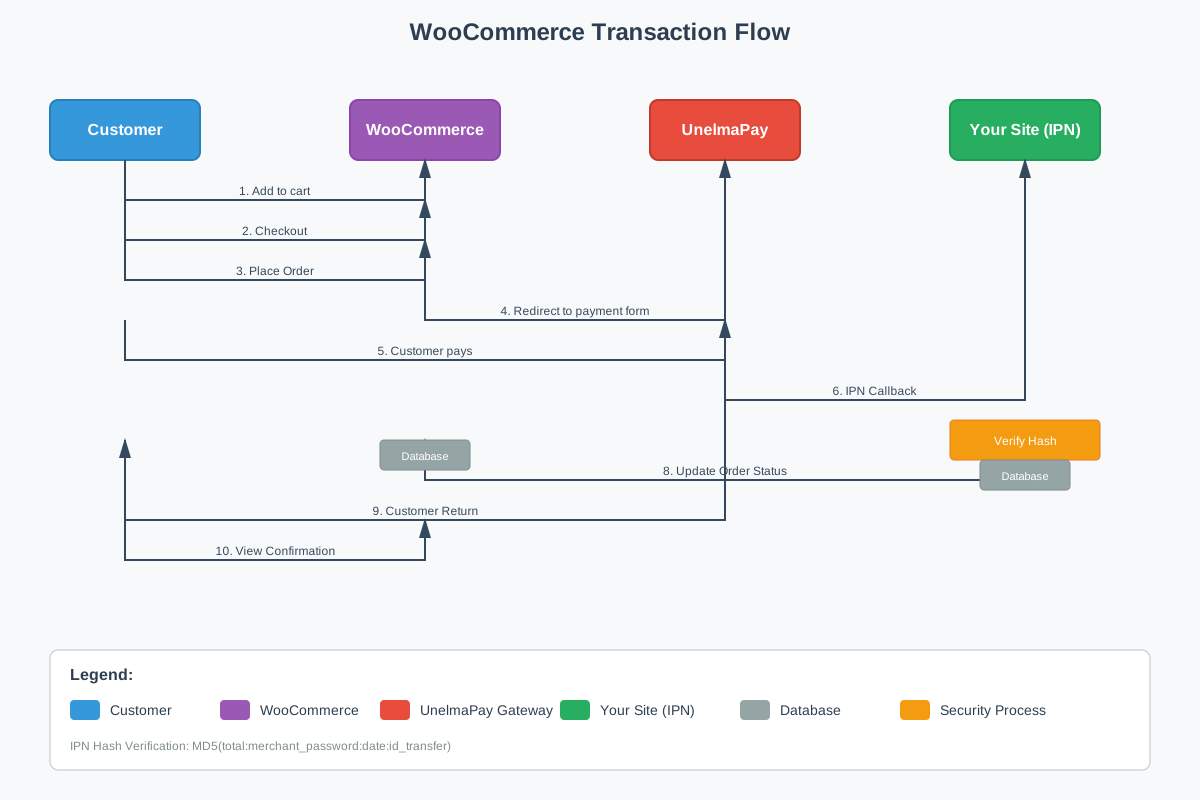
Step-by-Step WooCommerce Flow
-
🛒 Cart & Checkout
Customer → WooCommerce: Adds products to cart Customer → WooCommerce: Proceeds to checkout Customer → WooCommerce: Selects UnelmaPay payment method Customer → WooCommerce: Clicks "Place Order" -
📝 Order Creation
WooCommerce → Database: Creates order (Status: Pending) WooCommerce → UnelmaPay: Redirect to payment form Data sent: merchant_id, amount, order_id, return_url, notify_url -
💳 Payment Processing
Customer → UnelmaPay: Enters payment details Customer → UnelmaPay: Confirms payment UnelmaPay → Payment Gateway: Processes transaction -
🔄 IPN Callback
UnelmaPay → Your Site: Sends IPN callback Your Site → Database: Verifies hash signature Your Site → WooCommerce: Updates order status Status: Pending → Processing/Completed -
🔙 Customer Return
UnelmaPay → Customer: Redirects back to site
Customer → WooCommerce: Views order confirmation
Standalone Mode Flow
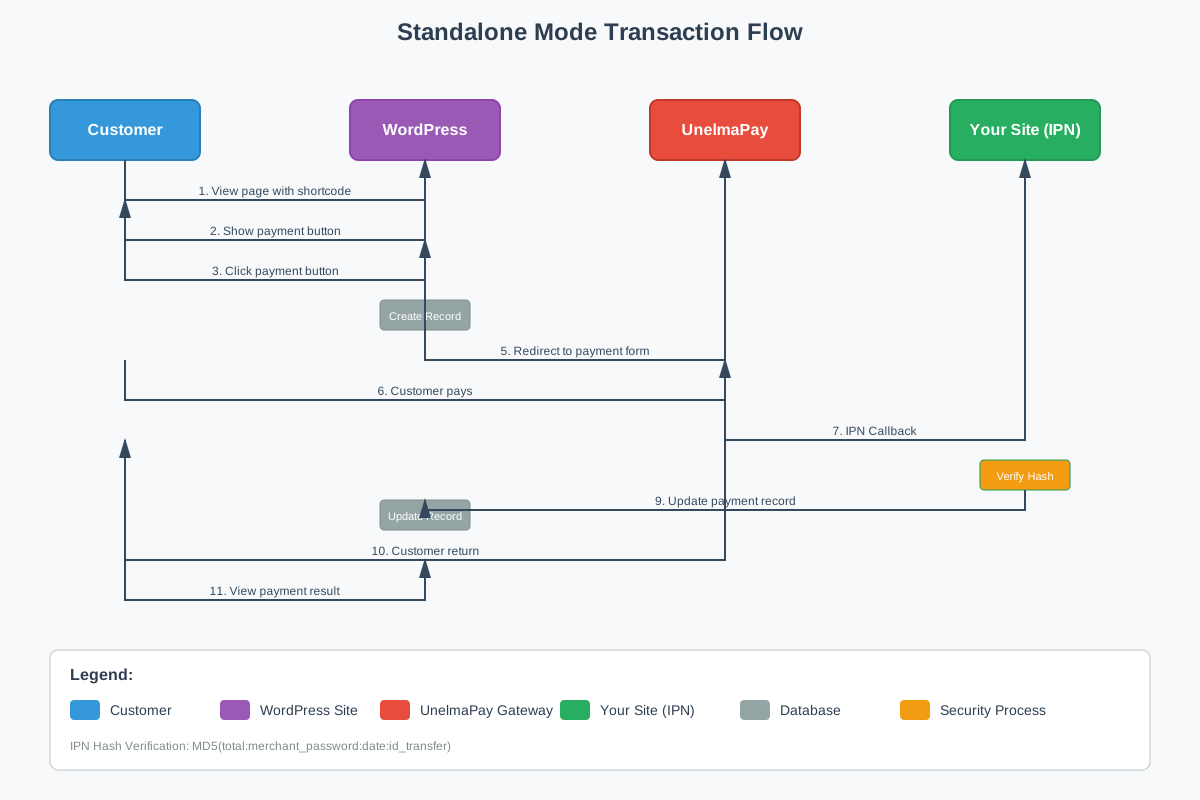
Step-by-Step Standalone Flow
-
📄 Payment Button Display
Customer → WordPress: Views page with shortcode WordPress → Customer: Shows "Pay with UnelmaPay" button -
🎯 Payment Initiation
Customer → WordPress: Clicks payment button WordPress → Database: Creates payment record WordPress → UnelmaPay: Redirect to payment form Data sent: amount, title, description, payment_id -
💳 Payment Processing
Customer → UnelmaPay: Enters payment details Customer → UnelmaPay: Completes payment UnelmaPay → Payment Gateway: Processes transaction -
🔄 IPN Processing
UnelmaPay → Your Site: Sends IPN callback Your Site → Database: Verifies hash signature Your Site → Database: Updates payment record Status: Pending → Completed -
🔙 Return Handling
UnelmaPay → Customer: Redirects back to site
Customer → WordPress: Views payment result
📊 Technical Details
WooCommerce Mode Data Flow
Payment Form Fields:
merchant: YOUR_MERCHANT_ID
item_name: Order #12345
amount: 2500.00
currency: debit_base
custom: 12345
return_url: https://yoursite.com/thank-you/
fail_url: https://yoursite.com/payment-failed/
cancel_url: https://yoursite.com/payment-cancelled/
notify_url: https://yoursite.com/wc-api/WC_Gateway_UnelmaPay
IPN Callback Data:
total: 2500.00
merchant_password: YOUR_MERCHANT_PASSWORD
date: 2024-01-04 16:30:00
id_transfer: TXN123456789
Standalone Mode Data Flow
Payment Form Fields:
merchant: YOUR_MERCHANT_ID
item_name: Tour Package
amount: 2500.00
currency: debit_base
custom: pay_1234567890abcdef
return_url: https://yoursite.com/payment-success/
fail_url: https://yoursite.com/payment-failed/
cancel_url: https://yoursite.com/payment-cancelled/
notify_url: https://yoursite.com/?unelmapay_ipn=1
Payment Record:
- Unique ID:
pay_1234567890abcdef - Status: Pending → Completed
- Transaction ID:
TXN123456789
Security & Verification
IPN Hash Verification
All IPN callbacks are verified using MD5 hash:
$calculated_hash = md5($total . ':' . $merchant_password . ':' . $date . ':' . $id_transfer);
$received_hash = $_POST['hash'];

if ($calculated_hash === $received_hash) {
    // Valid IPN - process payment
    update_payment_status($order_id, 'completed');
} else {
    // Invalid IPN - log and reject
    log_error('Invalid IPN hash received');
}
Security Measures
- ✅ Hash Verification: All IPNs verified before processing
- ✅ HTTPS Required: Production requires SSL certificate
- ✅ Password Protection: Merchant password never exposed
- ✅ Unique Payment IDs: Prevent duplicate processing
- ✅ IPN Logging: All callbacks logged for audit
Error Handling
Common Scenarios
-
Hash Verification Failed
- Log error with received vs calculated hash
- Do not update order status
- Notify admin via debug logs
-
IPN Not Received
- Order remains in "Pending" status
- Manual verification required
- Check UnelmaPay dashboard
-
Payment Timeout
- Customer redirected back after timeout
- Order status remains "Pending"
- Customer can retry payment
-
Network Issues
- IPN retry mechanism by UnelmaPay
- Plugin handles duplicate IPNs gracefully
- Status updated only once per payment
Data Flow Summary
| Step | WooCommerce | Standalone | Data Sent |
|---|---|---|---|
| 1. Initiation | Order created | Payment record created | Order/Payment ID |
| 2. Redirect | Payment form | Payment form | Amount, merchant, URLs |
| 3. Payment | Customer pays | Customer pays | Payment details |
| 4. IPN | Order status update | Payment record update | Transaction data |
| 5. Return | Thank you page | Custom page | Payment result |
Debug Information
Enable debug mode to track transaction flow:
- Payment Form Generation: Logs form data and URLs
- IPN Reception: Logs received callback data
- Hash Verification: Shows calculated vs received hash
- Status Updates: Records order/payment status changes
- Error Events: Captures any processing errors
View logs at: UnelmaPay → Debug Logs
🔍 Payment Tracking
View All Payments
Navigate to: UnelmaPay → All Payments
View payment list with columns:
- Payment ID
- Amount (NPR)
- Status (Completed/Pending)
- Transaction ID
- Date
View Payment Details
Click on any payment to see:
- Payment ID
- Item Name
- Description
- Amount in NPR
- Status (color-coded)
- Transaction ID
- Created At
- Completed At
📊 Debug Logs
Navigate to: UnelmaPay → Debug Logs
Features:
- View last 100 log entries
- Filter only UnelmaPay logs
- Clear logs button
- Download logs as text file
- Shows what gets logged
Logged events:
- Payment form generation
- IPN callback requests
- Hash verification results
- Payment status updates
- Error messages
🔒 Security
IPN Verification
The plugin implements secure IPN verification using MD5 hash:
hash = MD5(total:merchant_password:date:id_transfer)All IPN requests are verified before processing to prevent fraud.
Best Practices
- ✅ Always use HTTPS in production
- ✅ Keep merchant password secure
- ✅ Test in sandbox before going live
- ✅ Monitor debug logs initially
- ✅ Use strong WordPress admin passwords
- ✅ Keep WordPress and plugins updated
🛠️ Troubleshooting
Orders not completing automatically
Check:
- IPN URL is accessible:
https://yoursite.com/?unelmapay_ipn=1 - Firewall not blocking UnelmaPay requests
- Merchant password is correct
- Debug logs for errors
Payment button not showing logo
Solution:
- Logo is embedded as inline SVG
- Should display automatically
- Clear browser cache if needed
Sandbox mode not working
Solution:
- Uncheck sandbox mode checkbox
- Save settings
- Checkbox now properly saves unchecked state
- Should redirect to unelmapay.com.np
Hash verification failing
Check:
- Merchant password matches exactly (case-sensitive)
- No extra spaces in password field
- Check debug logs for hash comparison
💻 Development
File Structure
unelmapay-wordpress-woocommerce/
├── assets/
│   ├── css/
│   │   └── unelmapay.css          # Button styling
│   └── images/
│       └── unelmapay-logo.svg     # Logo file
├── includes/
│   ├── class-unelmapay-core.php   # Standalone mode logic
│   └── class-wc-gateway-unelmapay.php  # WooCommerce integration
├── languages/
│   └── unelmapay-payment-gateway.pot  # Translation template
├── unelmapay-payment-gateway.php      # Main plugin file
├── uninstall.php                  # Cleanup on uninstall
├── README.md                      # This file
├── CONFIGURATION_GUIDE.md         # Detailed config guide
├── STANDALONE_MODE.md             # Standalone usage guide
└── TESTING.md                     # Testing instructions
Contributing
- Fork the repository
- Create a feature branch:
git checkout -b feature/my-feature - Commit changes:
git commit -am 'Add new feature' - Push to branch:
git push origin feature/my-feature - Submit a Pull Request
Coding Standards
- Follow WordPress Coding Standards
- Use proper escaping and sanitization
- Add inline documentation
- Test in both standalone and WooCommerce modes
📚 Documentation
- Configuration Guide - Detailed configuration instructions
- Standalone Mode Guide - Using without WooCommerce
- Testing Guide - Complete testing procedures
- UnelmaPay API Docs - Official API documentation
🌐 API Endpoints
Sandbox (Testing)
https://dev.unelmapay.com/sci/formProduction
https://unelmapay.com.np/sci/formIPN Callback
https://yoursite.com/?unelmapay_ipn=1💰 Currency
All payments are processed in NPR (Nepalese Rupee), which is the base currency in the UnelmaPay system.
📞 Support
- Email: support@unelmapay.com
- Website: https://unelmapay.com.np
- Documentation: https://docs.unelmapay.com/
- GitHub Issues: https://github.com/unelmacoin/unelmapay-wordpress-woocommerce/issues
📝 Changelog
Version 2.0.0 (Latest)
- ✅ Complete rewrite for modern WordPress/WooCommerce
- ✅ Dual mode support (Standalone + WooCommerce)
- ✅ Beautiful branded buttons with UnelmaPay logo
- ✅ Enhanced payment tracking with custom columns
- ✅ Debug logs viewer with filter and download
- ✅ Additional merchant configuration fields
- ✅ Custom success/fail/cancel URLs
- ✅ Fixed sandbox mode checkbox bug
- ✅ Inline SVG logo for guaranteed display
- ✅ NPR currency information throughout
- ✅ Improved IPN handling
- ✅ Better error handling and logging
📄 License
This plugin is licensed under the GPL v2 or later.
This program is free software; you can redistribute it and/or modify
it under the terms of the GNU General Public License as published by
the Free Software Foundation; either version 2 of the License, or
(at your option) any later version.

This program is distributed in the hope that it will be useful,
but WITHOUT ANY WARRANTY; without even the implied warranty of
MERCHANTABILITY or FITNESS FOR A PARTICULAR PURPOSE. See the
GNU General Public License for more details.
🙏 Credits
Developed and maintained by UnelmaPay Team.
Made with ❤️ for the WordPress community
Releases
1 release.
These releases are tags only. The author does not attach a packaged zip, so there are no download counts to report.