Tenyen Analytics for WordPress WP Registry grade A. No security issues foundWP RegistryNo security issues foundOpen the reportA
A self-hosted analytics plugin for WordPress with pageviews, sessions, engagement metrics, GeoLite2 geolocation, ASN insights, bot detection, and asynchronous admin reports.
Install
Upload it under Plugins → Add New Plugin → Upload Plugin, then activate.
Install straight from GitHub with WP-CLI:
wp plugin install https://github.com/ultrasukiyaki/tenyen-analytics-wordpress/releases/download/v0.8.1/tenyen-analytics-wordpress-v0.8.1-stable.zipEnglish | 日本語
Tenyen Analytics for WordPress
Overview
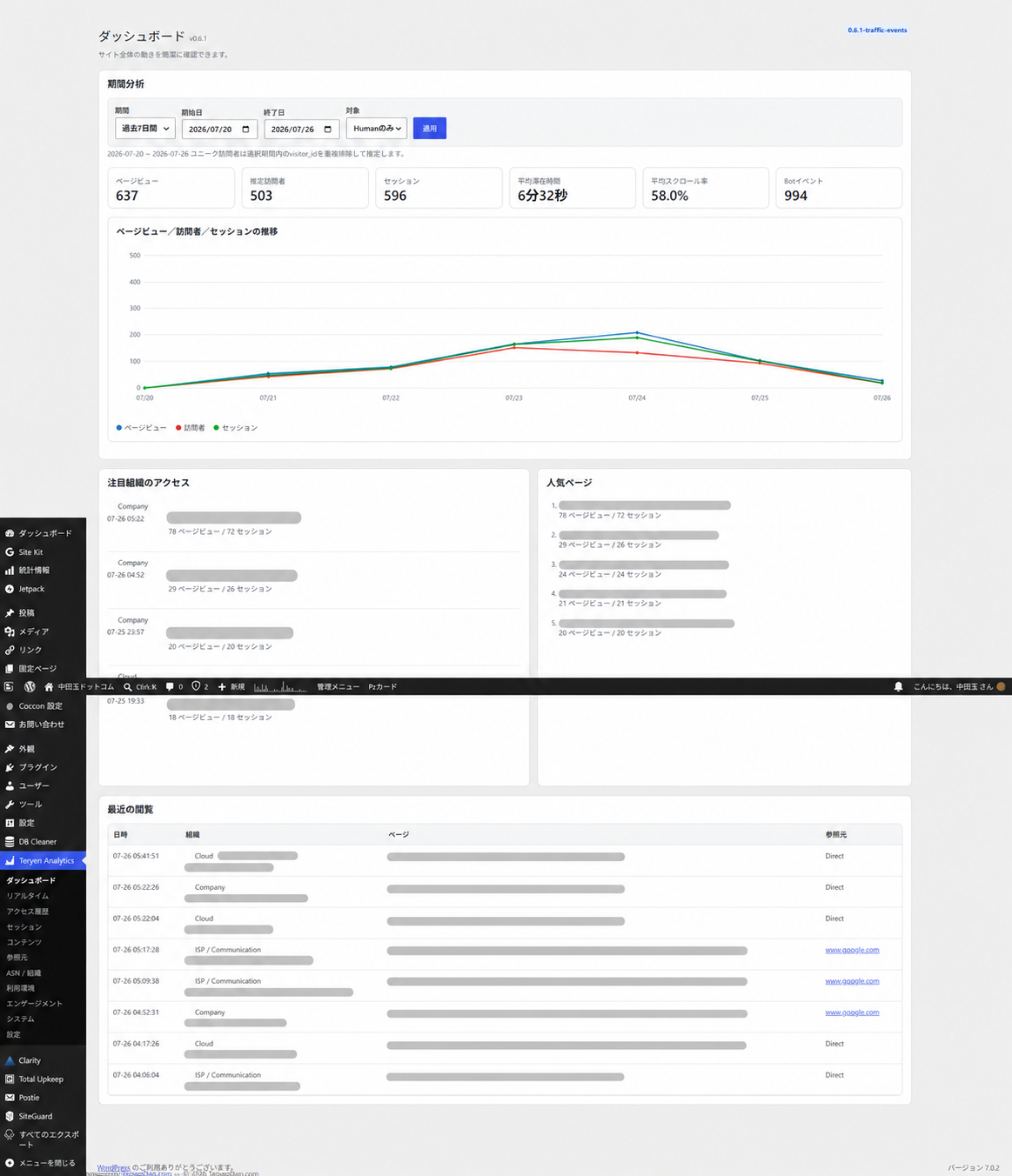
Tenyen Analytics is a self-hosted WordPress analytics plugin for pageviews, estimated unique visitors, sessions, engagement, referrers, audience details, GeoLite2 location and ASN insights, and bot detection. Analytics reports stay in WordPress and do not require an external analytics service.
Features
- Pageviews, estimated unique visitors, sessions, duration, scroll depth, external clicks, and downloads
- Human/Bot filters and locally rendered charts
- Encrypted raw IP storage and HMAC-based exact-match IP search
- Local GeoLite2 City and ASN lookup, health checks, and safe optional automatic updates
- Asynchronous access history and a compact WordPress Dashboard widget
- Notable-organization categories while preserving MaxMind organization names verbatim
- Administrator aliases, plain-text notes, reusable tags, organization watchlists, and private saved views
- Prospective collection exclusions, non-destructive analysis exclusions, and rule diagnostics
- Chunked CSV/JSON exports, configurable raw-data retention, resumable cleanup, and storage diagnostics
- Retention-safe UTC daily aggregates, resumable rebuilds, and mixed raw/aggregate long-range reports
Requirements
- WordPress 6.2 or later
- PHP 8.1 or later
Installation
Upload the release ZIP in Plugins → Add New → Upload Plugin, or copy the tenyen-analytics-wordpress directory to wp-content/plugins/, then activate it.
GeoLite2 setup
GeoLite2 MMDB files are not included. The site administrator must obtain them under MaxMind's terms. Manual maintenance remains supported: place GeoLite2-City.mmdb and GeoLite2-ASN.mmdb in wp-content/uploads/tenyen-analytics/, or configure their paths in the plugin. Basic collection works without them.
Optional automatic maintenance is configured under Tenyen Analytics → System with a numeric MaxMind account ID and license key. The license key is encrypted at rest with a WordPress-Salt-derived key, masked in the interface, omitted from status responses, and sent only to MaxMind through Basic Authentication over HTTPS. City and ASN are downloaded, validated, activated, and reported independently. The weekly job uses a lock and bounded retry backoff. A failed download, unsafe archive, missing or wrong MMDB type, corrupt database, or failed replacement leaves the currently working database in place. Changing WordPress salts makes the saved license key unusable; enter it again.
Dashboard and reports
The Tenyen Analytics menu contains Dashboard, Real-time, Access History, Sessions, Content, Referrers, ASN / Organizations, Knowledge, Exclusions, Data lifecycle, Audience, Engagement, System, and Settings. The standard WordPress Dashboard widget loads its totals asynchronously and is visible only to administrators with manage_options.
Privacy and security
Raw IP addresses are stored using reversible encryption; HMAC values support exact-match searches. Protection keys are derived from WordPress salts, so changing salts prevents old encrypted IPs from being decrypted. GeoLite2 queries are local. ASN organization names describe the registrant of an address range and do not prove a visitor's employer or affiliation. Administrators should disclose collection and retention in their privacy policy. Uninstall preserves analytics data unless an administrator removes it manually.
Updating
Back up WordPress, then overwrite or upload the new plugin version. Keep GeoLite2 files in the uploads directory. Version 0.8.1 does not change the 0.7.1 schema or indexes. Existing event rows, aggregates, annotations, tags, watchlists, saved views, exclusions, settings, manually maintained GeoLite2 files, and keys are preserved. Automatic updates are disabled until an administrator explicitly configures credentials and enables them.
Export, retention, and cleanup
The administrator-only Data lifecycle screen exports the raw access/event log, sessions, content summaries, organizations, traffic sources, campaigns, and event summaries as CSV or JSON. Exports are fetched in bounded chunks and respect date, Human/Bot, traffic, campaign, event, content, country/region, ASN/organization, tag, watchlist, and analysis-exclusion filters where meaningful. CSV cells beginning with spreadsheet formula characters are neutralized. JSON uses the documented tenyen-analytics.export.v1 envelope with schema, dataset, generated_at, columns, and rows fields.
IP addresses are omitted by default. Masked export zeroes the final IPv4 octet or retains only the first 48 IPv6 bits. Decrypted raw IP export requires manage_options, a valid nonce, selection of the raw mode, and a separate explicit-confirmation checkbox.
Retention supports unlimited, 30, 90, 180, 365, or a validated custom value from 1 to 3,650 days. Cleanup preview shows the whole-UTC-day cutoff, affected event/session counts, and aggregate coverage. Cleanup deletes at most 1,000 expired events per run, uses an overlap lock, preserves its cutoff and deleted count across continuation runs, and schedules continued work through WP-Cron. It is blocked until every affected UTC day has a current aggregate whose source count, maximum event ID, and analysis-exclusion signature match raw data. A successful cleanup freezes the preserved aggregate boundary. Cleanup never deletes settings, annotations, tags, saved views, exclusion rules, GeoLite files, or keys.
Storage diagnostics show the analytics-table and database sizes, raw event/session counts, oldest/newest timestamps, up to 24 monthly counts, current retention, and cleanup state.
Daily aggregation and long-range reports
WP-Cron incrementally aggregates completed UTC days and rechecks recent days for late events. Administrators can rebuild one day or a validated range of up to 730 days from Data lifecycle. Each run processes one day, records a checkpoint, uses a lock separate from cleanup, and resumes through WP-Cron. Status includes covered dates, checkpoint, next run, failure state, and a sampled raw-versus-aggregate source check.
Daily totals preserve pageviews, events, estimated visitors and sessions, bounces, entries, exits, engaged time, valid scroll totals and sample counts, Bot events, and fixed-size mergeable visitor/session sketches. Bounded daily dimensions cover content, organizations, traffic channels, referrer domains, campaigns, events, countries, browsers, operating systems, and devices. Organization rows are limited to 100 per day; other potentially high-cardinality dimensions also have explicit caps.
Reports select only complete aggregate days and query raw data for uncovered or partial-day ranges. These portions never overlap. Rates and means are recomputed from additive numerators and denominators. Realtime, access history, individual sessions, individual visitors, and raw event/session exports remain dependent on retained raw rows. After cleanup, later analysis-exclusion changes cannot rewrite frozen historical aggregates, which retain the exclusion policy used when coverage was approved.
Exclusion rules
The administrator-only Exclusions screen supports exact IPv4/IPv6, CIDR, exact path, path prefix, administrator/self, Bot, country, region, ASN, organization/category, browser, OS, device, referrer-domain, and UTM source/medium/campaign rules. Collection rules prevent matching future requests from being stored. Analysis rules hide matching stored rows from reports, history, sessions, and widgets without deleting them. CIDR, administrator, and organization-category rules are collection-only because the current historical schema cannot apply them in bounded SQL queries.
Rules have a deterministic type precedence followed by rule ID. The diagnostic form identifies the first matching rule, precedence, action, and reason. Rule values and notes are bounded plain text; administrative routes require manage_options and a valid WordPress REST nonce. Existing Exclude administrator access and Record bots as well settings remain collection controls. Historical data is never automatically deleted by exclusion management.
Administrator knowledge
The Knowledge screen manages aliases, notes (up to 4,000 characters), tags (up to 50 characters and 50 per entity), watched ASN organizations, and private saved views. Supported identities are numeric ASN, the existing anonymous visitor ID, post ID or canonical content path, normalized referrer domain, a deterministic hash of the five first-touch UTM dimensions, and normalized external target domain. Aliases never overwrite raw values. Orphaned annotations remain manageable.
Watching only marks and filters an ASN; it sends no notification and changes no analytics fact. Access was observed from an IP address registered to the ASN/organization—it does not identify a person, employment, affiliation, or intent. Saved views belong to one WordPress administrator. Relative date presets are recalculated when loaded; custom dates remain absolute. Pinned and one-per-report default states are supported by the storage/API model. Uninstall preserves the metadata and exclusion-rule tables under the existing data-retention policy. Notifications remain deferred.
Traffic attribution and events
Each session uses first-touch attribution from its first stored pageview. A recognized UTM source, medium, or campaign is classified as Campaign; otherwise traffic is Direct, Internal, Organic Search, Social, Referral, or Unknown. Supported fields are utm_source, utm_medium, utm_campaign, utm_content, and utm_term.
External links and configured download extensions are tracked automatically without double-counting a download as an external click. Internal-link and generic-button tracking are disabled by default. Form tracking is conservative and requires configuration or data-tenyen-track; field values are never collected. WordPress 404 requests produce not_found instead of an ambiguous pageview.
Custom integrations can call:
window.TenyenAnalytics.trackEvent('radio_play', {station: 'example-station', server: 'primary'});
window.TenyenAnalytics.trackEvent('stream_server_change', {server: 'backup'});
window.TenyenAnalytics.trackEvent('feature_used', {area: 'header'});
The method returns whether the payload was accepted locally for transport. Delivery is best-effort. Names, metadata keys/counts, scalar values, and lengths are bounded; functions, DOM nodes, nested and cyclic values are rejected. These examples do not install radio integration automatically.
Session and visitor journeys
The administrator-only Sessions screen lists stored sessions and opens ordered event journeys asynchronously. Stored session_id values are canonical; legacy events without one remain available in Access History but are not inferred into sessions. Anonymous visitor summaries use the existing browser-dependent visitor_id and must not be treated as proof of a person’s identity.
Engaged time uses the maximum cumulative engagement duration for each session and path. A bounce is a session with exactly one pageview. For content, bounce rate is bounced entry sessions divided by entry sessions, and exit rate is sessions exiting on the page divided by that page’s pageviews. These metrics are estimates and safely return zero when their denominator is zero.
Troubleshooting
Use Tenyen Analytics → System to check collection endpoints and the independent City/ASN health, build date, safe filename, size, last attempt, last success, next weekly run, retry, and failure status. If an automatic update fails, verify the MaxMind account permissions, credentials, configured directory permissions, and outbound HTTPS access; the previous valid MMDB remains active. If location or ASN fields are empty in manual mode, verify both MMDB paths and read permissions. If no events appear, check page caching/security rules and the browser network response from the collection endpoint.
Development
Run composer validate --strict, lint PHP with find . -name '*.php' -not -path './vendor/*' -print0 | xargs -0 -n1 php -l, check JavaScript with find assets -name '*.js' -print0 | xargs -0 -n1 node --check, and build with tools/build-release.sh.
License
Copyright © 10yendama.com. Licensed under GPL-2.0-or-later. See LICENSE. See THIRD-PARTY-NOTICES.md for optional components.
Releases
11 releases. Each count is every asset in that release; expand a row for the breakdown.