IPN-Adapter WP Registry grade D+. High-severity findings · 2 findingsWP RegistryHigh-severity findings · 2 findingsOpen the reportD+
Connect Digistore24 with Brevo to add buyers to mailing-lists
Install
Upload it under Plugins → Add New Plugin → Upload Plugin, then activate.
Install straight from GitHub with WP-CLI:
wp plugin install https://github.com/ulfk/ipn-adapter/releases/download/v1.2.2/ipn-adapter-v1.2.2.zipWP Plugin to connect Digistore24 IPN to Brevo
This is a solution to connect Digistore24 with Brevo to add buyers to mailing-lists.
Why?
Digistore24 currently does not support Brevo natively. So if you want to add buyers of your products to your mailing-lists, there is currently no easy (and free of extra charge) way to do this. So we had to find another solution. As there already was a website based on Wordpress involved, the easiest way was to write a small plugin for Wordpress, that acts as proxy between Digistore24 and Brevo.
How does it work?
The IPN-Adapter plugin provides an endpoint that acts as proxy. When a purchase is done on Digistore24, it will call the IPN-Adapters endpoint. The endpoint will transform the data, received from Digistore24, to the data needed for Brevo. The IPN-Adapter will then add the buyers e-mail address as contact in Brevo and will add that e-mail address to the configured mailing lists.
Important: To get this plugin running, your Wordpress server needs to have a static IP-address or at least an IP-address from a static range. This is because Brevo secures their API by IP whitelisting which is described here. Check your hosting provider to find out, if your Wordpress server fulfills this requirement.
The following picture shows a graphical overview on how the IPN-adapter works:
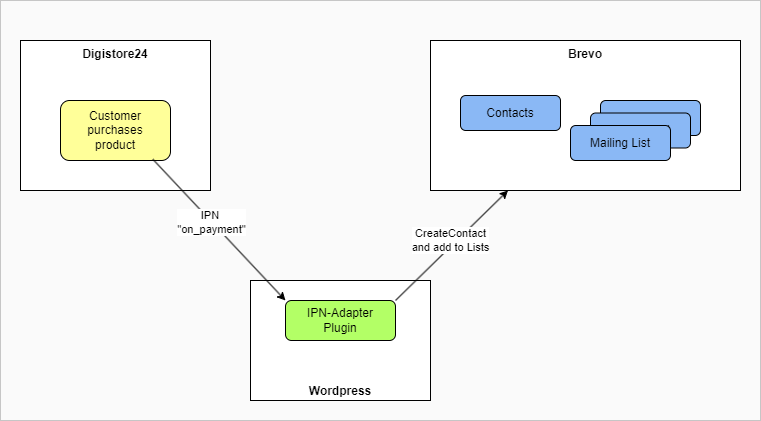
If you install this plugin in your Wordpress, the endpoint that you need to configure in Digistore24, will be https://<YOUR-SERVER>/wp-content/plugins/ipn-adapter/endpoint.php.
To add this plugin to your Wordpress, download the zip-file from the latest release and upload it to your Wordpress.
Setup of IPN-Adapter
Open the settings-page IPN Adapter in the Wordpress Settings menu and set the values accordingly.
| Field | Description |
|---|---|
| Adapter endpoint for Digistore24 | The adapter endpoint URL, you need to set in Digistore24, is displayed. You can copy it the the clipboard by clicking on the clipboard-icon. Be sure to configure POST as method in Digistore24. |
| Digistore24 Secret | The password you choose and set in Digistore24 for the IPN. |
| API Key | The API key from Brevo |
| Newsletter List ID | Brevo list ID of your newsletter list. |
| Firstname field | The IPN-adapter will send the firstname of the buyer in an attribute with the given name |
| Lastname field | The IPN-adapter will send the lastname of the buyer in an attribute with the given name |
| Product ID Mapping | Map Digistore24 product IDs to specific Brevo list IDs as needed |
View Logs
The plugin writes logs to a file in the uploads-folder. Via the menu entry IPN Logs in the Tools menu, you can view those logs.
Digistore24 hints
- Add a generic IPN.
- Be sure to deactivate grouping of calls.
- This plugin has not been tested with any AddOn products.
- Currently the endpoint only processes "on_payment" events. All other IPN events will be ignored for now.
- The plugin-endpoint will return
OKto Digistore in case of success.
Brevo hints
- Be aware that you need to add the IP-address of your Wordpress-server to the allowed addresses for API calls.
- Maybe you want to send other or more attributes to Brevo. You can change/add your attributes in the
$attributesarray inipn-adapter.php.
Bookmarks
- Brevo
- API docu for "createcontact": https://developers.brevo.com/reference/createcontact
- IP Security: https://developers.brevo.com/docs/ip-security
- Digistore24
Releases
12 releases. Each count is every asset in that release; expand a row for the breakdown.