VPM Menu Layout
Layout item types for WordPress menus
by Van Patten Media Inc. · github.com/tomodomoco/vpm-menu-layout · website
Install
No release zip yet. The repository archive installs, but the folder name will carry the branch suffix and updates will not flow:
wp plugin install https://github.com/tomodomoco/vpm-menu-layout/archive/refs/heads/master.zipThis plugin exposes a new menu item type, "Menu Layout". Within menu layout are helpful menu items that can be used for complicated menu layouts.
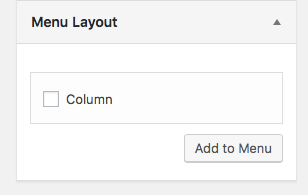
By default, the plugin includes one option: "Column".
Screenshots
Adding a new menu item
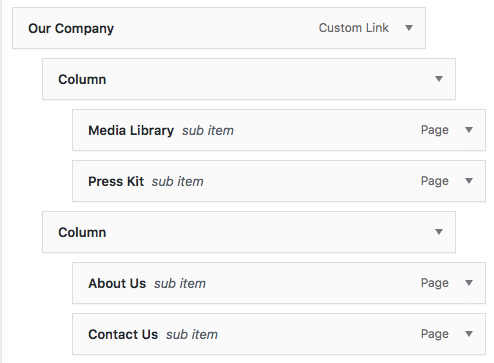
The menu item in context
Usage
Theme authors must provide support for custom menu types.
You can test for these in your menu walker — and do with them what you will — by checking that their URL matches the appropriate item type slug.
An array menu type slugs can be viewed with vpmml_get_item_types(); (the slug is the array item's key; just print_r or var_dump this function).
In your menu walker, the menu item URL will be in the form #vpmml-{type}# (for example: #vpmml-column#). Your walker might do something like the following within your walker's start_el method:
if ( $item->url === '#vpmml-column#' ) {
    // Add a class, change output markup, or something else entirely
}
Advanced Usage
You can register your own types with the vpmml_item_types filter, e.g.:
add_filter( 'vpmml_item_types', function ( $types ) {
    $types['mytypeslug'] = __('My Type Name');

    return $types;
} );
These will be accessible in your walker with the #vpmml-mytypeslug# URL like the built in types. You can also target the menu item in the admin editor with the .menu-item-vpmml-mytypeslug CSS class. See inc/item-column.php in this plugin for an example of how you might hide unnecessary settings.
License & Conduct
This project is licensed under the terms of the MIT License, included in LICENSE.md.
All Van Patten Media Inc. open source projects follow a strict code of conduct, included in CODEOFCONDUCT.md. We ask that all contributors adhere to the standards and guidelines in that document.
Thank you!