Install
This is the repository archive. It installs, but the folder name will carry the branch suffix and updates will not flow.
Install straight from GitHub with WP-CLI:
wp plugin install https://github.com/thiennhant95/wp-encrypted-fields/archive/refs/heads/main.zipRegistry-driven, field-level encryption for WordPress and WooCommerce.
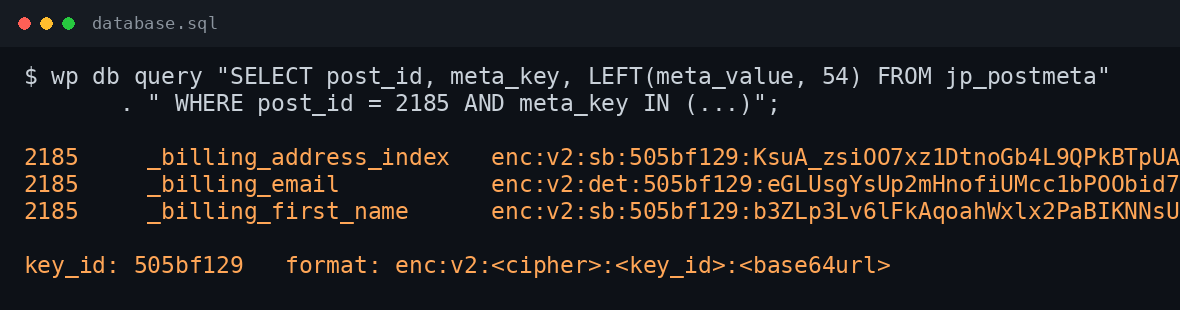
Encrypt only the fields you declare, keep normal WordPress APIs working, and search encrypted identifiers through blind indexes. Keys live outside the database; no core or third-party plugin patches are required.
Website: English · Tiếng Việt
Features
- Transparent encryption/decryption for post, user, term and comment meta.
wp_users.user_loginanduser_emailblind-index token mode (no column overflow, plaintext stored encrypted in user meta).- Exact and partial search through HMAC token indexes (no plaintext stored).
get_user_by(),email_exists(),username_exists()and raw=/INlookups keep working.- Mail recipients are decrypted automatically; optional body token replacement.
- Password-reset messages resolve token values.
- Registry can be defined in
wp-config.php, a config file, a filter, or the admin UI; unlisted fields are never encrypted (default deny). - Optional WooCommerce integration (order meta, order search, analytics customer lookup, customer objects). HPOS must be disabled in v1.
- Optional SiteGuard integration.
- Key rotation via a safe two-phase
KEC_KEY_NEXT. - Setup wizard for new and existing sites, with a mandatory backup gate.
- WP-CLI commands for status, scan, migrate, decrypt, reindex, verify and rotation.
- Automatic safety dump of affected tables before migration/rotation
(protected directory, size/row limits,
--no-safety-dumpoverride). - Legacy cipher adapter for migration from the original implementation.
Requirements
- PHP 8.0+ (8.3 recommended)
- WordPress 6.4+
- OpenSSL extension (required); Sodium is optional
- WooCommerce is optional
Installation
- Copy this directory to
wp-content/plugins/wp-encrypted-fields. - Activate Encrypted Fields in WordPress.
- Define a key and a field registry (see below).
- Open Settings → Encrypted Fields and complete the setup wizard.
Do not use the plugin without a key. Existing data must be backed up before migration; the wizard enforces this.
Quick start
Add to wp-config.php (before require_once ABSPATH . 'wp-settings.php';):
define('KEC_KEY', 'base64:REPLACE_WITH_32_BYTE_KEY');
define('KEC_TOKEN_SECRET', 'base64:REPLACE_WITH_A_STABLE_SECRET');

define('KEC_FIELDS', [
    'user' => [
        'columns' => [
            'user_login' => ['type' => 'login', 'max_length' => 60],
            'user_email' => ['type' => 'email', 'max_length' => 100],
        ],
        'meta' => [
            'billing_first_name' => ['type' => 'text', 'search' => true],
            'billing_email'      => ['type' => 'email', 'search' => true],
        ],
    ],
    'post' => [
        'post_types' => ['shop_order'],
        'meta' => [
            '_billing_first_name' => ['type' => 'text', 'search' => true],
            '_billing_email'      => ['type' => 'email', 'search' => true],
            '_billing_address_index'  => ['type' => 'text', 'search' => true],
            '_shipping_address_index' => ['type' => 'text', 'search' => true],
        ],
    ],
]);
Generate a key:
wp kec key generateThen run the wizard or:
wp kec scan
wp kec migrate --backup-confirmed --dry-run
wp kec migrate --backup-confirmed
wp kec verify
Configuration
See docs/configuration.md for the registry format, field types and every supported constant.
CLI
See docs/cli.md.
Migration
See docs/migration.md for plaintext/legacy migration,
auxiliary tables (wc_customer_lookup, siteguard_history) and key rotation.
Search
See docs/search.md for token mode and blind-index search.
Integrations
See docs/integrations.md for WooCommerce, SiteGuard and the legacy preset.
Security
See docs/security.md and SECURITY.md.
Known limitations (v1)
- WooCommerce HPOS is not supported; order encryption is refused when HPOS is on.
WP_Userobjects read outside supported hooks expose tokens, not plaintext; usekec_user_login(),kec_user_email()orColumnStore.wp_options,post_content/post_title, comments/reviews, order notes and third-party custom tables are not encrypted unless an adapter is registered.- WooCommerce reset-password templates may render the token login; core password-reset messages are handled.
- External search engines (Elasticsearch, Algolia, Relevanssi) need their own integration for encrypted fields.
v2cis accepted for backward compatibility only.
Development
find src tests -name '*.php' -print0 | xargs -0 -n1 php -l
for t in tests/run-*.php; do php "$t" || exit 1; done
The test scripts are standalone and need no database. Composer is optional.
Documentation
- Installation
- Configuration
- CLI
- Migration
- Search
- Integrations
- Compatibility
- Security
- Design
- FAQ
- Changelog
- Contributing
- Security policy
- Code of conduct
License
GPL-2.0-or-later. See LICENSE.
Releases
6 releases.
These releases are tags only. The author does not attach a packaged zip, so there are no download counts to report.