ZUL Weather Info
WordPress weather info plugins
Install
No release zip yet. The repository archive installs, but the folder name will carry the branch suffix and updates will not flow:
wp plugin install https://github.com/thetycoon79/zul-weatherinfo/archive/refs/heads/main.zipZUL Weather Info Plugin
A WordPress plugin that displays weather information for configured locations using the OpenWeatherMap API.
Features
- Admin Settings - Configure OpenWeatherMap API key and cache duration
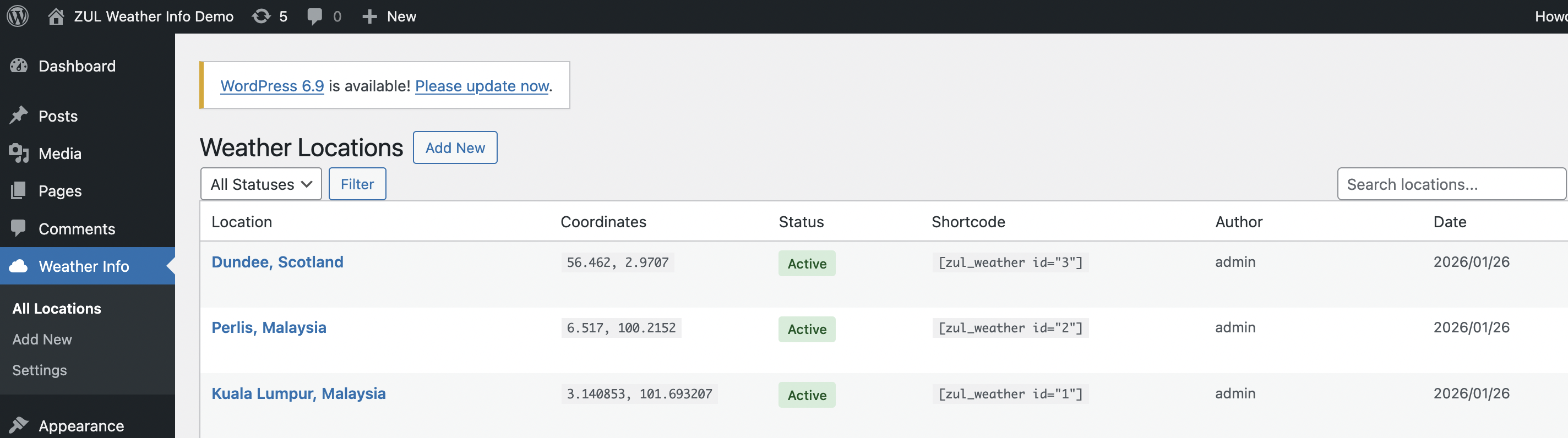
- Location Management - Add, edit, and manage weather locations with coordinates
- Transient Caching - Configurable cache duration to prevent API rate limiting
- Mock Data Fallback - Works without API key using demo data
- Shortcode Display - Easy frontend integration via
[zul_weather]shortcode - Responsive Design - Modern, mobile-friendly weather widget
Screenshots
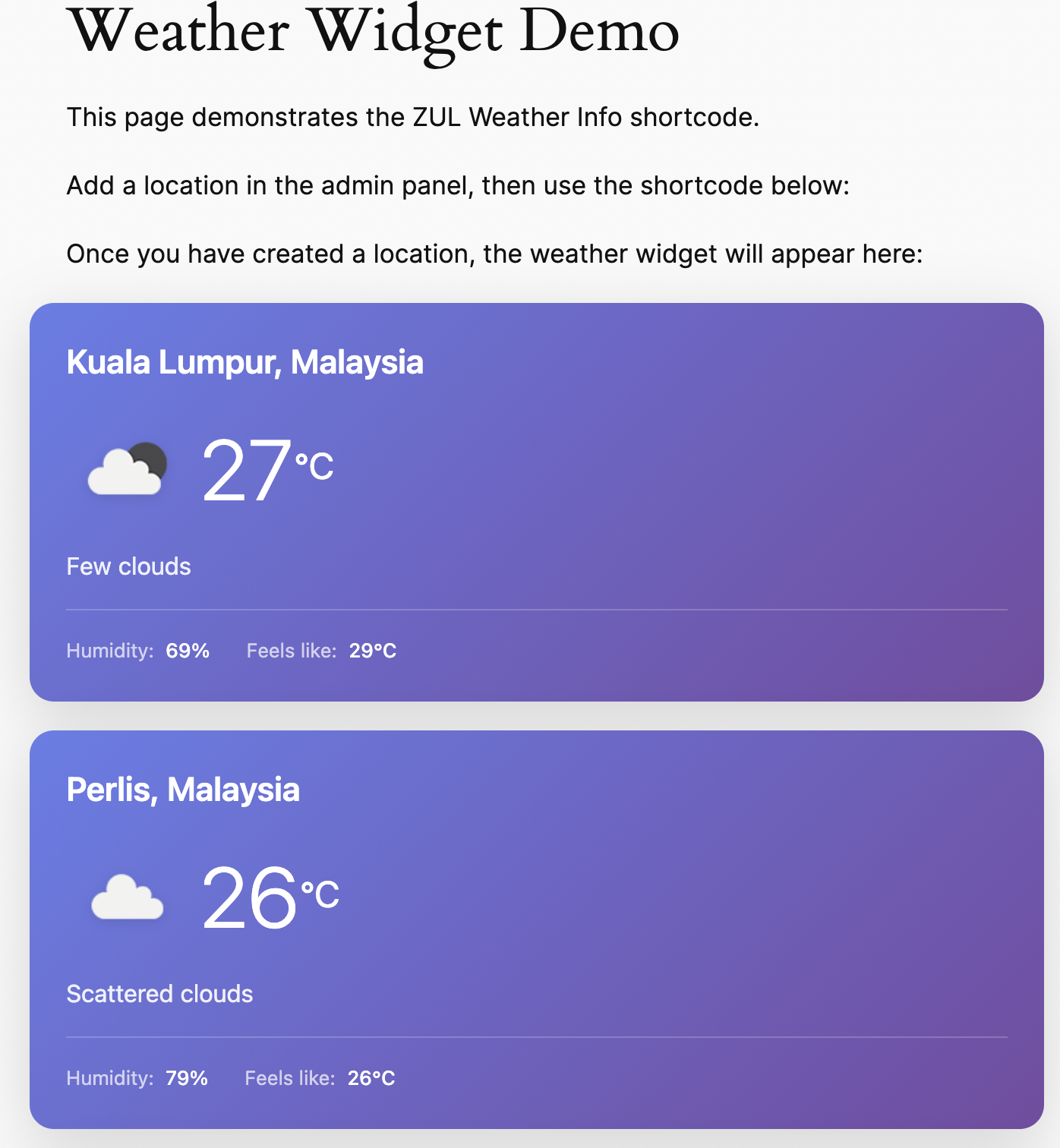
Weather Widget (Frontend)
Location Management
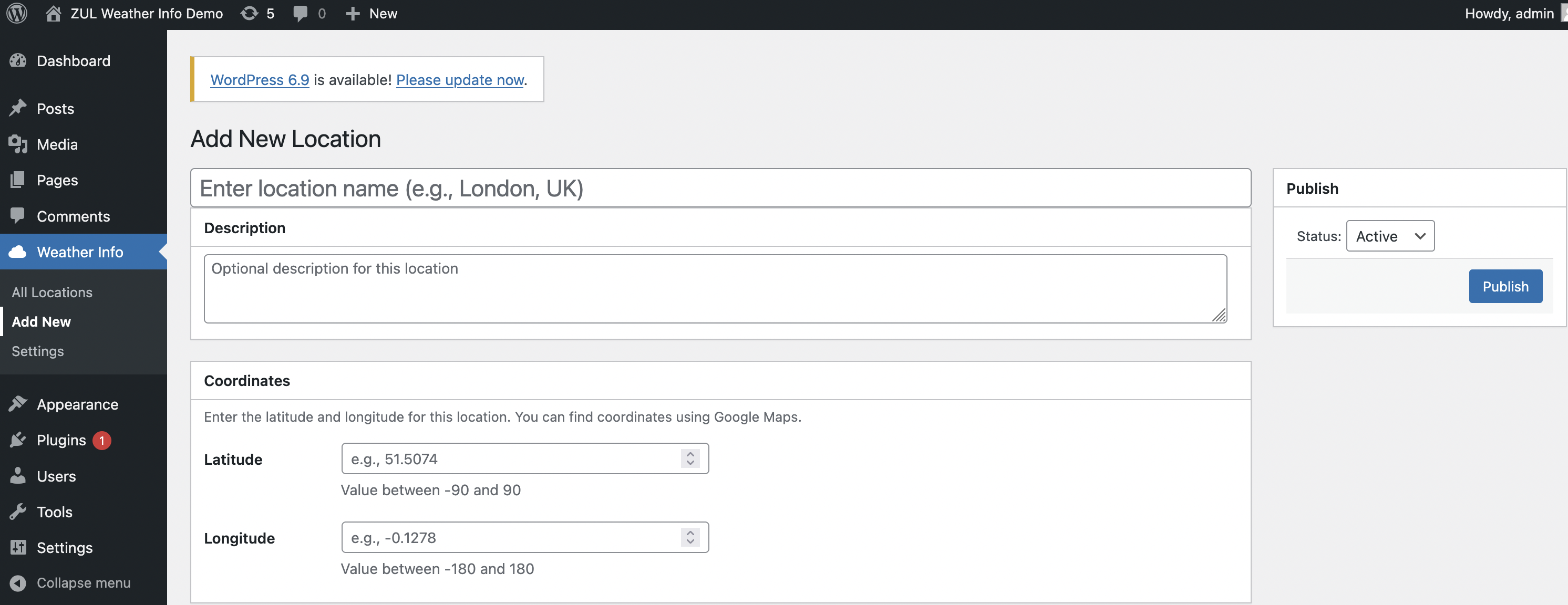
Add/Edit Location
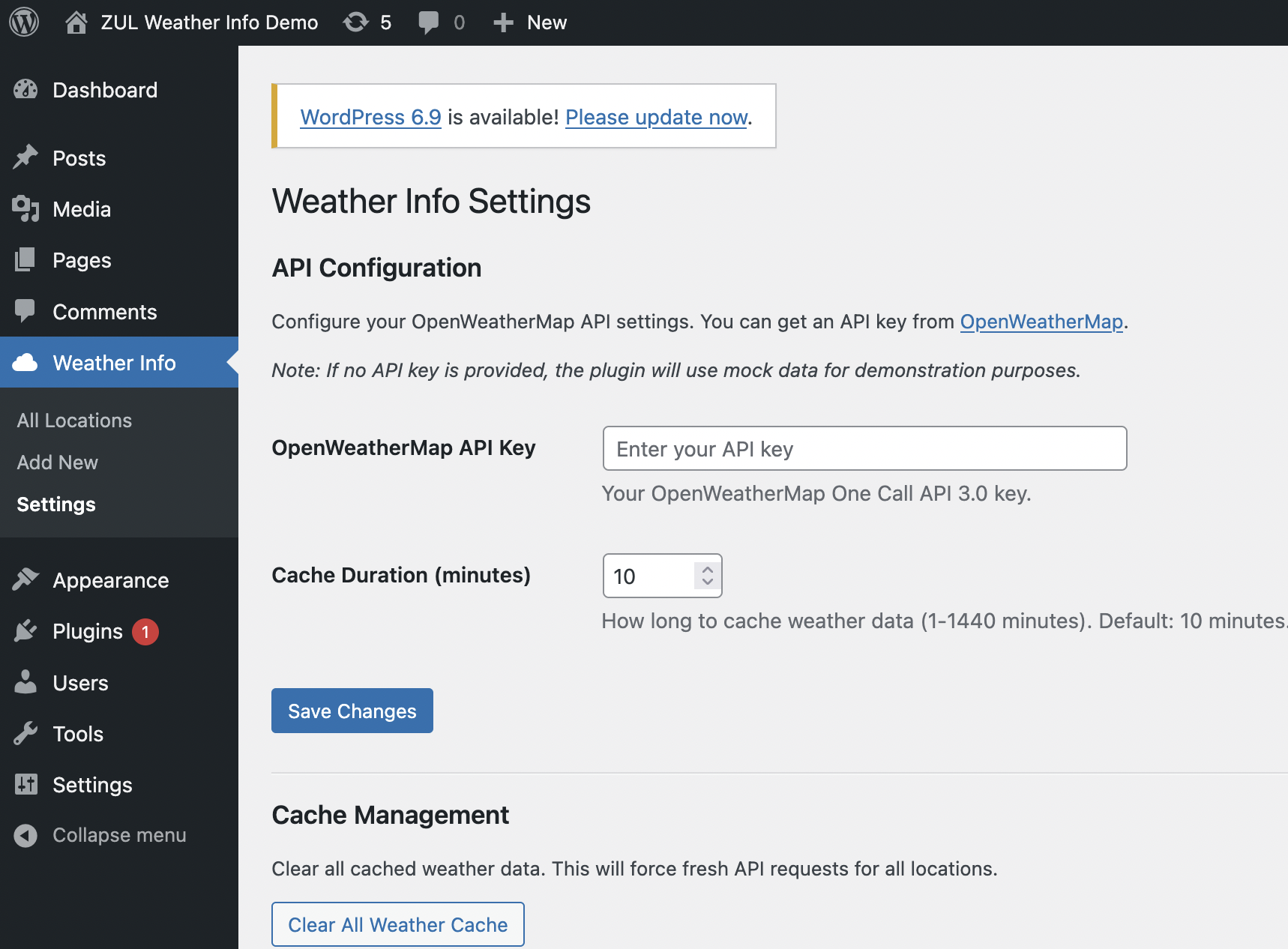
API Settings
Requirements
- WordPress 6.0 or higher
- PHP 8.0 or higher
- OpenWeatherMap API key (optional - uses mock data without it)
Installation
Manual Installation
- Download or clone this repository
- Upload the
zul-weatherinfofolder to/wp-content/plugins/ - Activate the plugin through the WordPress admin panel
- Go to Weather Info > Settings to configure your API key
Docker Installation (Development)
# Clone with submodules
git clone --recurse-submodules <repository-url>

# Or if already cloned, initialize submodules
git submodule update --init --recursive

# Start the Docker environment
./start.sh
Automatic Port Management
This project uses zul-check-ports as a git submodule to automatically handle port conflicts. When you run ./start.sh:
- The port checker scans for available ports
- If default ports are in use, it automatically finds alternatives
- Assigned ports are saved to
.env.ports - Docker Compose uses these dynamically assigned ports
# Example output when ports are in use:
Checking for available ports...

✓ WP: 8087 (default 8080 was in use)
✓ DB: 3310 (default 3307 was in use)
✓ PMA: 8088 (default 8081 was in use)

Port configuration saved to .env.ports
Default Ports
| Variable | Default | Fallback Range | Description |
|---|---|---|---|
WP_PORT |
8080 | 8080-8199 | WordPress port |
DB_PORT |
3307 | 3307-3399 | MySQL port |
PMA_PORT |
8081 | 8081-8199 | phpMyAdmin port |
Configuration
API Settings
- Navigate to Weather Info > Settings in WordPress admin
- Enter your OpenWeatherMap API key
- Get a free key at OpenWeatherMap
- The plugin uses the free Current Weather API 2.5
- New API keys may take 1-2 hours to activate
- Set cache duration (default: 10 minutes)
Note: If no API key is configured, the plugin displays mock/demo data.
Adding Locations
- Go to Weather Info > Add New
- Enter:
- Location Name - e.g., "London, UK"
- Description - Optional description
- Latitude - Between -90 and 90 (e.g., 51.5074)
- Longitude - Between -180 and 180 (e.g., -0.1278)
- Status - Active or Inactive
- Click Publish
Tip: Find coordinates using Google Maps - right-click on a location and select the coordinates.
Usage
Shortcode
Display weather for a location using the shortcode:
[zul_weather id="1"]Shortcode Attributes
| Attribute | Default | Description |
|---|---|---|
id |
(required) | Location ID |
class |
"" | Additional CSS class |
show_description |
"no" | Show location description |
show_humidity |
"yes" | Show humidity |
show_wind |
"no" | Show wind speed |
Examples
[zul_weather id="1"]
[zul_weather id="2" class="my-weather"]
[zul_weather id="1" show_wind="yes" show_humidity="yes"]
[zul_weather id="3" class="zul-weather-light"]
CSS Classes
The widget supports two themes:
- Default gradient theme (purple/blue)
- Light theme - add class
zul-weather-light
Widget Output
The weather widget displays:
- Location name
- Current temperature (°C)
- Weather condition with icon
- Humidity percentage
- Feels like temperature
- Wind speed (optional)
- "Demo data" notice when using mock data
Development
Directory Structure
zul-weatherinfo/
├── zul-weather-info.php          # Main plugin file
├── uninstall.php                 # Cleanup on uninstall
├── start.sh                      # Docker environment starter
├── mock_response.json            # Fallback mock data
├── composer.json                 # PHP dependencies
├── phpunit.xml                   # Test configuration
├── docker-compose.yml            # Docker configuration
├── .env.ports                    # Generated port assignments (gitignored)
├── includes/
│   ├── Plugin.php                # Main orchestrator
│   ├── Activation.php            # Database setup
│   ├── Autoloader.php            # PSR-4 autoloader
│   ├── Capabilities.php          # Permission management
│   ├── Support/                  # Utilities (Db, Validator, Nonce)
│   ├── Domain/                   # Entities and Value Objects
│   ├── Interfaces/               # Repository & Client interfaces
│   ├── Repositories/             # Data access layer
│   ├── Api/                      # OpenWeatherMap client
│   ├── Cache/                    # Transient caching
│   ├── Services/                 # Business logic
│   ├── Admin/                    # Admin pages & controllers
│   ├── Assets/                   # Script/style management
│   └── Shortcode/                # Frontend shortcode
├── assets/
│   ├── css/                      # Stylesheets
│   └── js/                       # JavaScript
├── docker/
│   └── scripts/
│       └── check-ports.sh        # Port checker wrapper script
├── tools/
│   └── zul-check-ports/          # Git submodule for port management
└── tests/                        # PHPUnit tests
Running Tests
# Using Docker
docker-compose run --rm --entrypoint "" phpunit vendor/bin/phpunit --testdox

# Using Make
make test
Docker Commands
# Start environment
./start.sh

# Stop environment
docker-compose down

# View logs
docker-compose logs -f

# Run WP-CLI commands
docker-compose run --rm --entrypoint "" wpcli wp plugin list --allow-root

# Access phpMyAdmin (debug mode)
docker-compose --profile debug up -d phpmyadmin
Make Commands
make start      # Start Docker environment
make stop       # Stop Docker environment
make test       # Run PHPUnit tests
make logs       # View container logs
make shell      # Open WordPress container shell
make clean      # Remove Docker volumes
Git Submodules
This project uses zul-check-ports as a git submodule for automatic port management.
Initial Setup
When cloning the repository, include submodules:
git clone --recurse-submodules <repository-url>Or if you've already cloned without submodules:
git submodule update --init --recursiveUpdating the Submodule
To update to the latest version of zul-check-ports:
cd tools/zul-check-ports
git pull origin main
cd ../..
git add tools/zul-check-ports
git commit -m "Update zul-check-ports submodule"
How Port Checking Works
The docker/scripts/check-ports.sh wrapper script:
- Calls the
zul-check-portstool with project-specific port configurations - Checks if default ports (8080, 3307, 8081) are available
- If a port is in use, finds the next available port in the fallback range
- Writes assigned ports to
.env.portsfile start.shsources this file and exports variables for docker-compose
# Manual port check (without starting Docker)
./docker/scripts/check-ports.sh

# View assigned ports
cat .env.ports
Customizing Port Ranges
Edit docker/scripts/check-ports.sh to modify port specifications:
# Format: NAME:DEFAULT:RANGE_START:RANGE_END
WP:8080:8080:8199      # WordPress: try 8080, fallback to 8080-8199
DB:3307:3307:3399      # MySQL: try 3307, fallback to 3307-3399
PMA:8081:8081:8199     # phpMyAdmin: try 8081, fallback to 8081-8199
Database
The plugin creates a custom table wp_zul_weather_info:
| Column | Type | Description |
|---|---|---|
| id | BIGINT | Primary key |
| location | VARCHAR(255) | Location name |
| description | TEXT | Optional description |
| latitude | DECIMAL(10,7) | Latitude coordinate |
| longitude | DECIMAL(10,7) | Longitude coordinate |
| created_by | BIGINT | WordPress user ID |
| status | VARCHAR(50) | active/inactive |
| create_dt | DATETIME | Created timestamp |
| modified_dt | DATETIME | Modified timestamp |
WordPress Options
| Option | Default | Description |
|---|---|---|
zul_weather_api_key |
"" | OpenWeatherMap API key |
zul_weather_cache_minutes |
10 | Cache TTL in minutes |
Capabilities
| Capability | Description |
|---|---|
zul_weather_manage |
Create, edit, delete locations |
zul_weather_view_admin |
View admin pages |
Both capabilities are granted to the Administrator role on activation.
API Reference
OpenWeatherMap Current Weather API 2.5 (Free Tier)
Endpoint:
https://api.openweathermap.org/data/2.5/weather?lat={lat}&lon={lon}&appid={key}&units=metricNote: This plugin uses the free Current Weather API 2.5, which is included with any OpenWeatherMap API key. New API keys may take 1-2 hours to activate after registration.
The plugin fetches current weather data including:
- Temperature
- Feels like temperature
- Humidity
- Pressure
- Wind speed
- Weather condition and icon
Error Handling
| Scenario | Behavior |
|---|---|
| No API key | Uses mock_response.json, shows "Demo data" notice |
| API timeout | Shows "Weather data unavailable" |
| Invalid API key | Shows "Weather data unavailable" |
| Location not found | Shows nothing (errors visible to admins only) |
| Inactive location | Shows nothing |
Security
- All admin actions require nonce verification
- Capability checks on all admin endpoints
- All SQL queries use
$wpdb->prepare() - Input sanitization with WordPress functions
- Output escaping with
esc_html(),esc_attr()
Changelog
1.0.0
- Initial release
- Admin settings page with API key and cache configuration
- Location management with CRUD operations
- OpenWeatherMap One Call API 3.0 integration
- Transient-based caching
- Mock response fallback
[zul_weather]shortcode- PHPUnit test suite
- Docker development environment
License
GPL-2.0-or-later
See DISCLAIMER.md for warranty information and third-party service details.
Credits
- Weather data provided by OpenWeatherMap
- Weather icons from OpenWeatherMap