Install
This is the repository archive. It installs, but the folder name will carry the branch suffix and updates will not flow.
Install straight from GitHub with WP-CLI:
wp plugin install https://github.com/theafolayan/wp-rest-api-page-views-tracker/archive/refs/heads/main.zipPage Views Tracker
Plugin Name: Rest API Page Views Tracker
Description: This Plugin Records page views on WordPress posts, including those fetched from the REST API and WPGraphQL, displays the views in the admin post list, and includes the views in the REST API and WPGraphQL responses.
Version: 1.3.1
Author: @theafolayan
Description
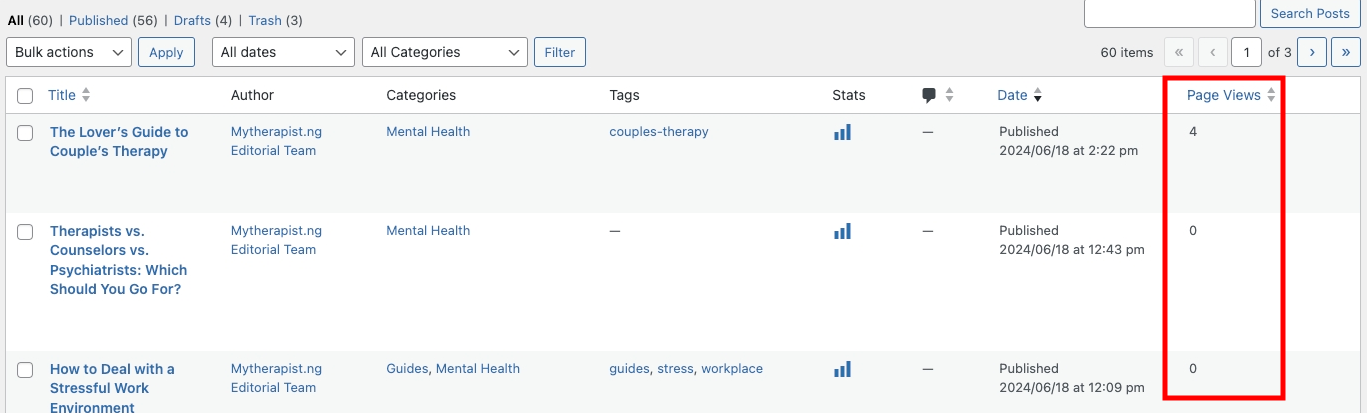 The Page Views Tracker plugin records page views on WordPress posts. It tracks views when posts are viewed on the site, fetched from the REST API, or queried via WPGraphQL. The plugin also displays the page views in the WordPress admin post list and includes the views in the REST API and WPGraphQL responses.
Features
- Tracks page views for WordPress posts.
- Increments page views when posts are viewed on the site.
- Increments page views when posts are fetched via the REST API.
- Increments page views when posts are queried via WPGraphQL.
- Displays page views in the WordPress admin post list.
- Adds the
page_viewsfield to the REST API response. - Adds the
pageViewsfield to the WPGraphQL schema.
Installation
- Download the plugin.
- Upload the
page-views-trackerfolder to the/wp-content/plugins/directory. - Activate the plugin through the 'Plugins' menu in WordPress.
Usage
Once activated, the plugin will automatically start tracking page views for your posts. You can see the page views in the WordPress admin post list. The page views will also be included in the REST API and WPGraphQL responses.
REST API
When you fetch a post via the REST API, the response will include the page_views field:
{
    "id": 1,
    "date": "2024-06-18T12:34:56",
    "title": {
        "rendered": "Sample Post"
    },
    "page_views": 10
}