ThaiTop Age Verification Popup
Add age verification popup for WooCommerce products with customizable minimum age requirements. Features include age calculation from current or custom date, Buddhist year display support, multiple color templates, and mobile-responsive design. Perfect for stores selling age-restricted products.
by ThaiTop · github.com/thaitop/thaitop-age-verification-popup
★ 0stars
0forks
Install
No release zip yet. The repository archive installs, but the folder name will carry the branch suffix and updates will not flow:
wp plugin install https://github.com/thaitop/thaitop-age-verification-popup/archive/refs/heads/main.zipA WordPress plugin for adding age verification popups to WooCommerce products.
Key Features
- ✅ Individual product age verification settings
- ✅ Customizable minimum and maximum age requirements
- ✅ Accurate age calculation with date precision
- ✅ Calculate age from current or custom date
- ✅ Buddhist year display support (BE)
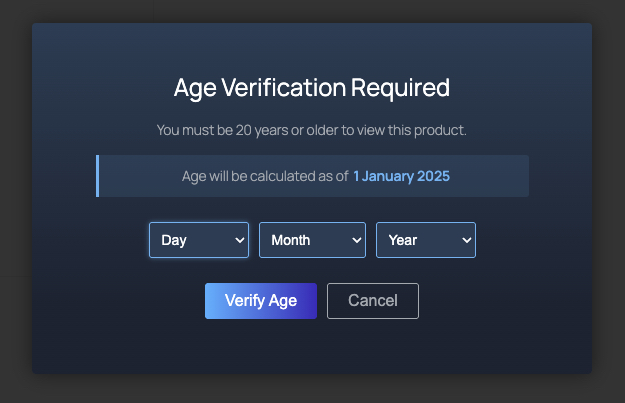
- ✅ 4 color templates (Steam, Dark, Light, Nature)
- ✅ Full color customization options
- ✅ Mobile-responsive design
- ✅ Multi-language support
- ✅ WooCommerce HPOS compatible
Version Information
- Current Version: 1.1.0
- Last Updated: January,27 2025
- Requires WordPress: 5.0+
- Tested up to WordPress: 6.7
- Requires PHP: 7.2+
- Requires WooCommerce: 6.0+
- Tested up to WooCommerce: 8.4
Installation
- Upload plugin files to
/wp-content/plugins/thaitop-age-verification-popupdirectory - Activate the plugin through the 'Plugins' menu in WordPress
- Configure plugin settings in WooCommerce > Settings > Age Verification
Usage
General Settings
- Go to WooCommerce > Settings > Age Verification
- Configure basic settings:
- Display style and colors
- Buddhist year display option
- Default messages and templates
Product Settings
- Open product edit page
- Go to 'Age Verification' tab
- Enable age verification
- Configure:
- Minimum age requirement
- Maximum age limit (optional)
- Age calculation method
- Reference date (if using custom date)
Age Verification Features
- Precise age calculation considering year, month, and day
- Support for both minimum and maximum age restrictions
- Optional Buddhist calendar year display
- Custom reference date support
- Session-based verification memory
Plugin Screenshot
Support
For support and assistance:
- Website: https://thaitoptecs.com
- Documentation: Plugin Documentation
License
This plugin is released under GPL v2 or later - see LICENSE for details
Changelog
Version 1.1.0
- Added maximum age restriction feature
- Added Buddhist year display support
- Improved age calculation accuracy
- Fixed date comparison issues
- Enhanced error handling
- Updated WooCommerce compatibility
Version 1.0.0
- Initial release