Polylang Re-translate WP Registry grade A. No security issues foundWP RegistryNo security issues foundOpen the reportA
Re-translate existing Polylang Pro translations using DeepL directly from the WordPress block editor.
Install
Upload it under Plugins → Add New Plugin → Upload Plugin, then activate.
Install straight from GitHub with WP-CLI:
wp plugin install https://github.com/teemujonkkari/polylang-retranslate/releases/download/v1.1.1/polylang-retranslate.zipA WordPress plugin that adds a "Re-translate" panel to the block editor, allowing you to re-translate existing translations using DeepL machine translation.
Description
Polylang Re-translate extends Polylang Pro by providing a convenient way to update existing translations with fresh machine translations. Instead of manually copying content and using the translation button for new posts, you can now re-translate any existing translation directly from the source post's editor.
This is particularly useful when:
- Source content has been significantly updated
- You want to refresh translations with improved DeepL models
- You need to bulk-update translations after content revisions
Requirements
- WordPress 6.2 or higher
- PHP 7.2 or higher
- Polylang Pro 3.6 or higher
- Machine Translation enabled in Polylang Pro settings
- Active DeepL API key configured in Polylang Pro
Installation
- Download the plugin files
- Upload the
polylang-retranslatefolder to/wp-content/plugins/ - Activate the plugin through the 'Plugins' menu in WordPress
- Ensure Polylang Pro is active with Machine Translation enabled
Usage
- Open any post in the default language using the block editor
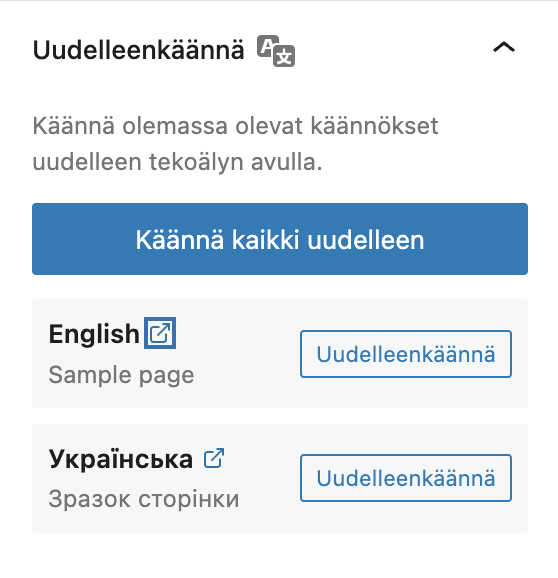
- Look for the "Re-translate" panel in the Document Settings sidebar (right side)
- You'll see a list of existing translations for the current post
- Click "Re-translate" next to any language to update that translation
- Confirm the action when prompted (this will overwrite the existing translation)
- The translation will be updated using DeepL
Important Notes
- The Re-translate panel only appears when editing posts in the default language
- Only existing translations can be re-translated (use Polylang Pro's standard flow for new translations)
- Re-translating will overwrite the current translation content
- The translation post's status (draft, published, etc.) is preserved
Features
- Block Editor Integration: Native sidebar panel in Gutenberg
- Re-translate All: Bulk re-translate all languages with one click (sequential with 2s delay)
- Per-Language Control: Re-translate individual languages independently
- Quick Edit Links: Open translation editor directly in a new tab
- Status Feedback: Visual indicators for loading, success, and error states
- Confirmation Dialog: Prevents accidental overwrites
- Permission Checks: Respects WordPress capabilities (edit_post)
- Post Type Support: Only works with Polylang-enabled post types
- Debug Logging: Optional logging for troubleshooting (when WP_DEBUG is enabled)
- Translations: Finnish language support included
Screenshot
The Re-translate panel in the block editor sidebar:
REST API
The plugin registers a REST API endpoint for the translation functionality:
Endpoint
POST /wp-json/pll-retranslate/v1/translateParameters
| Parameter | Type | Required | Description |
|---|---|---|---|
source_post_id |
integer | Yes | The ID of the source post to translate from |
target_language |
string | Yes | The target language slug (e.g., "en", "sv") |
Response
Success (200):
{
  "success": true,
  "post_id": 123,
  "post_title": "Translated Post Title"
}
Error (4xx/5xx):
{
  "code": "error_code",
  "message": "Error description",
  "data": {
    "status": 400
  }
}
Error Codes
| Code | Status | Description |
|---|---|---|
rest_forbidden |
403 | User lacks permission to edit source or target post |
invalid_source_post |
404 | Source post not found |
invalid_post_type |
400 | Post type doesn't support translations |
invalid_language |
400 | Target language not configured |
no_translation |
400 | No existing translation found |
service_unavailable |
503 | DeepL service not available |
translation_failed |
500 | DeepL translation error |
save_failed |
500 | Failed to save translated content |
Debug Logging
When WP_DEBUG is enabled, the plugin logs translation operations to wp-content/debug.log:
[Polylang Re-translate] Re-translation started: user #1, source post #42 ("Post Title") -> en (target post #43)
[Polylang Re-translate] Re-translation completed: post #42 -> en (post #43) by user #1
To enable debug logging, add to wp-config.php:
define( 'WP_DEBUG', true );
define( 'WP_DEBUG_LOG', true );
Security
The plugin implements several security measures:
- Capability Checks: Users must have
edit_postcapability for both source and target posts - Nonce Verification: Handled automatically by WordPress REST API
- Input Sanitization: All inputs are sanitized (
absint,sanitize_key) - Post Type Validation: Only Polylang-enabled post types can be translated
- ABSPATH Check: Direct file access is prevented
Hooks & Filters
The plugin currently does not provide custom hooks or filters. It integrates with Polylang Pro's existing infrastructure:
- Uses
pll_initaction for initialization - Leverages Polylang Pro's
Machine_Translation\Processorfor translations - Respects Polylang's post type translation settings
Changelog
1.1.1
- Keep plugin name in English across all translations
- Exclude assets folder from release zip
1.1.0
- Add "Re-translate All" button for bulk translation
- Add external link icon to open translation editor in new tab
- Sequential translation with 1 second delay to avoid API rate limits
- Progress indicator for bulk translations
1.0.1
- Add Finnish translations
- Improve dependency notice with Polylang Pro link
- Fix translation loading for JavaScript strings
1.0.0
- Initial release
- Block editor Re-translate panel
- REST API endpoint for translations
- Debug logging support
- Security hardening (capability checks, input sanitization)
- Performance optimization (query caching)
Development
File Structure
polylang-retranslate/
├── polylang-retranslate.php    # Main plugin file
├── includes/
│   └── class-rest-endpoint.php # REST API endpoint
├── js/
│   └── retranslate-panel.js    # Block editor panel
├── languages/                   # Translation files
├── assets/
│   └── screenshot.png          # Plugin screenshot
└── README.md                    # This file
Coding Standards
This plugin follows:
- WordPress Coding Standards
- Polylang Pro conventions (namespaces, PHPDoc with
@sincetags) - PSR-4 autoloading compatible structure
Namespace
WP_Syntex\Polylang_RetranslateSupport
For issues and feature requests, please visit the GitHub repository.
License
GPL-3.0-or-later
This plugin is free software: you can redistribute it and/or modify it under the terms of the GNU General Public License as published by the Free Software Foundation, either version 3 of the License, or (at your option) any later version.
Credits
- Author: Teemu Jonkkari
- Repository: github.com/teemujonkkari/polylang-retranslate
- Powered by: Polylang Pro and DeepL
Releases
3 releases. Each count is every asset in that release; expand a row for the breakdown.