Install
This is the repository archive. It installs, but the folder name will carry the branch suffix and updates will not flow.
Install straight from GitHub with WP-CLI:
wp plugin install https://github.com/techdom-digital-solutions-u-limited/shashura-mobile-money-for-camptix/archive/refs/heads/main.zipAccept MTN and Airtel Mobile Money for CampTix ticket sales in Uganda, settled through the Shashura payment gateway.
Not affiliated with, or endorsed by, the CampTix project.
What it does
Shashura Mobile Money for CampTix adds MTN and Airtel Mobile Money as a payment option for CampTix, the WordPress event ticketing plugin used by WordCamp and community events. It's built for organisers selling tickets in Uganda who need a payment method their attendees already use day to day.
A Shashura merchant account is required to use this plugin. Sign up or log in at shashura.com.
The plugin connects CampTix to the Shashura Mobile Money API and handles the full collection lifecycle: number verification, the PIN push to the buyer's phone, settlement confirmation, and reconciliation. It runs against either Shashura's Sandbox or Production environment, and the API endpoint is configurable, so it can be pointed at a specific Shashura deployment rather than the public default.
How a payment works
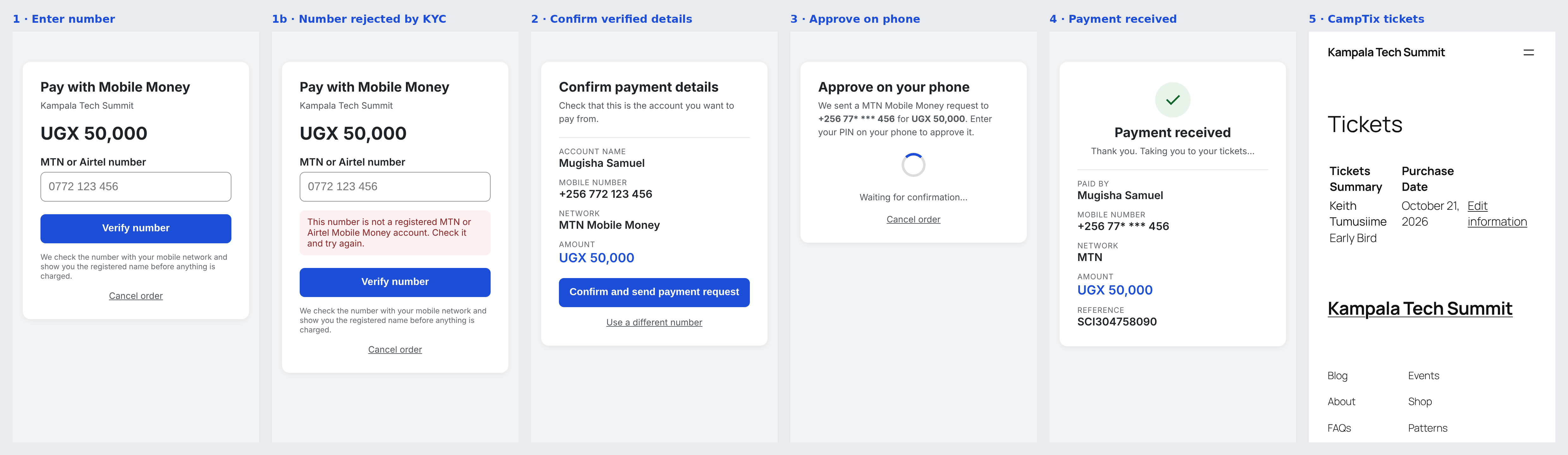
- The buyer selects Mobile Money at checkout and enters their MTN or Airtel number.
- The number is verified against the network before anything is charged, and the registered account name is shown to the buyer for confirmation.
- A PIN prompt is pushed to the buyer's phone for the exact order total.
- The plugin confirms the payment with Shashura directly rather than trusting the browser or an incoming webhook on their own. Both only trigger a check — only a status enquiry whose reference and amount match the order can mark it paid.
- Once confirmed, the buyer is taken to their CampTix ticket page and receives CampTix's standard confirmation email.
Screenshots
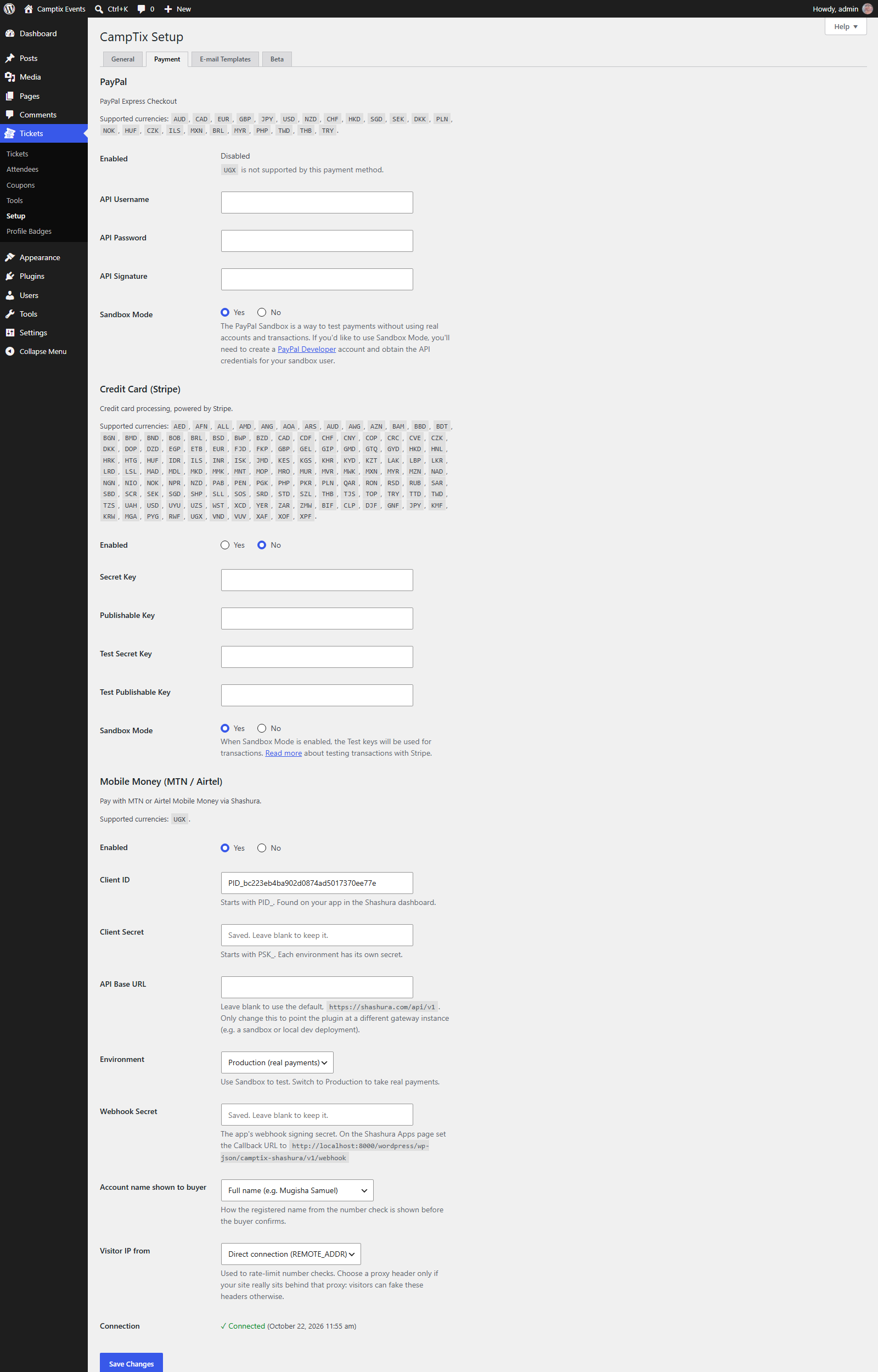
Payment configuration — Tickets → Setup → Payment: credentials, environment selection, and live connection status.
Buyer-facing checkout flow — from entering a mobile number through to the CampTix ticket page, including the KYC-rejection state for an unregistered number.
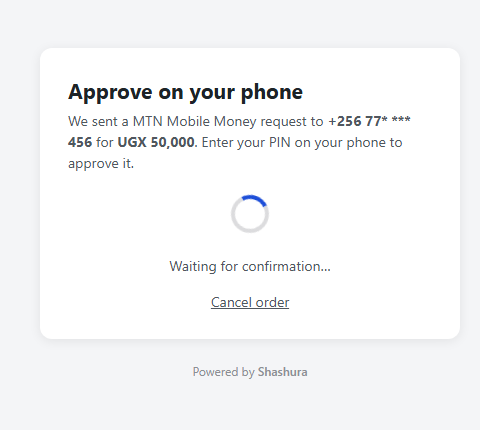
"Powered by Shashura" footer, shown here on the PIN-approval step, carried on every buyer-facing screen.
Reliability and safety
- Every payment prompt on an order is tracked and reconciled, including ones approved after a buyer tried more than once.
- A duplicate payment on the same order is detected and flagged to the site administrator for a manual refund, rather than accepted or dropped silently.
- Incoming webhooks are verified against an HMAC-SHA256 signature. Unsigned, forged, oversized or mismatched-environment events are rejected.
- A per-order lock stops the webhook, the buyer's browser, an order cancellation and CampTix's own timeout sweep from recording conflicting outcomes for the same order at the same time.
- A payment approved after an order was cancelled or timed out is still recognised and completes the order.
- Works with both current CampTix (2.x) and CampTix 1.4.x, using the reconciliation strategy appropriate to each.
An automated end-to-end suite (92 checks) has been run against WordPress with both current CampTix (2.x) and CampTix 1.4.x, covering the full payment lifecycle: KYC errors, underpayment, wrong reference, forged or replayed webhooks, double approval, telco rejection, token expiry, cancel races, concurrent webhook and browser settlement, the timeout sweep, rate limits, and privacy export/erase. An independent security review of the code and a live test deployment was also carried out, with every finding fixed and covered by the test suite.
Requirements
- CampTix, with the ticket currency set to UGX.
- A Shashura merchant account with an app configured for Mobile Money collections, and its Client ID, Client Secret and Webhook Secret.
- A publicly reachable site, with the server's outbound IP whitelisted on the Shashura app, so callbacks and settlement can reach the plugin.
Installation
- Install and activate CampTix. Under Tickets → Setup → General, set the ticket currency to UGX.
- Upload the plugin zip under Plugins → Add New → Upload Plugin, then activate it.
- Go to Tickets → Setup → Payment and open the Mobile Money (MTN / Airtel) section:
- Set Enabled to Yes.
- Enter the Client ID and Client Secret from your Shashura app (see Getting your Shashura API credentials below).
- Choose Sandbox while testing. Switch to Production only when ready to take real payments.
- Enter the Webhook Secret shown on your Shashura app. Mobile Money is not offered at checkout until this is set.
- Leave API Base URL blank to use Shashura's default endpoint, or set it to point at a specific Shashura deployment.
- Copy the webhook URL shown under Webhook Secret and set it as the Callback URL on the matching app in your Shashura dashboard.
- Ask Shashura to whitelist your server's outbound IP address for that app. Requests from an IP that is not whitelisted are rejected.
- Save your settings. The Connection line confirms whether the credentials authenticate successfully.
Getting your Shashura API credentials
This plugin needs three values from your Shashura merchant account: a Client ID, a Client Secret, and a Webhook Secret. All three are issued from the Apps page of your Shashura merchant dashboard.
- Log in to your Shashura merchant dashboard at shashura.com and open the Apps page. If you don't have an account yet, sign up there first.
- Click Create App and give it a name, such as your event site's name. Shashura generates a Sandbox credential pair and a Production credential pair for the app at the same time, along with a Webhook Signing Secret, so there's no separate step to request production access later.
- The Apps page lists each Client ID against its environment:
- Client ID — SANDBOX begins with
TID_. Use this, with its matching Client Secret, while Environment is set to Sandbox in this plugin. - Client ID — PRODUCTION begins with
PID_. Use this, with its matching Client Secret, once Environment is switched to Production. - Client Secret is hidden by default. Use the reveal icon to display it on screen, or the regenerate icon to issue a new one — regenerating immediately invalidates the previous secret, so update this plugin's settings straight after.
- Client ID — SANDBOX begins with
- Copy the Client ID and Client Secret for the environment you're configuring into this plugin's Payment settings.
- Reveal the Webhook Signing Secret (begins with
whsec_) on the same Apps page and copy it into this plugin's Webhook Secret field. - Copy the webhook URL this plugin displays under its Webhook Secret field and paste it into the Callback URL field for the same app on the Apps page.
- Ask Shashura to whitelist your server's outbound IP address for this app, so callbacks and settlement checks are accepted.
Because each app holds both a Sandbox and a Production credential pair, going live does not require creating a new app — only switching this plugin's Environment setting to Production and swapping in the Production Client ID and Secret from the same Apps page.
FAQ
Which currencies are supported? Uganda Shillings (UGX) only, matching Shashura's Mobile Money coverage.
Does this plugin process refunds? Not automatically. The Shashura API currently exposes payouts but no refund endpoint. Issue the refund from the Shashura dashboard, then mark the attendee as refunded in CampTix.
What happens if a buyer closes the browser tab after approving the PIN prompt? The payment still settles. Shashura's webhook, and CampTix's own timeout check on CampTix 2.x, both ask Shashura directly whether the order was paid, independently of whether the buyer's browser is still open.
Can I switch between Sandbox and Production while orders are still open? Avoid it. A prompt sent under one environment cannot be checked while the plugin is configured for the other. It stays in a waiting state, never shown as failed, until the environment is switched back.
Where do I see what happened on a specific order? Open the attendee's edit screen under Tickets → Attendees. The CampTix log on that screen records every check, error, amount mismatch or duplicate-payment warning for that order.
Can this connect to a Shashura deployment other than the public default? Yes. The API Base URL field under the payment settings accepts a full base URL, such as a sandbox or a dedicated gateway instance, in place of the default.
External services
This plugin connects to the Shashura Mobile Money API to collect ticket payments. This is required functionality — without it, the plugin cannot verify mobile numbers, push PIN prompts, or confirm payment, since Mobile Money collection can only happen through a licensed Mobile Money aggregator.
What is sent, and when:
- Number verification — when a buyer enters a mobile number at checkout, that number is sent to Shashura to look up the registered account name on the MTN/Airtel network, shown to the buyer for confirmation before anything is charged.
- Payment request — once the buyer confirms, the mobile number, the order total, and an order reference are sent to Shashura to push a PIN prompt to the buyer's phone.
- Status confirmation — after a prompt is sent, this plugin asks Shashura directly whether the referenced payment succeeded (and Shashura also notifies this plugin via a signed webhook). No card numbers, mobile money PINs, or other site data are sent.
- These calls happen only when a buyer actually attempts a Mobile Money payment at checkout — never on a page load with no checkout activity.
This service is provided by Shashura (operated by Techdom Digital Solutions): Terms of Service · Privacy Policy.
Privacy
Against each paid order, this plugin stores the payer's registered name, a masked mobile number, the mobile network, and the Shashura transaction reference, for reconciliation and support. Full, unmasked phone numbers and names are included in WordPress's own Tools → Export Personal Data and Erase Personal Data tools, so data-subject requests are handled through core WordPress, not a separate process. This plugin never handles or stores card numbers, mobile money PINs, or Shashura account credentials.
Developer filters
| Filter | Default | Description |
|---|---|---|
ctx_shashura_lookups_per_ip |
20 |
Number verification checks allowed per visitor IP per hour. |
ctx_shashura_lookups_alert |
300 |
Site-wide number verification checks per hour that trigger an admin email. |
ctx_shashura_client_ip |
— | Overrides the IP address used for rate limiting. |
ctx_shashura_accent_color |
#1d4ed8 |
Accent colour used on the payment pages. |
ctx_shashura_http_timeout |
25 |
Timeout, in seconds, for calls to the Shashura API. |
ctx_shashura_base_url |
https://shashura.com/api/v1 |
Overrides the API base URL on top of the settings field. HTTPS is enforced except for local or loopback addresses. |
Support
For help with a Shashura account, API credentials, or a specific payment, contact Shashura support through the merchant dashboard at shashura.com. For issues with this plugin itself, open an issue in this repository or use the plugin's support forum on WordPress.org.
Credits
Developed and maintained by Cipherwave Software Limited.
License
GPLv2 or later — see LICENSE.