Icon Library
A Wordpress Plugin using icon fragments
Install
No release zip yet. The repository archive installs, but the folder name will carry the branch suffix and updates will not flow:
wp plugin install https://github.com/svgforge/icon-library/archive/refs/heads/main.zipGutenberg plugin that inserts SVG icons from a central SVG sprite file (ico.svg) via <use> and links them. The sprite file can be uploaded directly from a settings page as an SVG fragment library or theme override.
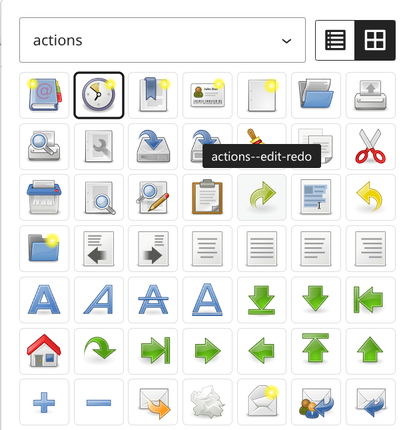
This plugin is only useful for advanced theme and plugin developers who manage their own SVG sprite file. It is not an icon library manager: there is no UI to collect, organize or import individual icons — every icon must first exist as a <symbol> in a sprite file you own, build and version. The editor's symbol picker (see screenshot) then lets you select icons from that sprite simply by clicking and browsing.
WordPress 7.1 already has SVG icons — why this plugin?
Since WordPress 7.1, core ships its own icon system: wp_register_icon_collection() / wp_register_icon() register icons once and they appear in the core Icon block picker, the REST API and the wp_get_icon() rendering helper. If you only need a few icons, register them in your theme/plugin and use core instead of this plugin.
The fragment approach of this plugin still has advantages when you run a real sprite pipeline:
- Full SVG survives. The browser loads the
<symbol>from the sprite and renders it via<use>unmodified — stroke-based icons, gradients,currentColor, inline styles and customviewBoxvalues all work. WordPress 7.1's sanitizer is intentionally strict (<svg>/<path>/<polygon>only, nostroke, no inline styles) and breaks most stroke-based icon sets. - Reuse existing assets. Upload a sprite you already have (or generate one with a CLI tool like svgforge-cli — no per-icon PHP code required.
- One file. The sprite is a single cacheable file that can live in your theme repo and is versioned with Git.
- Per-block control. Fill and stroke colours, width/height with units, links with
relhandling and aria-labels — per instance, without touching a stylesheet. - Works on WordPress < 7.1. The plugin supports 6.6+, so it works where the native API does not exist yet.
Honest limitations:
- To add or edit icons you must rebuild the sprite file — typically with a CLI tool such as svgforge (there is no in-browser icon editor, and no code-free icon management UI).
- Icons live in your content as a block. The frontend markup is server-rendered (
render.php), but there is no simplewp_get_icon()-style helper for theme PHP — for that, use the native 7.1 API.
Features
- Settings page (Settings → Icon Library) for uploading the SVG sprite file, including sanitization of scripts and event handlers
- Symbol picker in the editor with a live preview of all
<symbol>elements from the sprite - Icons can be linked (new tab with
noopener/noreferrer) - Aria-label for screen readers
- Fill/stroke colours and width/height per block (
px,em,rem,%) - Dynamic frontend rendering via
render.phpusingget_block_wrapper_attributes() - Block supports: alignment, anchor, additional CSS classes
Requirements
- WordPress >= 6.6
- PHP >= 8.3
Installation
- Upload the plugin folder to
/wp-content/plugins/(or install the ZIP from a GitHub release) - Activate the plugin
- Under Settings → Icon Library, upload the
ico.svgfile containing<symbol id="my-icon" viewBox="0 0 24 24">…</symbol>elements (or configure another source, see below) - In the editor, add the "SVG Fragment" block and choose an icon
Composer users should read Composer installation.
Sprite file configuration
Generating a sprite with svgforge-cli
Install svgforge-cli and build a valid ico.svg sprite (with <symbol id="…" viewBox="…"> elements) from a folder of SVG icons:
npm install --global @svgforge/svgforge-cli
svgforge --symbol --dest=out 'assets/./**/*.svg'
svgforge-cli sanitizes the SVG (stripping scripts, event handlers and javascript: links) and optimizes the output with svgo. The ./ keeps the relative paths, so files in subdirectories become directory--filename IDs — each directory is then a filter group in the icon picker. The generated sprite can be uploaded via the settings page or referenced from the theme via the icon_library_sprite_url filter, see below.
The SVG sprite file is resolved in this order (the first existing source wins):
- Filter
icon_library_sprite_url– the canonical override (theme file, CDN). Has priority. - Upload from settings – file uploaded via the settings page.
- Fallback
sprite.svgbundled with the plugin (wp-content/plugins/icon-library/sprite.svg).
Override with a filter (recommended, Git-versionable)
In your theme's functions.php, return the URL of your own sprite file — the file then lives in the theme repo and is versioned with the theme:
add_filter( 'icon_library_sprite_url', fn () => get_theme_file_uri( 'assets/ico.svg' ) );or point it at a CDN:
add_filter( 'icon_library_sprite_url', fn () => 'https://cdn.example.com/icons/ico.svg' );The filter is the only supported override mechanism and wins over everything, including a backend upload.
Roadmap: WordPress 7.1 integration
The native 7.1 icon API and this plugin complement each other, so an integration is being planned for a future release: on sites running WordPress >= 7.1 the plugin will register each <symbol> of the configured sprite as an icon-library collection via wp_register_icon(). The same sprite would then also power the core Icon block and wp_get_icon(), in addition to the SVG Fragment block.
Caveat: core's conservative sanitizer strips stroke and inline styles, so stroke-based sprite icons degrade to their fill shapes when consumed through the native path. The fragment block remains the primary experience; the core integration is a companion, not a replacement. See docs/roadmap.md.
Documentation
Developer and maintenance topics are split into docs/:
- Composer installation – install the plugin via Composer (GitHub repo or WP Packages)
- Translations – extract, translate and build the
languages/files - Release & WordPress.org – automatic release workflow and publishing requirements
- Roadmap – planned WordPress 7.1 icon API integration
- Development – build scripts, tests and project structure
License
GPL-2.0-or-later, see LICENSE.