manifest / integrations / tm-compare
TM Campaign Compare
WordPress plugin to compare Trackmania campaign records between players using the official Nadeo API.
★ 0stars
0forks
Install
No release zip yet. The repository archive installs, but the folder name will carry the branch suffix and updates will not flow:
wp plugin install https://github.com/supi99/tm-compare/archive/refs/heads/main.zipA WordPress plugin to compare Trackmania campaign records between players using the official Nadeo API.
Features
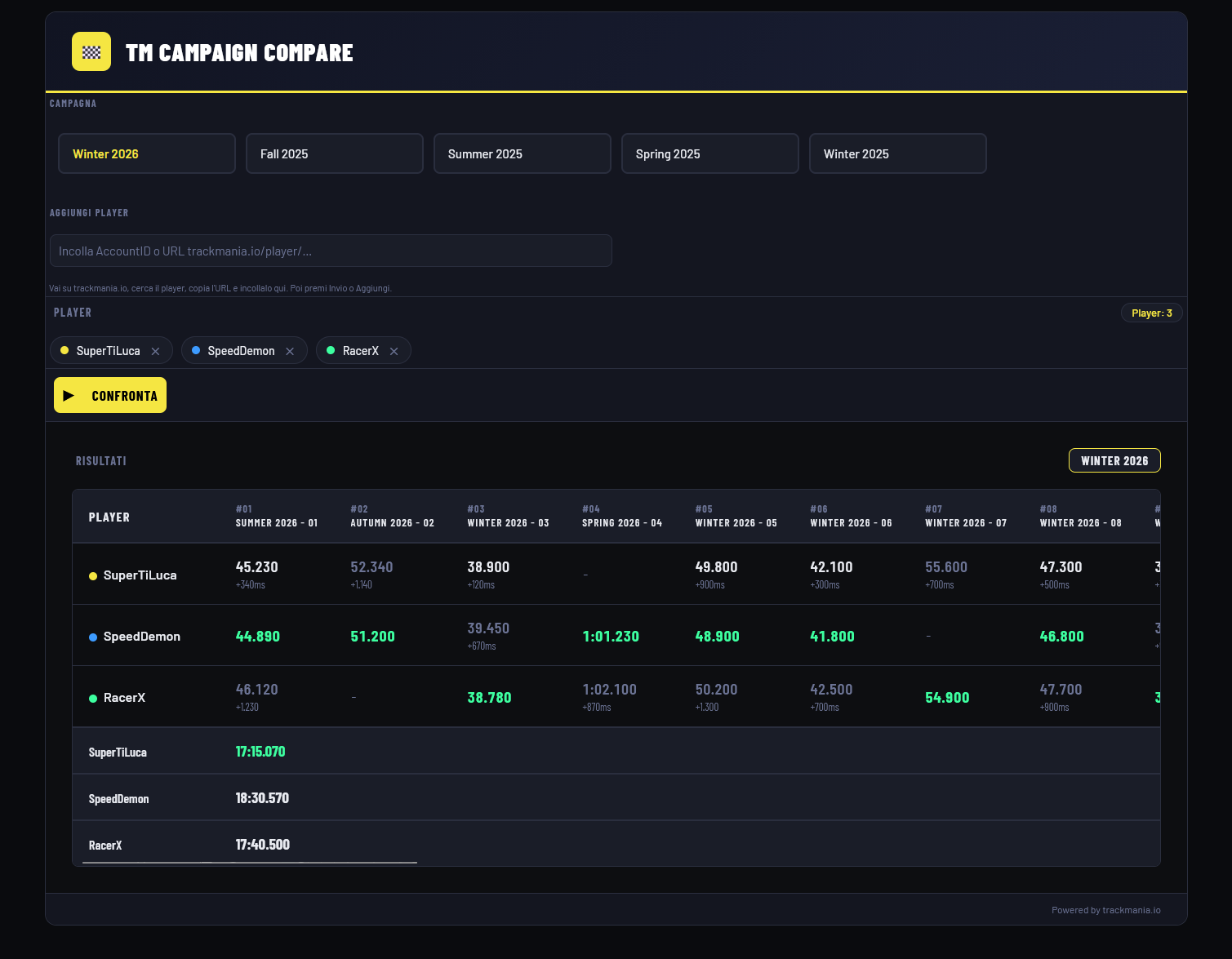
- Compare personal best times across all maps of any seasonal campaign
- Support for up to 7 players simultaneously
- Best and worst times highlighted per map
- Total time ranking at the bottom
- Players saved in localStorage — no need to re-add them on every visit
- Fully client-side UI rendered via shortcode
Requirements
- WordPress 5.8+
- PHP 7.4+
- A Dedicated Server Account on trackmania.com (free)
Installation
- Download or clone this repository into your
wp-content/plugins/directory:git clone https://github.com/Supi99/TM-Compare wp-content/plugins/tm-compare - Activate the plugin from the WordPress admin panel under Plugins.
- Go to Settings → TM Compare and enter your Dedicated Server Account credentials.
- Add the shortcode
[tm_compare]to any page or post.
Configuration
The plugin requires a Dedicated Server Account (not your regular Trackmania account). You can create one for free at trackmania.com/player/dedicated-servers.
Note: Credentials are stored in the WordPress database. Make sure your site is properly secured and access to the admin panel is restricted to trusted users.
Usage
- Open the page where you placed the
[tm_compare]shortcode. - Select a seasonal campaign.
- Add players by pasting their Account ID or their trackmania.io profile URL (e.g.
https://trackmania.io/player/xxxxxxxx-xxxx-xxxx-xxxx-xxxxxxxxxxxx). - Click Confronta to fetch and display the comparison table.
How it works
- Campaign and player data is fetched from trackmania.io (no authentication required).
- Personal best times are fetched from the Nadeo Core API (
/v2/mapRecords/by-account/) using aNadeoServicestoken obtained via your Dedicated Server credentials. - Tokens are cached in the WordPress database and automatically refreshed after 55 minutes.
- To stay within Nadeo's rate limits, requests are spaced ~550ms apart.
File structure
tm-compare/
├── tm-compare.php   # Plugin backend (WordPress + Nadeo API)
├── tm-compare.js    # Frontend UI
├── tm-compare.css   # Styles
└── README.md
License
MIT