Install
This is the repository archive. It installs, but the folder name will carry the branch suffix and updates will not flow.
Install straight from GitHub with WP-CLI:
wp plugin install https://github.com/studydev/hemtory-ai-editor/archive/refs/heads/main.zipAI-powered content editing for the WordPress Gutenberg editor.
자신이 보유한 Azure OpenAI, OpenAI, Anthropic API 키 하나로 Gutenberg 블록 에디터에 AI의 힘을 부여하세요. 별도의 SaaS 구독 없이, 내 API 키와 모델을 직접 연결하여 글쓰기, 교정, 요약, SEO 분석, 이미지 분석까지 에디터 안에서 바로 수행할 수 있습니다.
Bring the power of AI to your Gutenberg editor with your own API key. No separate SaaS subscription required — just connect your Azure OpenAI, OpenAI, or Anthropic key and unlock writing, proofreading, summarizing, SEO analysis, and image description directly inside the editor.
에디터 액션 메뉴 / Editor Action Menu
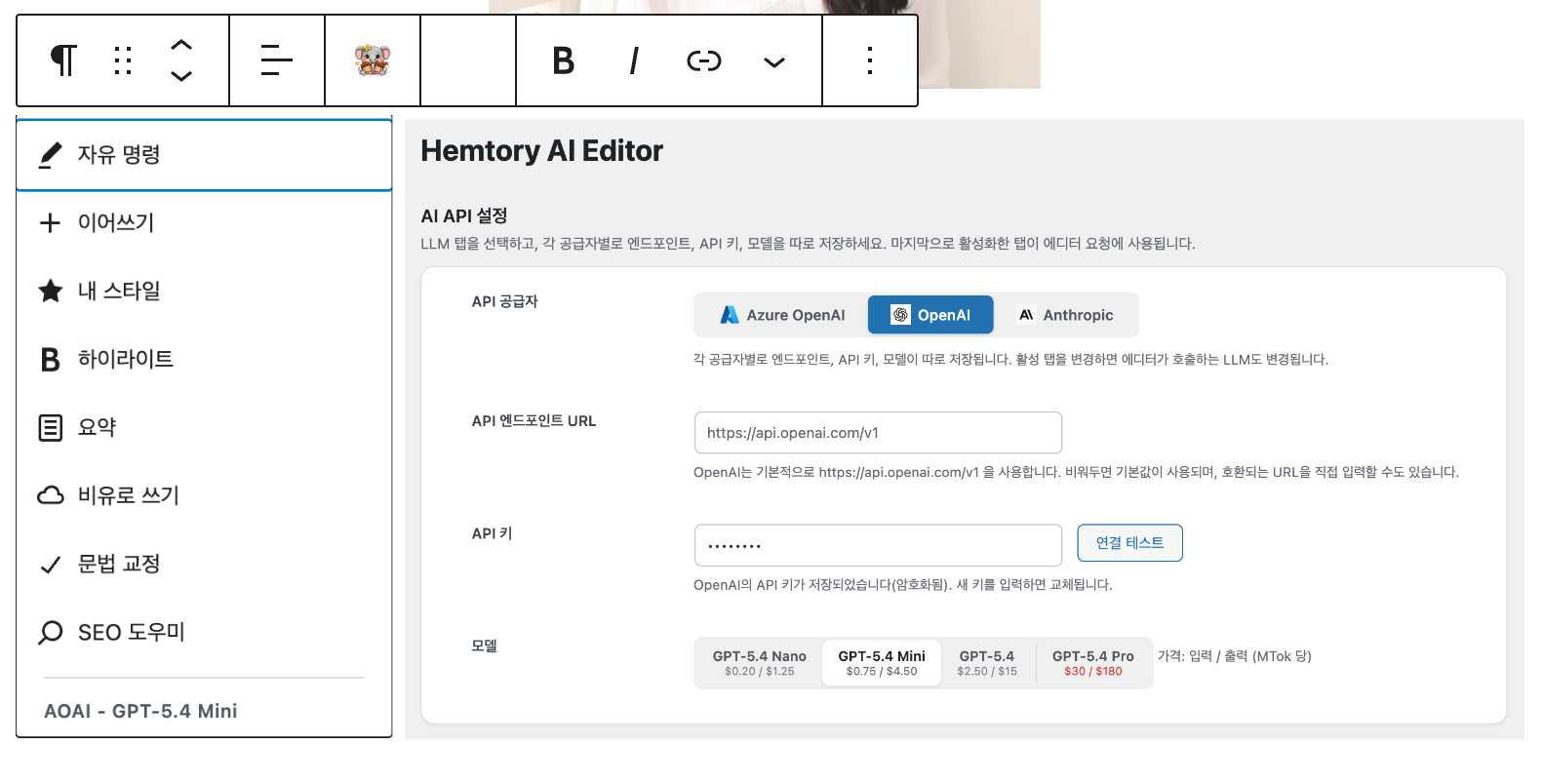
만든 계기 / Why This Exists
이 플러그인은 IT와 생성형 AI에 익숙하지 않은 Hemtory가 WordPress로 블로그를 시작하면서, 글을 더 쉽고 편하게 다듬을 수 있도록 Studydev가 만들었습니다. 복잡한 도구를 배우기보다 익숙한 Gutenberg 에디터 안에서 바로 AI 기능을 쓰는 데 초점을 맞췄고, 설정 화면에서 프롬프트와 동작 방식을 입맛에 맞게 조정할 수 있도록 구성했습니다.
This plugin was created by Studydev to help Hemtory start blogging with WordPress more comfortably. The goal was to keep AI features inside the familiar Gutenberg editor instead of forcing a separate workflow, while still allowing behavior and prompts to be customized from the settings screen.
현재는 Azure OpenAI, OpenAI, Anthropic(Claude)을 모두 지원하며, 각 공급자별로 API 키와 모델을 독립 관리합니다.
The plugin now supports Azure OpenAI, OpenAI, and Anthropic (Claude), with independent API key and model management per provider.
화면 미리보기 / Screenshots
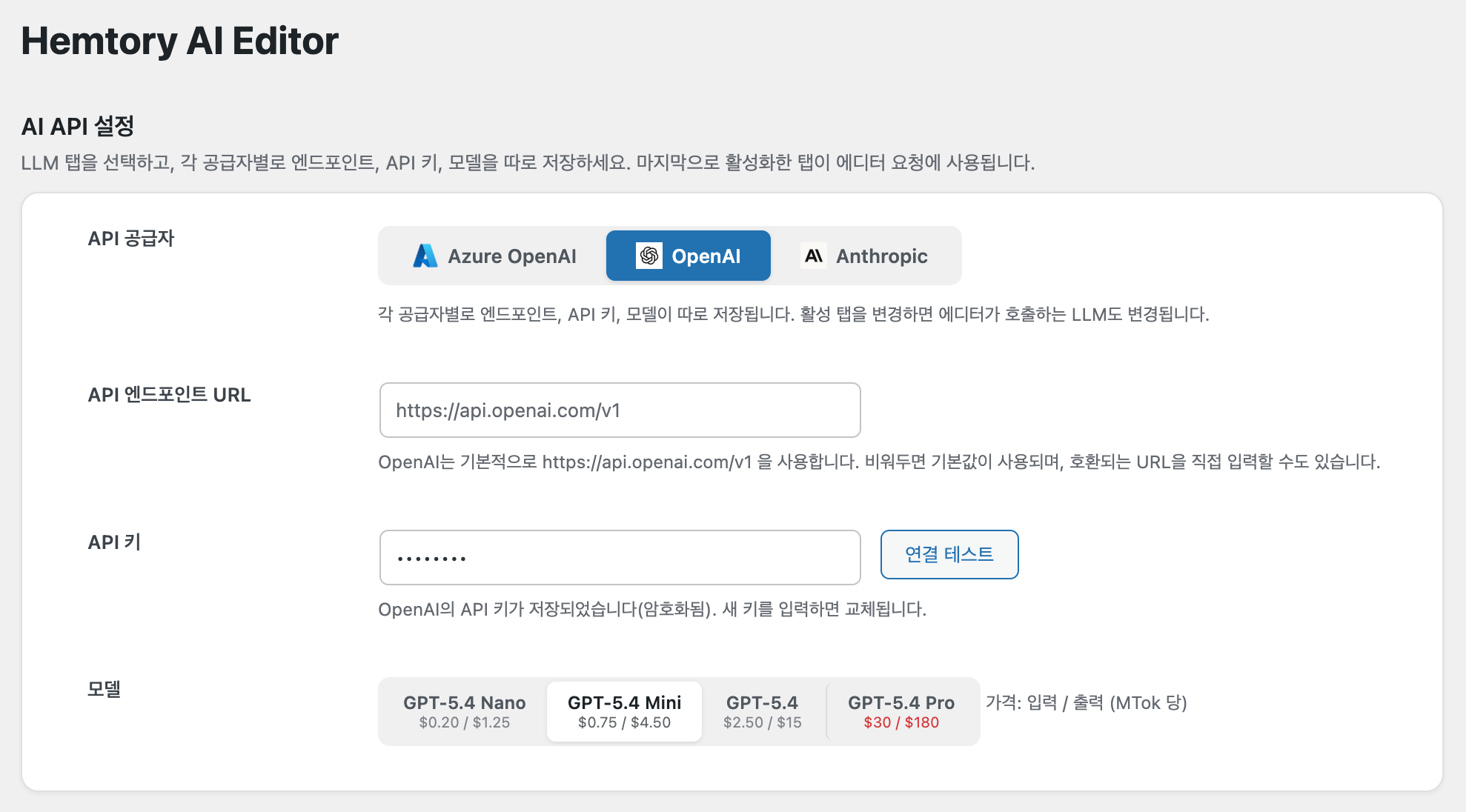
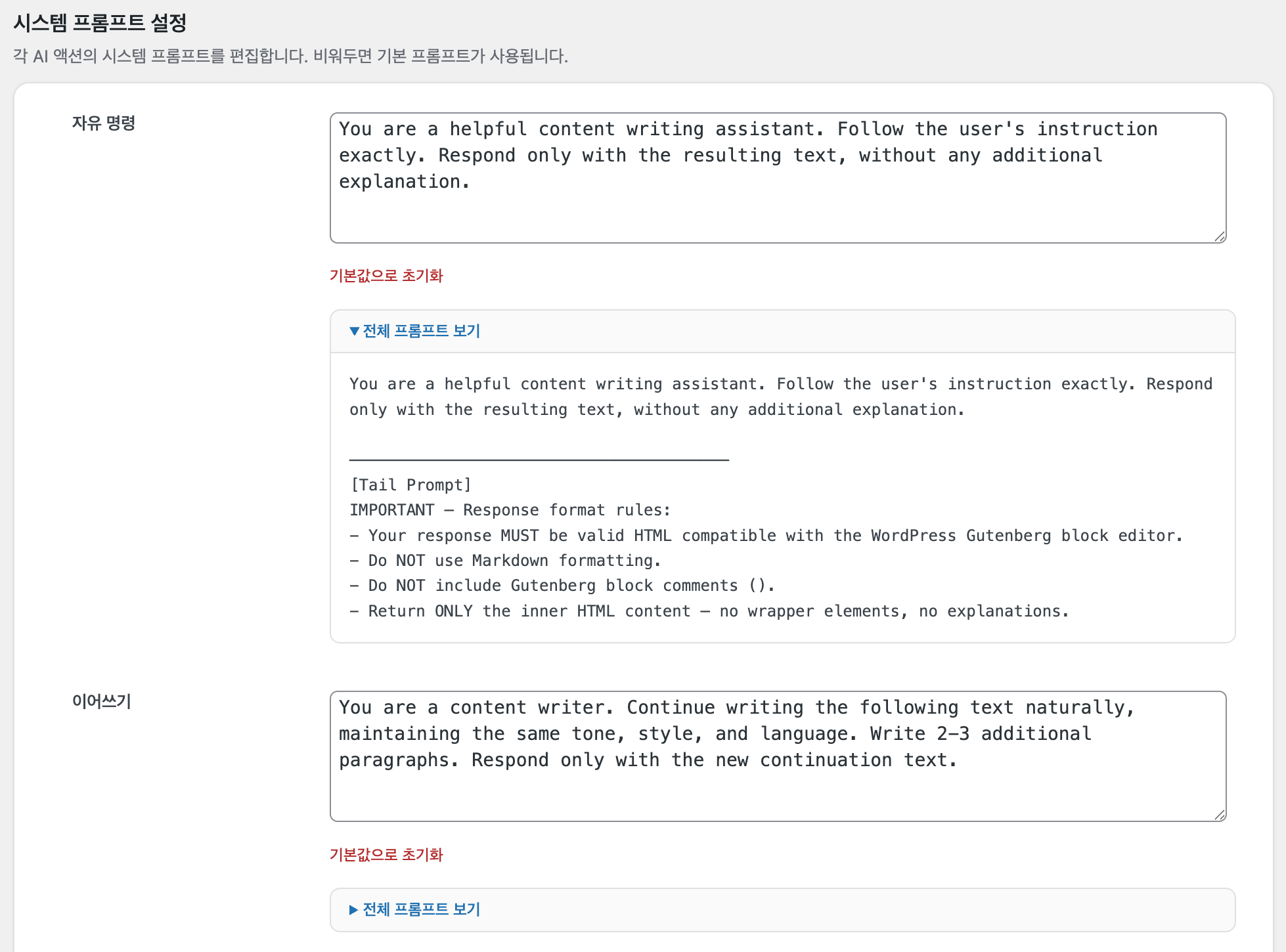
설정 화면 / Settings Screen
기능 / Features
| 액션 | Action | 설명 / Description |
|---|---|---|
| 자유 명령 | Your Command | 자유 텍스트 지시로 AI에 명령 / Give free-text instructions to the AI |
| 이어쓰기 | Write More | 같은 톤과 스타일로 글 이어쓰기 / Continue writing with the same tone and style |
| 내 스타일 | My Style | 프롬프트에 정의한 개인 문체로 변환 / Rewrite text to match your personal writing style |
| 하이라이트 | Highlight | 핵심 구문에 <strong>, <em> 태그 적용 / Mark key phrases with HTML emphasis tags |
| 요약 | Summarize | 긴 텍스트를 핵심 요점으로 압축 / Condense long text into key points |
| 비유로 쓰기 | Write Analogy | 비유와 은유로 텍스트 재구성 / Rewrite using metaphors and analogies |
| 문법 교정 | Fix Grammar | 문법, 맞춤법, 구두점 수정 / Correct grammar, spelling, and punctuation |
| SEO 도우미 | SEO Helper | 전체 문서 분석 → 제목 3개, 키워드 5개, 100자 요약 / Analyze entire document for titles, keywords, and summary |
이미지 분석 / Image Analysis
이미지 블록을 선택하면 AI 버튼이 툴바에 나타나며, 다음 액션을 사용할 수 있습니다. 결과는 이미지 하단에 새 단락 블록으로 삽입됩니다.
When you select an image block, the AI button appears in the toolbar with the following actions. Results are inserted as a new paragraph block below the image.
| 액션 | Action | 설명 / Description |
|---|---|---|
| 자유 명령 | Your Command | 이미지에 대해 자유 텍스트 지시 / Give free-text instructions about the image |
| 이미지 설명 | Describe Image | 이미지의 시각적 요소, 구성, 색상, 분위기를 상세 설명 / Describe visual elements, composition, colors, and mood |
| 캡션 제안 | Suggest Caption | 블로그/기사에 적합한 간결한 캡션 생성 / Generate a concise, engaging caption for blog posts |
Vision 지원: OpenAI/Azure OpenAI는
image_url방식, Anthropic은 서버에서 이미지를 다운로드하여base64인코딩 방식으로 처리합니다.Vision support: OpenAI/Azure uses
image_url, Anthropic downloads and encodes images asbase64on the server side.
플랫폼 기능 / Platform Features
- 실시간 스트리밍 — SSE 기반 AI 응답 실시간 표시 / Real-time streaming AI responses via SSE
- Gutenberg HTML 출력 — Tail Prompt로 에디터 호환 HTML 포맷 보장 / Gutenberg-compatible HTML output via configurable Tail Prompt
- 프롬프트 커스터마이징 — 액션별 시스템 프롬프트 편집 + 전체 프롬프트 미리보기 / Customizable system prompts per action with full prompt preview
- 멀티 LLM 탭 관리 — Azure OpenAI, OpenAI, Anthropic 설정을 각각 저장하고 마지막 활성 탭 기준으로 호출 / Manage Azure OpenAI, OpenAI, and Anthropic settings independently with tab-based activation
- 이미지 분석 — 이미지 블록 선택 시 Vision API로 설명/캡션 생성, 하단에 새 단락 삽입 / AI image analysis with description and caption generation via Vision API
- 멀티 블록 선택 — 여러 블록을 동시에 선택하여 AI 처리 / Works with single and multiple block selection
- API 키 암호화 — libsodium 기반 암호화 저장 / API key encryption using libsodium
- 보안 — DOMPurify XSS 방지, SSRF 엔드포인트 검증, Rate Limit / DOMPurify XSS protection, SSRF endpoint validation, rate limiting
- 다국어 지원 — 한국어(ko_KR) 번역 포함 / Korean (ko_KR) translation included
요구 사항 / Requirements
- WordPress 6.4+
- PHP 8.3+
- Azure OpenAI API endpoint and key, OpenAI API key, or Anthropic API key
설치 / Installation
방법 1: ZIP 업로드 / ZIP Upload
-
releases/디렉토리의hemtory-ai-editor.zip또는 Releases 페이지에서 zip 파일을 다운로드합니다. -
WordPress 관리자 → 플러그인 → 새로 추가 → 플러그인 업로드로 ZIP을 설치합니다.
Download
hemtory-ai-editor.zipfrom thereleases/directory or the Releases page, then upload via Plugins → Add New → Upload Plugin.
재설치 / Reinstall: 재설치 시에는 먼저 플러그인을 비활성화한 후 삭제하고, 새 ZIP 파일을 업로드하여 설치합니다.
To reinstall, deactivate and delete the existing plugin first, then upload and install the new ZIP file.
방법 2: 수동 설치 / Manual
cd /path/to/wordpress/wp-content/plugins/
git clone https://github.com/studydev/hemtory-ai-editor.git
cd hemtory-ai-editor
npm install && npm run build
방법 3: 개발 환경 / Development
git clone https://github.com/studydev/hemtory-ai-editor.git
cd hemtory-ai-editor
npm install
npm run start   # watch mode
설정 / Configuration
- 플러그인을 활성화합니다. / Activate the plugin.
- 관리자 메뉴 Hemtory AI Editor로 이동합니다. / Go to Hemtory AI Editor in the admin menu.
- 상단 LLM 탭에서 Azure OpenAI, OpenAI, 또는 Anthropic을 선택하고, 각 탭마다 API key, model을 따로 저장합니다 (Azure OpenAI는 endpoint도 설정). 마지막으로 활성화한 탭이 에디터 호출에 사용됩니다. / Use the LLM tabs to choose Azure OpenAI, OpenAI, or Anthropic, save each tab with its own settings, and the last active tab will be used by the editor.
- 연결 테스트를 클릭하여 확인합니다. / Click Test Connection to verify.
- Gutenberg 에디터에서 텍스트 블록을 선택하면 AI 버튼이 표시됩니다. / Select a text block in the Gutenberg editor to see the AI button.
지원 모델 / Supported Models
Azure OpenAI / OpenAI:
- GPT-5.4 Nano · GPT-5.4 Mini · GPT-5.4 · GPT-5.4 Pro
Anthropic:
- Claude Haiku 4.5 · Claude Sonnet 4.6 · Claude Opus 4.6
프로젝트 구조 / Project Structure
wp-ai-edit/
├── hemtory-ai-editor.php       # 메인 플러그인 파일 / Main plugin file
├── includes/
│   ├── class-admin-settings.php  # 관리자 설정 페이지 / Admin settings page
│   ├── class-openai-client.php   # Azure OpenAI / OpenAI / Anthropic API 클라이언트 / API client
│   ├── class-plugin.php          # 플러그인 부트스트랩 / Plugin bootstrap
│   ├── class-prompt-manager.php  # 프롬프트 관리 / Prompt management
│   └── class-rest-api.php        # REST API 엔드포인트 / REST API endpoints
├── src/
│   ├── editor/
│   │   ├── plugin.js             # Gutenberg 통합 / Gutenberg integration
│   │   ├── action-popover.js     # AI 액션 메뉴 / Action menu
│   │   ├── image-action-popover.js # 이미지 AI 액션 메뉴 / Image AI action menu
│   │   ├── result-popover.js     # 결과 표시 / Result display
│   │   ├── streaming-handler.js  # SSE 스트리밍 처리 / SSE streaming
│   │   └── command-input.js      # 자유 명령 입력 / Command input
│   ├── store/index.js            # Redux 스토어 / Redux store
│   └── styles/editor.scss        # 에디터 스타일 / Editor styles
├── assets/
│   ├── admin.css                 # 관리자 스타일 / Admin styles
│   ├── admin.js                  # 관리자 스크립트 / Admin scripts
│   └── icons/                    # LLM 공급자 로고 아이콘 / Provider logo icons
├── languages/                    # 번역 파일 / Translation files
├── releases/                     # 빌드 결과물 / Build releases
├── readme.txt                    # WordPress.org readme
└── plan.md                       # 구현 계획 문서 / Implementation plan
보안 / Security
- API 키 암호화:
sodium_crypto_secretbox로 암호화 저장 / Encrypted with libsodium - XSS 방지: DOMPurify로 AI 응답 HTML 새니타이즈 / AI response HTML sanitized with DOMPurify
- SSRF 방지: HTTPS 전용 + private IP 차단 / HTTPS-only endpoint with private IP blocking
- Rate Limit: 사용자당 5초 쿨다운 / 5-second per-user cooldown
- 입력 제한: 텍스트 최대 50,000자 / Max 50,000 characters per request
- 권한 제어: 관리자(
manage_options) / 편집자(edit_posts) / Capability-based access control
라이선스 / License
이 프로젝트는 GPL-2.0-or-later 라이선스로 배포됩니다.
This project is licensed under the GPL-2.0-or-later license.
기여 / Contributing
기여를 환영합니다! Code of Conduct를 확인해 주세요.
Contributions are welcome! Please read the Code of Conduct first.
- Fork this repository
- Create a feature branch (
git checkout -b feature/your-feature) - Commit your changes (
git commit -m 'Add your feature') - Push to the branch (
git push origin feature/your-feature) - Open a Pull Request