Install
This is the repository archive. It installs, but the folder name will carry the branch suffix and updates will not flow.
Install straight from GitHub with WP-CLI:
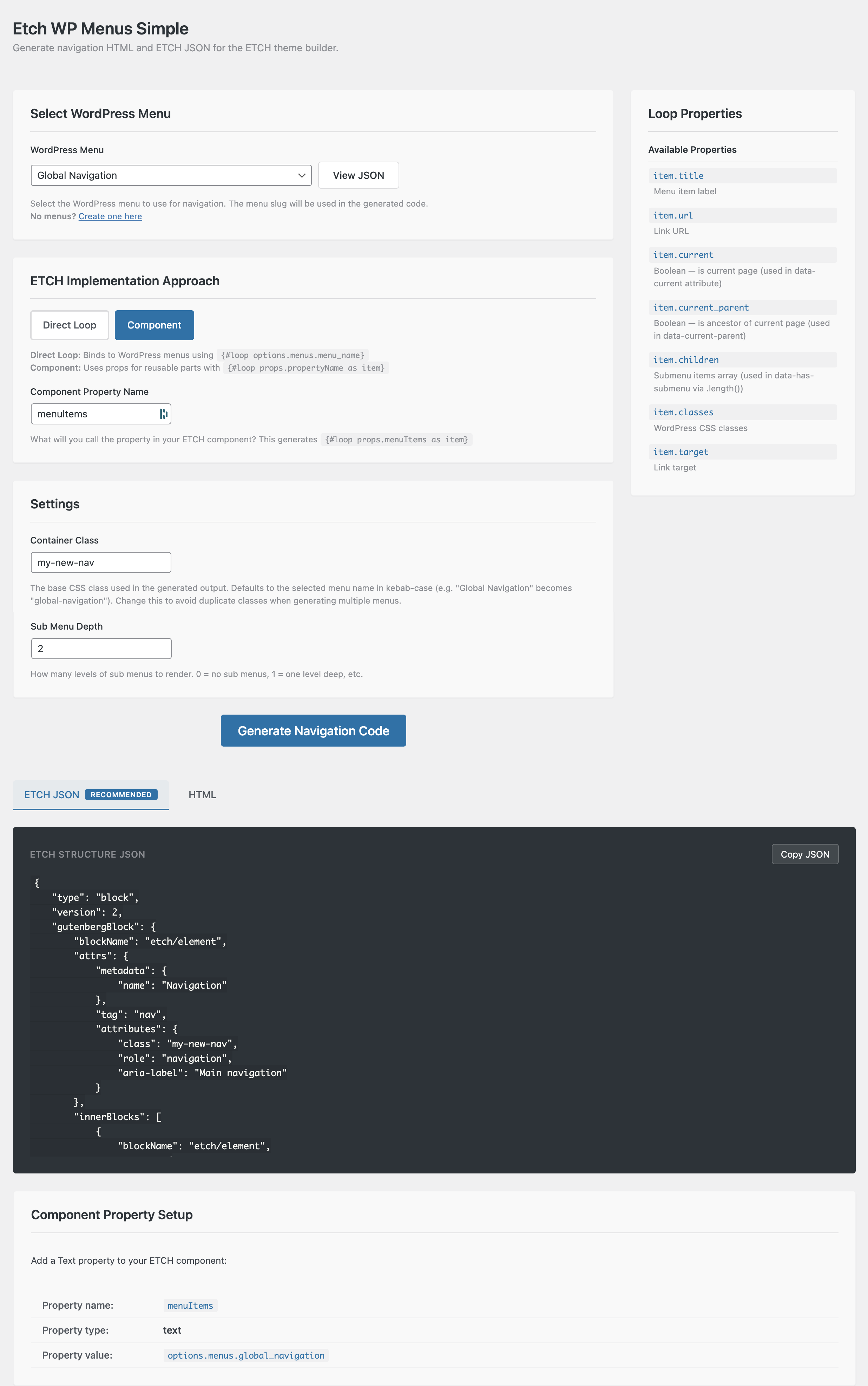
wp plugin install https://github.com/stuartdavison/etch-wp-menus-plugin/archive/refs/heads/main.zipGenerate navigation HTML and ETCH JSON for the ETCH theme builder.
Description
Etch WP Menus Simple is a WordPress plugin that provides an admin interface for generating navigation markup tailored for the ETCH theme builder by Digital Gravy. It outputs two formats: HTML (ETCH template syntax) and ETCH JSON (a block tree ready to paste into ETCH's Structure Panel).
This is a focused, HTML-only tool. No CSS or JavaScript is generated — you style and add interactivity to the navigation yourself.
Version
Current: 1.0.0
Features
-
Two Implementation Approaches:
- Direct Loop: Binds to WordPress menus via
{#loop options.menus.{slug} as item} - Component: Reusable components via
{#loop props.menuItems as item}
- Direct Loop: Binds to WordPress menus via
-
ETCH JSON Block Tree: Generates
etch/element,etch/loop,etch/condition, andetch/textblocks — fully editable in ETCH's Structure Panel (no styles embedded) -
Component Prop Guidance: When using the component approach, shows exactly what property to add to your ETCH component (name, type, and value)
-
Data Attribute State Management: Menu item state is expressed via data attributes on the
<li>, using ETCH comparison modifiers:data-current— whether the item is the current page (always present, all levels)data-has-submenu— whether the item has children (only present within configured depth)data-current-parent— whether the item is an ancestor of the current page (only present within configured depth)data-level— the depth level of the item (1 = top level)
-
BEM Class Generation: Customizable CSS class prefix generates consistent BEM classes throughout the HTML (
{cls}__list,{cls}__item,{cls}__link,{cls}__sub-menu, etc.). Classes are purely for styling — no state classes pollute the class attribute. -
Configurable Submenu Depth: 0-5 levels — controls how deep the HTML nesting goes. Depth 0 means no submenus at all, and
data-has-submenu/data-current-parentattributes are omitted entirely. -
Menu JSON Preview: View the raw WordPress menu data structure for debugging
Installation
- Download
etch-wp-menus-simple.zip - Upload via Plugins > Add New > Upload Plugin
- Activate and navigate to Tools > Etch WP Menus Simple
Requirements
- WordPress 5.8+
- PHP 7.4+
- ETCH Theme Builder
How It Works
WordPress Data Integration
The plugin hooks into etch/dynamic_data/option to inject hierarchical menu data:
options.menus.{menu_slug} -> array of menu items with current, current_parent, children, etc.The data layer provides raw values only. State presentation (data attributes) is handled entirely by the generated template using ETCH comparison modifiers.
Code Generation
The admin UI generates two outputs:
- HTML — ETCH template syntax with loops, conditionals, BEM classes, and data attributes
- ETCH JSON — Block tree (no styles) ready to paste into ETCH's Structure Panel
HTML Structure
nav.{cls}
  └── ul.{cls}__list
      └── {#loop} menu items
          └── li.{cls}__item [data-level, data-current, data-has-submenu?, data-current-parent?]
              ├── a.{cls}__link
              ├── button.{cls}__submenu-toggle (if has children)
              └── ul.{cls}__sub-menu (recursive based on depth)
CSS Targeting
Style menu state using attribute selectors:
.{cls}__item[data-current="true"] { /* current page styles */ }
.{cls}__item[data-has-submenu="true"] { /* items with children */ }
.{cls}__item[data-current-parent="true"] { /* ancestor of current page */ }
Settings
| Setting | Description |
|---|---|
| WordPress Menu | Select which menu to generate code for |
| Approach | Direct Loop (binds to menu) or Component (uses props) |
| Component Prop Name | Property name for component approach (default: menuItems) |
| Container Class | BEM class prefix (auto-populated from menu name) |
| Sub Menu Depth | 0-5 levels of nested submenus |
Support
Website: https://bbg.digital
License
GPL v2 or later
Credits
Author: Stuart Davison | BBG Digital