Admin Bar Position Switcher WP Registry grade A. No security issues foundWP RegistryNo security issues foundOpen the reportA
Move, recolor & reorganize the WordPress admin bar and menu — one click. Free core + Pro add-on. Déplacez la barre d'admin WordPress en un clic.
Install
Upload it under Plugins → Add New Plugin → Upload Plugin, then activate.
Install straight from GitHub with WP-CLI:
wp plugin install https://github.com/stephane-schmidt/admin-bar-position-switcher/releases/download/v1.8.4/admin-bar-position-switcher-1.8.4.zipMove the WordPress toolbar to the bottom of the screen on the front end, with a one‑click button to flip it top/bottom. The choice is remembered per browser.
A small, focused WordPress plugin. GPL‑2.0‑or‑later.
Screenshots
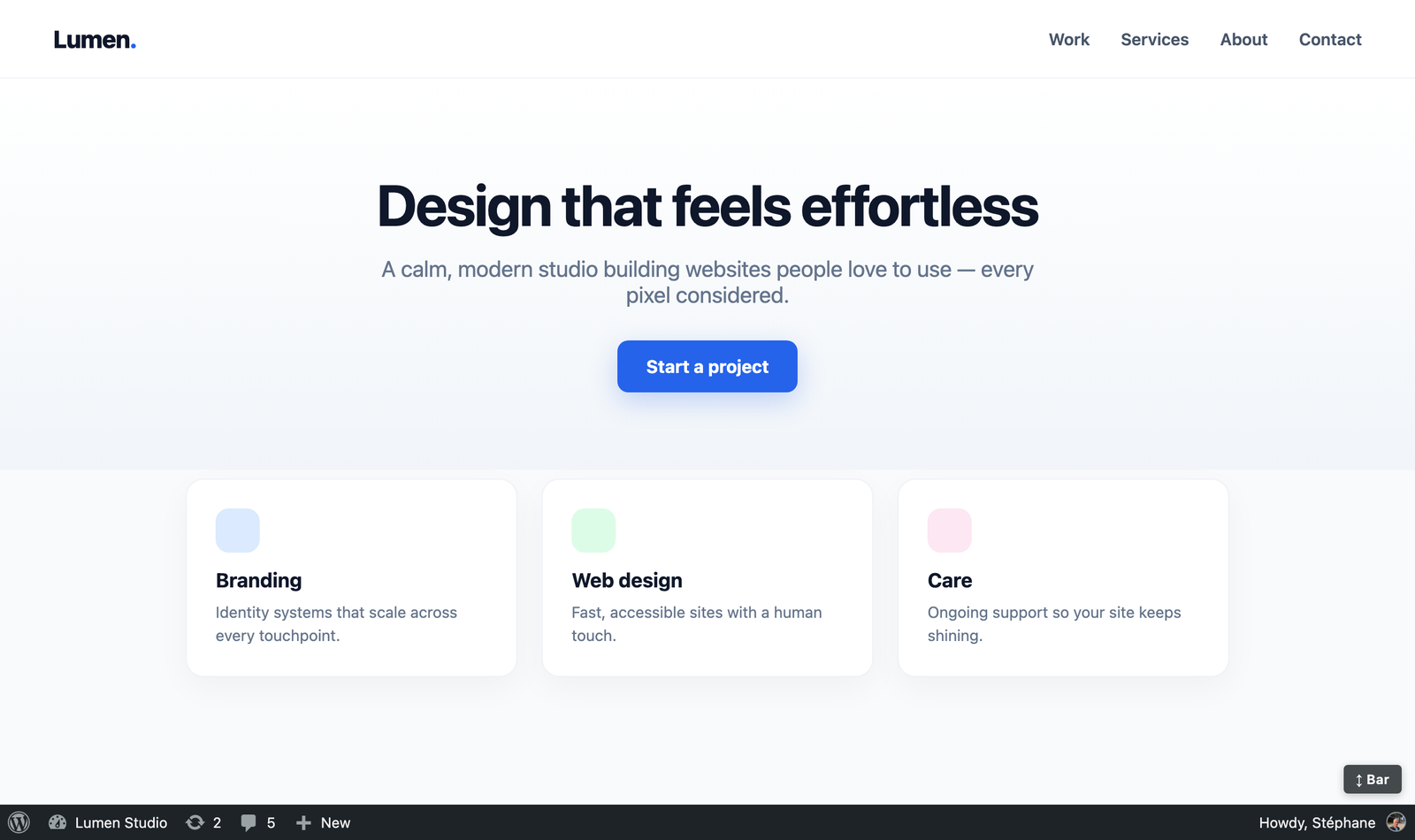
The WordPress toolbar moved to the bottom, with the “↕ Bar” switch button.
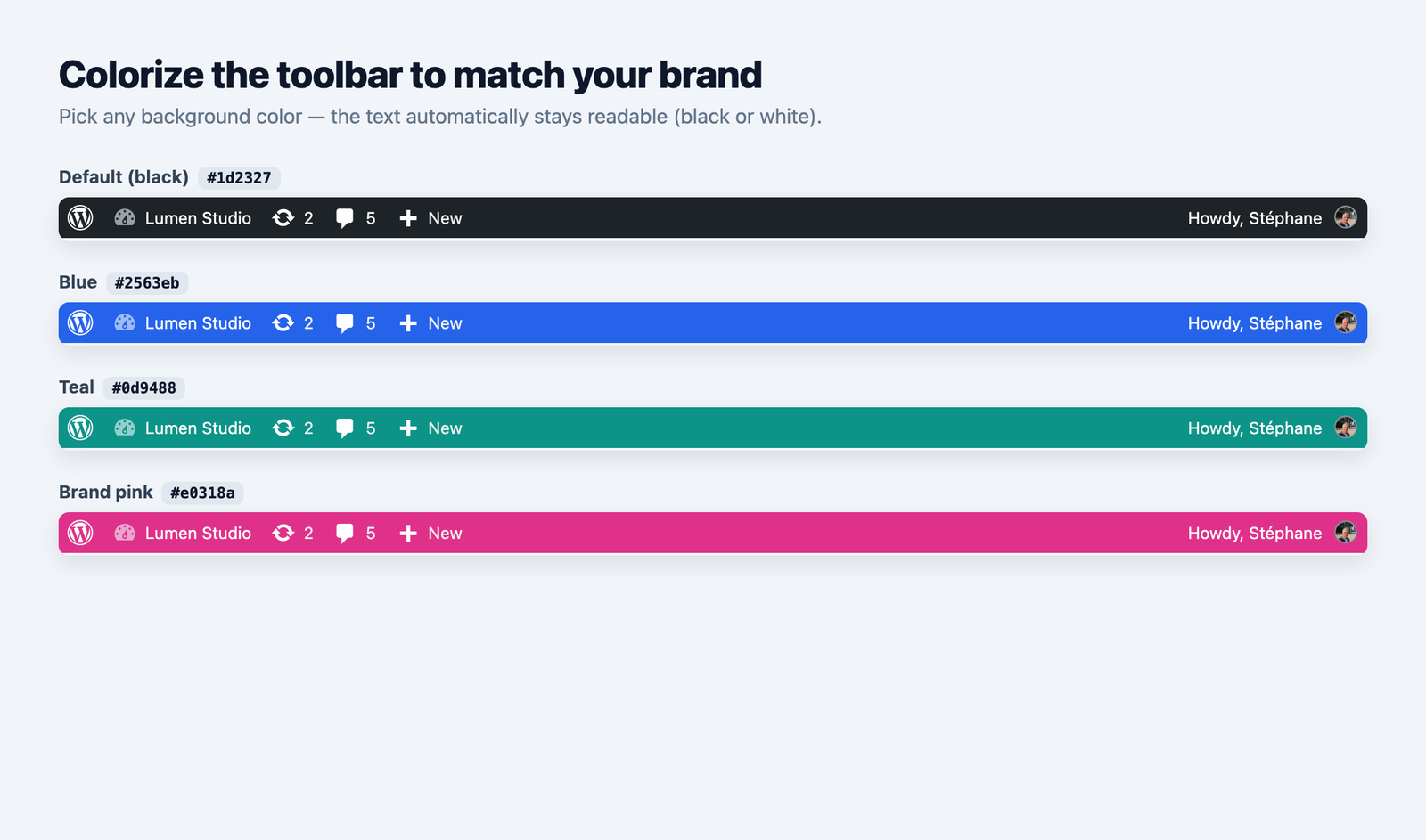
Colorize the toolbar — the text color stays readable automatically.
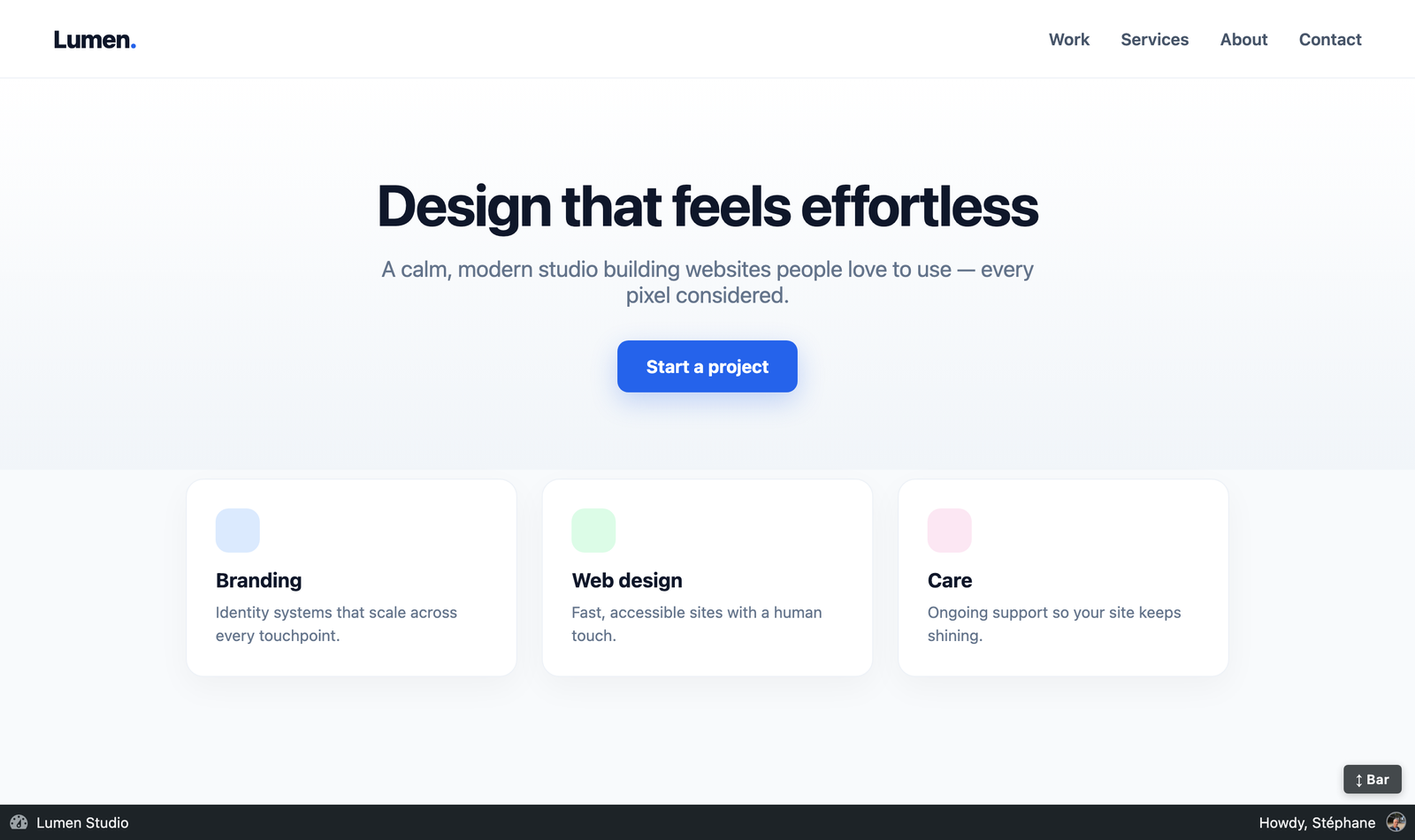
Hide the individual toolbar items you don’t need.
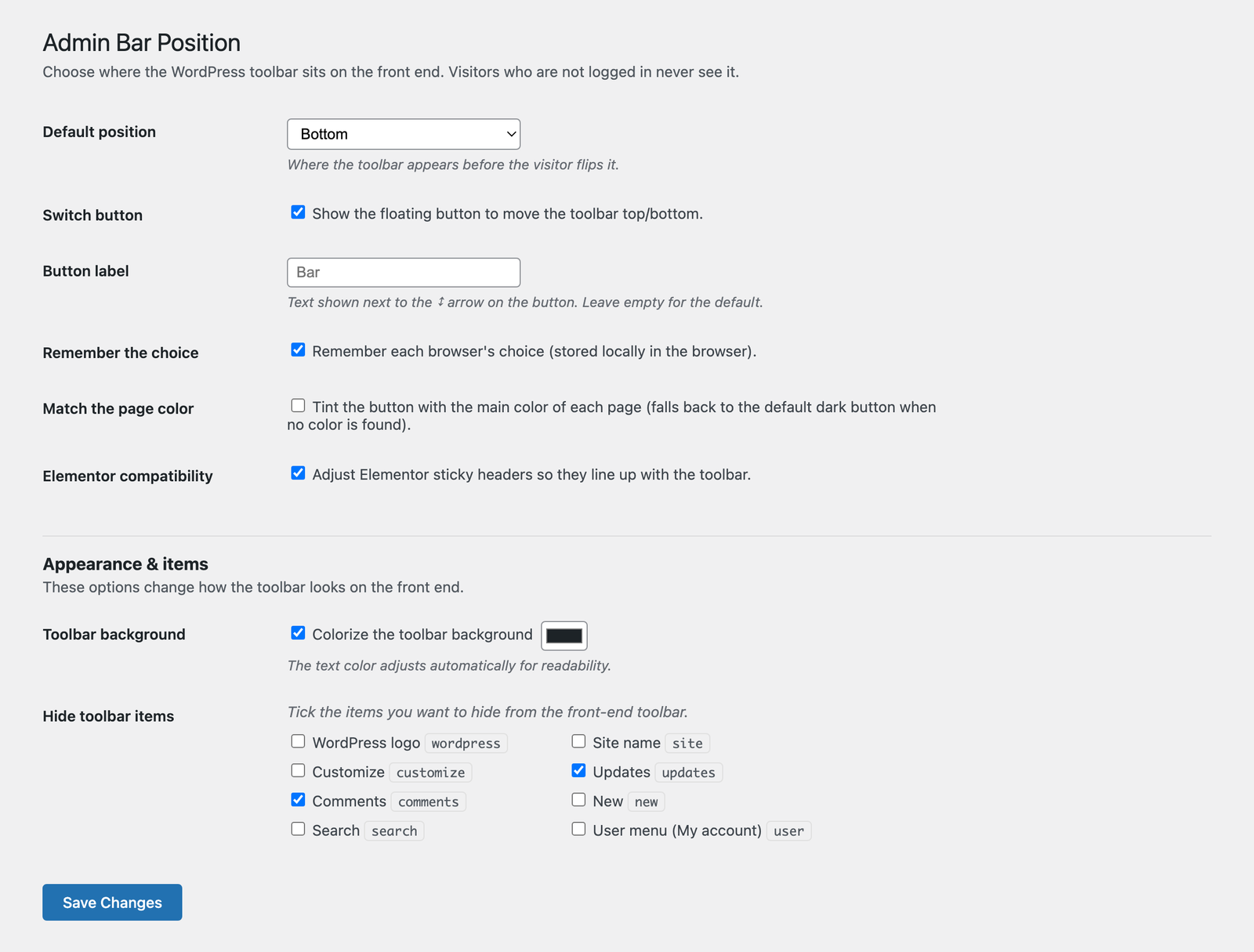
All options on one simple settings screen.
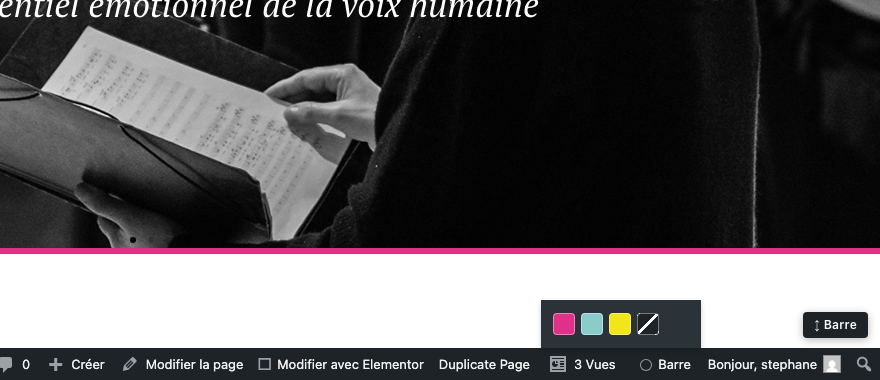
The "Bar" item in the toolbar: pick one of your site's dominant colors, detected from your logo and theme.
Why
By default WordPress pins its toolbar to the top of every front‑end page for logged‑in users. That top bar pushes the whole layout down, hides the first pixels of the design, and often collides with sticky headers, hero sections, and full‑screen builders like Elementor.
Admin Bar Position Switcher moves the toolbar to the bottom instead, closes the empty gap WordPress reserves at the top, and adds a floating "↕" button so each user can send the bar back to the top or down to the bottom whenever they like.
Everything happens on the front end and only for logged‑in users. Visitors who are not logged in never see the toolbar or the button, and the plugin loads nothing at all on their pages — no CSS, no JavaScript.
Features
- Places the WordPress toolbar at the bottom of the screen on the front end (default position is configurable).
- Floating "↕" button to switch the toolbar between top and bottom, on the fly.
- Auto‑hide (opt‑in) — off by default; when enabled, the button drifts away like a falling leaf after a few seconds of inactivity and floats back the moment your pointer moves anywhere over the toolbar (its full width), or it gains keyboard focus. A tap brings it back on touch, and it respects the "reduce motion" preference.
- Remembers each browser's choice (can be turned off).
- Match the page color — optionally tints the button with the main color of the current page (theme color, palette, or header background), with automatic black/white text for contrast. Falls back to a neutral dark button when no color is found.
- Colorize the toolbar — set a custom background color for the bar, with automatically readable text.
- Auto‑hide the toolbar, macOS Dock style (opt‑in) — the bar glides off‑screen and slides back when the pointer comes within 150px of its edge, or when it receives keyboard focus; once revealed it stays for at least 10 seconds.
- Recolor from the toolbar itself — a small "Bar" item (administrators only) reveals the site's five dominant colors on hover; one click recolors the bar and saves the choice. Colors are auto‑detected fully locally from your logo (PNG/SVG), Elementor kit, theme.json, Customizer settings, and a frequency scan of the home page.
- Removes WordPress's reserved top spacer when the bar is at the bottom, so there is no empty gap.
- Opens the toolbar sub‑menus upward when the bar is at the bottom.
- Optional Elementor compatibility so sticky headers line up with the toolbar.
- Clean, no external requests, no tracking, no cookies (the preference lives in
localStorage).
SwitchMyBar Pro
The back-office side lives in SwitchMyBar Pro — a small add-on: colorize, reorder (drag & drop) and space the left admin menu, dim the technical items, flip the menu to the right or dock it away macOS-style with floating tabs, and hide the toolbar items you never use. One payment of $15, yours for life. Your existing settings are picked up automatically when the add-on activates.
Settings
Admin Bar Position (top-level entry in the left admin menu)
| Setting | What it does |
|---|---|
| Default position | Where the toolbar starts (bottom or top). |
| Switch button | Show or hide the floating "↕" button. |
| Button label | Text shown next to the arrow (default: "Bar"). |
| Auto-hide the button | Let the button drift away when idle and float back near the toolbar (off by default). |
| Auto-hide the toolbar | Hide the bar off-screen like the macOS Dock; it glides back within 150px (off by default). |
| Remember the choice | Store each browser's top/bottom preference. |
| Match the page color | Tint the button with the page's main color. |
| Elementor compatibility | Align Elementor sticky headers with the toolbar. |
| Toolbar background | Set a custom background color for the bar (text stays readable). |
| Color picker in the toolbar | Show the "Bar" item that recolors the toolbar with the site's dominant colors. |
Installation
- Install from the WordPress Plugin Directory (once published), or upload the
admin-bar-position-switcherfolder to/wp-content/plugins/. - Activate the plugin through the Plugins screen.
- (Optional) Open Admin Bar Position in the left admin menu to tune the defaults.
Translations
Ships translated into 26 languages (full UI): French, Spanish, German, Italian, Portuguese (Portugal & Brazil), Dutch, Russian, Japanese, Chinese (Simplified & Traditional), Korean, Arabic, Polish, Swedish, Danish, Norwegian, Finnish, Czech, Turkish, Greek, Hebrew, Hungarian, Romanian, Ukrainian and Indonesian. Contributions of new or improved translations are welcome.
Author
Built and maintained by Stéphane Schmidt — a web designer and developer based in Switzerland.
Stéphane crafts clean, human‑friendly WordPress sites, often for cultural and non‑profit projects, and develops hand in hand with Claude Code with a lot of enthusiasm. Available for freelance work — reach him at stephane@alveo.design, on alveo.design, on Facebook, on Instagram, or on TikTok.
If this plugin is useful to you, you can buy him a coffee — thank you. (A small "Support the author" card with these links is also built into the plugin's settings screen, translated into every bundled language.)
License
This plugin is free software, released under the GNU General Public License v2.0 or later. See LICENSE.
Releases
23 releases. Each count is every asset in that release; expand a row for the breakdown.