Install
This is the repository archive. It installs, but the folder name will carry the branch suffix and updates will not flow.
Install straight from GitHub with WP-CLI:
wp plugin install https://github.com/stellarwp-sunset/iconic-tpd/archive/refs/heads/master.zipTemporary Plugin Deactivation by Iconic
Easily "turn off" plugins without actually deactivating them.
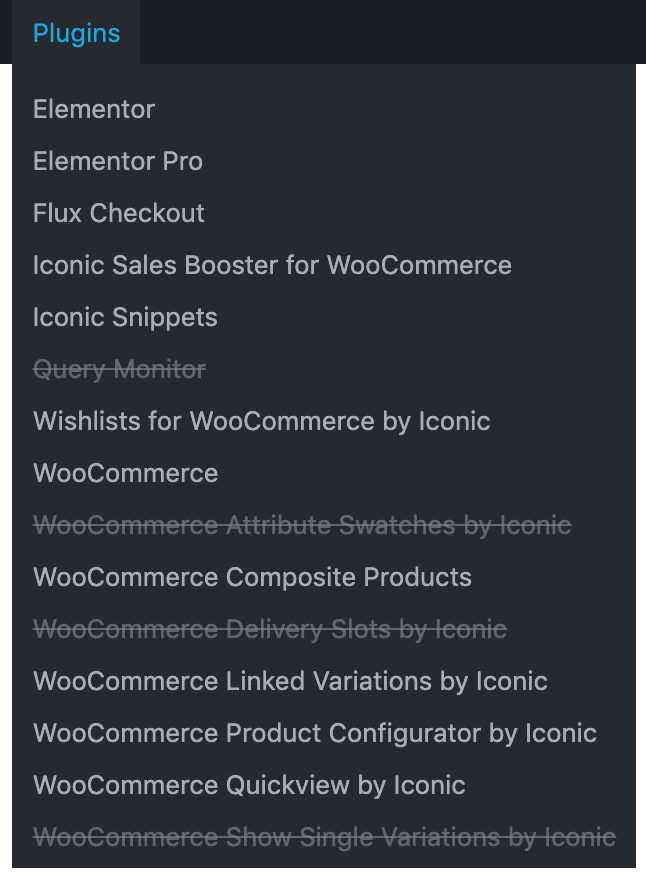
This is a "must-use" plugin which adds a "Plugins" dropdown to the admin bar menu for admin users.
From here you can click each active plugin to temporarily disable it. Click it again to turn it back on.
:warning: Important: This won't work unless it's installed as a must-use plugin.
Installation
Either add iconic-tbp.php to the /wp-content/mu-plugins folder, or if you want to load it from a subfolder like /wp-content/mu-plugins/iconic-tpd then add a loader file to /wp-content/mu-plugins like so:
<?php
/**
 * Plugin Name: Must-Use Loader
 * Description: Load Must-Use plugins in subfolders.
 */

require WPMU_PLUGIN_DIR.'/iconic-tpd/iconic-tpd.php';
Why?
When developing with WordPress, it's a hassle to keep activating and deactivating plugins; especially if you then need to reneter license keys, etc.
This plugin means you can do it from anywhere with a single click.
Do you accept contributions?
Sure, feel free to submit a PR if anything is missing.
Changelog
Next Version (-) [fix] Give menu items unique IDs to prevent conflicts
v1.0.0 (26 Feb 2021) [new] Initial Release