Install
Upload it under Plugins → Add New Plugin → Upload Plugin, then activate.
Install straight from GitHub with WP-CLI:
wp plugin install https://github.com/srescio/wp-hero-color/releases/download/v0.1.0/wp-hero-color-v0.1.0.zipWordPress plugin to compute deterministic hero colors from featured images and apply them as solid or gradient backgrounds.

Preview
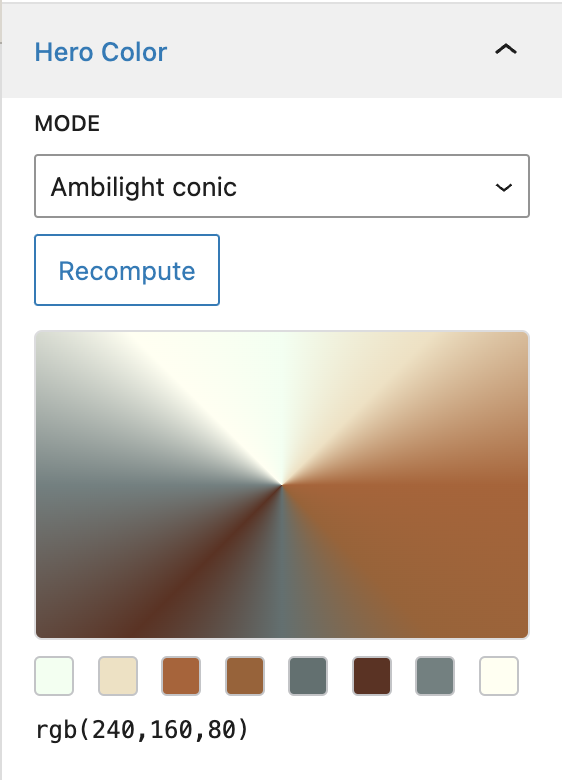
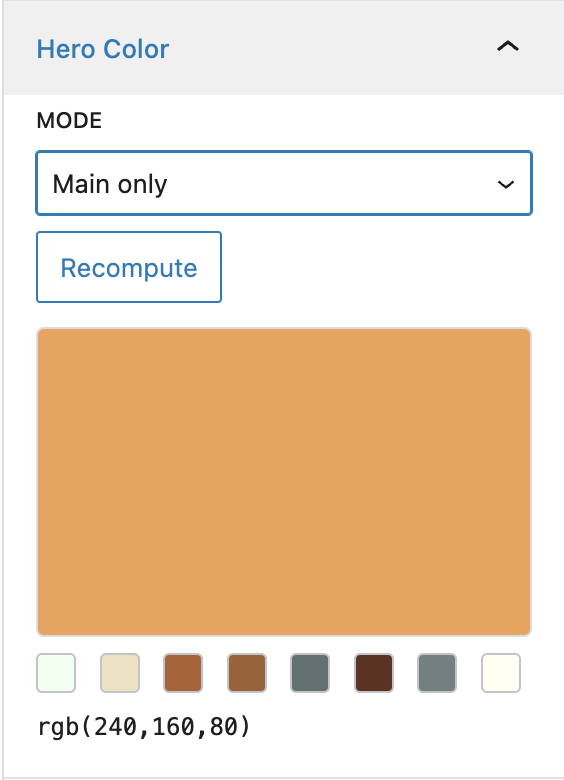
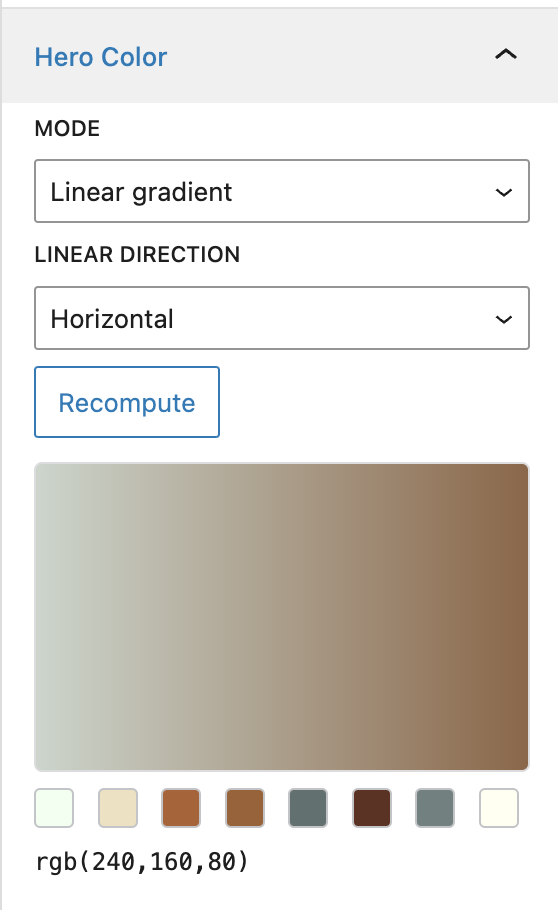
Editor panel preview samples:
Modes
solid(main dominant color)linear(edge-averaged gradient with selectable direction)conic(ambilight-style conic gradient using 8 edge colors)
How to install
This plugin is not on the WordPress.org directory. Install it in one of these ways:
From a GitHub Release (recommended)
GitHub uses fixed URL shapes for every repository (no permalink rot). For this repo (srescio/wp-hero-color):
| Link | Purpose |
|---|---|
| All releases | Index of published releases and assets. Works even when the list is empty. |
| Latest release | Always resolves; shows the newest non-draft release once one exists (otherwise the same empty state as above). |
Direct ZIP URL (after you publish a release for that tag):
https://github.com/srescio/wp-hero-color/releases/download/<tag>/wp-hero-color-<tag>.zip
Example for tag v0.1.0: https://github.com/srescio/wp-hero-color/releases/download/v0.1.0/wp-hero-color-v0.1.0.zip (returns 404 until that release exists).
The Build release ZIP workflow (.github/workflows/release-zip.yml) attaches wp-hero-color-<tag>.zip with a stable top-level folder wp-hero-color/. Install via Plugins → Add New → Upload Plugin, or unzip into wp-content/plugins/.
Note: Until the first release is published, the releases page is empty and direct download URLs for a tag return 404. Use from source below, or run the workflow manually (see below).
From source
Clone or download the repository and copy the project into wp-content/plugins/wp-hero-color/ (the folder name must be wp-hero-color so WordPress loads wp-hero-color.php).
When the ZIP is built (not on PR merge)
The ZIP workflow does not run automatically when a PR is merged. It runs only when:
- Someone publishes a GitHub Release — event
release: published. The job checks out the release tag (not the default branch), builds the ZIP, and uploads it to that release as an asset. - Someone runs “Build release ZIP” manually from the Actions tab (
workflow_dispatch) — useful to verify packaging; the ZIP is stored as a workflow artifact (filename usesdev-<short-sha>), not attached to a release.
Typical flow: merge to your mainline branch → create a git tag (for example v0.1.0) on the commit you want to ship → open Releases → Draft a new release, choose that tag, Publish release → download the attached ZIP.
Data model
The plugin stores one JSON string in post meta key _sr_hero_bg (registered for the REST API and Polylang meta copy). The document is normalized on save; unknown fields are dropped.
| Field | Type | Meaning |
|---|---|---|
v |
int | Payload schema version (currently 1). |
main |
string | Dominant color as rgb(r,g,b) from the central region of a downscaled copy of the featured image. |
edges |
string[] | Eight colors in fixed order: tl, t, tr, r, br, b, bl, l — each rgb(r,g,b) sampled from bands near the image edges. |
mode |
string | solid | linear | conic — how the frontend builds background CSS from main and edges. |
linear_dir |
string | For linear and conic: vertical | horizontal | diag_tl_br | diag_tr_bl (ignored for solid in practice). |
attachment_id |
int | Featured image attachment ID used for the last successful compute (0 if unknown). |
updated_at |
string | ISO-8601 timestamp (UTC) of the last compute. |
Consumers: the block editor panel, classic meta box, REST compute / post/{id}, WP-CLI, bulk admin form, and set_post_thumbnail all read or write this meta. The public helper wp_hero_color_get_attributes( $post_id ) maps the payload to HTML attributes and an inline style for themes.
How it works
-
Input — The compute path resolves the featured image (or an explicit
attachment_idover REST), then reads the file from disk with PHP (get_attached_file+file_get_contents). -
Decode and resize — The bytes are decoded with PHP GD (
imagecreatefromstring). Wide images are downscaled (long edge about 320px) withimagecopyresampledso work stays bounded. -
Sampling — A band inset from the edges defines a “center” rectangle; the most frequent RGB bucket there becomes
main. Eight outer regions map toedges(same bucketing logic, skipping near-black and near-white noise). -
Output — Results are JSON-encoded into
_sr_hero_bg. CSS for the hero wrapper is derived in PHP: solid usesmain;linearmaps opposing edge groups to gradient stops and direction;conicbuilds aconic-gradientfrom the eight edge colors. -
Where it runs — All of the above is server-side only (no ImageMagick, Node, or external binaries). Settings → Hero Color includes an environment table; if GD or other hard requirements are missing, bulk/REST/CLI are blocked and the Plugins screen shows a row-level notice for administrators.
Admin settings
In wp-admin, open Settings → Hero Color (capability: manage_options). From there you can:
- Run bulk recompute on the server (same logic as
wp hero-color recompute_all), with scope and optional mode overrides. - Optionally restrict bulk runs by category and/or tag (term IDs) when scope is Selected post types (taxonomy filters are ignored for the all-public scope so the UI matches behavior). Run once per combination with a different mode override to style different groups differently.
- Copy REST and WP-CLI over SSH examples for automation (MCP and remote hosts use these; the browser cannot open SSH itself).
Host Theme Integration Contract
To apply the result in frontend markup, host themes should add plugin-provided attributes on the hero wrapper element (typically .post-thumbnail):
data-sr-hero-computeddata-sr-hero-modedata-sr-hero-dir- inline
stylecontaining--sr-hero-main,--sr-hero-bg, and background declarations
Optional helper snippet (theme side)
<?php
if ( function_exists( 'wp_hero_color_get_attributes' ) ) {
    $attrs = wp_hero_color_get_attributes( get_the_ID() );
    foreach ( $attrs as $key => $value ) {
        printf( ' %s="%s"', esc_attr( $key ), esc_attr( $value ) );
    }
}
?>
The plugin stylesheet reads these attributes/variables and applies consistent placeholders and gradients on both single and listing contexts.
REST API usage
Compute/recompute and save payload:
curl -X POST "https://example.com/wp-json/sr-hero-color/v1/compute" \
  -H "Content-Type: application/json" \
  -H "X-WP-Nonce: <wp_rest_nonce>" \
  --data '{"post_id":123,"attachment_id":456,"mode":"conic","linear_dir":"vertical"}'
Read computed payload for a post:
curl "https://example.com/wp-json/sr-hero-color/v1/post/123"WP-CLI usage
Single post recompute:
wp hero-color recompute --post_id=123 --mode=conic --linear_dir=verticalBulk recompute by post type:
wp hero-color recompute_all --post_type=post --mode=linear --linear_dir=horizontalBulk recompute only posts in certain categories and/or tags (comma-separated term IDs; category group and tag group are combined with AND):
wp hero-color recompute_all --post_type=post --mode=conic --category_in=3,12 --tag_in=40Bulk recompute all supported types:
wp hero-color recompute_all --mode=solidRun WP-CLI over SSH
Example direct SSH usage:
ssh user@example.com "cd /path/to/wordpress && wp hero-color recompute_all --post_type=post --mode=conic"If your project includes a helper script such as scripts/ssh-wp-prod.sh, you can run:
bash scripts/ssh-wp-prod.sh wp hero-color recompute_all --post_type=post --mode=conicInspiration
The original idea is inspired by adaptive background extraction approaches such as jquery.adaptive-backgrounds and RGBaster.
Releases
1 release. Each count is every asset in that release; expand a row for the breakdown.