cme Google Analytics for HTML5 Video Tracking
WordPress plugin for tracking HTML5 video events in Google Analytics.
by caught my eye · github.com/spcktr/cme-ga4html5vid · website
★ 0stars
0forks
Install
No release zip yet. The repository archive installs, but the folder name will carry the branch suffix and updates will not flow:
wp plugin install https://github.com/spcktr/cme-ga4html5vid/archive/refs/heads/main.zipA WordPress Plugin for HTML5 Video Tracking using Google Analytics
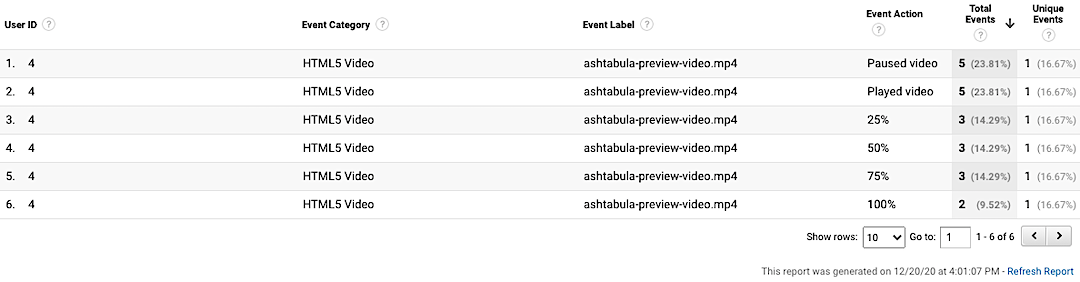
Supports logged-in user ID tracking.
Play around with the live demo.
Install
- Download the latest release (zip file) from GitHub.
- Log in to your WordPress site as an admin.
- Navigate to Plugins > Add New.
- Click Upload Plugin.
- Select the zip file downloaded in step 1.
- Click Install Now.
- Click Activate.
Next: Write your filter hook for your user ID custom dimension index.
PHP Filter Hook
Add a call to the cme_user_id_custom_dimension_index filter hook to your child theme’s functions.php file. Change the custom dimension index to match the user ID custom dimension index in your Google Analytics property.
add_filter( 'cme_user_id_custom_dimension_index', function($custom_dimension_index) {
    return '5'; // Change this to match your CD index number that's set in GA.
} );
Screen Captures
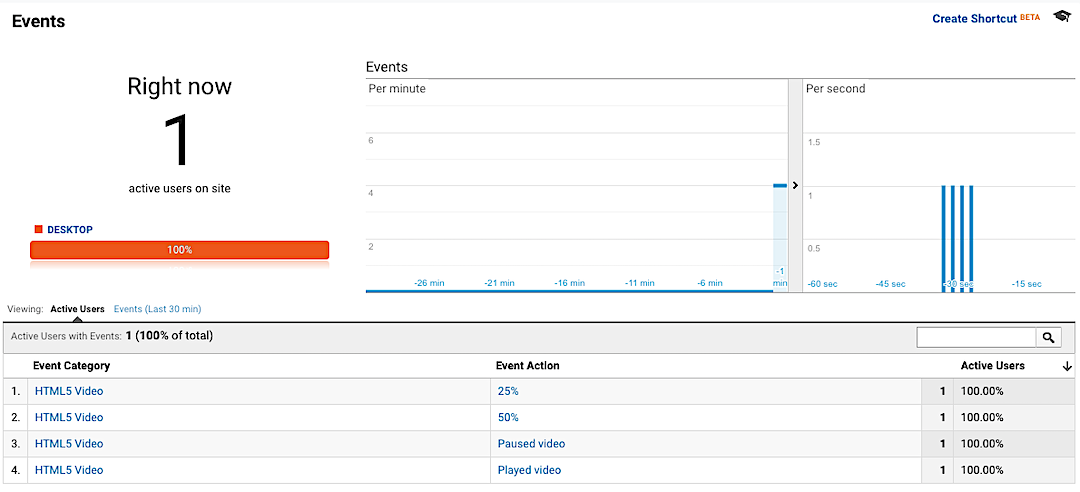
Google Analytics Realtime HTML5 Video Events Report
Google Analytics Custom Report Showing HTML5 Video Events by User ID
Credits
This solution is based on Julius Fedorovicius’ article, HTML5 Video Tracking Recipe for Google Tag Manager posted on Analytics Mania.